
How to Create a Sleep Shortcut in Windows
Information
This will show you how to create or download a Sleep shortcut to put your computer to sleep with. You can also Pin to Taskbar or Pin to Start Menu this shortcut, or move where you like for easy use.
Tip
If you would also like to create a keyboard shortcut key to use to open the shortcut with from either method below, then see: How to Create a Keyboard Shortcut for a Program
METHOD ONE
A Sleep Shortcut from a VBS File
NOTE: This method for a sleep shortcut will allow you to put your computer to sleep no matter if hibernate is enabled or disabled, or what you have your power plan settings set to.1. Set your Start Menu power button to Sleep. (see screenshot below)
:warn:WARNING: This Sleep shortcut will do whatever you have your Start Menu power button set to, so it's important to have this set to Sleep for this shortcut to put your computer to sleep.
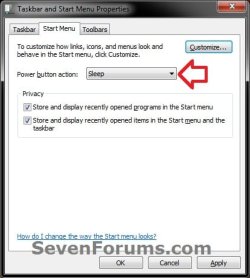
2. Click on the download button below to download the file below.METHOD_1_Sleep_Shortcut.zip
Download
3. Click on Save, and save the .zip file to the desktop.
4. Select and extract both the Sleep shortcut and "Sleep Shortcut" folder to the desktop.
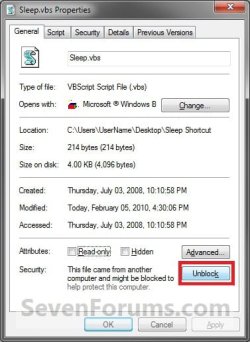
5. Open the "Sleep Shortcut" folder, then right click on the Sleep.vbs file, click on Properties, General tab, and on the Unblock button. (See screenshot below)
NOTE: If you do not have a Unblock button under the General tab, then the shortcut is already unblocked and you can continue on to step 6.
6. Right click on the "Sleep Shortcut" folder on the desktop, and click on Cut.
7. Open a Windows Explorer window and navigate to the C:\Program Files folder, then right click on the C:\Program Files folder and click on Paste. (See screenshot below)
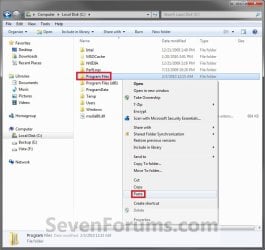
8. If prompted, click on Continue and Yes to approve copying the "Sleep Shortcut" folder into the C:\Program Files folder.
9. Right click on the Sleep shortcut, and click on Properties, General tab, and on the Unblock button. (See screenshot below)
NOTE: If you do not have a Unblock button under the General tab, then the shortcut is already unblocked and you can continue on to step 10.
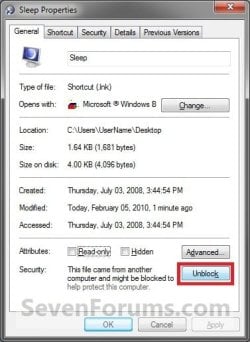
10. Move the Sleep shortcut on the desktop to where you like for easy use.
11. When done, you can delete the downloaded .zip file on the desktop if you like, or save it to use again.
METHOD TWO
A Normal Sleep Shortcut
NOTE: This method for a sleep or standby shortcut will allow you to put your computer to sleep, but you must have hibernate disabled for this shortcut to not have your computer hibernate instead.
OPTION ONE
Download the Shortcut
Download
2. Click on Save, and save the .zip file to the desktop.
3. Open the .zip file and extract the Sleep shortcut to the desktop.
4. Right click on the Sleep shortcut, and click on Properties, General tab, and on the Unblock button. (See screenshot below)
NOTE: If you do not have a Unblock button under the General tab, then the shortcut is already unblocked and you can continue on to step 5.
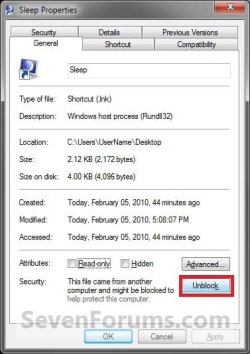
5. Move the shortcut to where you like for easy use.
6. When done, you can delete the downloaded .zip file on the desktop if you like, or save it to use again.
OPTION TWO
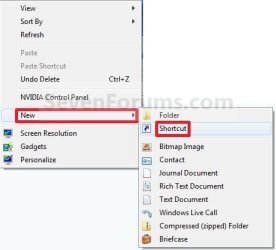
Manually Create the Shortcut
2. Type the command below into the location area, and click on the Next button. (See screenshot below)
Code:
rundll32.exe powrprof.dll,SetSuspendState
3. Type Sleep for the name, and click on the Finish button. (See screenshot below)
NOTE: You can name this anything you would like though.
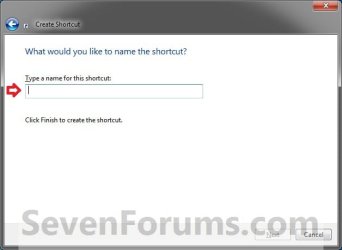
4. Right click on the new Sleep shortcut on the Desktop and click on Properties.
5. Click on the Shortcut tab, then click on the Change Icon button. (See screenshot below)
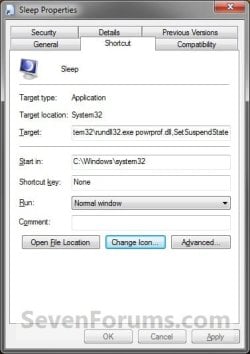
6. In the line under "Look for icons in this file", type the location below and press Enter. (See screenshot below)
Code:
C:\Windows\System32\imageres.dll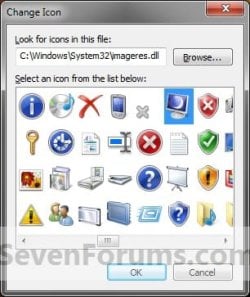
7. Select the icon highlighted in blue above and click on OK. (See screenshot above)
NOTE: You can use any icon that you would like instead though.
8. Click on OK. (See screenshot below step 5)
9. Disable hibernate.
10. Move the shortcut to where you like for easy use.
That's it,
Shawn
Related Tutorials
- How to Create a Restart Computer Shortcut in Windows
- How to Create a Lock Computer Shortcut on Your Windows 7 Desktop
- How to Create a Log Off Shortcut in Windows
- How to Create a Shut Down Windows Shortcut in Windows 7
- How to Create a Shut Down Computer Shortcut in Windows
- How to Create a Switch User Shortcut in Windows 7
- How to Create a Abort Shortcut in Windows
- How to Create a Hibernate Shortcut in Windows
- How to Add or Remove the Shut Down, Restart, Sleep, and Hibernate Commands in Windows 7
Attachments
Last edited:


