| Windows 7: AHCI : Enable in Windows 7 / Vista |
07 Feb 2010
|
#279 | | W 7 64-bit Ultimate The Lowcountry |
AHCI : Enable in Windows 7 / Vista AHCI : Enable in Windows 7 after OS install
Last edited by Brink; 15 Dec 2011 at 03:56 PM..
| My System Specs |
| System Manufacturer/Model Number * BFK Customs * OS W 7 64-bit Ultimate CPU Intel Q9550 Yorkfield Motherboard ASUS P5Q Pro Memory 8GB Dominator 8500C5D Graphics Card ATI : XFX 5870 Sound Card Realtek HD Audio 7-1 Monitor(s) Displays 1x 47" LCD HDMI & 3x 26" LCD HDMI Screen Resolution 1920x1080P & 1920x1200 Keyboard Microsoft 500 Mouse Razer Diamondback 3G PSU Corsair 620HX Case Cooler Master RC-690 Cooling Tuniq Tower 120, 2x 140mm and 3x 120mm case fans Hard Drives 1x 80GB Intel X25-M G2 SSD : 1x 500GB & 1x 640GB WD Caviar Black(s) Internet Speed 14 Mb/s Other Info 1x Koutech 3Gb/s SATA HDD Hot Swap Rack |
15 Oct 2010
|
#280 | | Windows 7 Ult x64 - SP1/ Windows 8 Pro x64 Wanderer |
Information is hard to find, very little on Intel's site.
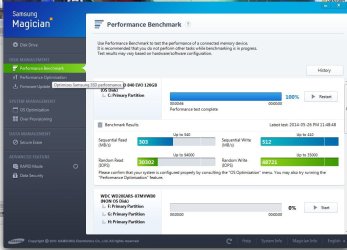
Here's some basic info, you probably have seen these, posted for others to see if they haven't already. RAID From Wikipedia Advanced Host Controller Interface (AHCI) And the rest is really hard to find, mostly discussions a couple of benchmark tests, not much info really. As you mentioned, I find this rather strange, even an Intel search gives old information. Other misc info found, that might be of interest. Benchmark Performance SSD Testing: AHCI vs IDE | My System Specs |
| Computer type PC/Desktop System Manufacturer/Model Number 76~2.0 OS Windows 7 Ult x64 - SP1/ Windows 8 Pro x64 CPU Intel Core i5-3570K 4.6GHz Motherboard Gigabyte GA-Z77X UD3H, f18 Memory 8GB (2X4GB) DDR3 1600 Corsair Vengeance CL8 1.5v Graphics Card Sapphire HD 7770 Vapor-X OC 1GB DDR5 Sound Card Onboard VIA VT2021 Monitor(s) Displays 22" LCD Dell Screen Resolution 1680x1050 Keyboard Logitech Wave Mouse CM Sentinel PSU Corsair HX650W Case Cooler Master Storm Scout Cooling Corsair H80 2x12cm Noctua NF P12 , 2x14cm case fans Hard Drives Samsung 840Pro 128GB SSD,
Seagate Barracuda 500GB SATA2 7200rpm 32MB cache, Seagate Barracuda 1TB SATA2 7200rpm 32MB cache, Internet Speed Dismal Antivirus Avast Browser Opera Next Other Info eSATA ports,
External eSATA Seagate 500GB SATA2 7200rpm,
External USB WD 500GB |
16 Nov 2010
|
#281 | | Windows 7 64 bit Home Premium Northern California Coast |

Quote: Originally Posted by swarfega Yes I enabled it before current format. Can I reopen this thread? I'm not sure I can get my computer to boot if I change the BIOS to AHCI. Not understanding the problem, I've tried to change that state to AHCI and the machine would not boot. After changing it back to IDE enhanced it would then boot. But I'm eager to make this change if it will work and I've appreciated your prior postings in this thread. | My System Specs | | System Manufacturer/Model Number Homebuilt OS Windows 7 64 bit Home Premium CPU Intel Core i5-2500K @ 3.30 ghz Motherboard ASUS P8Z68-V PRO GEN 3 Memory 8 GB of Corsair Graphics Card Intel integrated Sound Card none, Realtek HD integrated Monitor(s) Displays ACER X223W LCD Monitor Screen Resolution VGA for the moment: to change Keyboard MS Digital Multimedia Pro Mouse MS Wired Comfort Optical Mouse PSU HX 750 watt Corsair Case NZXT Cooling Cooler Master Hyper 212 Plus Hard Drives Samsung 128gb 830 series SSD;
WDC WD15EARS 1.5 TB Internet Speed Cable ? |
16 Nov 2010
|
#282 | | W 7 64-bit Ultimate The Lowcountry |
Hello mendopaul.
If you do the steps exactly as in the tutorial you should be ok.
Have a look at this tutorial at the link below before you start this to create at least 1 restore point, and 2 would be better in case you have any issues, a system restore will set the registry back to what it was before you started; be sure to post back with any further questions you may have and to keep us informed. How to Create a System Restore Point in Windows 7 | My System Specs | | System Manufacturer/Model Number * BFK Customs * OS W 7 64-bit Ultimate CPU Intel Q9550 Yorkfield Motherboard ASUS P5Q Pro Memory 8GB Dominator 8500C5D Graphics Card ATI : XFX 5870 Sound Card Realtek HD Audio 7-1 Monitor(s) Displays 1x 47" LCD HDMI & 3x 26" LCD HDMI Screen Resolution 1920x1080P & 1920x1200 Keyboard Microsoft 500 Mouse Razer Diamondback 3G PSU Corsair 620HX Case Cooler Master RC-690 Cooling Tuniq Tower 120, 2x 140mm and 3x 120mm case fans Hard Drives 1x 80GB Intel X25-M G2 SSD : 1x 500GB & 1x 640GB WD Caviar Black(s) Internet Speed 14 Mb/s Other Info 1x Koutech 3Gb/s SATA HDD Hot Swap Rack |
22 Nov 2010
|
#283 | | Windows 7 Home Premium Texas |
Got er done! Hey Ted,
Wow I figured it out! I changed the # from 3 to 0, then went into the bios and switched it from IDE to AHCI and rebooted.
Is it normal that whenever I reboot it says on one of the bootup screens:
"AHCI driver INT..." before it goes to the desktop? I know it was suppose to do it when I first made the change...just wondering I guess if it will do that every time I restart now. Just making sure I didn't mess something up.
Casey | My System Specs | | System Manufacturer/Model Number Custom Build OS Windows 7 Home Premium CPU AMD Phenom II 955 Black Edition Quad Core Motherboard MSI 870-G45 Memory Corsair XMS3 8GB Graphics Card ATI Eyefinity HD 5770 5 mini display ports Sound Card Realtek High Definition 6.1 Monitor(s) Displays 2 DELL E207WFP 21.5" - 1 Acer 21.5" Screen Resolution 2 Dells 1680x1050 - Acer 1920x1080 Mouse Logitech PSU Cooler Master 500w Case Cooler Master 430 Black Elite Hard Drives Intel 40GB SSD
WD 500GB internal
WD 500Gb external Internet Speed 6 mbs |
22 Nov 2010
|
#284 | | W 7 64-bit Ultimate The Lowcountry |
Hello Casey.
Well done.
The way SSDs are constructed, they don't need to be defragged. | My System Specs | | System Manufacturer/Model Number * BFK Customs * OS W 7 64-bit Ultimate CPU Intel Q9550 Yorkfield Motherboard ASUS P5Q Pro Memory 8GB Dominator 8500C5D Graphics Card ATI : XFX 5870 Sound Card Realtek HD Audio 7-1 Monitor(s) Displays 1x 47" LCD HDMI & 3x 26" LCD HDMI Screen Resolution 1920x1080P & 1920x1200 Keyboard Microsoft 500 Mouse Razer Diamondback 3G PSU Corsair 620HX Case Cooler Master RC-690 Cooling Tuniq Tower 120, 2x 140mm and 3x 120mm case fans Hard Drives 1x 80GB Intel X25-M G2 SSD : 1x 500GB & 1x 640GB WD Caviar Black(s) Internet Speed 14 Mb/s Other Info 1x Koutech 3Gb/s SATA HDD Hot Swap Rack |
03 Dec 2010
|
#285 | | |
So I just installed my os onto my new ssd and I did it in ide mode. my previous os was on my hdd is a raid 0 format. Can I use my ssd in achi while keep my hdd in raid 0? I have a gigibyte bios and it has 2 options for changing the ide/raid/achi not sure if both have to be on what | My System Specs | | OS windows 7 64bit CPU i5 3.2 oc Motherboard gigabyte ud4 Memory patriot viper2 4 gig Graphics Card 5850 crossfire Monitor(s) Displays samsung 2048x1152 PSU ace 750watt Case antec 600 Cooling h50 Hard Drives Western digital 500gigx2 raid0 |
03 Dec 2010
|
#286 | | W 7 64-bit Ultimate The Lowcountry |
Hello onthemour, welcome to Seven Forums!
I'm not sure what you're asking; are you asking if you can dual boot both the SSD and the RAID HDDs using the Windows managed dual boot?
I don't believe that would be possible; if it was a BIOS managed dual boot it may be possible though you would have to change back and forth between AHCI_SSD and RAID_HDD using the BIOS which I feel would become tedious after a while.
I had a dual boot with XP in IDE and Windows 7 in AHCI and I had to use the BIOS to boot to either and it became more trouble than it was worth before long. | My System Specs | | System Manufacturer/Model Number * BFK Customs * OS W 7 64-bit Ultimate CPU Intel Q9550 Yorkfield Motherboard ASUS P5Q Pro Memory 8GB Dominator 8500C5D Graphics Card ATI : XFX 5870 Sound Card Realtek HD Audio 7-1 Monitor(s) Displays 1x 47" LCD HDMI & 3x 26" LCD HDMI Screen Resolution 1920x1080P & 1920x1200 Keyboard Microsoft 500 Mouse Razer Diamondback 3G PSU Corsair 620HX Case Cooler Master RC-690 Cooling Tuniq Tower 120, 2x 140mm and 3x 120mm case fans Hard Drives 1x 80GB Intel X25-M G2 SSD : 1x 500GB & 1x 640GB WD Caviar Black(s) Internet Speed 14 Mb/s Other Info 1x Koutech 3Gb/s SATA HDD Hot Swap Rack |
03 Dec 2010
|
#287 | | |
When I set bios to raid and boot into my ssd os my hdd raid0 shows up as drive f and I can access the files on it. Which is what I want. I was wondering if I am getting ahci for my ssd? I read on forums that with raid enabled I get ahci eneabled for ssd. Is this true and if so do I get trim? It is a ocz vertex2 120gig | My System Specs | | OS windows 7 64bit CPU i5 3.2 oc Motherboard gigabyte ud4 Memory patriot viper2 4 gig Graphics Card 5850 crossfire Monitor(s) Displays samsung 2048x1152 PSU ace 750watt Case antec 600 Cooling h50 Hard Drives Western digital 500gigx2 raid0 |
03 Dec 2010
|
#288 | | W 7 64-bit Ultimate The Lowcountry |

Quote: Originally Posted by onthemour When I set bios to raid and boot into my ssd os my hdd raid0 shows up as drive f and I can access the files on it. Which is what I want. I was wondering if I am getting ahci for my ssd? I read on forums that with raid enabled I get ahci eneabled for ssd. Is this true and if so do I get trim? It is a ocz vertex2 120gig I don't have much practical experience with RAID, so hopefully someone else will have some suggestions for you, just keep checking back. | My System Specs | | System Manufacturer/Model Number * BFK Customs * OS W 7 64-bit Ultimate CPU Intel Q9550 Yorkfield Motherboard ASUS P5Q Pro Memory 8GB Dominator 8500C5D Graphics Card ATI : XFX 5870 Sound Card Realtek HD Audio 7-1 Monitor(s) Displays 1x 47" LCD HDMI & 3x 26" LCD HDMI Screen Resolution 1920x1080P & 1920x1200 Keyboard Microsoft 500 Mouse Razer Diamondback 3G PSU Corsair 620HX Case Cooler Master RC-690 Cooling Tuniq Tower 120, 2x 140mm and 3x 120mm case fans Hard Drives 1x 80GB Intel X25-M G2 SSD : 1x 500GB & 1x 640GB WD Caviar Black(s) Internet Speed 14 Mb/s Other Info 1x Koutech 3Gb/s SATA HDD Hot Swap Rack |
04 Dec 2010
|
#289 | | Windows 7 Enterprise (x64); Windows Server 2008 R2 (x64) Earth - I wish I was on Risa |

Quote: Originally Posted by onthemour When I set bios to raid and boot into my ssd os my hdd raid0 shows up as drive f and I can access the files on it. Which is what I want. I was wondering if I am getting ahci for my ssd? I read on forums that with raid enabled I get ahci eneabled for ssd. Is this true and if so do I get trim? It is a ocz vertex2 120gig Newer computers and newer controllers typically only have IDE and RAID. If you select RAID and do NOT create a RAID all drives are running in AHCI. -WS | My System Specs | | System Manufacturer/Model Number Dell OP760 OS Windows 7 Enterprise (x64); Windows Server 2008 R2 (x64) Memory 8GB Monitor(s) Displays 2 Dell 19" LCD Screen Resolution 1280x1024 Keyboard Dell Mouse Dell Optical Internet Speed 40meg AHCI : Enable in Windows 7 / Vista problems? All times are GMT -5. The time now is 08:58 PM. | |