|
Welcome to Windows 7 Forums. Our forum is dedicated to helping you find solutions with any problems, errors or issues you are experiencing with Windows 7. The Windows 7 forum also covers news and updates and has an extensive Windows 7 tutorial section that covers a wide range of tips and tricks.
Windows 7 - AHCI : Enable in Windows 7 / Vista |
02-07-2010
|
#409 | | |
AHCI : Enable in Windows 7 / Vista AHCI : Enable in Windows 7 after OS install
Last edited by Brink; 12-15-2011 at 03:56 PM..
| My System Specs | | System Manufacturer/Model Number * BFK Customs * OS W 7 64-bit Ultimate CPU Intel Q9550 Yorkfield Motherboard ASUS P5Q Pro Memory 8GB Dominator 8500C5D Graphics Card ATI : XFX 5870 Sound Card Realtek HD Audio 7-1 Monitor(s) Displays 1x 47" LCD HDMI & 3x 26" LCD HDMI Screen Resolution 1920x1080P & 1920x1200 Keyboard Microsoft 500 Mouse Razer Diamondback 3G PSU Corsair 620HX Case Cooler Master RC-690 Cooling Tuniq Tower 120, 2x 140mm and 3x 120mm case fans Hard Drives 1x 80GB Intel X25-M G2 SSD : 1x 500GB & 1x 640GB WD Caviar Black(s) Internet Speed 14 Mb/s Other Info 1x Koutech 3Gb/s SATA HDD Hot Swap Rack |
02-19-2012
|
#410 | | |
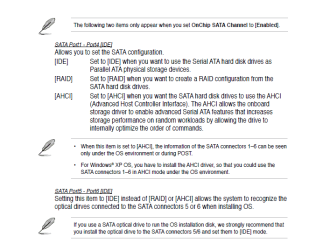
I've been trying to narrow down a problem I've been having with restoring a disk image of my SSD in a standalone environment, namely a recovery disk or USB stick. I have the controller defined as AHCI in my BIOS. Restores which used to take minutes can now take hours. Looking through different posts on the Web I've seen reports of the same problem. Many people claim that setting the controller to IDE in the BIOS and then rebooting to your particular standalone restorer fixed the speed issue.
I haven't tried this yet but will when I need to do a restore. Just wondering if I can get verification of this from the resident Gurus here?
| My System Specs | | System Manufacturer/Model Number Asus CG5290 OS Windows 7 x64 RTM Retail CPU Intel i7-920 Quad @ 4.0Ghz. Stepping D0. Motherboard Asus Rampage II GENE Memory 9GB DDR3 @ 1600 Mhz. 9-8-8-24-CR1 Graphics Card XFX ATI HD5870 @ 900/1300 Sound Card SupremeFX X/Fi HD Audio onboard Monitor(s) Displays Samsung 24" WS Screen Resolution 1920x1200 Keyboard MS Mouse MS wireless explorer PSU Antec TruePower 650 Watts Case Ugly but functional. Cooling Oversized heat sink, lots and lots of fans. Hard Drives OCZ AGILITY-EX (64 GB, SATA-II, SSD SLC NAND Flash)
Hitachi HDT721010SLA360 (1 TB, 7200 RPM, SATA-II)
Cavalry (500 GB, 7200 RPM, eSATA-II) Internet Speed 101/15 - Optimum Online Ultra |
02-20-2012
|
#411 | | |
This is what I got from my motherboard maker support: To install AHCI drivers properly (required for hot swap): 1. Enable AHCI mode in BIOS (under chipset – southbridge). 2. Format the hard drive. 3. Boot to CD, to Install Windows. 4. During the installation Windows will not recognize any drives, and will prompt you to install the third party AHCI drivers. support@biostar-usa.com 626-581-1055 menu select 2 This email message is for the sole use of the intended recipient(s) and may contain confidential information. Any unauthorized review, use, disclosure or distribution is prohibited. If you are not the intended recipient, please contact the sender by reply email and destroy all copies of the original message. From: bock_d@bellsouth.net [mailto:bock_d@bellsouth.net] Sent: Monday, February 13, 2012 4:11 PM To: support@biostar-usa.com Subject: << BIOSTAR Technical Support Request FORM >>
================================================= Question:
How to install AHCI (SATA HOT-SWAPPABLE) drivers in Windows 7 x64?
================================================= Email: bock_d@bellsouth.net Model / BIOS / PCB:
790GXE / / OS:
Win 7 x64 Name / Country / Local Dealer:
Donald Bock / USA / CPU:
AMD Memory / Speed & Size: / VGA Brand / Model: HDD / Size: / Power Supply: Other Device:
=================================================
Will the above AHCI work as described or do I need to do what Biostar Support wrote?
I have NOT enabled AHCI in BIOS yet; this install of Windows 7 was STRAIGHT OFF.
To give a heads up, would you mind giving EXPLICIT details? Thanks. Donald. | My System Specs | | System Manufacturer/Model Number Home build OS Windows 7 Pro 64Bit CPU AMD Phenom II 965 Motherboard Biostar 790GXE Memory Corsair XMS2 4GB PC6400 DDR2 800MHz Memory Upgrade - 2x2048M Graphics Card GeForce 9500 GT Video Card, 1GB DDR2 Sound Card Realtek Digital Audio 6.1 Monitor(s) Displays Acer X223W Screen Resolution 680Hx1050H Keyboard Logitech Deluxe 250 (PS/2) Mouse Logitech Optical Mouse 852149-0000 (PS/2) PSU Ultra X4 750-Watt Modular Power Supply - 135mm Fan, ATX Case CoolerMaster Elite 300 (Black) Cooling Enermax 120mm HiVolocity, CoolerMaster Hard Drives WDC WD1002-FAEX-00Z3A0 1000GB SATA2 64MB CACHE
WDC WD2002-FAEX-007BA0 2000GB SATA2 64MB CACHE Internet Speed AT&T (3Gb/s: so they claim) Other Info Logitech C600 Webcam HD, Logitech
Logitech Z-4(3-driver) 40 watts 2.1 Speakers w/subwoofer |
02-20-2012
|
#412 | | Windows 7 Ult x64 - SP1/ Windows 8 CP x64 |
If you follow the tutorial it will work just fine.
The tutorial is Explicit details.
Many have already done this with no problems.
If you are, going to or want to, re-install your OS you can do it that way also. | My System Specs | | System Manufacturer/Model Number 76~1.4 OS Windows 7 Ult x64 - SP1/ Windows 8 CP x64 CPU Intel Core i5-750 3.84GHz Motherboard Gigabyte GA-P55A-UD4P, SATA 6Gb/s USB 3, f14 Memory 8GB (2X4GB) DDR3 1600 Corsair Vengeance CL8 1.5v Graphics Card XFX HD 5770 1GB DDR5 Sound Card Realtek HD Audio ALC889 Integrated Chip Monitor(s) Displays 22" LCD Dell Screen Resolution 1680x1050 Keyboard Logitech Wave Mouse CM Sentinel PSU Corsair HX650W Case Cooler Master Storm Scout Cooling Corsair H80 2x12cm Noctua NF P12 , 2x14cm case fans Hard Drives Intel X25 M 120GB SSD,
Seagate Barracuda 500GB SATA2 7200rpm 32MB cache, Seagate Barracuda 1TB SATA2 7200rpm 32MB cache, Internet Speed Dismal Other Info eSATA ports,
External eSATA Seagate 500GB SATA2 7200rpm,
External USB WD 500GB |
02-21-2012
|
#413 | | |
Already at 0 Can I still proceed with the process of turning the mode to AHCI? on Regedit, it was already at 0. sorry if its a repeated comment. | My System Specs | | |
02-22-2012
|
#414 | | |

Quote: Originally Posted by sry9681 Can I still proceed with the process of turning the mode to AHCI? on Regedit, it was already at 0. sorry if its a repeated comment.  The 'start' entry in HKEY_LOCAL_MACHINE\SYSTEM\CurrentControlSet\services simply enables the AHCI driver in Windows 7 or Vista ( source). So if it was already on 0, you shouldn't have any need to change it.
In this case, I'd recommend a backup with your favourite backup software (or if you don't have any, create a fresh Restore Point), then go into the BIOS and try enable AHCI. If it fails to boot, then we can start looking at why. | My System Specs | | System Manufacturer/Model Number .oO-My Baby-Oo. OS Windows 7 Ultimate x64 CPU AMD AM2 6000+ @3084MHz (220MHz x 14) Motherboard XFX nForce 750a SLI (MCP72P) Memory TWIN2X2048-6400C5DHX (5-5-5-15, 880MHz, 8400MB/s) Graphics Card EVGA GTX 275 Superclocked 896mb Sound Card Onboard Realtek ALC-888 Monitor(s) Displays LG Flatron WS19 Screen Resolution 1440 x 900 x 75hz Keyboard A4Tech Multimedia Keyboard Mouse Logitech MX-1000 Laser PSU CoolerMaster eXtreme Power 650w Case Cheap handle case to play with case modding... Cooling 4x 120mm Zalman fans, Zalman CNPS9700NT, stock GPU cooler Hard Drives Seagate Barracuda in AHCI: 250GB 7200.12, 400GB 7200.10, 2 x 500GB 7200.12. Internet Speed 1Mb ADSL |
02-22-2012
|
#415 | | |
:) I was able to get into the BIOS after a good week of windows 8 not letting me. Aparently i bought this computer with AHCI mode on. well that is a relief! thank you anyway! | My System Specs | | |
02-22-2012
|
#416 | | |

Quote: Originally Posted by sry9681 I was able to get into the BIOS after a good week of windows 8 not letting me. Aparently i bought this computer with AHCI mode on. well that is a relief! thank you anyway! Windows shouldn't have anything to do with you accessing the BIOS, it's loaded before the OS... But either way, glad you figured it out. | My System Specs | | System Manufacturer/Model Number .oO-My Baby-Oo. OS Windows 7 Ultimate x64 CPU AMD AM2 6000+ @3084MHz (220MHz x 14) Motherboard XFX nForce 750a SLI (MCP72P) Memory TWIN2X2048-6400C5DHX (5-5-5-15, 880MHz, 8400MB/s) Graphics Card EVGA GTX 275 Superclocked 896mb Sound Card Onboard Realtek ALC-888 Monitor(s) Displays LG Flatron WS19 Screen Resolution 1440 x 900 x 75hz Keyboard A4Tech Multimedia Keyboard Mouse Logitech MX-1000 Laser PSU CoolerMaster eXtreme Power 650w Case Cheap handle case to play with case modding... Cooling 4x 120mm Zalman fans, Zalman CNPS9700NT, stock GPU cooler Hard Drives Seagate Barracuda in AHCI: 250GB 7200.12, 400GB 7200.10, 2 x 500GB 7200.12. Internet Speed 1Mb ADSL |
02-22-2012
|
#417 | | |
Yes, true, Windows 7 and Vista can find the AHCI drivers to LOAD BEFORE OS startup; it jut looks funny with a black text screen showing Loading AHCI driver...then Windows finishes boot.
- dbseven | My System Specs | | System Manufacturer/Model Number Home build OS Windows 7 Pro 64Bit CPU AMD Phenom II 965 Motherboard Biostar 790GXE Memory Corsair XMS2 4GB PC6400 DDR2 800MHz Memory Upgrade - 2x2048M Graphics Card GeForce 9500 GT Video Card, 1GB DDR2 Sound Card Realtek Digital Audio 6.1 Monitor(s) Displays Acer X223W Screen Resolution 680Hx1050H Keyboard Logitech Deluxe 250 (PS/2) Mouse Logitech Optical Mouse 852149-0000 (PS/2) PSU Ultra X4 750-Watt Modular Power Supply - 135mm Fan, ATX Case CoolerMaster Elite 300 (Black) Cooling Enermax 120mm HiVolocity, CoolerMaster Hard Drives WDC WD1002-FAEX-00Z3A0 1000GB SATA2 64MB CACHE
WDC WD2002-FAEX-007BA0 2000GB SATA2 64MB CACHE Internet Speed AT&T (3Gb/s: so they claim) Other Info Logitech C600 Webcam HD, Logitech
Logitech Z-4(3-driver) 40 watts 2.1 Speakers w/subwoofer |
03-07-2012
|
#418 | | Windows 7 Professional 64bit |
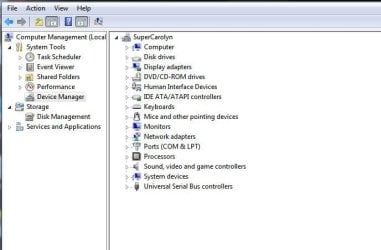
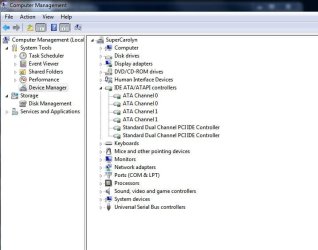
I have enabled AHCI in bios and reg. HOW or WHERE can a actualy see the AHCI driver, have looked in device manager nothing ? | My System Specs | | System Manufacturer/Model Number Homebuild OS Windows 7 Professional 64bit CPU AMD APU A8 3870 Motherboard Asus F1A75-I DELUXE Memory G.skill ripjaws 2x4GB SDRAM DDR3 1866, F314900CL9D-8GBXL Graphics Card AMD Radeon HD6550D (Integrated) PSU Silverstone Evelution 750W Hard Drives SSD Patriot Wildfire 120GB, Firmware 3.3.2 |
03-08-2012
|
#419 | | Windows 7 Ult x64 - SP1/ Windows 8 CP x64 |
Welcome to Seven Forums MikeM12345.
In Device Manager expand the 'IDE ATA/ATAPI controllers' you should see something with '...AHCI Controller' listed. | My System Specs | | System Manufacturer/Model Number 76~1.4 OS Windows 7 Ult x64 - SP1/ Windows 8 CP x64 CPU Intel Core i5-750 3.84GHz Motherboard Gigabyte GA-P55A-UD4P, SATA 6Gb/s USB 3, f14 Memory 8GB (2X4GB) DDR3 1600 Corsair Vengeance CL8 1.5v Graphics Card XFX HD 5770 1GB DDR5 Sound Card Realtek HD Audio ALC889 Integrated Chip Monitor(s) Displays 22" LCD Dell Screen Resolution 1680x1050 Keyboard Logitech Wave Mouse CM Sentinel PSU Corsair HX650W Case Cooler Master Storm Scout Cooling Corsair H80 2x12cm Noctua NF P12 , 2x14cm case fans Hard Drives Intel X25 M 120GB SSD,
Seagate Barracuda 500GB SATA2 7200rpm 32MB cache, Seagate Barracuda 1TB SATA2 7200rpm 32MB cache, Internet Speed Dismal Other Info eSATA ports,
External eSATA Seagate 500GB SATA2 7200rpm,
External USB WD 500GB AHCI : Enable in Windows 7 / Vista problems? All times are GMT -5. The time now is 02:48 AM. |  |