
Windows 7 Forums


Windows 7: Sticky Notes - Change Color


Sticky Notes - Change Color

How to Change the Color of a Sticky Note in Windows 7 and Windows 8
Published 01 Apr 2009
Published by

Featured Tutorial

Emergency Kit - save your files from a dead OS

How to Create and Use a Linux Mint Mate USB Flash Drive to Recover your Files

Clean Up Factory Bloatware


Secunia ONLINE Software Inspector

How to Scan for Common Software Vulnerabilities

Troubleshooting Windows 7 Failure to Boot


User Profile - Customize During Installation

How to Customize Default User Profile in Audit Mode

Peppermint3 - Create Live CD/DVD/USB To Use For Emergency Backup

How to Perform an Emergency Data Backup When Windows 7 Will Not Boot
How to Change the Color of a Sticky Note in Windows 7 and Windows 8

information   Information
Sticky Notes allows you to type and leave a Post-it type note on your desktop until deleted.

This tutorial will show you how to change the color of a new or existing Sticky Note to be either Blue, Green, Pink, Purple, White, or Yellow in Windows 7 and Windows 8.

Sticky Notes is not available in the Windows 7 Starter and Home Basic editions.


Here's How:
1. Right click on a blank space in the Sticky Note that you want to change the color of, and select the color that you want it to be. (See screenshot below)
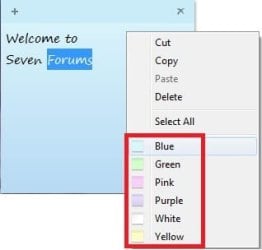
Sticky Notes - Change Color-color.jpg

That's it,
Shawn


Need more help? Try searching our extensive help and support site.
Loading
19 May 2009   #1
myndmelt

Windows 7 64-bit RC1
Fort Wayne, In
 
 
uht!

Where the hell is the RED????
Just kidding, I did feel like an idiot when I couldnt figure out how to change the color!
Thanks for the post!


My System SpecsSystem Spec

19 May 2009   #2
Brink

64-bit Windows 7 Ultimate SP1 & Windows 8 Enterprise
Texas


LOL, your welcome Myndmelt, and welcome to Seven Forums.

Yeah, it would be nice to have an option for custom colors.

Shawn
My System SpecsSystem Spec
19 May 2009   #3
myndmelt

Windows 7 64-bit RC1
Fort Wayne, In


Yeah a color picker and even the option to put in the RGB values, that would be sweet. I think they could also let you picky a sticky note theme. I know I could imagine a nice little glassy 'gloss' sticky note on my desktop.
My System SpecsSystem Spec
.


06 Dec 2009   #4
warmth

Windows 7 Ultimate (32 bits)
Caracas, Venezuela


has someone found any trick/addon/tool to change the colors in RGB mode or to add more colors?

Last edited by warmth; 06 Dec 2009 at 02:29 AM..
My System SpecsSystem Spec
Comment

 Sticky Notes - Change Color problems?


Tutorial Tools


Similar help and support threads for: Sticky Notes - Change Color
Windows 7 Tutorial Category
Sticky Notes - Change Text Format Tutorials
Sticky Notes - Change Default Font Tutorials
Sticky Notes: Change Default look Tutorials
Change 7's Sticky Notes Skin Customization
sticky notes color Software


All times are GMT -5. The time now is 07:20 AM.


Seven Forums Android App Seven Forums IOS App Follow us on Facebook

Windows 7 Forums is an independent web site and has not been authorized,
sponsored, or otherwise approved by Microsoft Corporation.
"Windows 7" and related materials are trademarks of Microsoft Corp.
© Designer Media Ltd
  

1 2 3 4 5 6 7 8 9 10 11 12 13 14 15 16 17 18 19 20 21 22 23 24 25 26 27 28 29 30 31 32