
Windows 7 Forums Search
Welcome to Windows 7 Forums. Our forum is dedicated to helping you find solutions with any problems, errors or issues you are experiencing with Windows 7. The Windows 7 forum also covers news and updates and has an extensive Windows 7 tutorial section that covers a wide range of tips and tricks.


Windows 7 - Flip 2D Shortcut Program


Flip 2D Shortcut Program

Download Flip 2D Shortcut to Open CTRL+ALT+TAB in Windows
Published by Brink
02-17-2010
Default Flip 2D Shortcut Program

Download Flip 2D Shortcut to Open CTRL+ALT+TAB in Windows

information   Information
The Flip 2D program will act as a shortcut that will open Switch Between Windows (task switcher) as if you had pressed the CTRL+ALT+TAB keys in Windows 7 or Vista.

When you use Flip 2D, it make it easier for you to select one of the open windows and programs to have it displayed as the active window on the desktop.

Note   Note
UAC will need to be turned on for this work.


EXAMPLE: Flip 2D Switch Between Windows
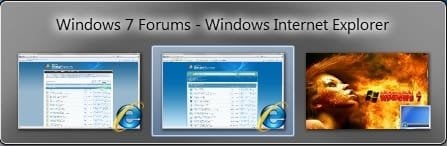
Flip 2D Shortcut Program-flip-2d.jpg

Here's How:
1. To download the Flip 2D program, click on the icon below to open the File Download dialog box.

2. Click on Save, and save the .zip file to the desktop.

3. Open the .zip file and extract the Flip 2D.exe file to the desktop.

4. Right click on the Flip 2D.exe file, and click on Properties, General tab, and on the Unblock button. (see screenshot below)
NOTE: If you do not have a Unblock button under the General tab, then the file is already unblocked and you can continue on to step 5.
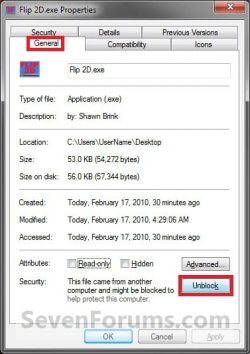
Flip 2D Shortcut Program-unblock.jpg
5. Save the Flip 2D.exe file to where you like, then you could Pin to Taskbar, Pin to Start Menu, or create a shortcut for it and move the shortcut where you like for ease of use.
That's it,
Shawn


Published by
Administrator

Join Date: Oct 2008
Location: Texas
Posts: 34,822
Brink has a reputation beyond reputeBrink has a reputation beyond reputeBrink has a reputation beyond repute
Brink has a reputation beyond reputeBrink has a reputation beyond reputeBrink has a reputation beyond reputeBrink has a reputation beyond reputeBrink has a reputation beyond reputeBrink has a reputation beyond reputeBrink has a reputation beyond reputeBrink has a reputation beyond reputeBrink has a reputation beyond reputeBrink has a reputation beyond reputeBrink has a reputation beyond reputeBrink has a reputation beyond reputeBrink has a reputation beyond reputeBrink has a reputation beyond repute

Tutorial Tools
Comment

Flip 2D Shortcut Program problems?


Tutorial Tools


Similar Threads for: Flip 2D Shortcut Program
Windows 7 Tutorial Category
Solved Program Files Flip General Discussion
Solved Click on shortcut, other program opens Browsers & Mail
Switch Between Windows - Flip 3D Shortcut Tutorials
Pinned program -> Shortcut? General Discussion
Program shortcut requires UAC permission? System Security


All times are GMT -5. The time now is 07:29 PM.


Windows 7 Forums is an independent web site and has not been authorized,
sponsored, or otherwise approved by Microsoft Corporation.
"Windows 7" and related materials are trademarks of Microsoft Corp.
© Designer Media Ltd
  

1 2 3 4 5 6 7 8 9 10 11 12 13 14 15 16 17 18 19 20 21 22 23 24 25 26 27 28 29 30