
 | | Welcome to Windows 7 Forums. Our forum is dedicated to helping you find solutions with any problems, errors or issues you are experiencing with Windows 7. The Windows 7 forum also covers news and updates and has an extensive Windows 7 tutorial section that covers a wide range of tips and tricks. | Windows 7 - Windows Mobility Center - Open and Use
Windows Mobility Center - Open and Use How to Open and Use Windows 7 Mobility Center
Published by Brink
04-06-2009
| Windows Mobility Center - Open and Use How to Open and Use Windows 7 Mobility Center  Information This will show you how to open Windows Mobility Center to display the most commonly used laptop settings, such as display brightness, volume, battery status, wireless network status, external display, Sync Center, and Presentation settings in one location for quicker access in Windows 7.  Tip If you wanted or needed to create a Windows Mobility Center shortcut, the exe file is located at C:\Windows\System32\mblctr.exe.  Note - By default, the Windows Mobility Center feature is only available on laptops, notebooks, and tablet PCs. It is not available on desktop computers unless enabled.
- Windows Mobility Center is not available in the Windows 7 Starter edition.
- The Presentation Settings in Windows Mobility Center are not available in the Windows 7 Home Basic and Home Premium editions.
EXAMPLE: Windows Mobility Center NOTE: Each available setting is displayed as a tile in Mobility Center. Different tiles are displayed depending on your system hardware and drivers. Some tiles are added by your laptop manufacturer. Not all settings are available on all laptops. Here's How:1. Press Windows Key + X. NOTE: You can also open the Start Menu - All Programs - Accessories - Windows Mobility Center on a laptop.A) Go to step 4. OR 2. Open the Control Panel (All Items view), and click on the Windows Mobility Center icon.A) Go to step 4. OR 3. Open the Start Menu, then type mblctr.exe and press enter. 4. You can now adjust the settings per tile to what you like. (See screenshot below) NOTE: You can click on a tile icon at the upper left corner of the tile to quickly open options for that setting. Here are some of the most common settings you might find in Mobility Center listed below. Remember that not all settings are available on all laptops.
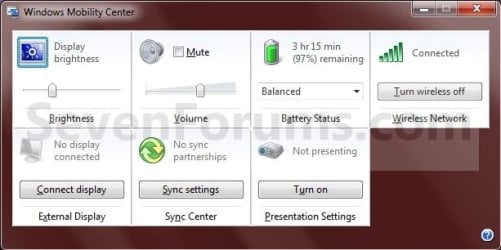
- Display Brightness - Move the slider to temporarily adjust the brightness of your display. To adjust the display brightness settings for your power plan, click the icon to open Power Options.
- Volume - Move the slider to adjust the speaker volume of your laptop, or select the Mute check box.
- Battery Status - View how much charge remains on your battery or select a power plan from the list.
- Wireless Network - View the status of your wireless network connection or turn your wireless network adapter on or off.
NOTE: If the Turn wireless on button is unavailable, you might need to use the hardware switch on your laptop computer to turn on the wireless network adapter. For more information about turning the adapter on and off, check the documentation that came with your computer. - Screen Rotation - Change the orientation of your Tablet PC screen from portrait to landscape, or vice versa.
- External Display - Connect an additional monitor to your laptop, or customize the display settings.
- Sync Center - View the status of an in-progress file sync, start a new sync, set up a sync partnership, or change your settings in Sync Center.
- Presentation Settings - Change the screen saver, adjust the speaker volume, and change your desktop background image to be applied when giving a presentation.
That's it,
Shawn |  Published by | | Administrator Join Date: Oct 2008 Location: Texas Posts: 34,653 | |
 Tutorial Tools | | | | | | | | | |
10-29-2009
|
#1 | | Windows 7 Professional 32 Bit |
I tried to open this on my laptop and got the error that it's only available on laptops
what's the deal did I disable a service that is needed to detect something?
| My System Specs | | System Manufacturer/Model Number HP DV9033CL OS Windows 7 Professional 32 Bit Memory 2 GB Graphics Card nVidia GeForce Go 7600 Sound Card Conexant HD Audio Board Screen Resolution 1440x900 Internet Speed aDSL 1.5Mbps / 256 Kbps |
10-29-2009
|
#2 | | Windows 7 Ultimate x64 SP1 |
Hello Bryan,
LOL, how strange. Check to see if using the tutorial to enable this on a desktop will allow it to work for you afterwards. Windows Mobility Center - Enable on Desktop Computer
Hope this helps,
Shawn | My System Specs | | System Manufacturer/Model Number Self built custom OS Windows 7 Ultimate x64 SP1 CPU Intel i7-980X 3.3 Ghz (3.48 Ghz OC'd) Motherboard ASUS P6X58D Premium Memory 12 GB (2GBx6) DDR3 PC3-16000 2000 MHz Kingston HyperX Graphics Card Sapphire HD5870 Eyefinity 6 2GB Sound Card Realtek HD Audio ALC889 Integrated Chip Monitor(s) Displays 3x 27" Asus VE278Q Screen Resolution 1920x1080 Keyboard Logitech Cordless Desktop MX 5500 Revolution Mouse Logitech Cordless Desktop MX 5500 Revolution PSU OCZ Series Gold OCZZ1000M 1000W Case Corsair Obsidian 800D Cooling Thermalright Ultra 120 Extreme Copper CPU heat sink w/120 MM Hard Drives 160GB OCZ RevoDrive X2
** 2 x 1TB Samsung HDD HD154UI SATA Internet Speed 50 Mb/s Download and 2 Mb/s Upload Other Info Microsoft LifeCam Cinema
** Lite-On iHBS212 12x BD Writer
** Samsung CLX-3175FW Printer
** Netgear WNDR3800 Router
** Motorola SBG6580 Cable Modem
** 2x APC Back-UPS XS 1500 |
10-29-2009
|
#3 | | Windows 7 Professional 32 Bit |
I was going to try that tutorial but it said not to do it on a laptop | My System Specs | | System Manufacturer/Model Number HP DV9033CL OS Windows 7 Professional 32 Bit Memory 2 GB Graphics Card nVidia GeForce Go 7600 Sound Card Conexant HD Audio Board Screen Resolution 1440x900 Internet Speed aDSL 1.5Mbps / 256 Kbps |
10-29-2009
|
#4 | | Windows 7 Ultimate x64 SP1 |
Since it thinks it's a desktop, go ahead and try enabling it with that tutorial. If it does not help any, then running the disable option will undo everything that the enable option did. | My System Specs | | System Manufacturer/Model Number Self built custom OS Windows 7 Ultimate x64 SP1 CPU Intel i7-980X 3.3 Ghz (3.48 Ghz OC'd) Motherboard ASUS P6X58D Premium Memory 12 GB (2GBx6) DDR3 PC3-16000 2000 MHz Kingston HyperX Graphics Card Sapphire HD5870 Eyefinity 6 2GB Sound Card Realtek HD Audio ALC889 Integrated Chip Monitor(s) Displays 3x 27" Asus VE278Q Screen Resolution 1920x1080 Keyboard Logitech Cordless Desktop MX 5500 Revolution Mouse Logitech Cordless Desktop MX 5500 Revolution PSU OCZ Series Gold OCZZ1000M 1000W Case Corsair Obsidian 800D Cooling Thermalright Ultra 120 Extreme Copper CPU heat sink w/120 MM Hard Drives 160GB OCZ RevoDrive X2
** 2 x 1TB Samsung HDD HD154UI SATA Internet Speed 50 Mb/s Download and 2 Mb/s Upload Other Info Microsoft LifeCam Cinema
** Lite-On iHBS212 12x BD Writer
** Samsung CLX-3175FW Printer
** Netgear WNDR3800 Router
** Motorola SBG6580 Cable Modem
** 2x APC Back-UPS XS 1500 |
10-29-2009
|
#5 | | Windows 7 Professional 32 Bit |
reading the registry file I think I figured out what it is.
I took the battery out and I noticed there is a line for skip battery check
so it seems like if you take the battery out you lose access to the mobile center without your tweak, pretty lame | My System Specs | | System Manufacturer/Model Number HP DV9033CL OS Windows 7 Professional 32 Bit Memory 2 GB Graphics Card nVidia GeForce Go 7600 Sound Card Conexant HD Audio Board Screen Resolution 1440x900 Internet Speed aDSL 1.5Mbps / 256 Kbps |
10-29-2009
|
#6 | | Windows 7 Ultimate x64 SP1 |
Strange, I guess that if you do not have the battery connected, then it from some reason it just thinks it's a desktop instead.
Did Mobility Center still run ok after you connected the battery back to the laptop with the tweak still enabled, did you need to disable the tweak after connecting the battery back? | My System Specs | | System Manufacturer/Model Number Self built custom OS Windows 7 Ultimate x64 SP1 CPU Intel i7-980X 3.3 Ghz (3.48 Ghz OC'd) Motherboard ASUS P6X58D Premium Memory 12 GB (2GBx6) DDR3 PC3-16000 2000 MHz Kingston HyperX Graphics Card Sapphire HD5870 Eyefinity 6 2GB Sound Card Realtek HD Audio ALC889 Integrated Chip Monitor(s) Displays 3x 27" Asus VE278Q Screen Resolution 1920x1080 Keyboard Logitech Cordless Desktop MX 5500 Revolution Mouse Logitech Cordless Desktop MX 5500 Revolution PSU OCZ Series Gold OCZZ1000M 1000W Case Corsair Obsidian 800D Cooling Thermalright Ultra 120 Extreme Copper CPU heat sink w/120 MM Hard Drives 160GB OCZ RevoDrive X2
** 2 x 1TB Samsung HDD HD154UI SATA Internet Speed 50 Mb/s Download and 2 Mb/s Upload Other Info Microsoft LifeCam Cinema
** Lite-On iHBS212 12x BD Writer
** Samsung CLX-3175FW Printer
** Netgear WNDR3800 Router
** Motorola SBG6580 Cable Modem
** 2x APC Back-UPS XS 1500 |
10-30-2009
|
#7 | | Windows 7 Professional 32 Bit |
the tweak didn't work
I rebooted my computer without the battery and now the mobility center is gone
I probably have to shut down put the battery back in to get it back | My System Specs | | System Manufacturer/Model Number HP DV9033CL OS Windows 7 Professional 32 Bit Memory 2 GB Graphics Card nVidia GeForce Go 7600 Sound Card Conexant HD Audio Board Screen Resolution 1440x900 Internet Speed aDSL 1.5Mbps / 256 Kbps |
10-30-2009
|
#8 | | Windows 7 Ultimate x64 SP1 |
You must have the battery pack connected then it seems. | My System Specs | | System Manufacturer/Model Number Self built custom OS Windows 7 Ultimate x64 SP1 CPU Intel i7-980X 3.3 Ghz (3.48 Ghz OC'd) Motherboard ASUS P6X58D Premium Memory 12 GB (2GBx6) DDR3 PC3-16000 2000 MHz Kingston HyperX Graphics Card Sapphire HD5870 Eyefinity 6 2GB Sound Card Realtek HD Audio ALC889 Integrated Chip Monitor(s) Displays 3x 27" Asus VE278Q Screen Resolution 1920x1080 Keyboard Logitech Cordless Desktop MX 5500 Revolution Mouse Logitech Cordless Desktop MX 5500 Revolution PSU OCZ Series Gold OCZZ1000M 1000W Case Corsair Obsidian 800D Cooling Thermalright Ultra 120 Extreme Copper CPU heat sink w/120 MM Hard Drives 160GB OCZ RevoDrive X2
** 2 x 1TB Samsung HDD HD154UI SATA Internet Speed 50 Mb/s Download and 2 Mb/s Upload Other Info Microsoft LifeCam Cinema
** Lite-On iHBS212 12x BD Writer
** Samsung CLX-3175FW Printer
** Netgear WNDR3800 Router
** Motorola SBG6580 Cable Modem
** 2x APC Back-UPS XS 1500 Windows Mobility Center - Open and Use problems? All times are GMT -5. The time now is 10:52 AM. |  |