How to Set the Number of Processors or Cores to be Used by Windows 7
Information
If you have a multiple core processor (CPU) or multiple processors, then this will show you how to limit the number of processors to be used by Windows 7, or to make sure that you are using all processors.
This can be handy for troubleshooting and debugging purposes to be able to determine if there is a problem with a single processor/core, or for a programmer to test their code against a single core while still running on their multi-processor/core system.
Windows 7 uses all of your processors or processor cores by default.
This can be handy for troubleshooting and debugging purposes to be able to determine if there is a problem with a single processor/core, or for a programmer to test their code against a single core while still running on their multi-processor/core system.
Windows 7 uses all of your processors or processor cores by default.
Note
You must be logged in as an administrator to be able to do this.
Here's How: 1. Open the Start Menu, then type msconfig and press enter.
2. If prompted by UAC, then click on Yes.
3. Under the Boot tab in System Configuration, click on the Advanced options button. (see screenshot below)
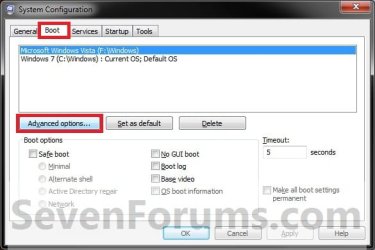
4. To Have Windows 7 Use All Processors or Cores A) Uncheck the Number of processors box, and click on OK. (see screenshot below)
NOTE: This is the default setting.

B) Go to step 6.
5. For Windows 7 to Use a Specified Number of Processors or Cores A) Check the Number of processors box, then select how may processors or cores you want Windows 7 to only be able to use in the drop down arrow menu and click on OK.
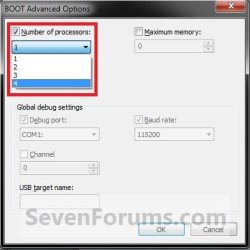
6. Check the Make all boot settings permanent box, and click on OK. (see screenshot below)
NOTE: You will still be able to come back and make changes again if you like.

7. Click on Yes. (see screenshot below)
NOTE: You will still be able to come back and make changes again if you like.

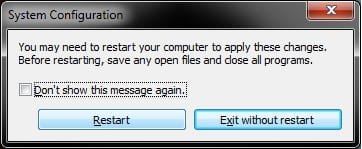
8. Click on the Restart button. (see screenshot below)
WARNING: This will restart the computer immediately. Make sure you save and close anything open that you do not want to lose first.
Tip
If you checked the Don't show this message again box and would like to restore this Restart box to display again, then see: How to Restore the System Configuration Restart Prompt in Vista or Windows 7
9. When Windows 7 is finished restarting, it will now be using only the number of processors or cores that you specified.
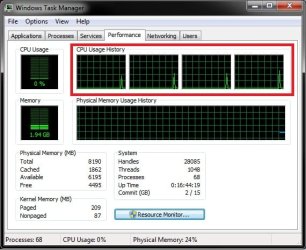
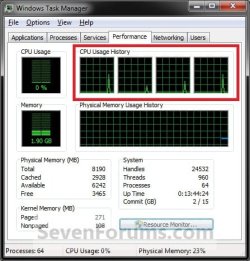
NOTE: You can look in Task Manager (CTRL+SHIFT+ESC) to confirm this number of processors or cores. You will have one graph per core in the CPU Usage History area.
That's it,
Shawn
Last edited: