| | Welcome to Windows 7 Forums. Our forum is dedicated to helping you find solutions with any problems, errors or issues you are experiencing with Windows 7. The Windows 7 forum also covers news and updates and has an extensive Windows 7 tutorial section that covers a wide range of tips and tricks. | Windows 7 - System Recovery Options System Recovery Options How to Boot to the System Recovery Options in Windows 7
Published by Brink
11-23-2008
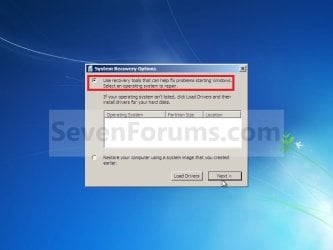
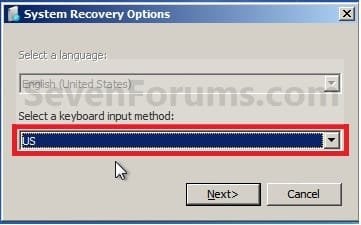
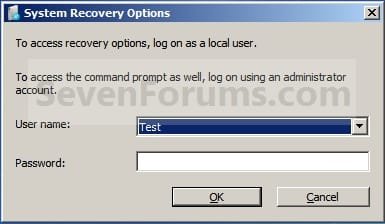
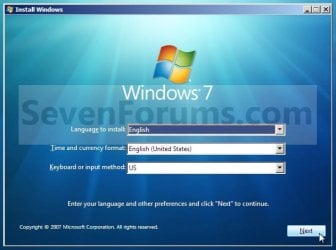
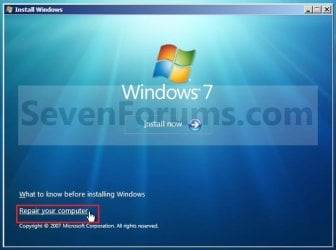
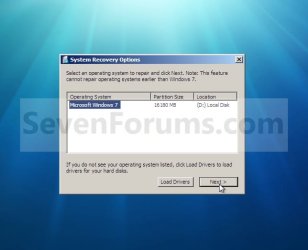
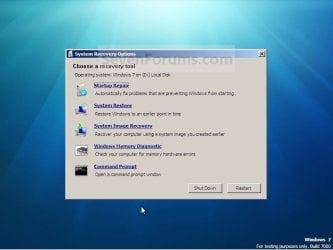
| System Recovery Options How to Boot to the System Recovery Options in Windows 7  Information This will show you how to boot to the System Recovery Options screen to select the Startup Repair, System Restore, Complete PC Restore, Memory Diagnostic Tool, or Command Prompt option to use on Windows 7.  Note The System Recovery Options menu is on the Windows 7 installation disc. If your computer manufacturer (OEM) has preinstalled recovery options, the menu might also be installed on your hard disk as a recovery partition. If your computer does not include the System Recovery Options menu, your computer manufacturer (OEM) might have customized or replaced the tool. Check the information that came with your computer or go to the manufacturer's website. METHOD ONE Using a OEM Recovery Partition NOTE: This is if your computer did not come with a Windows 7 installation DVD, and has pre-installed recovery options (recovery partition) instead. 1. Start or Restart the computer. 2. Boot into the Advanced Boot Options screen. A) Select Repair your computer and press Enter. 3. Select your keyboard language preferences and click on Next. (See screeshot below). 4. Select your user name and type in the password, and then click on OK. 5. Go to step 6 in METHOD TWO below. METHOD TWO Using a Windows 7 Installation Disc 1. Insert the Windows 7 installation disc or System Repair Disc into the CD/DVD drive and restart the computer. WARNING: Check to make sure that you set the BIOS to have the CD or DVD drive listed first in the boot order. 2. If prompted, press any key to boot from the Windows 7 installation DVD. (See screenshot below) NOTE: You will only have about 8 seconds to press this key. 3. Select your language preferences and click on Next. (See screeshot below). 4. Click on Repair your computer. (See screenshot below) 5. Select which operating system you want to restore and the click on Next. (See screenshot below) NOTE: If Windows 7 is not listed here, or it is blank, then it is ok. Click on Next anyway.  6. Select the system recovery option you want to do. (See screenshot below)

That's it,
Shawn |  Published by | | Administrator Join Date: Oct 2008 Location: Texas Posts: 17,035 | |
 Tutorial Tools | | | | | | | | | |
11-24-2008
|
#1 | | Windows 7 Ult x64(x2), HomePrem x32(x4), Server 08 (+VM), 08 R2 (VM) , SuSe 11.2 (VM), XP 32 (VM) In a ∞ Portal |
lol shawn
nice +1
" This is if your computer did not come with a Windows 7 installation DVD, and has pre-installed recovery options (recovery partition) instead."
| My System Specs | | System Manufacturer/Model Number Tx2500z Tablet Pc/Homemade Server OS Windows 7 Ult x64(x2), HomePrem x32(x4), Server 08 (+VM), 08 R2 (VM) , SuSe 11.2 (VM), XP 32 (VM) CPU Turion X2 ultra (oh well came with laptop)/P4 @3.2 (yes P4) Motherboard IDK HP Motherboard / Intel DG965SS Memory OCZ Dual Channel 4GB kit/ 1gb Dual Channel Graphics Card HD 3200 graphics /GMA x3100 (yay for intergrated!!) Sound Card Realtek HD Audio(mic working, well sort of)/Siig IC-70012 Monitor(s) Displays built-in Hp 12" laptop screen/ Acer 19" Screen Resolution 1280x800 /1440x900 Mouse Logi MX Rev. /MS Wheel Optical 1.1A /Logitech Optical Mouse Cooling All Air Cooled Internet Speed College baby but its still routed through vpn to 1536k... Other Info love my wacom pen and pressure sensitivity...
wished it worked in 7, SUSE for that matter though |
11-24-2008
|
#2 | | Windows 7 Ultimate x64 SP1 beta Texas |
LOL, now they just have to release Windows 7 for a OEM recovery partition. | My System Specs | | System Manufacturer/Model Number Self built custom OS Windows 7 Ultimate x64 SP1 beta CPU Intel i7-980X 3.3 Ghz Motherboard ASUS P6X58D Premium Memory 12 GB (2GBx6) DDR3 PC3-16000 2000 MHz Kingston HyperX Graphics Card EVGA GeForce GTX 480 SuperClocked 1536MB Sound Card Realtek HD Audio ALC889 Integrated Chip Monitor(s) Displays 28" Hanns-G HG281DJB and 23" Acer H233H Screen Resolution 28" 1920x1200 and 23" 1920x1080 Keyboard Logitech Cordless Desktop MX 5500 Revolution Mouse Logitech Cordless Desktop MX 5500 Revolution PSU OCZ Series Gold OCZZ1000M 1000W Case Corsair Obsidian 800D Cooling Thermalright Ultra 120 Extreme Copper CPU heat sink w/120 MM Hard Drives 50 GB OCZ Vertex 2 SSD
** 2 x 1TB Samsung HDD HD154UI SATA Internet Speed up to 20 Mb/s Download and up to 5 Mb/s Upload Other Info Microsoft LifeCam Cinema
** Samsung CLX-3175FW Printer
** D-Link DIR-855 Router
** Motorola SB6120 Cable Modem
** ASRock ION 330 server
** 2x APC Back-UPS XS 1500 |
06-08-2009
|
#3 | | |
Windows 7 recovery is definitely improved over previous versions, its saved me from reformatting at least twice now. Is there a way to add recovery options directly to the boot menu like you could in XP? | My System Specs | | OS Windows 7 CPU Intel Core 2 Duo E6300 Conroe 1.86GHz Motherboard BIOSTAR TForce965PT Memory G.SKILL 2GB (2 x 1GB) 240-Pin DDR2 SDRAM DDR2 800 Graphics Card GeForce 9600 GSO (768MB) Sound Card Onboard Monitor(s) Displays Dell e773c Screen Resolution 1024x768 Keyboard Logitech Media Elite Mouse Kensington PilotMouse Optical PSU OCZ GameXStream 600W Case Cooler Master Centurion 532 Cooling Stock Hard Drives Seagate Barracuda ST3320620AS 320GB 7200RPM SATA 3.0Gb/s Internet Speed 3Mbps x 864Kbps DSL |
06-08-2009
|
#4 | | Windows 7 Ultimate x64 SP1 beta Texas |
Hello Demono,
I do not know, but it wouldn't be very helpful if your computer doesn't boot though. | My System Specs | | System Manufacturer/Model Number Self built custom OS Windows 7 Ultimate x64 SP1 beta CPU Intel i7-980X 3.3 Ghz Motherboard ASUS P6X58D Premium Memory 12 GB (2GBx6) DDR3 PC3-16000 2000 MHz Kingston HyperX Graphics Card EVGA GeForce GTX 480 SuperClocked 1536MB Sound Card Realtek HD Audio ALC889 Integrated Chip Monitor(s) Displays 28" Hanns-G HG281DJB and 23" Acer H233H Screen Resolution 28" 1920x1200 and 23" 1920x1080 Keyboard Logitech Cordless Desktop MX 5500 Revolution Mouse Logitech Cordless Desktop MX 5500 Revolution PSU OCZ Series Gold OCZZ1000M 1000W Case Corsair Obsidian 800D Cooling Thermalright Ultra 120 Extreme Copper CPU heat sink w/120 MM Hard Drives 50 GB OCZ Vertex 2 SSD
** 2 x 1TB Samsung HDD HD154UI SATA Internet Speed up to 20 Mb/s Download and up to 5 Mb/s Upload Other Info Microsoft LifeCam Cinema
** Samsung CLX-3175FW Printer
** D-Link DIR-855 Router
** Motorola SB6120 Cable Modem
** ASRock ION 330 server
** 2x APC Back-UPS XS 1500 |
06-08-2009
|
#5 | | MS Windows 7 Ultimate 32-bit Austin, Texas |
Brink, Another option, which I use, is to put WinRE.Wim on a bootable PE memory stick. The procedure is highly similar to making a minimum PE USB stick. If it willl be of interest, I'll send a couple of .docx files giving a detailed, step-by-step. I've not read up on how to attach a file for upload to this forum and whether such is even permitted. Karl
Brink, Here goes an attempt at including two .docx attachments.
Brink,
Looks like that didn't work. Have saved as .doc files and will try to attach them.
Karl
Last edited by Brink; 06-08-2009 at 11:45 PM..
Reason: Merged multiple posts
| My System Specs | | System Manufacturer/Model Number Toshiba Satellite 305D OS MS Windows 7 Ultimate 32-bit CPU AMD Athlon X2 Dual-Core QL-64, 2100 Mhz, 2 Cores Motherboard TOSHIBA Portable PC (Socket M2/S1G1) Memory 4.0GB (2x2GB) DDR2 @ 333MHz 5-5-5-15 Graphics Card ATI Radeon 3100 Graphics (Toshiba) Sound Card Realtek High Definition Audio Monitor(s) Displays Generic PnP Monitor @ 1280x800 Screen Resolution 1280 x 800 Keyboard standard PS/2 Keyboard Mouse Microsoft Wireless Mobile Mouse 4000 Hard Drives 125.03GB Corsair CSSD-V128GB2 ATA Device (IDE)
1 partition C: Other Info Optical Drives HL-DT-ST DVDRAM GSA-T50N ATA Device
Synaptics PS/2 Port TouchPad
Speakers (Realtek High Definition Audio)
Atheros AR5007EG Wireless Network Adapter |
06-08-2009
|
#6 | | Windows 7 Ultimate x64 SP1 beta Texas |
Hello Karl,
Thank you. I'll take a look at it. | My System Specs | | System Manufacturer/Model Number Self built custom OS Windows 7 Ultimate x64 SP1 beta CPU Intel i7-980X 3.3 Ghz Motherboard ASUS P6X58D Premium Memory 12 GB (2GBx6) DDR3 PC3-16000 2000 MHz Kingston HyperX Graphics Card EVGA GeForce GTX 480 SuperClocked 1536MB Sound Card Realtek HD Audio ALC889 Integrated Chip Monitor(s) Displays 28" Hanns-G HG281DJB and 23" Acer H233H Screen Resolution 28" 1920x1200 and 23" 1920x1080 Keyboard Logitech Cordless Desktop MX 5500 Revolution Mouse Logitech Cordless Desktop MX 5500 Revolution PSU OCZ Series Gold OCZZ1000M 1000W Case Corsair Obsidian 800D Cooling Thermalright Ultra 120 Extreme Copper CPU heat sink w/120 MM Hard Drives 50 GB OCZ Vertex 2 SSD
** 2 x 1TB Samsung HDD HD154UI SATA Internet Speed up to 20 Mb/s Download and up to 5 Mb/s Upload Other Info Microsoft LifeCam Cinema
** Samsung CLX-3175FW Printer
** D-Link DIR-855 Router
** Motorola SB6120 Cable Modem
** ASRock ION 330 server
** 2x APC Back-UPS XS 1500 |
11-01-2009
|
#7 | | |
Boot into Windows 7 to retrieve docs before reinstall Okay, here's my issue, my install went south about 4 days after install, don't know why. Spent all day yesterday going through the various system recovery options described in this site and available via booting up using my windows 7 install disk. No luck. Fairly convinced the boot mgr became corrupt and no matter what I do none of the fixes work. So, I'm pretty much resigned to the fact that I will have to reinstall. But before I do that I'd like to pull some data off the HD that I had not yet had a chance to back up before the computer crashed. What method would best allow me to simply boot into Windows 7 just to recover the information (documents, file folders, etc.)? Help! | My System Specs | | System Manufacturer/Model Number Motion Computing Tablet OS Windows 7 CPU LE 1700 Memory 4 GB Hard Drives SSD KingSpec 128 GB |
11-01-2009
|
#8 | | Windows 7 Ultimate x64 SP1 beta Texas |
Hello Lindsay, and welcome to Seven Forums.
You should be able to do a repair install to fix Windows 7 without losing anything.
Hope this helps,
Shawn | My System Specs | | System Manufacturer/Model Number Self built custom OS Windows 7 Ultimate x64 SP1 beta CPU Intel i7-980X 3.3 Ghz Motherboard ASUS P6X58D Premium Memory 12 GB (2GBx6) DDR3 PC3-16000 2000 MHz Kingston HyperX Graphics Card EVGA GeForce GTX 480 SuperClocked 1536MB Sound Card Realtek HD Audio ALC889 Integrated Chip Monitor(s) Displays 28" Hanns-G HG281DJB and 23" Acer H233H Screen Resolution 28" 1920x1200 and 23" 1920x1080 Keyboard Logitech Cordless Desktop MX 5500 Revolution Mouse Logitech Cordless Desktop MX 5500 Revolution PSU OCZ Series Gold OCZZ1000M 1000W Case Corsair Obsidian 800D Cooling Thermalright Ultra 120 Extreme Copper CPU heat sink w/120 MM Hard Drives 50 GB OCZ Vertex 2 SSD
** 2 x 1TB Samsung HDD HD154UI SATA Internet Speed up to 20 Mb/s Download and up to 5 Mb/s Upload Other Info Microsoft LifeCam Cinema
** Samsung CLX-3175FW Printer
** D-Link DIR-855 Router
** Motorola SB6120 Cable Modem
** ASRock ION 330 server
** 2x APC Back-UPS XS 1500 |
11-01-2009
|
#9 | | MS Windows 7 Ultimate 32-bit Austin, Texas |
Brink's answers are always excellent. Here are a couple of other things which I have tried and which worked. 1. Get hold of a Windows 7 system that works and via the Backup and Restore option of control panel, Create a Recovery CD, boot from the recovery CD, choose applicable option. 2. Boot from a Knoppix CD and copy off your important files before doing a normal Win 7 restore. Knoppix is a Linux-variant which will allow you to access your NTFS Windows 7 partition and files. Just google Knoppix to find latest version. You will find Knoppix easy to use if you have a Linux user with you when you use Knoppix. I strongly advise (I learned the hard way.) that after you're back to a stable system, then do a full and complete backup t9 an external USB drive using the Control Panel Backup and Restore applet. This will create a VHD-format file on the external USB. Using DiskMgmt.msc you can even mount and copy off whatever you want if you only need cetain files. Good luck, Karl | My System Specs | | System Manufacturer/Model Number Toshiba Satellite 305D OS MS Windows 7 Ultimate 32-bit CPU AMD Athlon X2 Dual-Core QL-64, 2100 Mhz, 2 Cores Motherboard TOSHIBA Portable PC (Socket M2/S1G1) Memory 4.0GB (2x2GB) DDR2 @ 333MHz 5-5-5-15 Graphics Card ATI Radeon 3100 Graphics (Toshiba) Sound Card Realtek High Definition Audio Monitor(s) Displays Generic PnP Monitor @ 1280x800 Screen Resolution 1280 x 800 Keyboard standard PS/2 Keyboard Mouse Microsoft Wireless Mobile Mouse 4000 Hard Drives 125.03GB Corsair CSSD-V128GB2 ATA Device (IDE)
1 partition C: Other Info Optical Drives HL-DT-ST DVDRAM GSA-T50N ATA Device
Synaptics PS/2 Port TouchPad
Speakers (Realtek High Definition Audio)
Atheros AR5007EG Wireless Network Adapter All times are GMT -5. The time now is 08:19 AM. |  |