
How to Automatically Create System Restore Points in Windows 7 and 8
The two (2) separate methods outlined herein make it very easy to have fresh, reliable System Restore points available for use whenever needed; whether created by a system startup/restart or created by the Windows Task Scheduler; once it's setup you never have to be concerned with it again, it's all completely automatic.
Note
System Restore isn't available for Windows RT.
Credit for this goes to our own Microsoft MVP and all around good guy Brink who wrote these "Restore Point" scripts, without whose dedication and hard work with the Windows Operating Systems none of this would even be possible. Thanks Shawn!
Please view his original tutorial for pertinent Windows 7 information .
Windows 7 System Restore Point Shortcut
This will also work with Windows Vista.
Please view the relevant tutorial at Vista Forums at the link below.
Vista System Restore Point Shortcut
Credit for this goes to our own Microsoft MVP and all around good guy Brink who wrote these "Restore Point" scripts, without whose dedication and hard work with the Windows Operating Systems none of this would even be possible. Thanks Shawn!
Please view his original tutorial for pertinent Windows 7 information .
Windows 7 System Restore Point Shortcut
This will also work with Windows Vista.
Please view the relevant tutorial at Vista Forums at the link below.
Vista System Restore Point Shortcut
Information
For those of you that would like to have the option to create restore points without restarting the system have a look at step #4 A below to add a shortcut to the desktop or the taskbar that can be used whenever needed without a system restart.
Be sure to have a look at Method Two below to see the steps to use the Windows Task Scheduler to automatically create System Restore points, once the task is created there is nothing further to do, there will always be daily, fresh System Restore points available for use if needed, even if the PC is never restarted at all.
Be sure to have a look at Method Two below to see the steps to use the Windows Task Scheduler to automatically create System Restore points, once the task is created there is nothing further to do, there will always be daily, fresh System Restore points available for use if needed, even if the PC is never restarted at all.
Let's get started!
Method One
System Startup / Restart
1) The first thing that needs done is to download the file you want to use; to create a restore point with a description click the button below and select to save the file to the desktop.
Restore_Point_Shortcut.zip file (with description)
Download
2) To create a restore point without a description click the button below and save the file to the desktop.
Instant_Restore_Point.zip file (without description)
Download
3) Open the downloaded zip file, extract (drag and drop) the VBS file to the desktop, and unblock the VBS file.
4) Navigate to "C:\Program Files" in Windows Explorer (not "Program Files (x86)" if you have 64-bit Windows), move the extracted and unblocked VBS file into the "C:\Program Files" folder, then close the "Program Files" window.
click any image to enlarge

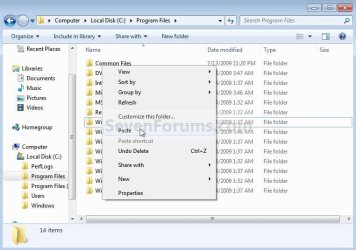
5) Now in the start menu navigate to and r click the "Startup File" to open the "Startup" file window; now back at the "Restore_Point Shortcut" window r click the "Create System Restore Point" shortcut and click cut, then in the "Startup" window at an empty spot click paste. A) Now if you want a shortcut on the desktop to create a restore point whenever needed (without restarting the PC) r click the "Instant Restore Point" shortcut in the "Startup" window and select "Send to, Desktop (create shortcut)" to place a shortcut on the desktop.
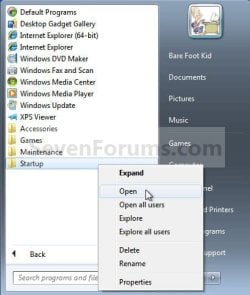
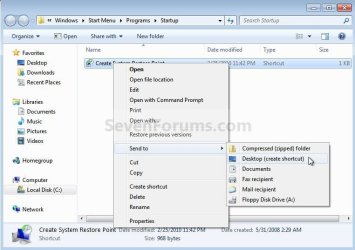
6) You're done, now close all the windows and if you want, the zip and the restore point files that you downloaded can be deleted from the desktop.
To use the shortcut you just created.
7) Whenever the PC boots to the desktop the first prompt you'll get is "Do you want to open this file?" click open then enter your user credentials for the UAC prompt and click yes.
click any image to enlarge
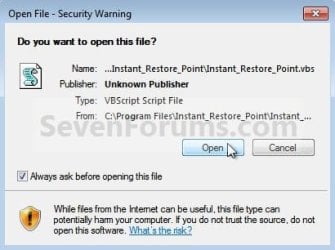
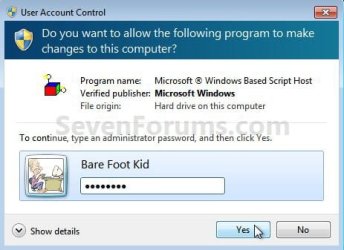
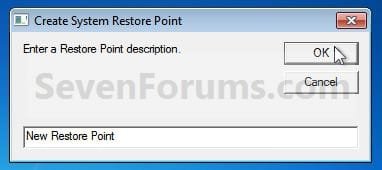
8) If you have chosen to use the restore point creator with a description this last snip is the last step in the process, enter the description you want to use and click ok to finish up, that's all there is to it. I use the one with no description and with 2 clicks at bootup it's done.
Method Two
Windows Task Scheduler
1) Start by downloading this zip file to the Windows desktop.
Scheduled_Instant_Restore_Point.zip
Download
2) Open the downloaded zip file, extract (drag and drop) the VBS file to the desktop, and unblock the VBS file.
3) Navigate to "C:\Program Files" in Windows Explorer (not "Program Files (x86)" if you have 64-bit Windows), move the extracted and unblocked VBS file into the "C:\Program Files" folder, then close the "Program Files" window.
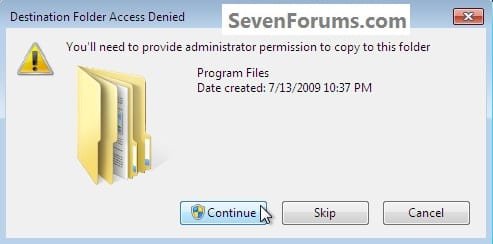
4) In the "Access Denied" dialog box that opens click Continue, if you get a UAC prompt, enter your user credentials and click Yes; then just close the Program Files window that opens.
You can now delete the downloaded Zip file from the desktop if you like.
Now in the Windows start menu search box type taskschd.msc and hit the <enter> key. In the Task Scheduler window that opens at the right pane Actions column, click Create Task.
5) In the "Create Task" window that opens at the General tab, give the new task a Name, a description is optional, dot "Run whether user ... " put a check/tic at "Run with highest ... " and "Configure for ... " your flavor Windows.
click any image to enlarge

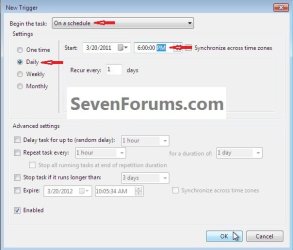
6) Now still in the "Create Task" window click the Triggers tab, at the bottom left click the New button, in the New Trigger dialog box that opens be sure to select when you want the task to run and the daily time you want it to run and click OK.
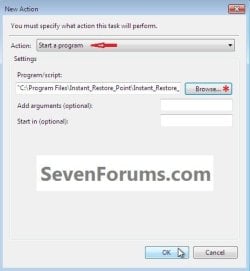
7) Now back at the "Create Task" window click the Actions tab, at the bottom left click the New button, in the New Action dialog box that opens click Browse (see #8 below), now browse to C:\Program Files and click the Instant_Restore_Point file you extracted there in step #2 above and click Open, then click the Instant_Restore_Point script and click Open again.
click any image to enlarge

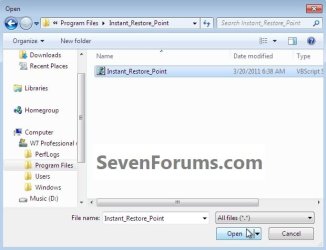
8) Now at the New Action dialog box that's still open click OK.
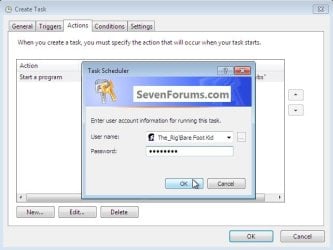
9) In the Create Task window that's still open click OK, in the Account Information dialog box that opens add your user credentials and click OK.
That's all, you are now finished and you can close the Task Scheduler.
Enjoy!
Related Tutorials
- How to Enable or Disable Automatic System Restore Point Creation in Windows
- http://www.sevenforums.com/tutorials/697-system-restore-point-create.html
- How to Delete System Protection Restore Points in Windows 7 and Windows 8
- http://www.sevenforums.com/tutorials/700-system-restore.html
- http://www.sevenforums.com/tutorials/335-system-protection-change-disk-space-usage.html
- http://www.sevenforums.com/tutorials/330-system-protection-turn-off.html
- How to Create a Task to Run a Program at Startup and Log On in Windows 7
- How to Enable or Disable Windows 7 System Restore
- How to Stop System Restore Points from being Deleted in Vista and Windows 7 when Dual Booting with XP
- How to Extract Files and Folders from System Restore Points in Windows 7 and Vista
- How to Make a "Create System Restore Point" Shortcut in XP, Vista, Windows 7, and Windows 8
- How to Add "Create Restore Point" to Context Menu in XP, Vista, Windows 7, and Windows 8
Attachments
Last edited by a moderator:


