
How to Create a "Devices and Printers" Shortcut in Windows 7 and Windows 8
Information
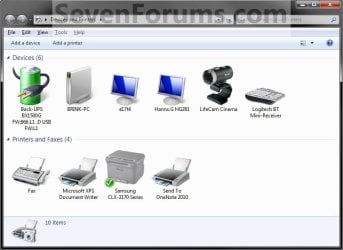
Device Stage, or Devices and Printers, gives you a quick view and access of all of your connected and wireless devices on your computer in one place. By viewing the contents of this folder, you can check to see which devices you have connected, view details about the devices, and learn what tasks you can perform with them by right clicking on the device and selecting the task you would like to do.
This tutorial will show you how to create or download a Devices and Printers shortcut for Windows 7 and Windows 8.
This tutorial will show you how to create or download a Devices and Printers shortcut for Windows 7 and Windows 8.
EXAMPLE: Devices and Printers
OPTION ONE
To Download a "Devices and Printers" Shortcut
Download
2. Save the .zip file to your desktop.
3. Open the .zip file and extract the Devices and Printers shortcut to the desktop.
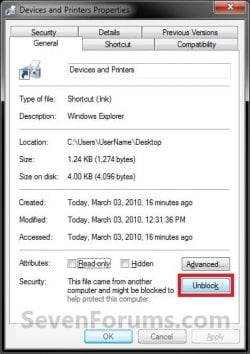
4. Right click on the Devices and Printers shortcut, and click/tap on Properties, General tab, and on the Unblock button. (See screenshot below)
NOTE: If you do not have a Unblock button under the General tab, then the shortcut is already unblocked and you can continue on to step 5.
5. In Windows 7, you can now Pin to Taskbar or Pin to Start Menu, add to Quick Launch, assign a keyboard shortcut to it, or move this shortcut to where you like for easy use.
6. In Windows 8, you can Pin to Taskbar on desktop, Pin to Start screen, add to Quick Launch, assign a keyboard shortcut to it, or move this shortcut to where you like for easy use.
7. When done, you can delete the downloaded .zip file on the desktop if you like, or save it to use again.
OPTION TWO
To Manually Create a "Devices and Printers" Shortcut
2. Copy and paste the location below into the location area, and click/tap on the Next button. (see screenshot below) %windir%\explorer.exe shell:::{A8A91A66-3A7D-4424-8D24-04E180695C7A}

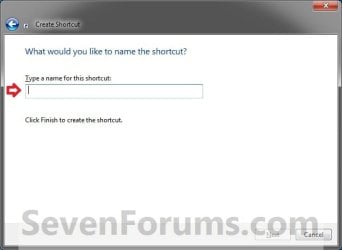
3. Type Devices and Printers for the name, and click/tap on the Finish button. (see screenshot below)
NOTE: You can name this anything you would like though.
4. Right click on the new Devices and Printers shortcut on the Desktop, and click/tap on Properties.
5. Click/tap on the Shortcut tab, then click/tap on the Change Icon button. (see screenshot below)

6. In the line under "Look for icons in this file", copy and paste the location below and press Enter. (see screenshot below) %systemroot%\system32\DeviceCenter.dll
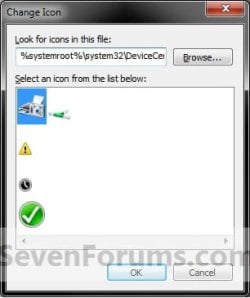
7. Select the icon highlighted in blue above, and click/tap on OK. (see screenshot above)
NOTE: You can use any icon that you would like instead though.
8. Click/tap on OK. (see screenshot below)
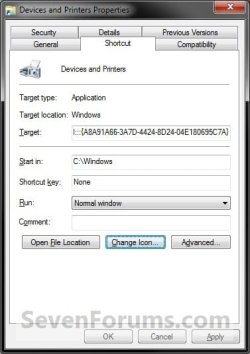
9. In Windows 7, you can now Pin to Taskbar or Pin to Start Menu, add to Quick Launch, assign a keyboard shortcut to it, or move this shortcut to where you like for easy use.
10. In Windows 8, you can Pin to Taskbar on desktop, Pin to Start screen, add to Quick Launch, assign a keyboard shortcut to it, or move this shortcut to where you like for easy use.
That's it,
Shawn
Related Tutorials
- How to Create a "Device Installation Settings" Shortcut in Windows 7 and Windows 8
- How to Open Devices and Printers in Windows 7 and Windows 8
- How to Change the Device Driver and Information Installation Settings in Windows 7
- How to Create a "Scanners and Cameras" Shortcut in Windows 7 and Windows 8
- How to Open and Use the "Scanner and Camera Installation Wizard" in Windows 7 and Windows 8
- How to Create a "Printers" Shortcut in Windows 7
- How to Create a Devices and Printers Troubleshoot Shortcut in Windows 7
- How to Create a "Printing Troubleshoot" Shortcut in Windows 7
- How to Create an "Add a Device" Shortcut in Windows 7
- How to Create an "Add Hardware Wizard" Shortcut in Windows 7
- How to Create a "Add Printer" Wizard Shortcut in Windows 7 and Vista
- How to Add "Devices and Printers" to "Computer" or "This PC" in Windows 7 and Windows 8
- How to Change Icons in Devices and Printers with Custom Icons
- How to Create a "Bluetooth Devices" Shortcut in Windows 7
- How to Create a "Bluetooth Devices" Shortcut in Windows 8 and 8.1
Attachments
Last edited:


