
Enable or Disable Changing "DPI" and "Screen Resolution" Display Settings in Windows 7 and Windows 8
Information
This tutorial will show you how to enable or disable the ability of all users on the computer to change the DPI and Screen Resolution display settings in Windows 7 and Windows 8.
You must be logged in as an administrator to be able to do this tutorial.
You must be logged in as an administrator to be able to do this tutorial.
Note
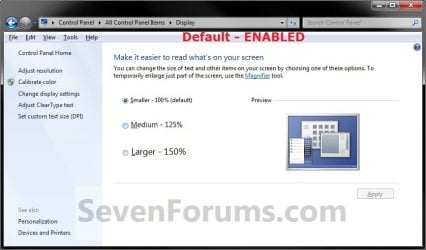
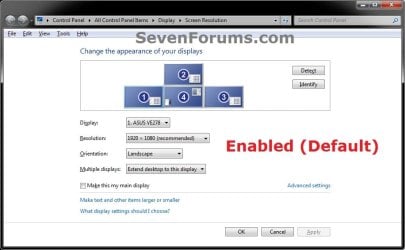
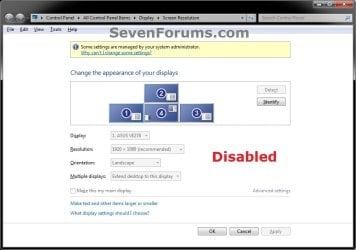
You could set the DPI and Screen Resolution display settings to what you like, then disable the display settings below so that no one else may be able to change them.
EXAMPLE: DPI Settings Enabled and Disabled

EXAMPLE: Screen Resolution Settings Enabled and Disabled
OPTION ONE
Enable or Disable Changing "Display" Settings using a REG File
1. Do step 2 or 3 below for what you would like to do.
2. Enable "DPI" and "Screen Resolution" Display Settings for All Users
NOTE: This is the default setting. A) Click/tap on the Download button below to download the file below, and go to step 4 below.
Enable_Display_Settings.reg
Download
3. Disable "DPI" and "Screen Resolution" Display Settings for All Users A) Click/tap on the Download button below to download the file below, and go to step 4 below.
Disable_Display_Settings.reg
Download
4. Save the .reg file to your desktop.
5. Double click/tap on the downloaded .reg file to merge it.
6. If prompted, click/tap on Run, Yes (UAC), Yes, and OK to approve the merge.
7. Restart the computer to fully apply.
8. When finished, you can delete the downloaded .reg file if you like.
OPTION TWO
Enable or Disable Changing "Display" Settings in Group Policy
2. In the left pane, click/tap on to expand User Configuration, Administrative Templates, Control Panel, and Display. (see screenshot below)
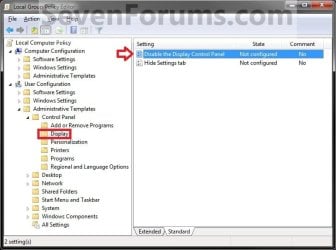
3. In the right pane, double click/tap on Disable the Display Control Panel to edit it. (see screenshot above)
4. Do step 5 or 6 below for what you would like to do.
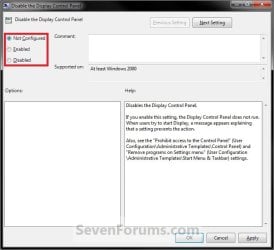
5. To Enable "DPI" and "Screen Resolution" Display Settings A) Select (dot) either Not Configured or Disabled, and go to step 8 below. (see screenshot below step 6)
NOTE: Not Configured is the default setting.
6. To Disable "DPI" and "Screen Resolution" Display Settings A) Select (dot) Enabled, and go to step 8 below. (see screenshot below step 6)
7. Click/tap on OK. (see screenshot below)
8. Close the Local Group Policy Editor window.
That's it,
Shawn
Related Tutorials
- How to Change the Screen Resolution in Windows 7
- How to Change the Screen Resolution of Displays in Windows 8 and 8.1
- How to Change Screen Orientation in Windows 8 and 8.1
- How to Change the Display DPI Size in Windows 7 and Windows 8
- How to Change DPI Scaling Size for Displays in Windows 8.1
- How to Create a "Display" DPI Shortcut in Windows 7 and Windows 8
- Add or Remove "Display" from Desktop Context Menu in Windows 7 and Windows 8
- How to Create a "Screen Resolution" Shortcut in Windows
- How to Change the Screen Refresh Rate in Windows 7 and Windows 8
- How to Change the Color Bit Depth in Windows 7
- How to Add or Remove "Screen resolution" from Desktop Context Menu in Windows
Attachments
Last edited:
