
How to Create a "Printing Troubleshoot" Shortcut in Windows 7
Information
This will show you how to create or download a Windows 7 Printing Troubleshoot shortcut. You can also Pin to Taskbar or Pin to Start Menu this shortcut, or move where you like for easy use.
Tip
You could also place any or all troubleshooting shortcuts that you would like to use as well from the related tutorials box at the bottom of this tutorial into a new folder, then pin the folder to the taskbar to make using them easier.
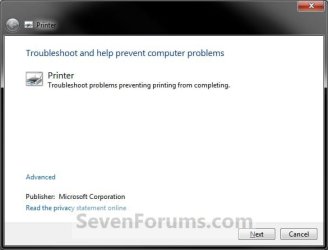
EXAMPLE: Troubleshooting Printing
OPTION ONE
To Download the "Printing Troubleshoot" Shortcut
1. Click on the Download button below to download the file below.
Printing_Troubleshoot.zip
Download
2. Click on Save, and save the .zip file to the desktop.
3. Open the .zip file and extract the Printing Troubleshoot shortcut to the desktop.
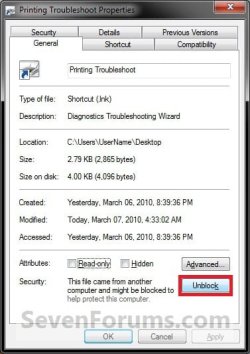
4. Right click on the Printing Troubleshoot shortcut, and click on Properties, General tab, and on the Unblock button. (See screenshot below)
NOTE: If you do not have a Unblock button under the General tab, then the shortcut is already unblocked and you can continue on to step 5.
5. Move the shortcut to where you like for easy use.
6. When done, you can delete the downloaded .zip file on the desktop if you like, or save it to use again.
OPTION TWO
To Manually Create the "Printing Troubleshoot" Shortcut
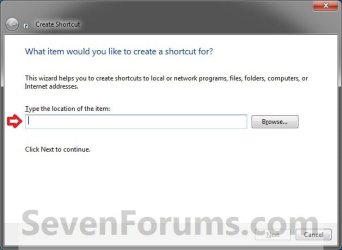
1. Right click on a empty area on desktop, and click on New and Shortcut.
2. Copy and paste the location below into the location area, and click on the Next button. (See screenshot below)
%systemroot%\system32\msdt.exe -id PrinterDiagnostic
3. Type Printing Troubleshoot for the name, and click on the Finish button. (See screenshot below)
NOTE: You can name this anything you would like though.

4. Right click on the new Printing Troubleshoot shortcut on the Desktop and click on Properties.
5. Click on the Shortcut tab, then click on the Change Icon button. (See screenshot below)

6. In the line under "Look for icons in this file", copy and paste the location below and press Enter. (See screenshot below)
%SystemRoot%\diagnostics\system\Printer\DiagPackage.dll
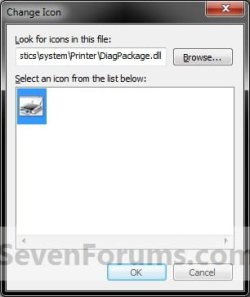
7. Select the icon highlighted in blue above and click on OK. (See screenshot above)
NOTE: You can use any icon that you would like instead though.
8. Click on OK. (See screenshot below)
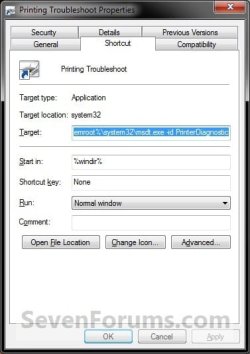
9. Move the shortcut to where you like for easy use.
That's it,
Shawn
Related Tutorials
- How to Clear and Reset the Print Spooler Queue in Windows 7 and Vista
- How to Open Troubleshooting in Windows 7
- How to Create a Windows 7 Troubleshooting Shortcut
- How to Create a Aero Troubleshoot Shortcut in Windows 7
- How to Create a Connection to Workplace using DirectAccess Troubleshoot Shortcut in Windows 7
- How to Create a Devices and Printers Troubleshoot Shortcut in Windows 7
- How to Create a Hardware and Devices Troubleshoot Shortcut in Windows 7
- How to Create a HomeGroup Troubleshoot Shortcut in Windows 7
- How to Create a Incoming Connections Troubleshoot Shortcut in Windows 7
- How to Create a Internet Connections Troubleshoot Shortcut in Windows 7
- How to Create a Network Adapter Troubleshoot Shortcut in Windows 7
- How to Create a Performance Troubleshoot Shortcut in Windows 7
- How to Create a Playing Audio Troubleshoot Shortcut in Windows 7
- How to Create a Power Troubleshoot Shortcut in Windows 7
- How to Create a Program Compatibility Troubleshoot Shortcut in Windows 7
- How to Create a Recording Audio Troubleshoot Shortcut in Windows 7
- How to Create a Search and Indexing Troubleshoot Shortcut in Windows 7
- How to Create a Shared Folders Troubleshoot Shortcut in Windows 7
- How to Create a System Maintenance Troubleshoot Shortcut in Windows 7
- How to Create a Windows Media Player DVD Troubleshoot Shortcut in Windows 7
- How to Create a Windows Media Player Library Troubleshoot Shortcut in Windows 7
- How to Create a Windows Media Player Settings Troubleshoot Shortcut in Windows 7
- How to Create a Windows Update Troubleshoot Shortcut in Windows 7
- How to Have Windows 7 Automatically Switch Default Printers with Location Aware Printing
Attachments
Last edited: