
How to Restore Public Folders in Windows 7
Information
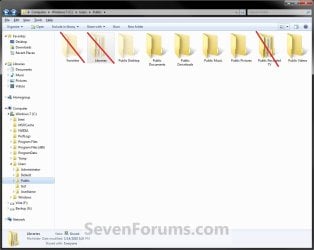
This tutorial will show you how to restore any missing or moved Windows 7 Public folders located at C:\Users\Public.
You will need to be logged in as an administrator to be able to do the steps in this tutorial.
You will need to be logged in as an administrator to be able to do the steps in this tutorial.
Note
The hidden Favorites, Libraries, and nonhidden Public Recorded TV public folders are not included in this tutorial.
EXAMPLE: Public folders
Here's How:
Warning
If you have any duplicate public folders, or public folders that do not have a Location properties tab, then you will need to:
- Backup only the folder's contents to another location to be safe.
- Now proceed with the steps below
1. To Restore Default Public Desktop FolderA) Click on the Download button below to download the file below.Restore_Default_Public_Desktop_Folder.reg
Download
2. To Restore Default Public Documents FolderA) Click on the Download button below to download the file below.Restore_Default_Public_Documents_Folder.reg
Download
3. To Restore Default Public Downloads FolderA) Click on the Download button below to download the file below.Restore_Default_Public_Downloads_Folder.reg
Download
4. To Restore Default Public Music FolderA) Click on the Download button below to download the file below.Restore_Default_Public_Music_Folder.reg
Download
5. To Restore Default Public Pictures FolderA) Click on the Download button below to download the file below.Restore_Default_Public_Pictures_Folder.reg
Download
6. To Restore Default Public Videos FolderA) Click on the Download button below to download the file below.Restore_Default_Public_Videos_Folder.reg
Download
7. Click on Save, and save the .reg file to the Desktop.
8. Right click on the downloaded .reg file and click on Merge.
9. Click on Run, Yes, Yes, and OK when prompted.
10. Open the C:\Users\Public folder. If a public folder is missing, then create a New Folder and rename it with the name below for each missing specific public folder.Public Folders Names
NOTE: The names in red are hidden system folders.
- Libraries
- Desktop
- Documents
- Downloads
- Music
- Pictures
- Recorded TV
- Videos
11. Open an elevated command prompt (Right click -> Run as administrator).
12. In the elevated command prompt, Copy and Paste the command below for the public folder, and press Enter. This will restore the default attributes for the public folder. (see table below)
| Public Folder | Command |
|---|---|
| Libraries | attrib +h +r -s %Public%\Libraries /S /D |
| Desktop | attrib +h +r -s %Public%\Desktop /S /D |
| Documents | attrib +r -s -h %Public%\Documents /S /D |
| Downloads | attrib +r -s -h %Public%\Downloads /S /D |
| Music | attrib +r -s -h %Public%\Music /S /D |
| Pictures | attrib +r -s -h %Public%\Pictures /S /D |
| Videos | attrib +r -s -h %Public%\Videos /S /D |
13. You may need to log off and log on, or restart the computer, to finish restoring the default public folder location.
NOTE: Sometimes you may need to restart more than once for the changes to be applied.
14. When done, you can delete the downloaded .reg file(s) on the desktop if you like.
That's it,
Shawn Brink
Attachments
-
Restore_Default_Public_Desktop_Folder.reg398 bytes · Views: 11,289
-
Restore_Default_Public_Documents_Folder.reg838 bytes · Views: 6,291
-
Restore_Default_Public_Downloads_Folder.reg303 bytes · Views: 4,476
-
Restore_Default_Public_Music_Folder.reg378 bytes · Views: 4,829
-
Restore_Default_Public_Pictures_Folder.reg405 bytes · Views: 4,682
-
Restore_Default_Public_Videos_Folder.reg387 bytes · Views: 4,530
Last edited:


