| | Welcome to Windows 7 Forums. Our forum is dedicated to helping you find solutions with any problems, errors or issues you are experiencing with Windows 7. The Windows 7 forum also covers news and updates and has an extensive Windows 7 tutorial section that covers a wide range of tips and tricks. | Windows 7 - Unidentified Networks - Set as Private or Public
Unidentified Networks - Set as Private or Public How to Set Unidentified Networks to be a Private or Public Network Location
Published by Brink
03-16-2010
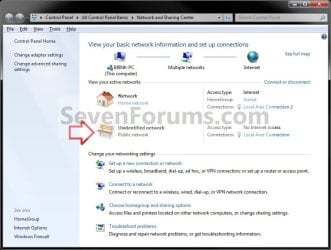
| Unidentified Networks - Set as Private or Public How to Set Unidentified Networks to be a Private or Public Network Location  Information Sometimes Windows 7 is unable to identify the network it is connected to due to a network issue or lack of identifiable characteristics. This type of network is called a unidentified network.
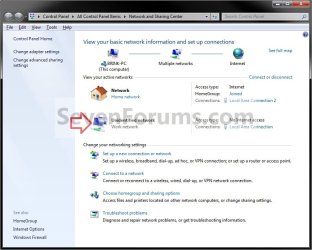
A network location identifies the type of network that a computer is connected to and automatically sets the appropriate firewall settings for that location. This will show you how to set a unidentified network to always be set as a private (work) or public network location as displayed in the Network and Sharing Center.  Note - Choose Private network (Work) for small office or other workplace networks. Network discovery, which allows you to see other computers and devices on a network and allows other network users to see your computer, is on by default, but you can't create or join a homegroup.
- All computers are peers; no computer has control over another computer.
- Each computer has a set of user accounts. To log on to any computer in the workgroup, you must have an account on that computer.
- There are typically no more than twenty computers.
- A workgroup is not protected by a password.
- All computers must be on the same local network or subnet.
- Choose Public network for networks in public places (such as coffee shops or airports). This location is designed to keep your computer from being visible to other computers around you and to help protect your computer from any malicious software from the Internet. HomeGroup is not available on public networks, and network discovery is turned off. You should also choose this option if you're connected directly to the Internet without using a router, or if you have a mobile broadband connection.
 Warning You will only be able to do this while logged in as an administrator. EXAMPLE: Unidentified Network set as Private or Public  OPTION ONE
Through Network List Manager Policies
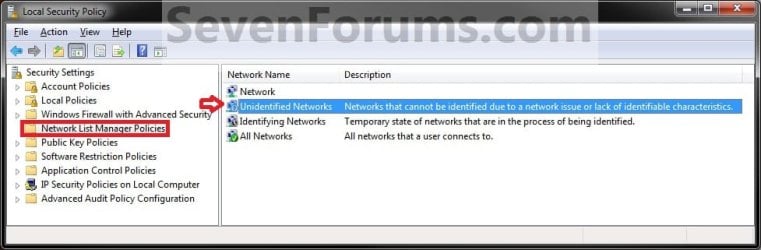
1. Open the Local Security Policy editor.A) In the left pane, select Network List Manager Policies. (see screenshot below) B) Go to step 3. OR 2. Open the Local Group Policy Editor.A) In the left pane, click on to expand Computer Configuration, Windows Settings, Security Settings, and Network List Manager Policies. (see screenshot below) 
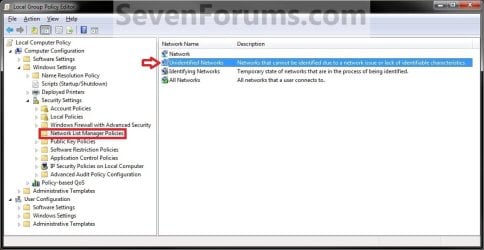
3. In the right pane, double click on Unidentified Networks. (see screenshots above) 4. To Restore Unidentified Networks to Default Not Configured NOTE: This allows Windows 7 to set the unidentified network to be either Public or Private (work) as it so determines automatically.A) Under Location type, select (dot) Not Configured and click on OK. B) Go to step 7. 5. To Set Unidentified Networks to Public Network LocationA) Under Location type, select (dot) Public and click on OK. (see screenshot below step 4A)
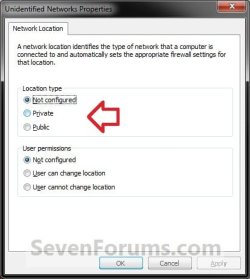
B) Go to step 7. 6. To Set Unidentified Networks to Private Network LocationA) Under Location type, select (dot) Private (Work) and click on OK. (see screenshot below step 4A) 7. Close the Local Security Policy or Local Group Policy Editor. 8. Open the Network and Sharing Center to see the change. NOTE: You can open the Network and Sharing Center from within the Control Panel, or by right clicking on your Network icon in taskbar notification area. OPTION TWO
Through a REG File Download
1. To Restore Unidentified Networks to Default Not Configured NOTE: This allows Windows 7 to set the unidentified network to be either Public or Private (work) as it so determines automatically.A) Click on the Download button below to download the file below.Set_Unidentified_Networks_Default-Not_Configured.reg  B) Go to step 4. 2. To Set Unidentified Networks to Public Network LocationA) Click on the Download button below to download the file below.Set_Unidentified_Networks_Public.reg  B) Go to step 4. 3. To Set Unidentified Networks to Private (Work) Network LocationA) Click on the Download button below to download the file below.Set_Unidentified_Networks_Private.reg 
4. Click on Save, and save the .reg file to the desktop. 5. Right click the downloaded .reg file and click on Merge. 6. Click on Run, Yes, Yes, and OK when prompted. 7. Open the Network and Sharing Center to see the change. NOTE: You can open the Network and Sharing Center from within the Control Panel, or by right clicking on your Network icon in taskbar notification area. 8. When done, you can delete the downloaded .reg file on the desktop if you like. That's it,
Shawn |  Published by | | Administrator Join Date: Oct 2008 Location: Texas Posts: 34,826 | |
 Tutorial Tools | | | | | | | | | |
04-02-2010
|
#1 | | |
I am using Home Premium. I tried Option 2. When i get click on Run (in step 6) it opens notepad. How do i continue as there is no Yes option?
UPDATE:
I managed to get my wireless connection working. I went into the wireless connection properties and changed the settings for Internet Protocol Version 4 properties to Obtain an IP address automatically. Such a simple fix for so many frustrating hours.
Last edited by Brink; 04-02-2010 at 12:32 PM..
Reason: merged consecutive posts
| My System Specs | | System Manufacturer/Model Number Acer aspire OS Windows 7 Home Premium CPU Celeron t3000 Memory 4gb |
04-02-2010
|
#2 | | Windows 7 Ultimate x64 SP1 |
Hello Ruds, and welcome to Seven Forums.
I'm happy to hear that you got your problem sorted.
However, it sounds like your REG file associations are not correct. Double check in Default Programs to make sure that the .reg file extension has it's "Current Default" program set as Registry Editor (C:\Windows\regedit.exe) and not Notepad.
Hope this helps,
Shawn | My System Specs | | System Manufacturer/Model Number Self built custom OS Windows 7 Ultimate x64 SP1 CPU Intel i7-980X 3.3 Ghz (3.48 Ghz OC'd) Motherboard ASUS P6X58D Premium Memory 12 GB (2GBx6) DDR3 PC3-16000 2000 MHz Kingston HyperX Graphics Card Sapphire HD5870 Eyefinity 6 2GB Sound Card Realtek HD Audio ALC889 Integrated Chip Monitor(s) Displays 3x 27" Asus VE278Q Screen Resolution 1920x1080 Keyboard Logitech Cordless Desktop MX 5500 Revolution Mouse Logitech Cordless Desktop MX 5500 Revolution PSU OCZ Series Gold OCZZ1000M 1000W Case Corsair Obsidian 800D Cooling Thermalright Ultra 120 Extreme Copper CPU heat sink w/120 MM Hard Drives 160GB OCZ RevoDrive X2
** 2 x 1TB Samsung HDD HD154UI SATA Internet Speed 50 Mb/s Download and 2 Mb/s Upload Other Info Microsoft LifeCam Cinema
** Lite-On iHBS212 12x BD Writer
** Samsung CLX-3175FW Printer
** Netgear WNDR3800 Router
** Motorola SBG6580 Cable Modem
** 2x APC Back-UPS XS 1500 |
04-03-2010
|
#3 | | |
Thanks. I have changed my default program.
I had problems connecting to my wireless network again. After connecting to ethernet it worked. I disconnected the ethernet and rebooted the computer and the wireless still worked. I am not sure why. I will test it a few more times and seek further advice if necessary. | My System Specs | | System Manufacturer/Model Number Acer aspire OS Windows 7 Home Premium CPU Celeron t3000 Memory 4gb |
07-04-2010
|
#4 | | |
Hi all,
thank you very much for this :-) I was looking a long time to find a solution for Windows Home Prium without the Policy possibility.
So I downloaded the "Set_Unidentified_Networks_Public.reg" script and run as Administrator. The information was finally add to registry. Fine.
I then added to a new network but the Pop Up appears again. I was asked to which network I wanted to add it ???
Did I understand this article wrong? Does the Pop Up always come even after defining the network?
Or is it possible that tis only works on English release an not other languages (mine is German)
Thank you in advance
Alex | My System Specs | | OS Windows 7 Home Premium |
07-04-2010
|
#5 | | Windows 7 Ultimate x64 SP1 |
You're welcome Alex, and welcome to Seven Forums.
It may be some issue with the language difference. After you selected which network you wanted, did it apply it properly and not come back?
Could you post a screenshot of this registry location below from your computer? Code:
HKEY_LOCAL_MACHINE\SOFTWARE\Policies\Microsoft\Windows NT\CurrentVersion\NetworkList\Signatures\010103000F0000F0010000000F0000F0C967A3643C3AD745950DA7859209176EF5B87C875FA20DF21951640E807D7C24 | My System Specs | | System Manufacturer/Model Number Self built custom OS Windows 7 Ultimate x64 SP1 CPU Intel i7-980X 3.3 Ghz (3.48 Ghz OC'd) Motherboard ASUS P6X58D Premium Memory 12 GB (2GBx6) DDR3 PC3-16000 2000 MHz Kingston HyperX Graphics Card Sapphire HD5870 Eyefinity 6 2GB Sound Card Realtek HD Audio ALC889 Integrated Chip Monitor(s) Displays 3x 27" Asus VE278Q Screen Resolution 1920x1080 Keyboard Logitech Cordless Desktop MX 5500 Revolution Mouse Logitech Cordless Desktop MX 5500 Revolution PSU OCZ Series Gold OCZZ1000M 1000W Case Corsair Obsidian 800D Cooling Thermalright Ultra 120 Extreme Copper CPU heat sink w/120 MM Hard Drives 160GB OCZ RevoDrive X2
** 2 x 1TB Samsung HDD HD154UI SATA Internet Speed 50 Mb/s Download and 2 Mb/s Upload Other Info Microsoft LifeCam Cinema
** Lite-On iHBS212 12x BD Writer
** Samsung CLX-3175FW Printer
** Netgear WNDR3800 Router
** Motorola SBG6580 Cable Modem
** 2x APC Back-UPS XS 1500 |
07-05-2010
|
#6 | | Windows 7 Professional SP1 - x64 |
One question Shawn...
What if i click on the Icon, comes up a window telling me priority of the network, just underneath it tells me if i want to merge both network together...What's the consequences of doing that?
Thanks. | My System Specs | | System Manufacturer/Model Number Acer Aspire 4810TZG Timeline (Sub Notebook) OS Windows 7 Professional SP1 - x64 CPU Mobile Intel® Pentium_SU4100 - 2 Core/ 1,30Ghz-800MHz FSB Motherboard Acer - Mobile Intel® GS45 Express Chipset Family Memory 4,00Gb Ram, SoDimm_DDR3-PC3 8500F-Dual Channel, 1066MHz Graphics Card ATI Mobility Radeon HD4330 - Onboard Intel® GM45 Sound Card Realtek HDA (ALC269) + USB Creative Sound Blaster X-Fi Go! Monitor(s) Displays Acer - LED Backlit LCD-HD 16:9 Screen Resolution 1366 X 768 (14') Keyboard Acer + MultiTouch Synth Pad Mouse Opus Digital Nano Wireless Laser for notebook (1600dpi) PSU 65W/Ac - 63W Battery Li-Ion (5800mAh) Case Base Board Cooling Acer + Cooler Master™ NotePal D1 Hard Drives INTERNAL:
-500Gb S-ATA-AHCI ICH9-E/M_5400 Rpm
EXTERNAL:
-1Tb/To WD Elements_NTFS_3,5", 7200 Rpm_Usb 2.0
-500Gb/Go Iomega Prestige_NTFS _3,5", 7200 Rpm_Usb 2.0.
-320Gb/Go Seagate FreeAgent Go_NTFS_2,5", Usb 2.0 Other Info -Switchable Intel® GMA 4500MHD Driver for Mobile.
-Intel® Wireless WiFi Link 1000BGN
-Altec Lansing Portable (Usb/Aux) Powered Stereo Speakers XT1-s. |
07-05-2010
|
#7 | | Windows 7 Ultimate x64 SP1 |
Hello NoN,
It would be like if you are connected through one wired connection (ex: Network 1), that is your default network, and one wireless connection (ex: Network 2), then if one connection drops, the other one will automatically take over. | My System Specs | | System Manufacturer/Model Number Self built custom OS Windows 7 Ultimate x64 SP1 CPU Intel i7-980X 3.3 Ghz (3.48 Ghz OC'd) Motherboard ASUS P6X58D Premium Memory 12 GB (2GBx6) DDR3 PC3-16000 2000 MHz Kingston HyperX Graphics Card Sapphire HD5870 Eyefinity 6 2GB Sound Card Realtek HD Audio ALC889 Integrated Chip Monitor(s) Displays 3x 27" Asus VE278Q Screen Resolution 1920x1080 Keyboard Logitech Cordless Desktop MX 5500 Revolution Mouse Logitech Cordless Desktop MX 5500 Revolution PSU OCZ Series Gold OCZZ1000M 1000W Case Corsair Obsidian 800D Cooling Thermalright Ultra 120 Extreme Copper CPU heat sink w/120 MM Hard Drives 160GB OCZ RevoDrive X2
** 2 x 1TB Samsung HDD HD154UI SATA Internet Speed 50 Mb/s Download and 2 Mb/s Upload Other Info Microsoft LifeCam Cinema
** Lite-On iHBS212 12x BD Writer
** Samsung CLX-3175FW Printer
** Netgear WNDR3800 Router
** Motorola SBG6580 Cable Modem
** 2x APC Back-UPS XS 1500 |
07-06-2010
|
#8 | | Windows 7 Professional SP1 - x64 |

Quote: Originally Posted by Brink Hello NoN,
It would be like if you are connected through one wired connection (ex: Network 1), that is your default network, and one wireless connection (ex: Network 2), then if one connection drops, the other one will automatically take over. Ha, allright, so i'll have to be both wired and wireless connected. It is just bizarre to me that one call "virtual Wi-fi" and the other "Wi-fi" network, and the first one could serve needs for a hot-spot wi-fi. It shows ethernet cable with turned on, that why i'm a little puzzled about it.
Thanks! | My System Specs | | System Manufacturer/Model Number Acer Aspire 4810TZG Timeline (Sub Notebook) OS Windows 7 Professional SP1 - x64 CPU Mobile Intel® Pentium_SU4100 - 2 Core/ 1,30Ghz-800MHz FSB Motherboard Acer - Mobile Intel® GS45 Express Chipset Family Memory 4,00Gb Ram, SoDimm_DDR3-PC3 8500F-Dual Channel, 1066MHz Graphics Card ATI Mobility Radeon HD4330 - Onboard Intel® GM45 Sound Card Realtek HDA (ALC269) + USB Creative Sound Blaster X-Fi Go! Monitor(s) Displays Acer - LED Backlit LCD-HD 16:9 Screen Resolution 1366 X 768 (14') Keyboard Acer + MultiTouch Synth Pad Mouse Opus Digital Nano Wireless Laser for notebook (1600dpi) PSU 65W/Ac - 63W Battery Li-Ion (5800mAh) Case Base Board Cooling Acer + Cooler Master™ NotePal D1 Hard Drives INTERNAL:
-500Gb S-ATA-AHCI ICH9-E/M_5400 Rpm
EXTERNAL:
-1Tb/To WD Elements_NTFS_3,5", 7200 Rpm_Usb 2.0
-500Gb/Go Iomega Prestige_NTFS _3,5", 7200 Rpm_Usb 2.0.
-320Gb/Go Seagate FreeAgent Go_NTFS_2,5", Usb 2.0 Other Info -Switchable Intel® GMA 4500MHD Driver for Mobile.
-Intel® Wireless WiFi Link 1000BGN
-Altec Lansing Portable (Usb/Aux) Powered Stereo Speakers XT1-s. |
07-06-2010
|
#9 | | Windows 7 Ultimate x64 SP1 |
NoN,
No, that was just an example above. You can have any type of connections that you like and merge them. | My System Specs | | System Manufacturer/Model Number Self built custom OS Windows 7 Ultimate x64 SP1 CPU Intel i7-980X 3.3 Ghz (3.48 Ghz OC'd) Motherboard ASUS P6X58D Premium Memory 12 GB (2GBx6) DDR3 PC3-16000 2000 MHz Kingston HyperX Graphics Card Sapphire HD5870 Eyefinity 6 2GB Sound Card Realtek HD Audio ALC889 Integrated Chip Monitor(s) Displays 3x 27" Asus VE278Q Screen Resolution 1920x1080 Keyboard Logitech Cordless Desktop MX 5500 Revolution Mouse Logitech Cordless Desktop MX 5500 Revolution PSU OCZ Series Gold OCZZ1000M 1000W Case Corsair Obsidian 800D Cooling Thermalright Ultra 120 Extreme Copper CPU heat sink w/120 MM Hard Drives 160GB OCZ RevoDrive X2
** 2 x 1TB Samsung HDD HD154UI SATA Internet Speed 50 Mb/s Download and 2 Mb/s Upload Other Info Microsoft LifeCam Cinema
** Lite-On iHBS212 12x BD Writer
** Samsung CLX-3175FW Printer
** Netgear WNDR3800 Router
** Motorola SBG6580 Cable Modem
** 2x APC Back-UPS XS 1500 Unidentified Networks - Set as Private or Public problems? All times are GMT -5. The time now is 05:24 AM. |  |