Windows 7 Forums Search
Welcome to Windows 7 Forums. Our forum is dedicated to helping you find solutions with any problems, errors or issues you are experiencing with Windows 7. The Windows 7 forum also covers news and updates and has an extensive Windows 7 tutorial section that covers a wide range of tips and tricks.


Windows 7 - Restart Time


11-27-2008   #29
Brink


Windows 7 Ultimate x64 SP1


Restart Time

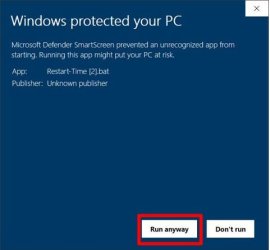
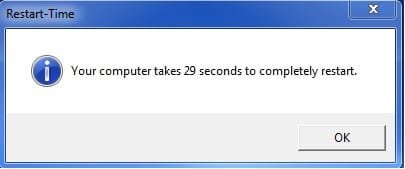
How to See What Your Windows 7 Restart Time is

...


Last edited by Brink; 10-20-2011 at 12:48 PM..
My System SpecsSystem Spec
06-07-2010   #30
Dave76


Windows 7 Ult x64 - SP1/ Windows 8 Dev Build x64


Hi all,

You should post your restart times here: ReBoot Time

This is just the tutorial on how to do it.

You can see a lot more posted, some are very fast...

My System SpecsSystem Spec
08-14-2010   #31
khalis


Windows 7 Ultimate 64Bits


Hello everyone

My score is 40sec.
My System SpecsSystem Spec
11-28-2010   #32
Tony2438


windows 7 beta


Here you go
Attached Images
 
My System SpecsSystem Spec
01-15-2011   #33
Solarstarshines


Windows 7 Home Premium 64bit sp1


This can't possibly be right even though i changed the cpu and psu is this really accurate i mean it is fast but this fast ?
Attached Thumbnails
Restart Time-restart-time.jpg  
My System SpecsSystem Spec
.


01-15-2011   #34
Brink


Windows 7 Ultimate x64 SP1


LOL, nice edit job there Tommy.
My System SpecsSystem Spec
01-15-2011   #35
Solarstarshines


Windows 7 Home Premium 64bit sp1


haha i could only wish i knew how to edit that portion and if you told me how belive me i would probally bs a few stats hahaha j/k

But seriously I am shocked ! this is beyond belivable for me and also my boot duration is short as well take a look also i am way overdue for a SSD It would probally exceed this if any with a SSD
Attached Images
 
My System SpecsSystem Spec
01-15-2011   #36
Brink


Windows 7 Ultimate x64 SP1


I'm not sure why you would get a result like that. Maybe the OC'd CPU may have something to do with it??
My System SpecsSystem Spec
01-15-2011   #37
Solarstarshines


Windows 7 Home Premium 64bit sp1


Quote   Quote: Originally Posted by Brink View Post
I'm not sure why you would get a result like that. Maybe the OC'd CPU may have something to do with it??

That could be it i did bump it up to 3.7 stable could have went to 4ghz but im not trying to kill my system when i get a new mobo and ram i will probally clock that high
My System SpecsSystem Spec
01-25-2011   #38
WindowsStar


Windows 7 Enterprise (x64); Windows Server 2008 R2 (x64)


Quote   Quote: Originally Posted by seeker3 View Post
Is there a way to make one of these just for boot up time?
Try this:

Restart-and-Boot-Time.vbs
Code:
 
On Error Resume Next
MsgA = "Please close all running applications and click on OK."
KeyA = "HKEY_CURRENT_USER\Software\RestartTime\"
KeyB = "HKEY_CURRENT_USER\Software\Microsoft\Windows\CurrentVersion\Run\RestartTime"
AppName = "Restart-and-Boot-Time"
strComputer = "."
Set objWMIService = GetObject ("winmgmts:\\" & strComputer & "\root\cimv2")
Set colOperatingSystems = objWMIService.ExecQuery("Select * from Win32_OperatingSystem")
Set WshShell = CreateObject("WScript.Shell")
PathFile = """" & WScript.ScriptFullName & """"
Result = WshShell.RegRead(KeyA & "Times")
If Result = "" then
   MsgResult = Msgbox (MsgA, vbOKCancel, AppName)
   If MsgResult = vbcancel then WScript.Quit
   WshShell.RegWrite KeyA & "Times", left(Time,8), "REG_SZ"
   WshShell.RegWrite KeyB, PathFile, "REG_SZ"
   WshShell.Run "cmd /c Shutdown -r -t 00", false, 0 
else
   For Each objOS in colOperatingSystems
      dtmBootup = objOS.LastBootUpTime
      dtmLastBootupTime = CDate(Mid(dtmBootup, 5, 2) & "/" & Mid(dtmBootup, 7, 2) & "/" & Left(dtmBootup, 4) & " " & Mid (dtmBootup, 9, 2) & ":" & Mid(dtmBootup, 11, 2) & ":" & Mid(dtmBootup, 13, 2))
      BootTime = DateDiff("s",dtmLastBootupTime,now)
   Next
   WshShell.RegDelete KeyA & "Times"
   WshShell.RegDelete KeyA
   WshShell.RegDelete KeyB
   TimeDiff = DateDiff("s",Result,left(Time,8))
   MsgBox "Your computer restarts in " & TimeDiff & " seconds and" & vbLF & "Boots in approximately " & BootTime & " seconds", VbInformation, AppName
End if
My System SpecsSystem Spec
02-26-2011   #39
element180


Windows 7 Home Premium 64bit (build 7600)


I've been looking for something like this,thanks

79 seconds.I obviously still have some tweaking to do
My System SpecsSystem Spec
Comment

Restart Time problems?


Tutorial Tools


Similar Threads for: Restart Time
Windows 7 Tutorial Category
Time and date resets when i restart the pc? Hardware & Devices
Solved restart time 258 seconds Performance & Maintenance
Windows time changes every time I restart General Discussion
Windows wants me to restart evey time I log in General Discussion
Restart time script problem Performance & Maintenance


All times are GMT -5. The time now is 05:48 PM.


Windows 7 Forums is an independent web site and has not been authorized,
sponsored, or otherwise approved by Microsoft Corporation.
"Windows 7" and related materials are trademarks of Microsoft Corp.
© Designer Media Ltd
  

1 2 3 4 5 6 7 8 9 10 11 12 13 14 15 16 17 18 19 20 21 22 23 24 25 26 27 28 29 30