Windows 7 Forums Search
Welcome to Windows 7 Forums. Our forum is dedicated to helping you find solutions with any problems, errors or issues you are experiencing with Windows 7. The Windows 7 forum also covers news and updates and has an extensive Windows 7 tutorial section that covers a wide range of tips and tricks.


Windows 7 - SATA Drivers - Slipstream into Windows XP CD

 
03-19-2010   #149
theog


ME/XP/Vista/Win7


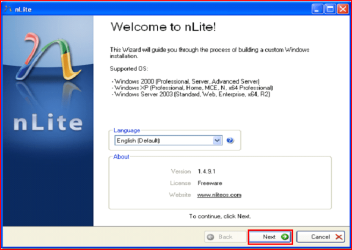
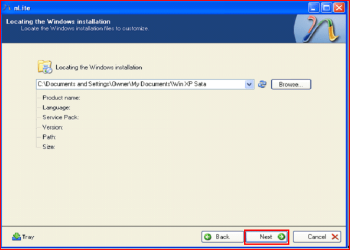
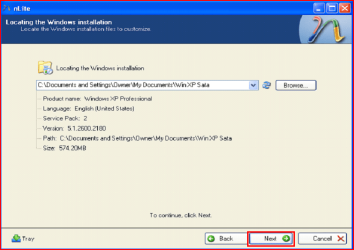
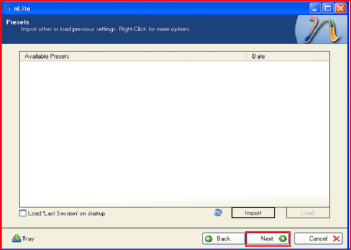
SATA Drivers - Slipstream into Windows XP CD

How to slipstream SATA drivers into Windows XP setup CD, on your dual boot PC with Windows 7 or Vista

When you install Win XP, setup can not find your Hard Drive.

...


Last edited by Brink; 03-27-2010 at 11:17 PM..
My System SpecsSystem Spec
08-26-2011   #150
theog


ME/XP/Vista/Win7


Quote   Quote: Originally Posted by Reygok View Post
I don't have a floppy drive, so I'll try and integrate them in a CD with nLite again, the ones I found on the ASUSTEK Website. Will that work?
If can find the F6 drivers on Asus OK.
or use
F6 Intel Sata Controller

My System SpecsSystem Spec
08-28-2011   #151
Reygok


Windows 7 Home Premium


I got it now, with the correct drivers from the ASUS website thx for your help
My System SpecsSystem Spec
08-28-2011   #152
theog


ME/XP/Vista/Win7


Quote   Quote: Originally Posted by Reygok View Post
I got it now, with the correct drivers from the ASUS website thx for your help
You are welcome.
My System SpecsSystem Spec
09-17-2011   #153
UtoldUs


Windows 7 Home Professional


I got same problem as Reygok with message showing that Windows XP installation failed. Tried several drivers found online, none works. See most people don't have Dell computers any more. Checked Dell drivers page, no drivers seem to be for XP. Would appreciate if you can point me to the right direction on where to get them.

Dell Inspiron 560
Hardrive: 500GB Serial ATA Hard Drive (7200RPM) w/DataBurst Cache™
Processor: Intel® Celeron® 450

Thank you!
My System SpecsSystem Spec
.


09-18-2011   #154
theog


ME/XP/Vista/Win7


Quote   Quote: Originally Posted by UtoldUs View Post
I got same problem as Reygok with message showing that Windows XP installation failed. Tried several drivers found online, none works. See most people don't have Dell computers any more. Checked Dell drivers page, no drivers seem to be for XP. Would appreciate if you can point me to the right direction on where to get them.

Dell Inspiron 560
Hardrive: 500GB Serial ATA Hard Drive (7200RPM) w/DataBurst Cache™
Processor: Intel® Celeron® 450

Thank you!
First check for all the Win XP drivers for your hardware.Check with your tag No:
Dell Inspiron 560 drivers for Win XP:
XP Drivers for Inspiron 560 - Microsoft OS Forum - Software & Operating Systems - Dell Community
If your Win XP CD, does not support your Sata Controller, you will need to load drivers to uses at F6.
Load Sata Controller drivers with a floppy disk is the best way.
SATA Drivers - Load in Windows XP Setup on Dual Boot
OR
SATA Drivers - Slipstream into Windows XP CD

Your Dell Inspiron 560 has a Intel Sata Controller.
You can download your F6 Sata Controller drivers from here:
http://downloadcenter.intel.com/Deta...onal*&lang=eng
My System SpecsSystem Spec
10-29-2011   #155
woofiedog


Windows 7 Pro 64 bit


Do I need both Version V1.2.2.0 & Version 3.3.1540.92/1.2.1.29 to slipstream the SATA drivers? Or just the Version V1.2.2.0 of the SATA drivers. Thank's

My System SpecsSystem Spec
11-01-2011   #156
theog


ME/XP/Vista/Win7


Quote   Quote: Originally Posted by woofiedog View Post
Do I need both Version V1.2.2.0 & Version 3.3.1540.92/1.2.1.29 to slipstream the SATA drivers? Or just the Version V1.2.2.0 of the SATA drivers. Thank's


Make sure you read the Readme Text Doc, to find the F6 drivers.

As your MOBO has uEFI BIOS, I personally would use
Windows XP Mode - Install and Setup
My System SpecsSystem Spec
11-01-2011   #157
woofiedog


Windows 7 Pro 64 bit


Thank you for your reply.

I do have XP mode setup already... but it doesn't support 3D for gaming. One of the main reasons I am setting up a dual boot. But will go back and reread all of the install/re me instructions before going ahead with the install.

Again Thank's for your help in this matter.
My System SpecsSystem Spec
02-18-2012   #158
sjanzeir


Windows 7 Professional 32-bit


Ray, I've been trying to do this on my Getac B300 for two days now, following your instructions to the letter, and I seem to have been slip-streaming the wrong drivers or something. I keep getting the message "XP could not find the iastor.sys file" message, even though I made sure to include it in the slip-streaming process. I downloaded the chipset driver zip file from Getac, but it doesn't seem to contain the iaahci and the iastor.sys files. What am I doing wrong? Please help me out here.
My System SpecsSystem Spec
02-19-2012   #159
theog


ME/XP/Vista/Win7


Hi sjanzeir

As the Getac B300 Fully Rugged Notebook comes with Windows 7 Professional, have you tried the FREE XP Mode?
Windows XP Mode - Install and Setup

First check for all the Win XP drivers for your hardware on the manufacturer's web site.
If your Win XP CD, does not support your Sata Controller, you will need to load drivers to uses at F6.
Load Sata Controller drivers with a floppy disk is the best way.
SATA Drivers - Load in Windows XP Setup on Dual Boot
OR
SATA Drivers - Slipstream into Windows XP CD

Unzipped download from Getac.

SATA Drivers - Slipstream into Windows XP CD-capture.png

Using Intel Sata Controller Drivers:

Quote   Quote: Originally Posted by theog View Post
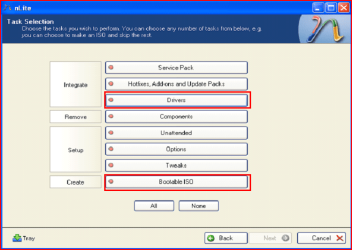
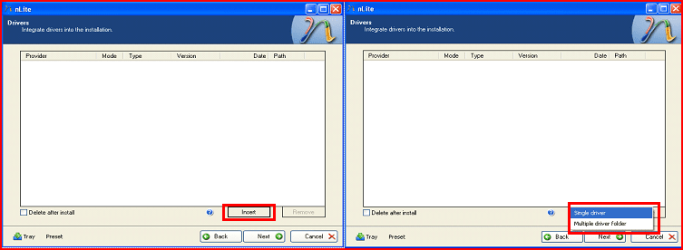
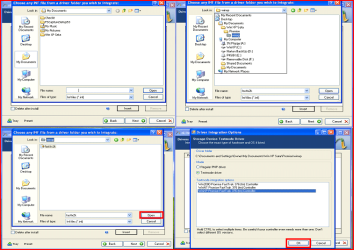
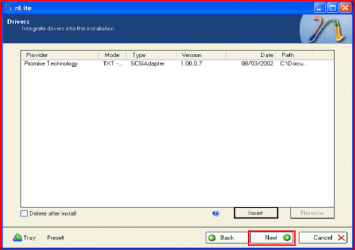
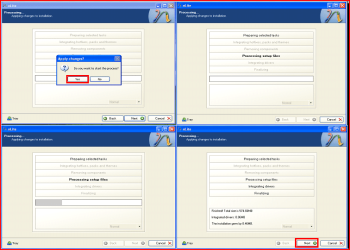
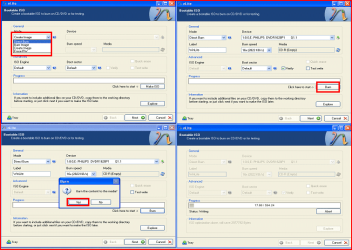
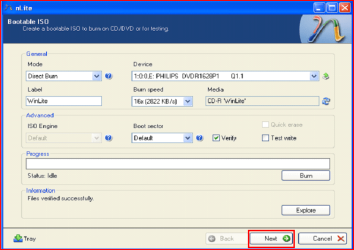
Take a look at step 11.(option Multple Drivers)


Choose both setup inf files.

Choose all drivers.

Choose all sata controllers.


Attachment 149858


Attachment 149859
My System SpecsSystem Spec
Comment

 SATA Drivers - Slipstream into Windows XP CD problems?


Tutorial Tools


Similar Threads for: SATA Drivers - Slipstream into Windows XP CD
Windows 7 Tutorial Category
Solved Slipstream SATA drivers into XP setupCD,which driver to be chosen,pls? Installation & Setup
SATA driver for Windows XP Slipstream Installation & Setup
Possible to slipstream all W7 drivers to XP CD? Drivers
Slipstream Drivers and N-light. Drivers
How to slipstream graphics drivers Drivers


All times are GMT -5. The time now is 02:59 AM.


Windows 7 Forums is an independent web site and has not been authorized,
sponsored, or otherwise approved by Microsoft Corporation.
"Windows 7" and related materials are trademarks of Microsoft Corp.
© Designer Media Ltd
  

1 2 3 4 5 6 7 8 9 10 11 12 13 14 15 16 17 18 19 20 21 22 23 24 25 26 27 28 29 30