Windows 7 Forums Search
Welcome to Windows 7 Forums. Our forum is dedicated to helping you find solutions with any problems, errors or issues you are experiencing with Windows 7. The Windows 7 forum also covers news and updates and has an extensive Windows 7 tutorial section that covers a wide range of tips and tricks.


Windows 7 - SATA Drivers - Slipstream into Windows XP CD


SATA Drivers - Slipstream into Windows XP CD

How to Slipstream SATA drivers into Windows XP setup CD with Dual Boot of Windows 7 or Vista
Published by theog
03-19-2010
Default SATA Drivers - Slipstream into Windows XP CD

How to slipstream SATA drivers into Windows XP setup CD, on your dual boot PC with Windows 7 or Vista

When you install Win XP, setup can not find your Hard Drive.

SATA Drivers - Slipstream into Windows XP CD-1.png

SATA Drivers - Slipstream into Windows XP CD-2.png


1) Download & Install nLite
nLite - Deployment Tool for the bootable Unattended Windows installation

2) Make a new folder for your Windows XP image.
Note: for this example, I am using the name Win XP Sata.

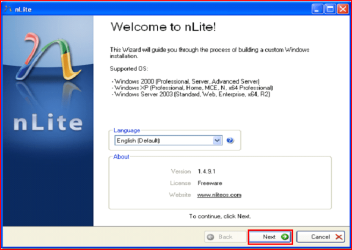
3) Insert XP CD & start nLite

4) Click Next.
SATA Drivers - Slipstream into Windows XP CD-3.png
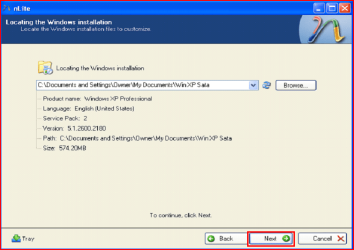
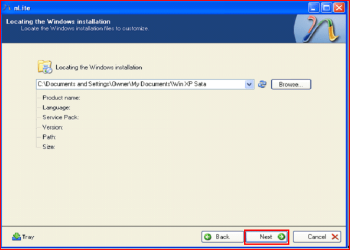
5) Choose your Windows XP image folder, & Click Next, than OK.
Note: nLite will put the image into your folder.
SATA Drivers - Slipstream into Windows XP CD-4.png

SATA Drivers - Slipstream into Windows XP CD-5.png
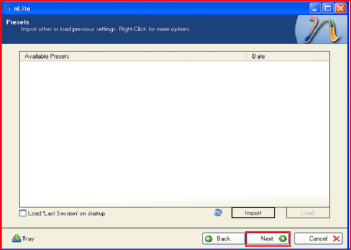
6) Click Next.
SATA Drivers - Slipstream into Windows XP CD-6.png
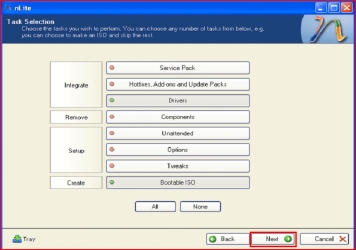
7) Click Next.
SATA Drivers - Slipstream into Windows XP CD-7.png
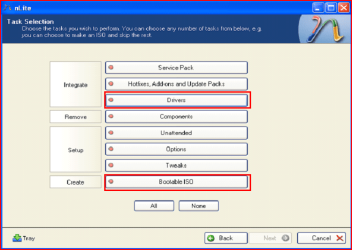
8) Choose Integrate Drivers & Create Bootable ISO
SATA Drivers - Slipstream into Windows XP CD-8.png
9) Click Next.
SATA Drivers - Slipstream into Windows XP CD-9.png
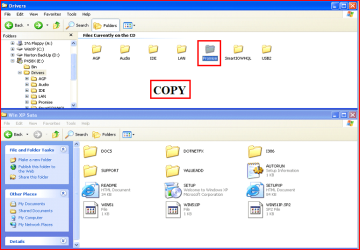
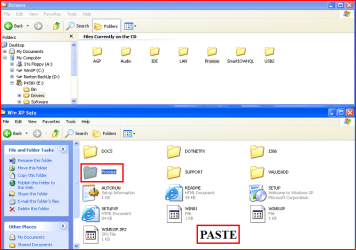
10) Copy & Paste your Sata Driver to your image folder.
Note: for this example, I am using Promise Fastrak 376.
SATA Drivers - Slipstream into Windows XP CD-10.png

SATA Drivers - Slipstream into Windows XP CD-11.png
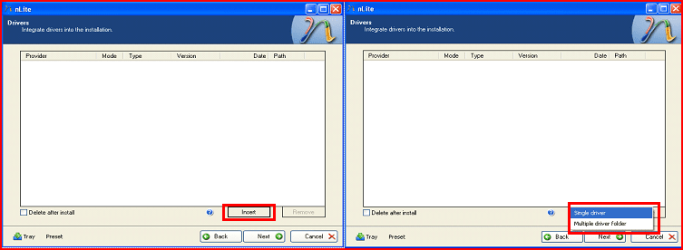
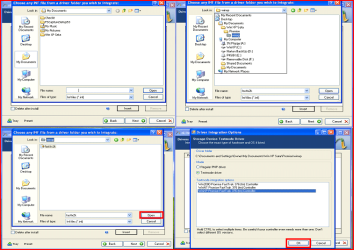
11) Click Insect, than Single Driver.
SATA Drivers - Slipstream into Windows XP CD-12.png
12) Locate your Sata Setup Inf file.
Click Open, than OK.
Note: for this example the file is called fasttx2k.
Note: for this example, I am using Promise Fastrak 376.
SATA Drivers - Slipstream into Windows XP CD-13.png
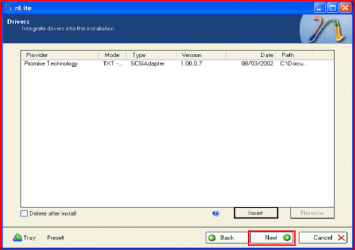
13) Click Next.
SATA Drivers - Slipstream into Windows XP CD-14.png
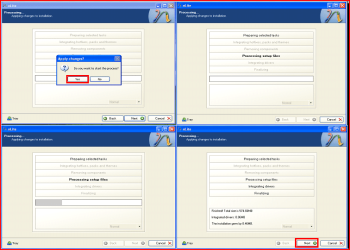
14) Click Yes, than Next.
SATA Drivers - Slipstream into Windows XP CD-15.png
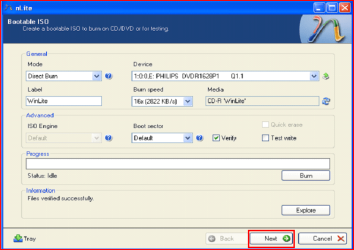
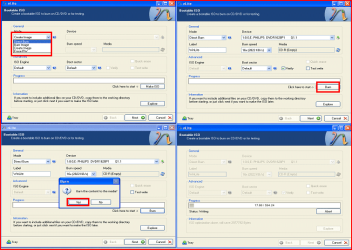
15) Choose Direct Burn.
Click Burn, than Yes.
Note: nLite will now burn your new CD.
SATA Drivers - Slipstream into Windows XP CD-16.png
16) Click Next.
SATA Drivers - Slipstream into Windows XP CD-17.png
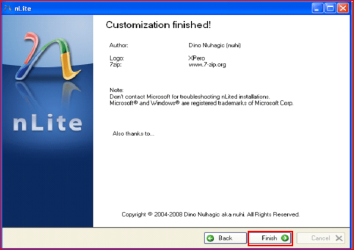
17) Click Finish.
SATA Drivers - Slipstream into Windows XP CD-18.png
Your Sata drive will now show up in setup.
SATA Drivers - Slipstream into Windows XP CD-19.png
Published by
Senior Member


Join Date: Aug 2009
Location: uk Hampshire
Posts: 9,180
theog has a reputation beyond reputetheog has a reputation beyond reputetheog has a reputation beyond repute
theog has a reputation beyond reputetheog has a reputation beyond reputetheog has a reputation beyond reputetheog has a reputation beyond reputetheog has a reputation beyond reputetheog has a reputation beyond reputetheog has a reputation beyond reputetheog has a reputation beyond repute

Tutorial Tools
03-19-2010   #1
gregrocker


Win7 x 6 PC's


Thanks so much, theog.

This is valuable help now that XP installer no longer can keep up with SATA drives.

The use of screenshots is also far beyond anything else out there on the web for this.

Will be giving this out several times per week, I'm sure.

My System SpecsSystem Spec
03-20-2010   #2
theog


ME/XP/Vista/Win7


Quote   Quote: Originally Posted by gregrocker View Post
Thanks so much, theog.

This is valuable help now that XP installer no longer can keep up with SATA drives.

The use of screenshots is also far beyond anything else out there on the web for this.

Will be giving this out several times per week, I'm sure.
Thank you, Greg.

Ray.
My System SpecsSystem Spec
04-05-2010   #3
ducada


windows 7


I have an alienware aurora. I am trying to set up a dual boot so i can run xp and windows 7. Windows 7 is currently installed and it does not work with pro-tools 8 to my liking which is why i would like to install xp. where would i find the sata drivers for my machine?
My System SpecsSystem Spec
.


04-06-2010   #4
theog


ME/XP/Vista/Win7


Quote   Quote: Originally Posted by ducada View Post
I have an alienware aurora. I am trying to set up a dual boot so i can run xp and windows 7. Windows 7 is currently installed and it does not work with pro-tools 8 to my liking which is why i would like to install xp. where would i find the sata drivers for my machine?
Try here.
Alienware Computers - Custom-Built Gaming Desktops and Laptops
My System SpecsSystem Spec
04-15-2010   #5
nijaz89


Windows XP


Hi theog

I have a asus motherboard and I have followed your steps but its not working I can not integrate my drivers into my Win XP cd.
Can you plz tell me what is the problem?
My System SpecsSystem Spec
04-16-2010   #6
theog


ME/XP/Vista/Win7


Quote   Quote: Originally Posted by nijaz89 View Post
Hi theog

I have a asus motherboard and I have followed your steps but its not working I can not integrate my drivers into my Win XP cd.
Can you plz tell me what is the problem?
Did you UNZIP the Sata driver download?

Can you post a link to download.
My System SpecsSystem Spec
04-16-2010   #7
AJstone13


Windows 7 Home Premium


Studio XPS 8100 iastor issue

Hello,
I have a pre-installed Windows 7 Home Premium crate, but need XP to run my favourite apps. I have tried to make a new bootable disk with the SATA drivers included, but keep getting ''iastor.sys is corrupt''. I believe I've done everything that can be done, so don't know where to go from here.
I have tried to use 'R245418' driver from Dell in bembeded in nLite ISO. I selected 'Intel ICH8R/ICH9R/ICH10R/DO/5 SERIES/3400 SERIES' when presented with the option because that's what is in 'Manage/Device Manager/Storage Controller'.
Once I've made and burnt my new XP ISO, I try to install on my already 'shrunk' partition and I get past the F6 option then, 'iastor.sys is corrupt'.

Please, any help?
My System SpecsSystem Spec
04-16-2010   #8
theog


ME/XP/Vista/Win7


Quote   Quote: Originally Posted by AJstone13 View Post
Hello,
I have a pre-installed Windows 7 Home Premium crate, but need XP to run my favourite apps. I have tried to make a new bootable disk with the SATA drivers included, but keep getting ''iastor.sys is corrupt''. I believe I've done everything that can be done, so don't know where to go from here.
I have tried to use 'R245418' driver from Dell in bembeded in nLite ISO. I selected 'Intel ICH8R/ICH9R/ICH10R/DO/5 SERIES/3400 SERIES' when presented with the option because that's what is in 'Manage/Device Manager/Storage Controller'.
Once I've made and burnt my new XP ISO, I try to install on my already 'shrunk' partition and I get past the F6 option then, 'iastor.sys is corrupt'.

Please, any help?
Try the Intel drivers.

32-bit Floppy Configuration Utility
My System SpecsSystem Spec
04-17-2010   #9
nijaz89


Windows XP


ASUSTeK Computer Inc.-Support-
find P4S800D-X and there you will find RAID to download
I have unziped and integrate it in xp cd with nlite, and when boot up xp says no hard drive found :S
Is there other way to integrate this drivers?
My System SpecsSystem Spec
Comment

SATA Drivers - Slipstream into Windows XP CD problems?


Tutorial Tools


Similar Threads for: SATA Drivers - Slipstream into Windows XP CD
Windows 7 Tutorial Category
Solved Slipstream SATA drivers into XP setupCD,which driver to be chosen,pls? Installation & Setup
SATA driver for Windows XP Slipstream Installation & Setup
Possible to slipstream all W7 drivers to XP CD? Drivers
Slipstream Drivers and N-light. Drivers
How to slipstream graphics drivers Drivers


All times are GMT -5. The time now is 02:38 AM.


Windows 7 Forums is an independent web site and has not been authorized,
sponsored, or otherwise approved by Microsoft Corporation.
"Windows 7" and related materials are trademarks of Microsoft Corp.
© Designer Media Ltd
  

1 2 3 4 5 6 7 8 9 10 11 12 13 14 15 16 17 18 19 20 21 22 23 24 25 26 27 28 29 30