| Windows 7: Data Partition |
20 Mar 2010
|
#19 | | Vista, Windows7, Mint Mate, Zorin, Windows 8 Florida in winter, Black Forest/Germany |
Data Partition  Information This video tutorial explains how to...
Last edited by whs; 24 Aug 2010 at 03:30 PM..
| My System Specs |
| System Manufacturer/Model Number HP, Dell, Gateway, Toshiba - 4 laptops and 2 desktops OS Vista, Windows7, Mint Mate, Zorin, Windows 8 CPU from 1.6GHz Duo to i7 Monitor(s) Displays 2x HP w2207 Keyboard with trackball - no mices Mouse Trackball mice Hard Drives 5x HDD, 7x SSD, 12x Externals Internet Speed DSL 6000 |
05 Aug 2011
|
#20 | | |
Great tutorial. I was wondering can you move the main user file ie C:users/username and everything including sub folders will go over? Do you have to do each one manually?
Also how many gigs for the 7pro os with system restore?
Last edited by ariel5345; 05 Aug 2011 at 03:52 PM..
Reason: clarification
| My System Specs |
| System Manufacturer/Model Number Hp presario v6620us 6500notebook series. OS 7 professional CPU Your Processor type and speed - AMD ATHLON(tm) 64X2 DUAL-COR Motherboard Quanta 30CF Memory 2.5gb Graphics Card NVIDIA GeForce 7150/nForce 64MB Sound Card conextant smartaudio hd2 Keyboard Yep Mouse Nope PSU Wth? is this Case The judge threw it out. Not enough evidence. Cooling sometimes. Hard Drives FUJITSU PLATA 160GB IDE Internet Speed fast |
05 Aug 2011
|
#21 | | Vista, Windows7, Mint Mate, Zorin, Windows 8 Florida in winter, Black Forest/Germany |

Quote: Originally Posted by ariel5345 Great tutorial. I was wondering can you move the main user file ie C:users/username and everything including sub folders will go over? Do you have to do each one manually? As far as I know, that will not work. Only those folders that have the Location tab in Properties can be moved with this method. But sometimes that is no obvious. E.g. Appdata has no location tab, but the folders in Appdata (Local, etc.) do have a location tab. | My System Specs | | System Manufacturer/Model Number HP, Dell, Gateway, Toshiba - 4 laptops and 2 desktops OS Vista, Windows7, Mint Mate, Zorin, Windows 8 CPU from 1.6GHz Duo to i7 Monitor(s) Displays 2x HP w2207 Keyboard with trackball - no mices Mouse Trackball mice Hard Drives 5x HDD, 7x SSD, 12x Externals Internet Speed DSL 6000 |
08 Aug 2011
|
#22 | | |
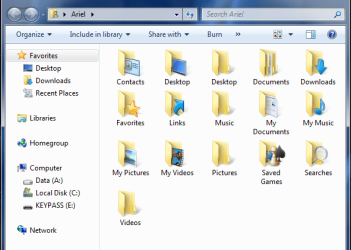
Hey WHS. I need a little help. I moved every user folder. WhenI got done I clicked on start/myfolder I got this. 
Is this normal? I have double folders. It might be because of the way I copypasted my whole user folder from Vista to external drive and back to win 7 after install.
The c:documents folders has an empty onenote folder in it. I can access it. I can also access the c:desktop folder. The other c: folders like Pictures and music and videos I cannot access them.
I don't dare try to delete them but I would like too. Can I?
Another question. On the public folders in users there is a locate tab and it says you can relocate, yet there is no Move Button. Is this a permission thing? Or these folders can not move?
Final question I can't find my app folder? Not in users/myname.
I think though I should leave my settings along with my programs anyway. Wouldn't this be better if I am going to do incremental Images of just my Primary C partician? | My System Specs | | System Manufacturer/Model Number Hp presario v6620us 6500notebook series. OS 7 professional CPU Your Processor type and speed - AMD ATHLON(tm) 64X2 DUAL-COR Motherboard Quanta 30CF Memory 2.5gb Graphics Card NVIDIA GeForce 7150/nForce 64MB Sound Card conextant smartaudio hd2 Keyboard Yep Mouse Nope PSU Wth? is this Case The judge threw it out. Not enough evidence. Cooling sometimes. Hard Drives FUJITSU PLATA 160GB IDE Internet Speed fast |
08 Aug 2011
|
#23 | | Vista, Windows7, Mint Mate, Zorin, Windows 8 Florida in winter, Black Forest/Germany |
1. The double folders are not normal. You must have done a false manipulation somewhere. I suggest you save your data in the folders and start anew.
The safest way rather than moving the folders from the standard library is to create new folders (Documents, Music, etc.) on the other disk and INCLUDE those into their respective libraries. That keeps the default folders in the library (which has certain advantages) plus the new folders as a new library entry. You can then delete what is no more needed. User Folders - Restore Default Location 2. With public folders it is a bit different. There you have to change the path. But I would leave them alone. They are so small, it is not worth it.
3. The AppData folder is a hiddden folder. You have to "show hidden folders" in Organize > Folder and Search Options > View Hidden Files and Folders - Show or Hide
Last edited by Brink; 08 Aug 2011 at 01:11 PM..
Reason: added links ;)
| My System Specs | | System Manufacturer/Model Number HP, Dell, Gateway, Toshiba - 4 laptops and 2 desktops OS Vista, Windows7, Mint Mate, Zorin, Windows 8 CPU from 1.6GHz Duo to i7 Monitor(s) Displays 2x HP w2207 Keyboard with trackball - no mices Mouse Trackball mice Hard Drives 5x HDD, 7x SSD, 12x Externals Internet Speed DSL 6000 |
09 Aug 2011
|
#24 | | |

Quote: Originally Posted by whs The safest way rather than moving the folders from the standard library is to create new folders (Documents, Music, etc.) on the other disk and INCLUDE those into their respective libraries. That keeps the default folders in the library (which has certain advantages) plus the new folders as a new library entry. You can then delete what is no more needed. Thanks Whs for the4 help. I followed everything you did on the video. except for one thing. I went to c:user/user name/ then relocated all the folders from there. I did make other folders with duplicate names on the data parician first.
I put everyhting back. I am still trying to figure out what I did wrong. | My System Specs | | System Manufacturer/Model Number Hp presario v6620us 6500notebook series. OS 7 professional CPU Your Processor type and speed - AMD ATHLON(tm) 64X2 DUAL-COR Motherboard Quanta 30CF Memory 2.5gb Graphics Card NVIDIA GeForce 7150/nForce 64MB Sound Card conextant smartaudio hd2 Keyboard Yep Mouse Nope PSU Wth? is this Case The judge threw it out. Not enough evidence. Cooling sometimes. Hard Drives FUJITSU PLATA 160GB IDE Internet Speed fast All times are GMT -5. The time now is 06:16 AM. | |