
Icons - Change Using Resource Hacker

   Information
A few days ago I faced a question http://www.sevenforums.com/customization/72719-how-do-i-change-icons-using-restorator.html . I provided the suggestion there; latter thought if there is a tutorial, it may help many guys asking the question.
   Note
Tools required :
1. Resource Hacker : Now supports 64 bit system and .png files. Download it from : Download New Updated “Resource Hacker 3.5.2 Beta” with 64-bit and PNG File Support - Tweaking with Vishal

2. IcoFX : A free application that can be used to get a ready reference of the system icons. Download it from IcoFX - The Free Icon Editor - Download


Download and install the above mentioned programs.


Now it starts :

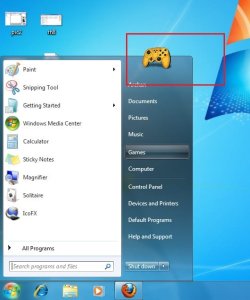
Suppose we are changing the default games icon with this one chinaz5.png

Though almost all of the system is changeable in this process, it is just an example :D

1. Go to C:\Windows\System32\imageres.dll and take a copy if it in a secured place (i.e. take a backup of it)

2. Now Take Ownership of the imageres.dll

3. Open IcoFX. Click on Tools > Resource Editor.
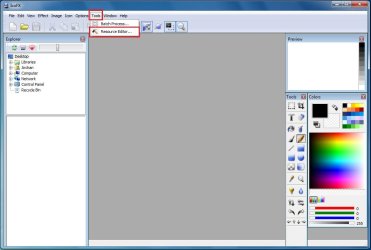
Pic1.jpg
4. In the resource editor window , click on the folder icon. The Open Resources window will appear.
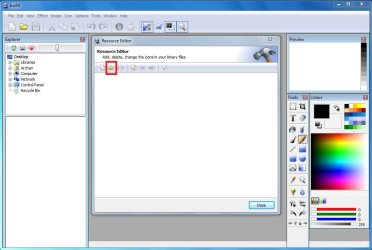
pic2.JPG
5. In the open resources window, give the filename "imageres.dll" and click open.
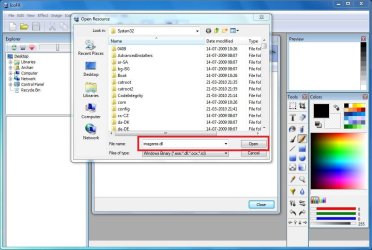
pic3.JPG
6. So in the resource editor window, The games icon no is #14
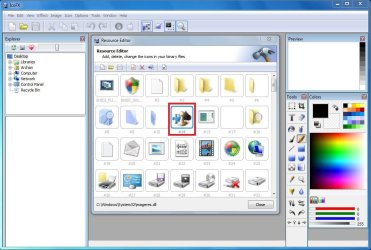
pic4.JPG
We are to moderate it using Resource Hacker. Now we may close IcoFX.

7. Open Resource Hacker. Click on File > Open . It will automatically open in System 32.
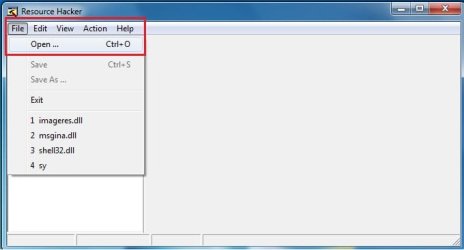
pic5.jpg
8. In the incoming box, give the file name "imageres.dll" and click "open".
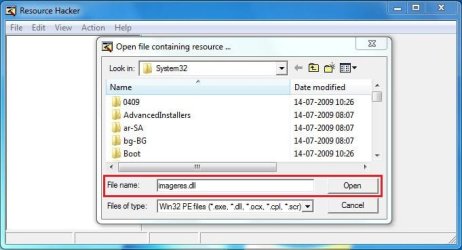
pic6.JPG
9. Now, Click on the "+" sign in front of "Icon Group"
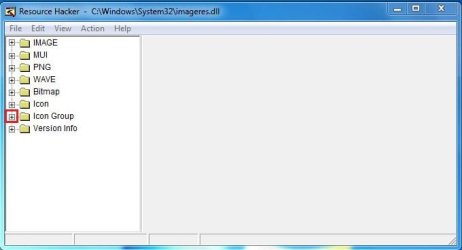
pic7.JPG
10. You will look the Icon group tree expands, and an item "*1033" there. Click on "*1033" and see the games icon revealed in the right side pane of the window.
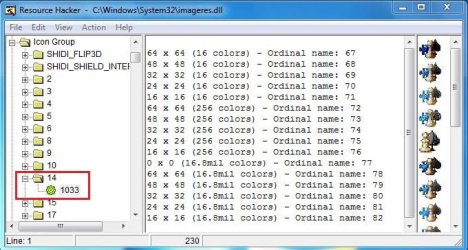
pic8.JPG
11. Now right click on "*1033" and click on "replace resource"
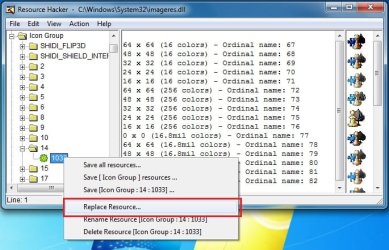
pic9.jpg
12. In the upcoming box, click on "Open the file with new icon" and browse for it.
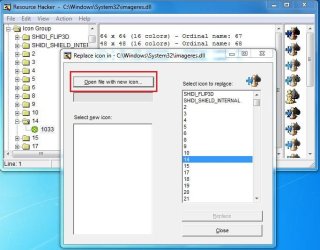
pic10.JPG
13. Now, first click on "Select new icon" and then click on "replace"
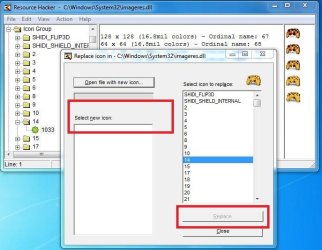
pic11.JPG
Repeat upto step 13 for the icons you want to change at a time, and when all of your icons are replaced, go to step 14.
14. We are almost done. We successfully modified the imageres.dll file. Now it is to save it. Cilck on File > Save as, give the filename "imageres,dll". Save it on your desktop.
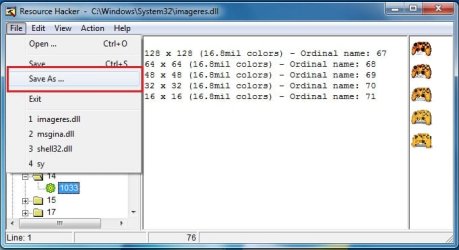
pic12.jpg
15. Go again to C:\Windows\System32\imageres.dll. Rename it to inageresOLD.dll or something. Now copy the modified imageres.dll in that location. The last thing is to restart ... either you may restart your computer, or you may restart explorer.exe using task manager.

16. After restart, Click on start menu and place your pointer on the games link. you will get it :D
final.jpg
I agree with you that the process is lengthy and labourous :( But it is the free of cost way to change all the system icons.

Enjoy yourself. And again,dont forget to backup your original imageres.dll before starting the process :)


Last edited by a moderator:
Hi Diko !
Welcome to seven forums !
May you please describe the problem in detail ?
 

My Computer

Computer type
PC/Desktop
Computer Manufacturer/Model Number
Self Assembled
OS
Microsoft Windows 10 Pro Insider Preview 64-bit
CPU
Intel(R) Core(TM) i3-4130 CPU @ 3.40GHz
Motherboard
Gigabyte Technology Co., Ltd. B85M-D3H
Memory
Corsair Vengence 4GB x2 (8.00GB Dual-Channel DDR3 @ 798MHz)
Graphics Card(s)
2047MB GeForce GTS 450 (ZOTAC International)
Sound Card
Onboard (Realtek High Definition Audio)
Monitor(s) Displays
LG Flatron E2040T
Screen Resolution
1600x900
Hard Drives
Western Digital 1 TB
Seagate 500 GB
PSU
Corsair VS550
Case
Cooler Master K380
Cooling
Cooler Master Seidon 120V Plus
Keyboard
Logitech MK260r
Mouse
Logitech MK260r
Internet Speed
PMPL Broadband
Antivirus
Windows Defender + MBAM
Browser
Firefox
Other Info
Dell Studio 15" Laptop
Hi!

v73uyw.jpg


I replaced a few icons especially folder icons in imageres.dll as you mentioned. But it's not applied on all folders. Some of them have old icon while others have the new icon. When I use large icons, they all have the new icon. Other types of icons such as desktop and drive icons that i replaced have the same problem. How can i solve this problem? Thanks a lot.
 

My Computer

OS
Windows 7
Hi!

v73uyw.jpg


I replaced a few icons especially folder icons in imageres.dll as you mentioned. But it's not applied on all folders. Some of them have old icon while others have the new icon. When I use large icons, they all have the new icon. Other types of icons such as desktop and drive icons that i replaced have the same problem. How can i solve this problem? Thanks a lot.
Try this http://www.sevenforums.com/tutorials/49819-icon-cache-rebuild.html

Wish you good luck.
 

My Computer

Computer type
PC/Desktop
Computer Manufacturer/Model Number
Self Assembled
OS
Microsoft Windows 10 Pro Insider Preview 64-bit
CPU
Intel(R) Core(TM) i3-4130 CPU @ 3.40GHz
Motherboard
Gigabyte Technology Co., Ltd. B85M-D3H
Memory
Corsair Vengence 4GB x2 (8.00GB Dual-Channel DDR3 @ 798MHz)
Graphics Card(s)
2047MB GeForce GTS 450 (ZOTAC International)
Sound Card
Onboard (Realtek High Definition Audio)
Monitor(s) Displays
LG Flatron E2040T
Screen Resolution
1600x900
Hard Drives
Western Digital 1 TB
Seagate 500 GB
PSU
Corsair VS550
Case
Cooler Master K380
Cooling
Cooler Master Seidon 120V Plus
Keyboard
Logitech MK260r
Mouse
Logitech MK260r
Internet Speed
PMPL Broadband
Antivirus
Windows Defender + MBAM
Browser
Firefox
Other Info
Dell Studio 15" Laptop
Hi!

v73uyw.jpg


I replaced a few icons especially folder icons in imageres.dll as you mentioned. But it's not applied on all folders. Some of them have old icon while others have the new icon. When I use large icons, they all have the new icon. Other types of icons such as desktop and drive icons that i replaced have the same problem. How can i solve this problem? Thanks a lot.
Try this http://www.sevenforums.com/tutorials/49819-icon-cache-rebuild.html

Wish you good luck.

Thanks a lot. That's Okay now. :)
 

My Computer

OS
Windows 7

My Computer

Computer type
PC/Desktop
Computer Manufacturer/Model Number
Self Assembled
OS
Microsoft Windows 10 Pro Insider Preview 64-bit
CPU
Intel(R) Core(TM) i3-4130 CPU @ 3.40GHz
Motherboard
Gigabyte Technology Co., Ltd. B85M-D3H
Memory
Corsair Vengence 4GB x2 (8.00GB Dual-Channel DDR3 @ 798MHz)
Graphics Card(s)
2047MB GeForce GTS 450 (ZOTAC International)
Sound Card
Onboard (Realtek High Definition Audio)
Monitor(s) Displays
LG Flatron E2040T
Screen Resolution
1600x900
Hard Drives
Western Digital 1 TB
Seagate 500 GB
PSU
Corsair VS550
Case
Cooler Master K380
Cooling
Cooler Master Seidon 120V Plus
Keyboard
Logitech MK260r
Mouse
Logitech MK260r
Internet Speed
PMPL Broadband
Antivirus
Windows Defender + MBAM
Browser
Firefox
Other Info
Dell Studio 15" Laptop
problem occured after icons-change using resourse hacker

ARC
After following your tutorial to change the icon for recycle bin, I restarted my computer and log on screen turned black. I did not show username and password field for me to fill in.....
How can i solve this problem
 

My Computer

OS
win 7 pro

My Computer

Computer type
PC/Desktop
Computer Manufacturer/Model Number
Self Assembled
OS
Microsoft Windows 10 Pro Insider Preview 64-bit
CPU
Intel(R) Core(TM) i3-4130 CPU @ 3.40GHz
Motherboard
Gigabyte Technology Co., Ltd. B85M-D3H
Memory
Corsair Vengence 4GB x2 (8.00GB Dual-Channel DDR3 @ 798MHz)
Graphics Card(s)
2047MB GeForce GTS 450 (ZOTAC International)
Sound Card
Onboard (Realtek High Definition Audio)
Monitor(s) Displays
LG Flatron E2040T
Screen Resolution
1600x900
Hard Drives
Western Digital 1 TB
Seagate 500 GB
PSU
Corsair VS550
Case
Cooler Master K380
Cooling
Cooler Master Seidon 120V Plus
Keyboard
Logitech MK260r
Mouse
Logitech MK260r
Internet Speed
PMPL Broadband
Antivirus
Windows Defender + MBAM
Browser
Firefox
Other Info
Dell Studio 15" Laptop
It helps,tx:thumbsup::thumbsup:. I got my computer back.
I really dont know why startup was crashed and is there another way to change the icons for files and folders in win 7 because I am only one to get this trouble for this tutorial.
Thanks
Tuan Tran
Nice to know that you get it back, pal :D I hope you have followed all the steps carefully, specially taking ownership .

I'd suggest you to http://www.sevenforums.com/tutorials/663-backup-complete-computer-create-image-backup.html first (in case of any severe crash, it will help you to get your things back), and follow the steps again . Hope in the next time everything would be ok :D
 

My Computer

Computer type
PC/Desktop
Computer Manufacturer/Model Number
Self Assembled
OS
Microsoft Windows 10 Pro Insider Preview 64-bit
CPU
Intel(R) Core(TM) i3-4130 CPU @ 3.40GHz
Motherboard
Gigabyte Technology Co., Ltd. B85M-D3H
Memory
Corsair Vengence 4GB x2 (8.00GB Dual-Channel DDR3 @ 798MHz)
Graphics Card(s)
2047MB GeForce GTS 450 (ZOTAC International)
Sound Card
Onboard (Realtek High Definition Audio)
Monitor(s) Displays
LG Flatron E2040T
Screen Resolution
1600x900
Hard Drives
Western Digital 1 TB
Seagate 500 GB
PSU
Corsair VS550
Case
Cooler Master K380
Cooling
Cooler Master Seidon 120V Plus
Keyboard
Logitech MK260r
Mouse
Logitech MK260r
Internet Speed
PMPL Broadband
Antivirus
Windows Defender + MBAM
Browser
Firefox
Other Info
Dell Studio 15" Laptop
It helps,tx:thumbsup::thumbsup:. I got my computer back.
I really dont know why startup was crashed and is there another way to change the icons for files and folders in win 7 because I am only one to get this trouble for this tutorial.
Thanks
Tuan Tran
Nice to know that you get it back, pal :D I hope you have followed all the steps carefully, specially taking ownership .

I'd suggest you to http://www.sevenforums.com/tutorials/663-backup-complete-computer-create-image-backup.html first (in case of any severe crash, it will help you to get your things back), and follow the steps again . Hope in the next time everything would be ok :D

I have just tried the tutorial again and i got the message "Out of system resource" after entering replacing the original icon with my own icon. Did it happen to you when you tried it.
Tuan Tran
 

My Computer

OS
win 7 pro
I have just tried the tutorial again and i got the message "Out of system resource" after entering replacing the original icon with my own icon. Did it happen to you when you tried it.
Tuan Tran
Dont know why, but the message is shown :( If you dont pay a heed to tht message , it would not me a trouble at all . It happens to me, too . Almost every time .
 

My Computer

Computer type
PC/Desktop
Computer Manufacturer/Model Number
Self Assembled
OS
Microsoft Windows 10 Pro Insider Preview 64-bit
CPU
Intel(R) Core(TM) i3-4130 CPU @ 3.40GHz
Motherboard
Gigabyte Technology Co., Ltd. B85M-D3H
Memory
Corsair Vengence 4GB x2 (8.00GB Dual-Channel DDR3 @ 798MHz)
Graphics Card(s)
2047MB GeForce GTS 450 (ZOTAC International)
Sound Card
Onboard (Realtek High Definition Audio)
Monitor(s) Displays
LG Flatron E2040T
Screen Resolution
1600x900
Hard Drives
Western Digital 1 TB
Seagate 500 GB
PSU
Corsair VS550
Case
Cooler Master K380
Cooling
Cooler Master Seidon 120V Plus
Keyboard
Logitech MK260r
Mouse
Logitech MK260r
Internet Speed
PMPL Broadband
Antivirus
Windows Defender + MBAM
Browser
Firefox
Other Info
Dell Studio 15" Laptop
I have just tried the tutorial again and i got the message "Out of system resource" after entering replacing the original icon with my own icon. Did it happen to you when you tried it.
Tuan Tran
Dont know why, but the message is shown :( If you dont pay a heed to tht message , it would not me a trouble at all . It happens to me, too . Almost every time .
I tried twice and my computer was crashed an log on screen. Dunt know what should I do now. :confused::confused:
 

My Computer

OS
win 7 pro
d
I tried twice and my computer was crashed an log on screen. Dunt know what should I do now. :confused::confused:
Ok I am thinking on this issue . If I got any success, I will inform you :)
 

My Computer

Computer type
PC/Desktop
Computer Manufacturer/Model Number
Self Assembled
OS
Microsoft Windows 10 Pro Insider Preview 64-bit
CPU
Intel(R) Core(TM) i3-4130 CPU @ 3.40GHz
Motherboard
Gigabyte Technology Co., Ltd. B85M-D3H
Memory
Corsair Vengence 4GB x2 (8.00GB Dual-Channel DDR3 @ 798MHz)
Graphics Card(s)
2047MB GeForce GTS 450 (ZOTAC International)
Sound Card
Onboard (Realtek High Definition Audio)
Monitor(s) Displays
LG Flatron E2040T
Screen Resolution
1600x900
Hard Drives
Western Digital 1 TB
Seagate 500 GB
PSU
Corsair VS550
Case
Cooler Master K380
Cooling
Cooler Master Seidon 120V Plus
Keyboard
Logitech MK260r
Mouse
Logitech MK260r
Internet Speed
PMPL Broadband
Antivirus
Windows Defender + MBAM
Browser
Firefox
Other Info
Dell Studio 15" Laptop
Hey Arc

i used a similar icon changer and i changed my folder icon would you be able to tell me what to do to change the folder icon (or make a similar tutorial instead with the folder)
 

My Computer

Computer Manufacturer/Model Number
7600
OS
Windows 7 Home Premium
CPU
Pentium(R) Dual-Core E5300 @ 2.60GHz
Motherboard
ASUS P5KPL-AM/PS
Memory
4GB RAM
Graphics Card(s)
NVIDIA GeForce 9500 GT
Monitor(s) Displays
Benq 22"
Screen Resolution
1920 x 1080
Hard Drives
600GB NTFS HDD WD, 1TB External HDD HP simple save , 1TB External WD HDD, 250GB External WD HDD.
Case
Cooler Master Scout
Keyboard
Razer Lycosa
Mouse
Razer Imperator
Other Info
Windows®. Life without Walls™.

Love Steam
i used a similar icon changer and i changed my folder icon would you be able to tell me what to do to change the folder icon (or make a similar tutorial instead with the folder)
Hi Jack ! To change the folder icon, you are to change imageres 4, 5, 6, and 162. (4=open folder, 5=back, 6= front and 162 = work folder) .

If any further assistance is required, please post back :D
 

My Computer

Computer type
PC/Desktop
Computer Manufacturer/Model Number
Self Assembled
OS
Microsoft Windows 10 Pro Insider Preview 64-bit
CPU
Intel(R) Core(TM) i3-4130 CPU @ 3.40GHz
Motherboard
Gigabyte Technology Co., Ltd. B85M-D3H
Memory
Corsair Vengence 4GB x2 (8.00GB Dual-Channel DDR3 @ 798MHz)
Graphics Card(s)
2047MB GeForce GTS 450 (ZOTAC International)
Sound Card
Onboard (Realtek High Definition Audio)
Monitor(s) Displays
LG Flatron E2040T
Screen Resolution
1600x900
Hard Drives
Western Digital 1 TB
Seagate 500 GB
PSU
Corsair VS550
Case
Cooler Master K380
Cooling
Cooler Master Seidon 120V Plus
Keyboard
Logitech MK260r
Mouse
Logitech MK260r
Internet Speed
PMPL Broadband
Antivirus
Windows Defender + MBAM
Browser
Firefox
Other Info
Dell Studio 15" Laptop
Arc,

I have a 3rd party icon changer (well i did and it changed my icon to this ugly thing and i want the default back any ideas?)
 

Attachments

  • Capture.PNG
    Capture.PNG
    50.3 KB · Views: 882

My Computer

Computer Manufacturer/Model Number
7600
OS
Windows 7 Home Premium
CPU
Pentium(R) Dual-Core E5300 @ 2.60GHz
Motherboard
ASUS P5KPL-AM/PS
Memory
4GB RAM
Graphics Card(s)
NVIDIA GeForce 9500 GT
Monitor(s) Displays
Benq 22"
Screen Resolution
1920 x 1080
Hard Drives
600GB NTFS HDD WD, 1TB External HDD HP simple save , 1TB External WD HDD, 250GB External WD HDD.
Case
Cooler Master Scout
Keyboard
Razer Lycosa
Mouse
Razer Imperator
Other Info
Windows®. Life without Walls™.

Love Steam
I have a 3rd party icon changer (well i did and it changed my icon to this ugly thing and i want the default back any ideas?)
Which third party icon changer you used, Jack ? Is there any backup system ? Post back in detail (which icons have you changed).

Even at the worst stage, it is recoverable using the tutorial here . But initially it is to know what actually happened .
 

My Computer

Computer type
PC/Desktop
Computer Manufacturer/Model Number
Self Assembled
OS
Microsoft Windows 10 Pro Insider Preview 64-bit
CPU
Intel(R) Core(TM) i3-4130 CPU @ 3.40GHz
Motherboard
Gigabyte Technology Co., Ltd. B85M-D3H
Memory
Corsair Vengence 4GB x2 (8.00GB Dual-Channel DDR3 @ 798MHz)
Graphics Card(s)
2047MB GeForce GTS 450 (ZOTAC International)
Sound Card
Onboard (Realtek High Definition Audio)
Monitor(s) Displays
LG Flatron E2040T
Screen Resolution
1600x900
Hard Drives
Western Digital 1 TB
Seagate 500 GB
PSU
Corsair VS550
Case
Cooler Master K380
Cooling
Cooler Master Seidon 120V Plus
Keyboard
Logitech MK260r
Mouse
Logitech MK260r
Internet Speed
PMPL Broadband
Antivirus
Windows Defender + MBAM
Browser
Firefox
Other Info
Dell Studio 15" Laptop
Ark

I did not back up with the default and i do not know what i changed it with i changed all the folder icons
 

My Computer

Computer Manufacturer/Model Number
7600
OS
Windows 7 Home Premium
CPU
Pentium(R) Dual-Core E5300 @ 2.60GHz
Motherboard
ASUS P5KPL-AM/PS
Memory
4GB RAM
Graphics Card(s)
NVIDIA GeForce 9500 GT
Monitor(s) Displays
Benq 22"
Screen Resolution
1920 x 1080
Hard Drives
600GB NTFS HDD WD, 1TB External HDD HP simple save , 1TB External WD HDD, 250GB External WD HDD.
Case
Cooler Master Scout
Keyboard
Razer Lycosa
Mouse
Razer Imperator
Other Info
Windows®. Life without Walls™.

Love Steam
I did not back up with the default and i do not know what i changed it with i changed all the folder icons
Hi Jack !!

Download View attachment Live folder.zip (imageres 4, 5, 6, and 162 ; extracted from my machine) , and change the corresponding icon groups in imageres.dll using that tutorial . It will become normal, as previous.

BTW, yours is 32 bit , or 64 bit ? If you really fail to follow the tutorial, I may provide you my system file ( as I use 32 bit os, it will take a time if you need 64 bit file , coz I am to install that in another machine ).
 

My Computer

Computer type
PC/Desktop
Computer Manufacturer/Model Number
Self Assembled
OS
Microsoft Windows 10 Pro Insider Preview 64-bit
CPU
Intel(R) Core(TM) i3-4130 CPU @ 3.40GHz
Motherboard
Gigabyte Technology Co., Ltd. B85M-D3H
Memory
Corsair Vengence 4GB x2 (8.00GB Dual-Channel DDR3 @ 798MHz)
Graphics Card(s)
2047MB GeForce GTS 450 (ZOTAC International)
Sound Card
Onboard (Realtek High Definition Audio)
Monitor(s) Displays
LG Flatron E2040T
Screen Resolution
1600x900
Hard Drives
Western Digital 1 TB
Seagate 500 GB
PSU
Corsair VS550
Case
Cooler Master K380
Cooling
Cooler Master Seidon 120V Plus
Keyboard
Logitech MK260r
Mouse
Logitech MK260r
Internet Speed
PMPL Broadband
Antivirus
Windows Defender + MBAM
Browser
Firefox
Other Info
Dell Studio 15" Laptop
Back
Top