
Information
A few days ago I faced a question http://www.sevenforums.com/customization/72719-how-do-i-change-icons-using-restorator.html . I provided the suggestion there; latter thought if there is a tutorial, it may help many guys asking the question.
Note
Tools required :
1. Resource Hacker : Now supports 64 bit system and .png files. Download it from : Download New Updated “Resource Hacker 3.5.2 Beta” with 64-bit and PNG File Support - Tweaking with Vishal
2. IcoFX : A free application that can be used to get a ready reference of the system icons. Download it from IcoFX - The Free Icon Editor - Download
1. Resource Hacker : Now supports 64 bit system and .png files. Download it from : Download New Updated “Resource Hacker 3.5.2 Beta” with 64-bit and PNG File Support - Tweaking with Vishal
2. IcoFX : A free application that can be used to get a ready reference of the system icons. Download it from IcoFX - The Free Icon Editor - Download
Download and install the above mentioned programs.
Now it starts :
Suppose we are changing the default games icon with this one

Though almost all of the system is changeable in this process, it is just an example

1. Go to C:\Windows\System32\imageres.dll and take a copy if it in a secured place (i.e. take a backup of it)
2. Now Take Ownership of the imageres.dll
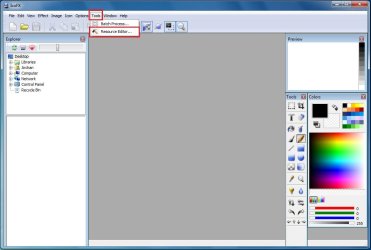
3. Open IcoFX. Click on Tools > Resource Editor.
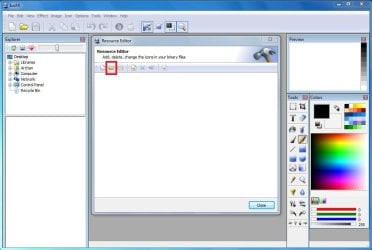
4. In the resource editor window , click on the folder icon. The Open Resources window will appear.
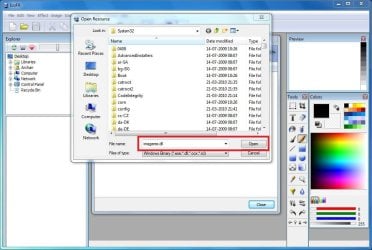
5. In the open resources window, give the filename "imageres.dll" and click open.
6. So in the resource editor window, The games icon no is #14
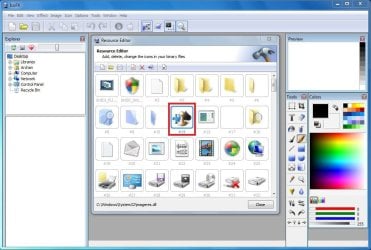
We are to moderate it using Resource Hacker. Now we may close IcoFX.
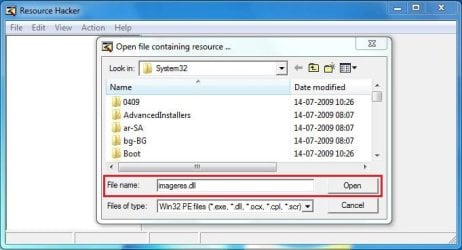
7. Open Resource Hacker. Click on File > Open . It will automatically open in System 32.

8. In the incoming box, give the file name "imageres.dll" and click "open".
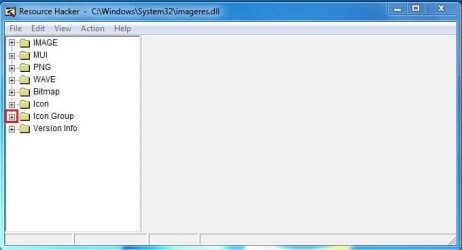
9. Now, Click on the "+" sign in front of "Icon Group"
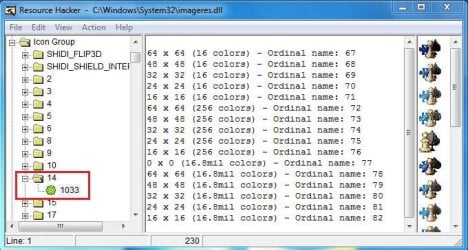
10. You will look the Icon group tree expands, and an item "*1033" there. Click on "*1033" and see the games icon revealed in the right side pane of the window.
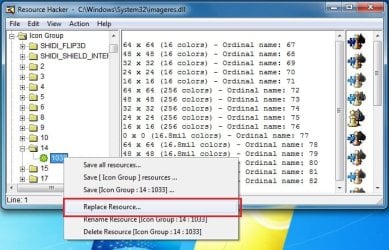
11. Now right click on "*1033" and click on "replace resource"
12. In the upcoming box, click on "Open the file with new icon" and browse for it.
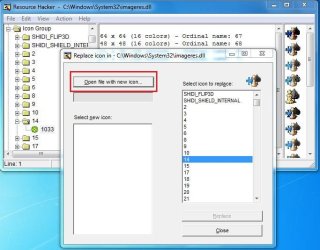
13. Now, first click on "Select new icon" and then click on "replace"

Repeat upto step 13 for the icons you want to change at a time, and when all of your icons are replaced, go to step 14.
14. We are almost done. We successfully modified the imageres.dll file. Now it is to save it. Cilck on File > Save as, give the filename "imageres,dll". Save it on your desktop.
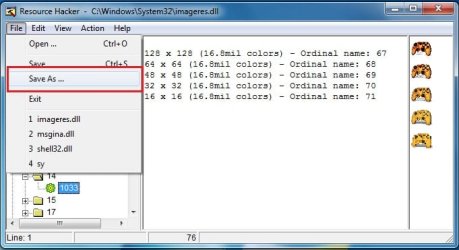
15. Go again to C:\Windows\System32\imageres.dll. Rename it to inageresOLD.dll or something. Now copy the modified imageres.dll in that location. The last thing is to restart ... either you may restart your computer, or you may restart explorer.exe using task manager.
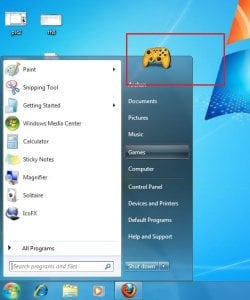
16. After restart, Click on start menu and place your pointer on the games link. you will get it
I agree with you that the process is lengthy and labourous
 But it is the free of cost way to change all the system icons.
Enjoy yourself. And again,dont forget to backup your original imageres.dll before starting the process

Related Tutorials
- How to Change the Windows 7 Default User Folder Icons
- How to Change Windows 7 Default Control Panel Icons
- How to Change a Library Icon in Windows 7
- How to Change the Open Folder Icon in Windows 7
- How to Change the Default Libraries Icon in Windows 7
- How to Add or Remove Control Panel from the Windows 7 Navigation Pane
- How to Change the Default Icon of a File Extension in Windows 7
- Download Windows 7 Default ICO and PNG Icons
- How to Change a Drive Icon in Vista, Windows 7, and Windows 8
- How to Change the Windows 7 Default Folder Icon
- How to Change Windows 7 Default Folder Icons using Resource Hacker
Last edited by a moderator:


