
Windows 7 Forums Search
Welcome to Windows 7 Forums. Our forum is dedicated to helping you find solutions with any problems, errors or issues you are experiencing with Windows 7. The Windows 7 forum also covers news and updates and has an extensive Windows 7 tutorial section that covers a wide range of tips and tricks.


Windows 7 - pst file Corrupted - Repair


pst file Corrupted - Repair

How to Repair a Corrupted pst File
Published by ryo
03-24-2010
Default pst file Corrupted - Repair

How to Repair a Corrupted PST File

information   Information
This will help you to repair your pst file when the pst file corrupted.


1. If you Have 32-bit Windows Installed
A) For Outlook 2007, go to the location below and run the SCANPST.EXE file.
C:\Program Files\Microsoft Office\Office12\SCANPST.EXE
B) For Outlook 2010, go to the location below and run the SCANPST.EXE file.
C:\Program Files\Microsoft Office\Office14\SCANPST.EXE
C) Go to step 3.
2. If you Have 64-bit Windows Installed
A) For Outlook 2007, go to the location below and run the SCANPST.EXE file.
C:\Program Files (x86)\Microsoft Office\Office12\SCANPST.EXE
B) For Outlook 2010, go to the location below and run the SCANPST.EXE file.
C:\Program Files (x86)\Microsoft Office\Office14\SCANPST.EXE
C) Continue on to step 3.
3. Type your current pst file folder
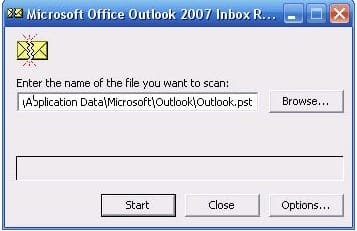
pst file Corrupted - Repair-pst.jpg
4. then press start button for start scan corrupted file
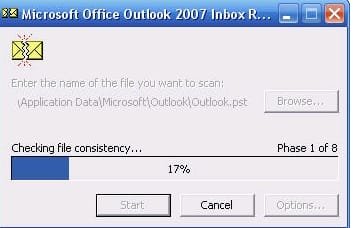
pst file Corrupted - Repair-pst1.jpg
5. if your pst file can recover, that will show in the message and press repair to fix it.
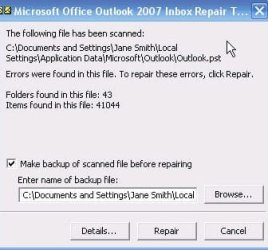
pst file Corrupted - Repair-pst2.jpg

Published by
Senior Member


Join Date: Feb 2010
Location: Indonesia
Posts: 2,034
ryo has a reputation beyond reputeryo has a reputation beyond reputeryo has a reputation beyond reputeryo has a reputation beyond reputeryo has a reputation beyond reputeryo has a reputation beyond reputeryo has a reputation beyond reputeryo has a reputation beyond reputeryo has a reputation beyond reputeryo has a reputation beyond reputeryo has a reputation beyond reputeryo has a reputation beyond reputeryo has a reputation beyond repute

Tutorial Tools
03-24-2010   #1
Darryl Licht


Windows 7 Ultimate 64 bit Steve Ballmer Signature Edition


Great Tutorial & useful tutorial! +1!!!

My System SpecsSystem Spec
03-25-2010   #2
ryo


Quote   Quote: Originally Posted by Darryl Licht View Post
Great Tutorial & useful tutorial! +1!!!

Thank you
My System SpecsSystem Spec
03-25-2010   #3
Darryl Licht


Windows 7 Ultimate 64 bit Steve Ballmer Signature Edition


No problemo!
My System SpecsSystem Spec
.


08-17-2010   #4
Abhishek Ghosh


Windows 7 Ultimate 64 bit, Mac OS X 10.6


Nice tutorial mate
My System SpecsSystem Spec
08-17-2010   #5
ryo


thanks you nokia..very appreciate it.
My System SpecsSystem Spec
08-17-2010   #6
Lomai


Win7 HP (x64)/Win7 Ultimate (x64)


Thanks for this.
Appreciate the time taken and regards
My System SpecsSystem Spec
08-17-2010   #7
ryo


thanks lomai.. glad this useful.
My System SpecsSystem Spec
03-30-2011   #8
YTTiger


Windows 7 64 bit


So corrupt!

[IMG]file:///C:/Users/Tammy/AppData/Local/Temp/moz-screenshot.png[/IMG] This tool is not looking for my .pst file. I have Windows 7 on a 64 bit platform. When I do this, I select my .pst file and it says it is 'The Microsoft Office 2007 Outlook Repair Tool cannot recover the data file in...(where my .pst file is located).pst. File recovery is stopping now'. Can it be so corrupt that it is unsavable? Thank you for any input or advice.
My System SpecsSystem Spec
03-30-2011   #9
ryo


hi...can you take snapshot on it?? how big the pst file?
My System SpecsSystem Spec
Comment

pst file Corrupted - Repair problems?


Tutorial Tools


Similar Threads for: pst file Corrupted - Repair
Windows 7 Tutorial Category
corrupted administrator account repair replace General Discussion
How do I repair Windows 7 when Extensions are corrupted Customization
How to repair corrupted dlls and Registry? Installation & Setup
Profile Corrupted.... Repair Install to Fix it ??? General Discussion


All times are GMT -5. The time now is 07:52 PM.


Windows 7 Forums is an independent web site and has not been authorized,
sponsored, or otherwise approved by Microsoft Corporation.
"Windows 7" and related materials are trademarks of Microsoft Corp.
© Designer Media Ltd
  

1 2 3 4 5 6 7 8 9 10 11 12 13 14 15 16 17 18 19 20 21 22 23 24 25 26 27 28 29 30