
How to Change the Time to Warn a User to Change Password Before Expiration
Information
If you have password expiration enabled, then this will show you how to change how far in advance (in days) users are warned that their password is about to expire in Windows 7 and Windows 8.
Note
You can only do this while logged in as an administrator.
In Windows 8, this only applies to local accounts, and not Microsoft accounts.
In Windows 8, this only applies to local accounts, and not Microsoft accounts.
OPTION ONE
Through Local Security Policy Manager
NOTE: This option is only available for the Windows 7 Professional, Ultimate, and Enterprise editions.
1. If you have not already, you must enable password expiration for each user account that you want to have their password expire for that user to be able to get a warning that their password will expire before the maximum password age has been reached.
2. Open the Local Security Policy editor.
3. In the left pane, expand Local Policies, and click on Security Options. (see screenshot below)
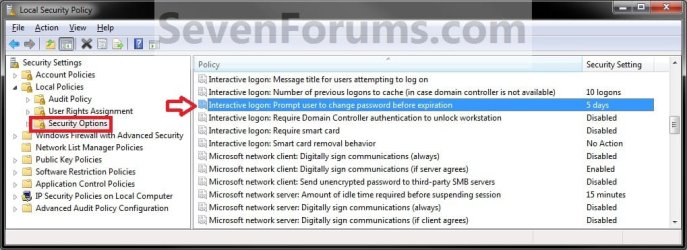
4. In the right pane, double click on Interactive logon: Prompt user to change password before expiration. (see screenshot above)
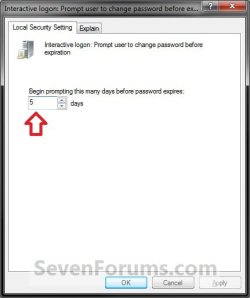
5. Type in how many days you want Windows 7 to begin prompting users to change their password before it expires, then click on OK. (see screenshot below)
6. Close the Local Security Policy editor.
OPTION TWO
Through Registry Editor
NOTE: This option is available for all Windows 7 editions.
1. If you have not already, you must enable password expiration for each user account that you want to have their password expire for that user to be able to get a warning that their password will expire before the maximum password age has been reached.
2. Open the Start Menu, then type regedit in the search box and press enter.
3. If prompted by UAC, then click on Yes.
4. In regedit, navigate to the location below: (see screenshot below)
Code:
HKEY_LOCAL_MACHINE\SOFTWARE\Microsoft\Windows NT\CurrentVersion\Winlogon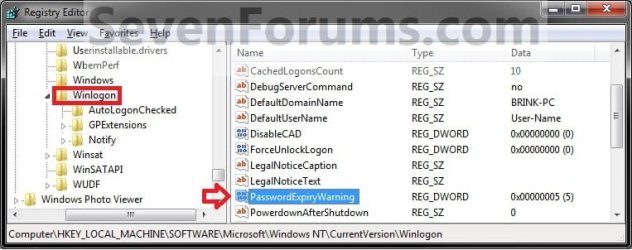
5. In the right pane of Winlogon, double click on PasswordExpiryWarning. (see screenshot above)
6. Select (dot) Decimal, then type in how many days you want Windows 7 to begin prompting users to change their password before it expires and click on OK. (see screenshot below)

7. Close regedit.
8. Restart the computer to fully apply.
That's it,
Shawn
Related Tutorials
- How to Enable or Disable Password Expiration for a User in Windows 7 and Windows 8
- How to Change Maximum and Minimum Password Age in Windows 7 and Windows 8
- How to Change the Password for Your or Another User Account in Windows 7
- How to Create a Password for a Windows 7 User Account
- How to Reset the Password of a User Account in Windows 7
- How to Make Windows 7 Require a User Name and Password at Log On
- How to Add or Remove Change Password from the CTRL+ALT+DEL Screen
- How to Create a Windows 7 Password Reset Disk
- How to Use System Restore to Change User Account Password
- How to Change the User Account Password if Unable to Login to Windows
- How to Enable or Disable Password must meet Complexity Requirements
- How to Set Account Lockout Threshold for Invalid Logon Attempts
- How to Set Account Lockout Duration for Locked Out User Accounts
- How to Set the Reset Account Lockout Counter After Setting
- How to Enable or Disable Windows 7 Password History Enforcement
Last edited: