| | Welcome to Windows 7 Forums. Our forum is dedicated to helping you find solutions with any problems, errors or issues you are experiencing with Windows 7. The Windows 7 forum also covers news and updates and has an extensive Windows 7 tutorial section that covers a wide range of tips and tricks. | Windows 7 - Show Window Contents or Outline While Dragging
Show Window Contents or Outline While Dragging How to Show Window Contents or Outline While Dragging in Windows 7
Published by Brink
03-30-2010
| Show Window Contents or Outline While Dragging How to Show Window Contents or Outline While Dragging in Windows 7  Information This will show you how to set Windows 7 to show window contents while dragging the window, or show only window outline while dragging the window. EXAMPLE: Show window outline while dragging OPTION ONE
Through Visual Effects Settings
1. Open the Visual Effects settings window in Performance Options. 2. To Show Window Contents While DraggingA) Check the Show window contents while dragging box, and click on OK. (see screenshot below)
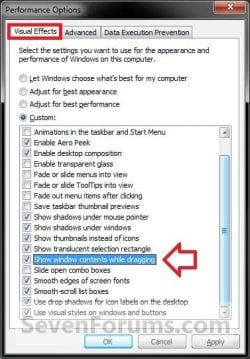
3. To Show Window Outline While DraggingA) Uncheck the Show window contents while dragging box, and click on OK. (see screenshot above) OPTION TWO
Using a REG File Download
1. To Show Window Contents While Dragging A) Click on the download button below to download the file below.Show_window_contents_while_dragging.reg  B) Go to step 3. 2. To Show Window Outline While DraggingA) Click on the download button below to download the file below.Show_window_outline_while_dragging.reg 
3. Click on Save, and save the .reg file to the Desktop. 4. Right click on the downloaded .reg file and click on Merge. 5. Click on Run, Yes, Yes, and OK when prompted. 6. Log off and log on, or restart the computer to apply the changes. 7. When done, you can delete the downloaded .reg file if you like. OPTION THREE
Manually in Registry Editor
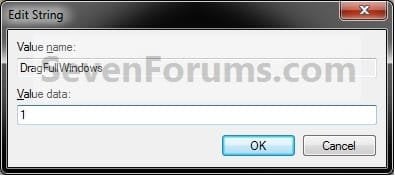
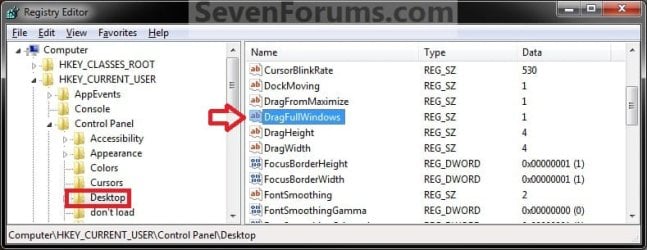
1. Open the Start Menu, then type regedit in the search boxand press Enter. 2. If prompted by UAC, click on Yes to allow. 3. In regedit, navigate to the location below. (see screenshot below)HKEY_CURRENT_USER\Control Panel\Desktop  4. In the right pane, double click on DragFullWindows. (see screenshot above) 5. To Show Window Contents While DraggingA) Type in 1, and click on OK. (see screenshot below) B) Go to step 7. 6. To Show Window Outline While DraggingA) Type in 0, and click on OK. (see screenshot above) 7. Close regedit. 8. Log off and log on, or restart the computer to apply the changes. That's it,
Shawn |  Published by | | Administrator Join Date: Oct 2008 Location: Texas Posts: 34,826 | |
 Tutorial Tools | | | | | | | | | |
07-14-2011
|
#1 | | Windows 7 Professional 64bit |
Thanks for that, I wasn't even sure what the problem was tell i saw this post.
| My System Specs | | System Manufacturer/Model Number Custom Build OS Windows 7 Professional 64bit CPU Intel i7 920 OC 3.8ghz Motherboard Asus P6T Memory 8gb Kingston DDR3 Graphics Card Gtx 460 1gb & 9500gt 1gb OC Sound Card Realtek HD audio inbuilt 7.1 surround Monitor(s) Displays SyncMaster 2333 Screen Resolution 1920*1080 PSU 1200 watt Cooling Trition 81 Hard Drives Seagate es2 barracuda 1TB,
Kingston 128gb SSD,
2 WD 2TB green drives , |
07-14-2011
|
#2 | | Windows 7 Ultimate x64 SP1 |
You're welcome thepower. I'm happy to hear that you got it sorted. | My System Specs | | System Manufacturer/Model Number Self built custom OS Windows 7 Ultimate x64 SP1 CPU Intel i7-980X 3.3 Ghz (3.48 Ghz OC'd) Motherboard ASUS P6X58D Premium Memory 12 GB (2GBx6) DDR3 PC3-16000 2000 MHz Kingston HyperX Graphics Card Sapphire HD5870 Eyefinity 6 2GB Sound Card Realtek HD Audio ALC889 Integrated Chip Monitor(s) Displays 3x 27" Asus VE278Q Screen Resolution 1920x1080 Keyboard Logitech Cordless Desktop MX 5500 Revolution Mouse Logitech Cordless Desktop MX 5500 Revolution PSU OCZ Series Gold OCZZ1000M 1000W Case Corsair Obsidian 800D Cooling Thermalright Ultra 120 Extreme Copper CPU heat sink w/120 MM Hard Drives 160GB OCZ RevoDrive X2
** 2 x 1TB Samsung HDD HD154UI SATA Internet Speed 50 Mb/s Download and 2 Mb/s Upload Other Info Microsoft LifeCam Cinema
** Lite-On iHBS212 12x BD Writer
** Samsung CLX-3175FW Printer
** Netgear WNDR3800 Router
** Motorola SBG6580 Cable Modem
** 2x APC Back-UPS XS 1500 |
4 Weeks Ago
|
#3 | | Windows 7 Home Premium 64bit |
Hello,
please, does this registry value apply for all programs and all windows?
Thanks,
~tEh'Pār4d0x | My System Specs | | OS Windows 7 Home Premium 64bit |
4 Weeks Ago
|
#4 | | Windows 7 Ultimate x64 SP1 |
Hello ~tEh'Pār4d0x,
Yes, it is applied to all opened windows including program windows. | My System Specs | | System Manufacturer/Model Number Self built custom OS Windows 7 Ultimate x64 SP1 CPU Intel i7-980X 3.3 Ghz (3.48 Ghz OC'd) Motherboard ASUS P6X58D Premium Memory 12 GB (2GBx6) DDR3 PC3-16000 2000 MHz Kingston HyperX Graphics Card Sapphire HD5870 Eyefinity 6 2GB Sound Card Realtek HD Audio ALC889 Integrated Chip Monitor(s) Displays 3x 27" Asus VE278Q Screen Resolution 1920x1080 Keyboard Logitech Cordless Desktop MX 5500 Revolution Mouse Logitech Cordless Desktop MX 5500 Revolution PSU OCZ Series Gold OCZZ1000M 1000W Case Corsair Obsidian 800D Cooling Thermalright Ultra 120 Extreme Copper CPU heat sink w/120 MM Hard Drives 160GB OCZ RevoDrive X2
** 2 x 1TB Samsung HDD HD154UI SATA Internet Speed 50 Mb/s Download and 2 Mb/s Upload Other Info Microsoft LifeCam Cinema
** Lite-On iHBS212 12x BD Writer
** Samsung CLX-3175FW Printer
** Netgear WNDR3800 Router
** Motorola SBG6580 Cable Modem
** 2x APC Back-UPS XS 1500 |
4 Weeks Ago
|
#5 | | Windows 7 Home Premium 64bit |

Quote: Originally Posted by Brink Hello ~tEh'Pār4d0x,
Yes, it is applied to all opened windows including program windows.  Hi, thanks for such a quick answer! I don't intend to bother you or in any way hijack this topic, so I will simply link here: http://www.sevenforums.com/customiza...w-outline.html
I mean, I enabled content, it's showing, it's even working for this Xfire messenger window, but when I try to resize the Xfire chat-window, there it appears. It wasn't there a week ago, my PC once suddenly crashed and this started happening.
I tried to reinstall, but nothing helped. Xfire support claims, it is most likely some OS related error.
Weird..
Thanks anyway,
~tEh'Pār4d0x | My System Specs | | OS Windows 7 Home Premium 64bit |
4 Weeks Ago
|
#6 | | Windows 7 Ultimate x64 SP1 |
This seems more like some sort of issue with Xfire instead IMO since it is only happening with this program for you. I would suggest to keep contacting Xfire support to see if they may come out with a patch for it. If they wish to pass the buck and not help, then I would recommend that you pass the buck as well to another software company that cares about their product and customers. | My System Specs | | System Manufacturer/Model Number Self built custom OS Windows 7 Ultimate x64 SP1 CPU Intel i7-980X 3.3 Ghz (3.48 Ghz OC'd) Motherboard ASUS P6X58D Premium Memory 12 GB (2GBx6) DDR3 PC3-16000 2000 MHz Kingston HyperX Graphics Card Sapphire HD5870 Eyefinity 6 2GB Sound Card Realtek HD Audio ALC889 Integrated Chip Monitor(s) Displays 3x 27" Asus VE278Q Screen Resolution 1920x1080 Keyboard Logitech Cordless Desktop MX 5500 Revolution Mouse Logitech Cordless Desktop MX 5500 Revolution PSU OCZ Series Gold OCZZ1000M 1000W Case Corsair Obsidian 800D Cooling Thermalright Ultra 120 Extreme Copper CPU heat sink w/120 MM Hard Drives 160GB OCZ RevoDrive X2
** 2 x 1TB Samsung HDD HD154UI SATA Internet Speed 50 Mb/s Download and 2 Mb/s Upload Other Info Microsoft LifeCam Cinema
** Lite-On iHBS212 12x BD Writer
** Samsung CLX-3175FW Printer
** Netgear WNDR3800 Router
** Motorola SBG6580 Cable Modem
** 2x APC Back-UPS XS 1500 Show Window Contents or Outline While Dragging problems? All times are GMT -5. The time now is 02:57 AM. |  |