Windows 7 Forums Search
Welcome to Windows 7 Forums. Our forum is dedicated to helping you find solutions with any problems, errors or issues you are experiencing with Windows 7. The Windows 7 forum also covers news and updates and has an extensive Windows 7 tutorial section that covers a wide range of tips and tricks.


Windows 7 - Offscreen Window - Move Back to Desktop


Offscreen Window - Move Back to Desktop

How to Move Offscreen Window Back to the Desktop in Windows 7
Published by Brink
03-31-2010
Default Offscreen Window - Move Back to Desktop

How to Move a Offscreen Window Back to the Desktop in Windows 7

information   Information
If you have a opened window that is offscreen from your main display, then this will show you how to move the offscreen window back on your desktop in Windows 7.

Note   Note
This would be a opened window that you accidentally moved off the screen to far to get to it with the mouse pointer, or if a laptop or desktop computer is plugged up to a temporary secondary monitor display and then disconnected without remembering to move the open window(s) back to the primary desktop display.


Here's How:
1. Hover the mouse pointer over the offscreen open window icon on the taskbar until you see it's taskbar thumbnail preview display. (see screenshot below)
Offscreen Window - Move Back to Desktop-step1.jpg
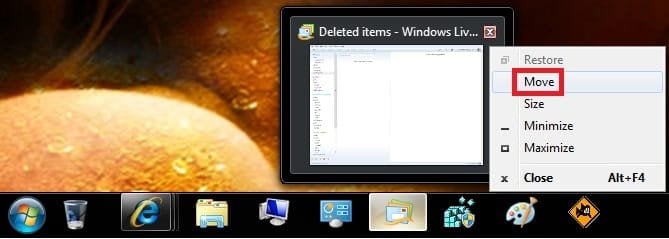
2. Right click on the taskbar thumbnail preview, and click on Move. (see screenshot below)
NOTE: You could also press and hold the Shift key, right click on the taskbar icon of the offscreen window, release the Shift key, then click on Move.
Offscreen Window - Move Back to Desktop-step2b.jpg
Tip   Tip
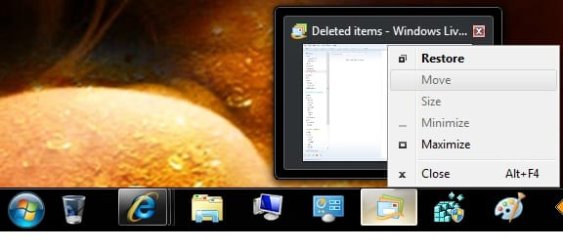
If Move is grayed out, then that means that the offscreen window has been minimized to the taskbar. Click on Maximize or Restore and repeat step 2 to now be able to click on Move.

Offscreen Window - Move Back to Desktop-step2a.jpg

3. The mouse pointer will now turn into the move cursor Name:  Move_Cursor.jpg
Views: 11999
Size:  1.0 KB on the offscreen window, but you will not see this quite yet.

4. Press and release one of the arrow keys on the keyboard.

5. Now drag the offscreen window back to your desktop by either moving the mouse or using the arrow keys.
NOTE: You may need to move the mouse around a bit until you see what direction the offscreen window is coming from.

6. When you have the window back to where you want it on the desktop, left click or press Enter to drop the window into place.
That's it,
Shawn


Published by
Brink's Avatar
Administrator

Join Date: Oct 2008
Location: Texas
Posts: 37,303

Tutorial Tools
03-31-2010   #1
CassieFWinTeam


Windows 7 Professional 64-bit


Thanks for sharing, Shawn!

Cassandra
Microsoft Windows Outreach

My System SpecsSystem Spec
03-31-2010   #2
Brink


Windows 7 Ultimate x64 SP1


Thank you Cassandra.
My System SpecsSystem Spec
04-24-2010   #3
RyanG


Windows 7


6. When you have the window back to where you want it on the desktop, left click or press Enter to drop the window into place.

when i press Enter or left click the window disappears and is offscreen again.
My System SpecsSystem Spec
.


04-24-2010   #4
Brink


Windows 7 Ultimate x64 SP1


Hello Ryan, and welcome to Seven Forums.

Strange, that should not happen. Do you have the window all the way onto your desktop and not hanging offscreen any at all? What is that window for?
My System SpecsSystem Spec
04-24-2010   #5
RyanG


Windows 7


yes, the window is all the way on the screen. And the window is for Steam Community chat
My System SpecsSystem Spec
04-24-2010   #6
Brink


Windows 7 Ultimate x64 SP1


Ryan,

I must admit that I'm not sure why it is doing that for you. You might see if uninstalling and reinstalling the program may be able to reset it for you so that it opens on the desktop normally again.
My System SpecsSystem Spec
05-02-2010   #7
Torongo


Windows 7


Nice, thanks. =)

~Joshua~
My System SpecsSystem Spec
05-02-2010   #8
Brink


Windows 7 Ultimate x64 SP1


You're most welcome Joshua. Thank you.
My System SpecsSystem Spec
01-05-2011   #9
Kari


Sorry but IMO this is wrong:
Quote:
If Move is grayed out, then that means that the offscreen window has been minimized to the taskbar. Click on Maximize and repeat step 2 to now be able to click on Move.
I think it should be:
Quote:
If Move is grayed out, then that means that the offscreen window has been minimized to the taskbar or maximized to full screen. To move a window, it must be restored to non-full screen mode. Click on Restore and repeat step 2 to now be able to click on Move.
This is at least how this works on all my rigs; only open, non-full screen windows can be moved using this method.

Kari
My System SpecsSystem Spec
Comment

 Offscreen Window - Move Back to Desktop problems?


Tutorial Tools


Similar Threads for: Offscreen Window - Move Back to Desktop
Windows 7 Tutorial Category
Move files back and forth Virtualization
Move a window slowly on desktop, all other windows disappear.. General Discussion
Move back My Documents Folder to Root Directory General Discussion
IE8 and offscreen compositing Browsers & Mail
Move a Window with the Keyboard Tutorials


All times are GMT -5. The time now is 03:00 AM.


Windows 7 Forums is an independent web site and has not been authorized,
sponsored, or otherwise approved by Microsoft Corporation.
"Windows 7" and related materials are trademarks of Microsoft Corp.
© Designer Media Ltd
  

1 2 3 4 5 6 7 8 9 10 11 12 13 14 15 16 17 18 19 20 21 22 23 24 25 26 27 28 29 30