
Windows 7 Forums


Windows 7: Mouse Pointer - Snap To Default Button


Mouse Pointer - Snap To Default Button

How to Set Windows 7 Mouse Pointer to Automatically Move to the Default Button
Published 01 Dec 2008
Published by

Featured Tutorial

User Profile - Customize During Installation

How to Customize Default User Profile in Audit Mode

Secunia ONLINE Software Inspector

How to Scan for Common Software Vulnerabilities

Windows 7 Installation - Transfer to a New Computer

How to Transfer your Complete Windows 7 Installation to a New Computer

Make Windows 7 bootable after motherboard swap

Paragon P2P Adjust OS - Make Windows 7 bootable after motherboard swap

Clean Up Factory Bloatware


How to Set Windows 7 Mouse Pointer to Automatically Move to the Default Button

information   Information
This will show you how to set the Windows 7 mouse pointer to automatically move (snap) to the default button in a pop-up dialog box to make it easier to select.


Here's How:
1. Open the Control Panel (All Items View).

2. Click on the Mouse icon.

3. Click on the Pointer Options tab. (See screenshot below)
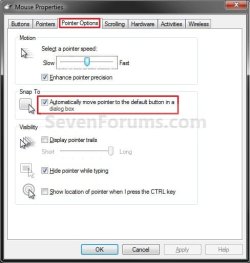
Mouse Pointer - Snap To Default Button-mouse_properties.jpg
4. To Turn Snap To On -
A) Check the Automatically move pointer to the default button in a dialog box button. (See screenshot above)

B) Go to step 6.
5. To Turn Snap To Off -
A) Uncheck the Automatically move pointer to the default button in a dialog box button. (See screenshot below step 3)
6. Click on OK. (See screenshot below step 3)

7. Close the Control Panel window.
That's it,
Shawn

Need more help? Try searching our extensive help and support site.
Loading
14 Mar 2009  
drchaitra

 
automatically move pointer to the default button in the dialogue box

The box gets unclicked every now and then, what to do?

My System SpecsSystem Spec

14 Mar 2009  
Brink


Hello Dr. Chaita, and welcome to Seven Forums.

Not sure what you mean, but it may reset if you have installed a new mouse driver version.

Shawn
My System SpecsSystem Spec
15 Mar 2009  
drchaitra


Thanks for ur reply Shawn, yes the problem did start after I had installed a new driver as my mouse touchpad had started behaving erratically. Once I saw that the snap to function got uncheck automatically inspite of checking it several times in a day, I uninstalled the driver and starting using the native drivers, however, the problems still persists. I then tried installing the drivers that came with the dell laptop with no change in status. I am very used to the mouse snapping to the default button as there are many in my line of work. Its just very irritating that this mouse property doesn't work fine anymore inspite of checking the box in the CP
My System SpecsSystem Spec
.


15 Mar 2009  
Brink


If it has not been to long a go, you might try a System Restore using a restore point dated when it did work properly to see if that may help.
My System SpecsSystem Spec
17 Mar 2009  
drchaitra


Hey thanks Brink, it worked and is still working. Cant tell u you have relieved I am that the snap to function is working fine now.
My System SpecsSystem Spec
17 Mar 2009  
Brink


You're welcome Dr. Chaitra. I'm happy to hear that you got it sorted.
My System SpecsSystem Spec
07 Aug 2009  
Backdoc52

 
Mouse snap function lost

I have had problems with my mouse snap function since going from Windows 7 Beta to RC, as well as a lot of other items stopped working or were incompatible.
I have set the mouse to snap to the default in the control panel, installed the latest drivers (Microsoft Deskset 4000 wireless/USB) but it has not worked to date, while the rest of the functions are fine.
Any comments on how and why this might not work and what to do about it?

Backdoc52
My System SpecsSystem Spec
07 Aug 2009  
Brink


Hello Backdoc52, and welcome to Seven Forums.

It may be your mouse movement (motion) sensitivity settings. I noticed that if you move the mouse when it is suppose to snap, that it will not snap. If you click on the item and wait without moving the mouse it may snap then.

Hope this helps some,
Shawn
My System SpecsSystem Spec
09 Aug 2009  
Backdoc52


Quote   Quote: Originally Posted by Brink View Post
Hello Backdoc52, and welcome to Seven Forums.

It may be your mouse movement (motion) sensitivity settings. I noticed that if you move the mouse when it is suppose to snap, that it will not snap. If you click on the item and wait without moving the mouse it may snap then.

Hope this helps some,
Shawn
Thanks for the info, Shawn, but I have set the speed and sensitivity low, switched off any additional functions, but no good, it still will not "snap-to" . This is the first operating system I have played with, where I have had this problem. (and I have been playing with windows since Version 1.0, and with DOS since Version 1.0.)
There must be something wrong with the RC, since it never had this problem.

Backdoc52
My System SpecsSystem Spec
Comment

 Mouse Pointer - Snap To Default Button problems?


Tutorial Tools


Similar help and support threads for: Mouse Pointer - Snap To Default Button
Windows 7 Tutorial Category
On mouse moven the mouse pointer gets stuck randomly Hardware & Devices
Need Mouse & Pointer Help ... Hardware & Devices
Mouse snap to default - applied settings but still doesn't work General Discussion
Mouse Pointer General Discussion
mouse pointer switch to default after reboot Customization


All times are GMT -5. The time now is 01:11 PM.


Windows 7 Forums is an independent web site and has not been authorized,
sponsored, or otherwise approved by Microsoft Corporation.
"Windows 7" and related materials are trademarks of Microsoft Corp.
© Designer Media Ltd