
How to Change Taskbar Thumbnail and List Mode Threshold in Windows 7 and Windows 8
Information
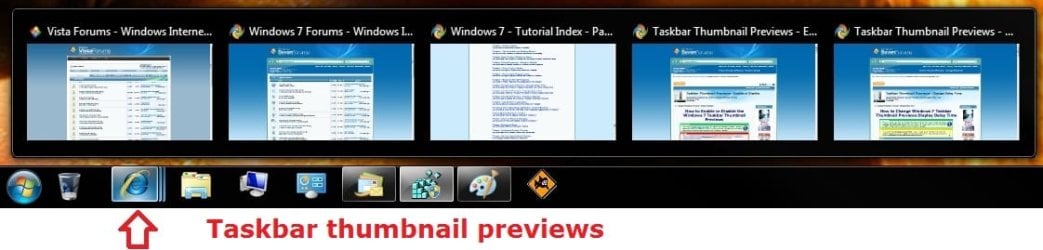
By default, the taskbar will show thumbnail previews of open windows and programs when you hover the mouse pointer over it's taskbar icon while using a Aero theme.
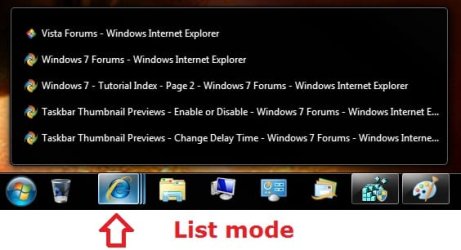
When you are using a Basic or High Contrast theme, the taskbar will only show a list of tabs (list mode) for the open windows and programs (ex: Internet Explorer) when you hover the mouse pointer over it's taskbar icon, and never any thumbnail previews.
While still using a Aero theme, this will show you how to change the number of thumbnail previews that will display for a icon on the taskbar before it switches to list mode instead in Windows 7.
When you are using a Basic or High Contrast theme, the taskbar will only show a list of tabs (list mode) for the open windows and programs (ex: Internet Explorer) when you hover the mouse pointer over it's taskbar icon, and never any thumbnail previews.
While still using a Aero theme, this will show you how to change the number of thumbnail previews that will display for a icon on the taskbar before it switches to list mode instead in Windows 7.
Note
If the taskbar thumbnail previews of multiple windows/tabs opened for a icon go past your screen's edge, then they will automatically be displayed in list mode instead of thumbnail preview mode.
For example, if your screen resolution is 1200x800, and say you have more than 15 tabs open in IE, then it will display in list mode when you hover over IE's icon on the taskbar.
Limits before list mode examples:
1920x1080 = 15 tabs or windows open for a icon
1200x800 = 10 tabs or windows open for a icon
For example, if your screen resolution is 1200x800, and say you have more than 15 tabs open in IE, then it will display in list mode when you hover over IE's icon on the taskbar.
Limits before list mode examples:
1920x1080 = 15 tabs or windows open for a icon
1200x800 = 10 tabs or windows open for a icon
EXAMPLE: Taskbar Thumbnail Previews Mode
EXAMPLE: Taskbar List Mode
OPTION ONE
Change Taskbar Thumbnail and List Mode Threshold using REG File
1. To Always Have Taskbar List Mode
NOTE: This sets the NumThumbnails value to 0 in OPTION TWO below.
A) Click on the download button below to download the file below.
Taskbar_Always_List_Mode.reg
Download
B) Go to step 3.
2. To Have Taskbar Thumbnail Previews Mode
NOTE: This deletes the NumThumbnails value in OPTION TWO below. This is the default setting.
A) Click on the download button below to download the file below.
Taskbar_Thumbnail_Previews_Mode.reg
Download
3. Save the .reg file to your desktop.
4. Double click/tap on the downloaded .reg file to merge it.
5. If prompted, click/tap on Run, Yes (UAC), Yes, and OK to approve the merge.
6. Log off and log on, or restart the computer to apply the changes.
7. When done, you can delete the downloaded .reg file if you like.
OPTION TWO
Change Taskbar Thumbnail and List Mode Threshold in Registry Editor
1. Press the Windows + R keys to open the Run dialog, type regedit, and click/tap on OK.
2. In regedit, navigate to the location below. (see screenshot below step 3A)
HKEY_CURRENT_USER\Software\Microsoft\Windows\CurrentVersion\Explorer\Taskband
3. To Change Thumbnail Previews Threshold Before Switching to List Mode
A) In the right pane, right click on a empty space and click on New and DWORD (32-bit) Value. (see screenshot below)

B) Type NumThumbnails and press enter. (see screenshot below)
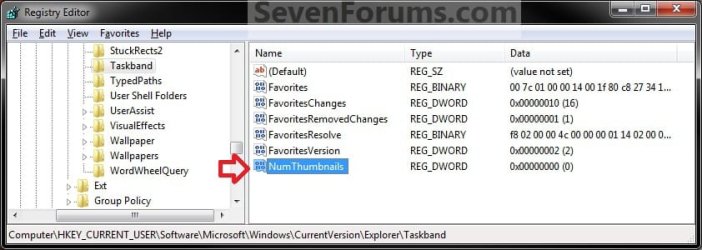
C) In the right pane, double click on NumThumbnails. (see screenshot above)
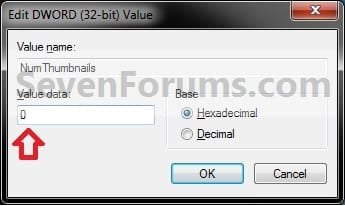
D) Type in how many thumbail previews you want to have display so that it will switch to list mode after this number, then click on OK. (see screenshot below)
NOTE: Typing in 0 will result in always being in list mode.
E) Go to step 5.
4. To Restore Taskbar Thumbnail Previews Mode
NOTE: This is the default setting.
A) In the right pane, right click on NumThumbnails and click on Delete. (see screenshot below step 3B)
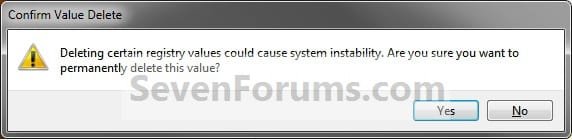
B) Click on Yes to confirm. (see screenshot below)
5. Close regedit.
6. Log off and log on, or restart the computer to apply the changes.
That's it,
Shawn
Related Tutorials
- How to Enable or Disable Taskbar Thumbnail Previews in Windows 7 and Windows 8
- How to Change Taskbar Thumbnail Live Preview Delay Time in Windows 7 and Windows 8
- How to Change Taskbar Thumbnail Previews Display Delay Time in Windows 7 and Windows 8
- How to Enable or Disable Taskbar Button Grouping in Windows 7
- How to Allow or Prevent Taskbar Button Grouping in Windows 7
- How to Enable or Disable Internet Explorer Individual Tabbed Browsing Taskbar Preview Windows
- How to Change Size of Taskbar Thumbnail Previews in Windows 7 and Windows 8
- How to Change Space Size Between Taskbar Thumbnail Previews in Windows 7 and Windows 8
- How to Change Margin Size Taskbar Thumbnail Previews in Windows 7 and Windows 8
Attachments
Last edited:


