
How to Enable or Disable Point to Select using Single-click to Open an Item
Information
This will show you how to enable or disable selecting a item by hovering the mouse pointer over it (point to select) when you have Folder Options set to Single-click to Open an Item in Windows 7.
Note
Credit goes to our member Msafi for finding this and bringing it to my attention.
Warning
A side effect of disabling point to select is that a taskbar icon's thumbnail previews (if using a Aero theme) for it's open window will not display automatically since it cannot be selected automatically anymore.
A workaround for this is to either:
A workaround for this is to either:
- Use the Windows Key + T and Windows Key + Shift + T shortcut keys to cycle through programs on the taskbar, and press Enter to open the one selected.
- Right click and then double left click on the taskbar icon of the opened window. The thumbnail preview will now display.
NOTE: This is only for when you have the Single-click to Open an Item Folder Option set, and not when you have Double-click to open an item (single-click to select) set.
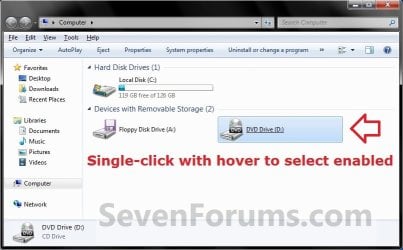
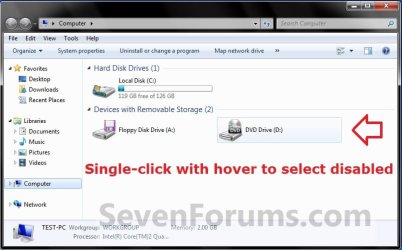
OPTION ONE
Through a REG File Download
1. To Enable Single Click Point to Select
NOTE: This is the default setting.
A) Click on the download button below to download the file below.
Enable_Single-Click_Point_to_Select.reg
Download
B) Go to step 3.
2. To Disable Single Click Point to Select
A) Click on the download button below to download the file below.
Disable_Single-Click_Point_to_Select.reg
Download
3. Save the .reg file to the desktop.
4. Right click the downloaded .reg file and click on Merge.
5. Click on Run, Yes (UAC), Yes, and OK when prompted.
6. Log off and log on, or restart the computer to apply the changes.
7. When done, you can delete the downloaded .reg file if you like.
OPTION TWO
Manually Through the Registry
1. Open the Start Menu, then type regedit in the search boxand press Enter.
2. In regedit, go to: (see screenshot below)
Code:
HKEY_CURRENT_USER\Control Panel\Mouse
3. To Enable Single Click Point to Select
NOTE: This is the default setting.
A) In the right pane, double click on MouseHoverHeight. (see screenshot above)
B) Type in 4, then click on OK. (see screenshots below)

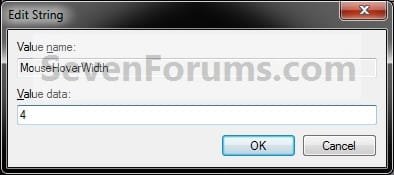
C) Repeat steps 3A and 3B for MouseHoverWidth.
D) Go to step 5.
4. To Disable Single Click Point to Select
A) In the right pane, double click on MouseHoverHeight. (see screenshot below step 2)
B) Type in 0, then click on OK. (see screenshots below)
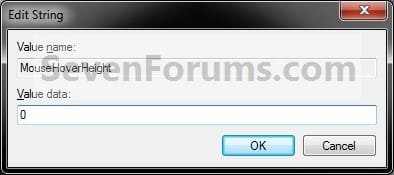
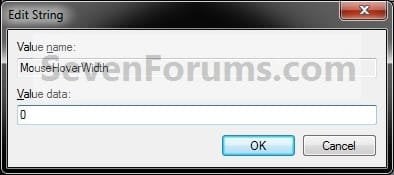
C) Repeat steps 4A and 4B for MouseHoverWidth.
5. Close regedit.
6. Log off and log on, or restart the computer to apply the changes.
That's it,
Shawn
Attachments
Last edited:


 But those tricks are not very usefull in everyday use. I choose to use single click, and then I have to click 3 times to see the toasters? Pehaps some day one will find another workarround. I stick to the check boxes.


