
How to Select a Power Plan Scheme in Windows 7 and Windows 8
Information
A power plan is a collection of hardware and system settings that manages how your computer uses power. Power plans can help you save energy, maximize system performance, or achieve a balance between the two.
This tutorial will help show you how to select either a Balanced, Power Saver, High Performance, or Custom power plan as active for your user account in Windows 7 and Windows 8.
This tutorial will help show you how to select either a Balanced, Power Saver, High Performance, or Custom power plan as active for your user account in Windows 7 and Windows 8.
Tip
You may also have a custom power plan available from your computer manufacturer (OEM) that may also appear by default on the battery meter on a mobile PC (laptop), or as one of the preferred power plans (step 7 below) on a desktop computer.
OPTION ONE
To Select Power Plan Scheme as Active in Power Options
1. Open the Control Panel (icons view) in Windows 7 or Windows 8, click/tap on the Power Options icon.
2. To see alll of your available power plans, you will need to click on the drop down arrow to the right of Show additional plans, and do step 3, 4, 5, or 6 below for the power plan you want. (See screenshots below)
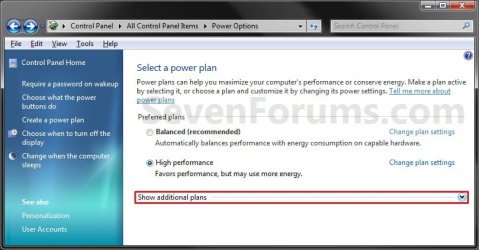

3. For the Balanced Power Plan Scheme
NOTE: Offers full performance when you need it and saves power during periods of inactivity. This power plan balances energy conservation with performance.
A) Select (dot) Balanced (Recommended), and go to step 7 below. (See screenshots below step 2)
4. For the Power Saver Power Plan Scheme
NOTE: Saves power by reducing system performance. This plan can help mobile PC users get the most from a single battery charge. This power plan conserves energy.
A) Select (dot) Power saver, and go to step 7 below. (See screenshots below step 2)
5. For the High Performance Power Plan Scheme
NOTE: This power plan maximizes system performance and responsiveness. Mobile PC users may notice that their battery doesn't last as long when using this plan.
A) Select (dot) High Performance, and go to step 7 below. (See screenshots below step 2)
6. For a Custom Power Plan Scheme
NOTE: To be able to select a custom power plan, either the OEM will have one listed or you must have created a custom power plan.
A) Select (dot) an available custom power plan, and go to step 7 below. (See screenshots below step 2)
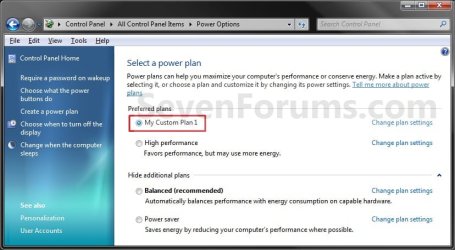
7. Close the Power Options window. (See screenshots below step 2)
8. You can also change the Advanced Power Plan Settings in Windows 7 or Windows 8 for this selected power plan if you like.
OPTION TWO
To Select Power Plan Scheme as Active in Command Prompt
1. Open a command prompt in Vista/Windows 7 or Windows 8/8.1.
2. In the command prompt, copy and paste the command below, and press Enter to see a list of existing power plan schemes.
powercfg /List
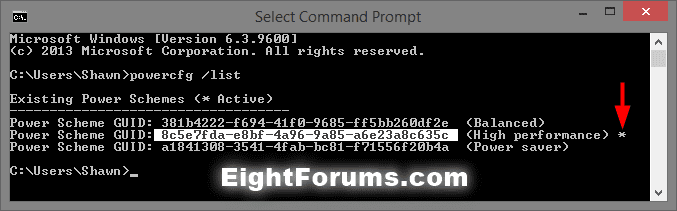
Note
The power scheme that has an asterisk * to the right of it is the current active power plan scheme.
3. In the command prompt, type the command below, press Enter to set a power scheme as active. (see screenshot below)
powercfg /S SCHEME_GUID

Note
Substitute SCHEME_GUID in the command with the actual GUID number of the power plan scheme you want from step 2 above.
For example, I would type this below to make the High performance power plan scheme the active power scheme.
powercfg /S 8c5e7fda-e8bf-4a96-9a85-a6e23a8c635c
For example, I would type this below to make the High performance power plan scheme the active power scheme.
powercfg /S 8c5e7fda-e8bf-4a96-9a85-a6e23a8c635c
4. You can now close the command prompt if you like.
That's it,
Shawn
Related Tutorials
- How to Create or Delete a Custom Power Plan in Windows 7
- How to Change the Power Plan Settings in Windows 7
- How to Change Power Plan Settings in Windows 8 and 8.1
- How to Restore the Default Power Plan Settings in Windows 7
- How to Run a Power Efficiency Diagnostics Report in Windows 7
- How to Enable or Disable Require Password on Wakeup in Windows 7
- How to Create a Shortcut to Change Power Plans in Windows 7 and Windows 8
- How to Add "Choose Power Plan" to Desktop Context Menu in Windows 7 and Windows 8
- How to Change the Return to Sleep Timeout for a Unattended Wake Up in Windows 7
- How to Create a Power Options Shortcut in Windows 7
- How to Create a "Advanced Power Options" Shortcut in Windows 7
- How to Create a Power Troubleshoot Shortcut in Windows 7
- How to Export and Import Power Plans in Windows 7
- How to Rename a Power Plan Name in Windows 7
- How to Turn Off Hard Disk After so many Minutes of being Idle or Never
- How to Turn On or Off "USB Selective Suspend" for Idle USB Devices
- How to Specify Default Power Plan for All Users in Vista, Windows 7, and Windows 8
Last edited:

