|
Welcome to Windows 7 Forums. Our forum is dedicated to helping you find solutions with any problems, errors or issues you are experiencing with Windows 7. The Windows 7 forum also covers news and updates and has an extensive Windows 7 tutorial section that covers a wide range of tips and tricks.
Windows 7 - Menus Open to the Left or Right Side Menus Open to the Left or Right Side How to Set Windows 7 Menus to Open to the Left or Right Side
Published by Brink
12-05-2008
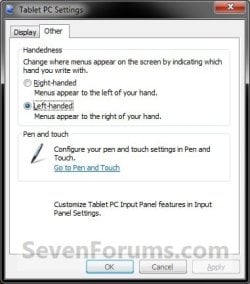
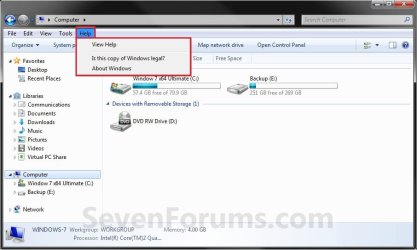
| Menus Open to the Left or Right Side How to Set Windows 7 Menus to Open to the Left or Right Side  Information This will show you how to set all menus (ex: context menu, Menu bar, etc...) in Windows 7 to open to the left or right side of where you click at.  Warning If the menu does not have enough room to fully open at the border of the window or display screen, it will compensate and open from the opposite direction of the border instead. This will override whatever side you have the menu set to open on below. EXAMPLE: Right-handed NOTE: Menus open to the left of your hand.  EXAMPLE: Left-handed NOTE: Menus open to the right of your hand. OPTION ONE
Using a REG File Download
1. To Have Menus Open to the LeftA) Click on the Download button below to download the file below.Menus_Open_To_Left.reg  B) Go to step 3. 2. To Have Menus Open to the Right A) Click on the Download button below to download the file below.Menus_Open_To_Right.reg 
3. Save the .reg file to the desktop. 4. Right click on the downloaded .reg file and click on Merge. 5. Click on Run, Yes, Yes, and OK when prompted. 6. Log off and log on, or restart the computer to apply. 7. When done, you can delete the downloaded .reg file on the desktop if you like. OPTION TWO
Manually in Registry Editor
1. Open the Start Menu, then type regedit in the search line and press enter. 2. If prompted by UAC, then click on Yes. 3. In regedit, navigate to the location below. (see screenshot below) Code: HKEY_CURRENT_USER\Software\Microsoft\Windows NT\CurrentVersion\Windows
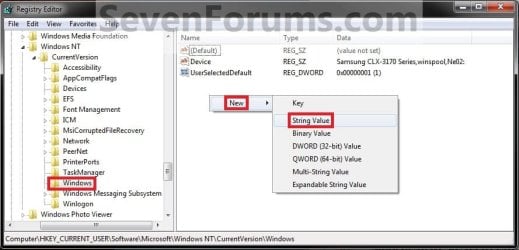
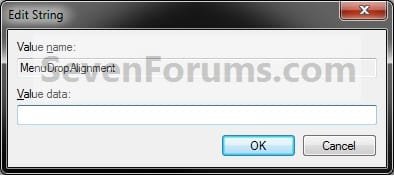
 4. To Have Menus Open to the Left A) In the right pane of Windows, right click on a empty space and click on New and String Value. Type MenuDropAlignment and press enter. (see screenshot below) NOTE: If you already have MenuDropAlignment, then skip this step and go to step 4B instead. B) In the right pane, right click on MenuDropAlignment and click on Modify. (see screenshot above)
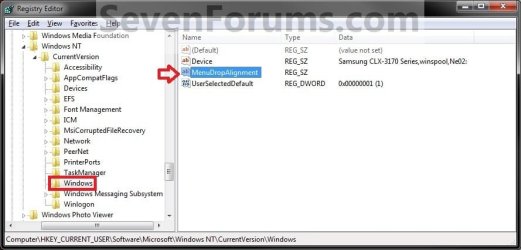
C) Type 1 and click on OK. (see screenshot below) D) Go to step 6. 5. To Have Menus Open to the Right A) In the right pane of Windows, right click on MenuDropAlignment and click on Delete and Yes. (see screenshot below step 4B) OR
B) Repeat all steps in step 4, and type 0 in step 4C instead. 6. Close regedit. 7. Log off and log on, or restart the computer to apply.
That's it,
Shawn |  Published by | | Administrator Join Date: Oct 2008 Location: Texas Posts: 37,303 | |
 Tutorial Tools | | | | | | | | | |
02-23-2010
|
#1 | | Windows 7 64-bit Windows 7 32-bit |
I cant find the "Tablet PC Settings" folder, I'm guessing it only exists on tablet PC's, is there a way to add it to non tablet PC's? Cause I've always wanted these to show up to the left of the mouse.
| My System Specs | | System Manufacturer/Model Number acer timeline 3810t OS Windows 7 64-bit Windows 7 32-bit CPU Intel Core 2 Solo (1.4 GHz) Memory 4 GB DDR3 SDRAM - 1066 MHz SO DIMM 204-pin Graphics Card Intel GMA 4500MHD Dynamic Video Memory Technology 5.0 Monitor(s) Displays Widescreen 13.3 in TFT active matrix Case # Ultraportable (Under 4 lbs.) , Budget Hard Drives # 250 GB - Serial ATA-150 - 5400 rpm |
02-23-2010
|
#2 | | Windows 7 Ultimate x64 SP1 |
Hello Kookster,
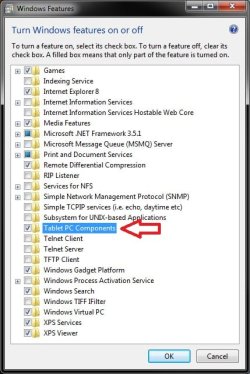
Double check in Windows Features to make sure that you have the Tablet PC Components option checked. Afterwards, it should be available in the Control Panel.
Hope this helps,
Shawn | My System Specs | | System Manufacturer/Model Number Self built custom OS Windows 7 Ultimate x64 SP1 CPU Intel i7-980X 3.3 Ghz (3.48 Ghz OC'd) Motherboard ASUS P6X58D Premium Memory 12 GB (2GBx6) DDR3 PC3-16000 2000 MHz Kingston HyperX Graphics Card Sapphire HD5870 Eyefinity 6 2GB Sound Card Realtek HD Audio ALC889 Integrated Chip Monitor(s) Displays 3x 27" Asus VE278Q Screen Resolution 1920x1080 Keyboard Logitech Cordless Desktop MX 5500 Revolution Mouse Logitech Cordless Desktop MX 5500 Revolution PSU OCZ Series Gold OCZZ1000M 1000W Case Corsair Obsidian 800D Cooling Thermalright Ultra 120 Extreme Copper CPU heat sink w/120 MM Hard Drives 160GB OCZ RevoDrive X2
** 2 x 1TB Samsung HDD HD154UI SATA Internet Speed 50 Mb/s Download and 2 Mb/s Upload Other Info Microsoft LifeCam Cinema
** Lite-On iHBS212 12x BD Writer
** Samsung CLX-3175FW Printer
** Netgear WNDR3800 Router
** Motorola SBG6580 Cable Modem
** 2x APC Back-UPS XS 1500 |
02-23-2010
|
#3 | | Windows 7 Professional x64 |
Shawn, I do have the feature turned on, and I still don't see anything in Control Panel. A search for it was fruitless. | My System Specs | | System Manufacturer/Model Number Custom OS Windows 7 Professional x64 CPU Intel i7 2600K OC'd @ 4620 MHz Motherboard Asus P8Z68-V Pro Memory 16GB GSkill Sniper 2133 Mhz (4x4GB) Graphics Card EVGA GeForce GTX 480 SuperClocked+ Sound Card Realtek High Definition Audio Monitor(s) Displays 2x Acer S273HLbmii 27" Screen Resolution 2 x 1920x1080 Keyboard Logitech MK320 (wireless) Mouse Logitech MK320 (wireless) PSU Corsair HW Series 750w (modular) Case Cooler Master HAF 932 Advanced Blue Edition Cooling CM Hyper 212+ CPU cooler, 3x 230mm + 1x 140mm case fans Hard Drives 64GB Crucial M4 SSD
Storage: Hitachi 1TB 5400RPM, Samsung 1.5TB 5400RPM Internet Speed 30 Mb/s : 2 Mb/s |
02-23-2010
|
#4 | | Windows 7 Ultimate x64 SP1 |
Um, it seems that MS removed Tablet PC Settings in the Control Panel.
Well, I'll have to do some more digging on this. These are the settings for this in the registry in Vista. RIGHT_HANDED
[HKEY_CURRENT_USER\Software\Microsoft\Windows NT\CurrentVersion\Windows]
"MenuDropAlignment"="1" LEFT_HANDED
[HKEY_CURRENT_USER\Software\Microsoft\Windows NT\CurrentVersion\Windows]
"MenuDropAlignment"="0" UPDATE:
They work, but you have to log off and on and not just kill/restart explorer. Tutorial has been updated with this new way.
Last edited by Brink; 02-23-2010 at 04:11 PM..
Reason: Update
| My System Specs | | System Manufacturer/Model Number Self built custom OS Windows 7 Ultimate x64 SP1 CPU Intel i7-980X 3.3 Ghz (3.48 Ghz OC'd) Motherboard ASUS P6X58D Premium Memory 12 GB (2GBx6) DDR3 PC3-16000 2000 MHz Kingston HyperX Graphics Card Sapphire HD5870 Eyefinity 6 2GB Sound Card Realtek HD Audio ALC889 Integrated Chip Monitor(s) Displays 3x 27" Asus VE278Q Screen Resolution 1920x1080 Keyboard Logitech Cordless Desktop MX 5500 Revolution Mouse Logitech Cordless Desktop MX 5500 Revolution PSU OCZ Series Gold OCZZ1000M 1000W Case Corsair Obsidian 800D Cooling Thermalright Ultra 120 Extreme Copper CPU heat sink w/120 MM Hard Drives 160GB OCZ RevoDrive X2
** 2 x 1TB Samsung HDD HD154UI SATA Internet Speed 50 Mb/s Download and 2 Mb/s Upload Other Info Microsoft LifeCam Cinema
** Lite-On iHBS212 12x BD Writer
** Samsung CLX-3175FW Printer
** Netgear WNDR3800 Router
** Motorola SBG6580 Cable Modem
** 2x APC Back-UPS XS 1500 |
02-23-2010
|
#5 | | Windows 7 Professional x64 |
That works very well now Shawn. Thanks! | My System Specs | | System Manufacturer/Model Number Custom OS Windows 7 Professional x64 CPU Intel i7 2600K OC'd @ 4620 MHz Motherboard Asus P8Z68-V Pro Memory 16GB GSkill Sniper 2133 Mhz (4x4GB) Graphics Card EVGA GeForce GTX 480 SuperClocked+ Sound Card Realtek High Definition Audio Monitor(s) Displays 2x Acer S273HLbmii 27" Screen Resolution 2 x 1920x1080 Keyboard Logitech MK320 (wireless) Mouse Logitech MK320 (wireless) PSU Corsair HW Series 750w (modular) Case Cooler Master HAF 932 Advanced Blue Edition Cooling CM Hyper 212+ CPU cooler, 3x 230mm + 1x 140mm case fans Hard Drives 64GB Crucial M4 SSD
Storage: Hitachi 1TB 5400RPM, Samsung 1.5TB 5400RPM Internet Speed 30 Mb/s : 2 Mb/s |
02-23-2010
|
#6 | | Windows 7 Ultimate x64 SP1 |
You're most welcome. | My System Specs | | System Manufacturer/Model Number Self built custom OS Windows 7 Ultimate x64 SP1 CPU Intel i7-980X 3.3 Ghz (3.48 Ghz OC'd) Motherboard ASUS P6X58D Premium Memory 12 GB (2GBx6) DDR3 PC3-16000 2000 MHz Kingston HyperX Graphics Card Sapphire HD5870 Eyefinity 6 2GB Sound Card Realtek HD Audio ALC889 Integrated Chip Monitor(s) Displays 3x 27" Asus VE278Q Screen Resolution 1920x1080 Keyboard Logitech Cordless Desktop MX 5500 Revolution Mouse Logitech Cordless Desktop MX 5500 Revolution PSU OCZ Series Gold OCZZ1000M 1000W Case Corsair Obsidian 800D Cooling Thermalright Ultra 120 Extreme Copper CPU heat sink w/120 MM Hard Drives 160GB OCZ RevoDrive X2
** 2 x 1TB Samsung HDD HD154UI SATA Internet Speed 50 Mb/s Download and 2 Mb/s Upload Other Info Microsoft LifeCam Cinema
** Lite-On iHBS212 12x BD Writer
** Samsung CLX-3175FW Printer
** Netgear WNDR3800 Router
** Motorola SBG6580 Cable Modem
** 2x APC Back-UPS XS 1500 |
02-23-2010
|
#7 | | Windows 7 64-bit Windows 7 32-bit |
Thanks Brink works just fine now. | My System Specs | | System Manufacturer/Model Number acer timeline 3810t OS Windows 7 64-bit Windows 7 32-bit CPU Intel Core 2 Solo (1.4 GHz) Memory 4 GB DDR3 SDRAM - 1066 MHz SO DIMM 204-pin Graphics Card Intel GMA 4500MHD Dynamic Video Memory Technology 5.0 Monitor(s) Displays Widescreen 13.3 in TFT active matrix Case # Ultraportable (Under 4 lbs.) , Budget Hard Drives # 250 GB - Serial ATA-150 - 5400 rpm |
02-23-2010
|
#8 | | Windows 7 Ultimate x64 SP1 |
You're most welcome. | My System Specs | | System Manufacturer/Model Number Self built custom OS Windows 7 Ultimate x64 SP1 CPU Intel i7-980X 3.3 Ghz (3.48 Ghz OC'd) Motherboard ASUS P6X58D Premium Memory 12 GB (2GBx6) DDR3 PC3-16000 2000 MHz Kingston HyperX Graphics Card Sapphire HD5870 Eyefinity 6 2GB Sound Card Realtek HD Audio ALC889 Integrated Chip Monitor(s) Displays 3x 27" Asus VE278Q Screen Resolution 1920x1080 Keyboard Logitech Cordless Desktop MX 5500 Revolution Mouse Logitech Cordless Desktop MX 5500 Revolution PSU OCZ Series Gold OCZZ1000M 1000W Case Corsair Obsidian 800D Cooling Thermalright Ultra 120 Extreme Copper CPU heat sink w/120 MM Hard Drives 160GB OCZ RevoDrive X2
** 2 x 1TB Samsung HDD HD154UI SATA Internet Speed 50 Mb/s Download and 2 Mb/s Upload Other Info Microsoft LifeCam Cinema
** Lite-On iHBS212 12x BD Writer
** Samsung CLX-3175FW Printer
** Netgear WNDR3800 Router
** Motorola SBG6580 Cable Modem
** 2x APC Back-UPS XS 1500 |
04-28-2010
|
#9 | | Windows 7 Professional SP1 - x64 |

Quote: Originally Posted by Brink Hello Kookster,
Double check in Windows Features to make sure that you have the Tablet PC Components option checked. Afterwards, it should be available in the Control Panel. Attachment 56125
Hope this helps,
Shawn Hi Shawn, i was hanging around reading a thread...and linked here.
Seems Tablet PC Components does exist on my Win 7 (it is checked on mine), and aswell the registry key: "RIGHT_HANDED
[HKEY_CURRENT_USER\Software\Microsoft\Windows NT\CurrentVersion\Windows]
"MenuDropAlignment"="1"."
No need to create the key now, just have to set to 0 or 1....
Last edited by NoN; 04-28-2010 at 01:24 PM..
| My System Specs | | System Manufacturer/Model Number Under Construction [mid-2012] - I'm building a brand new mid-tower (half way done!) OS Windows 7 Professional SP1 - x64 Menus Open to the Left or Right Side problems? All times are GMT -5. The time now is 03:03 AM. |  |