How to Install Windows 7 FAST without a DVD or USB Device
Information
So far we've seen tutorials for installing Windows 7 in quite a few different ways. All of them require boot media like a DVD or USB key. All of them use the Windows 7 installer. All of them require you to upgrade or replace your existing Windows 7 installation. All of them are relatively slow. All of them are using technology designed by Microsoft for clueless end-users.
This method uses technology designed for advanced users; OEMs like Dell, big IT departments and experts like us. It doesn't require extra bootable media and it leaves your existing Windows install intact. It's fast, it's flexible and it's all command line suitable for scripting.
Let's start with the assumption that you've got a single hard disk with one big partition, it's not full, and you're already running some build of Windows 7 or Vista. If you've got more than one partition and can't figure out how to modify the steps in this tutorial to accommodate that please post a comment and I'll add the steps. The same goes for other hard disks. The only hard requirement is that you be running Windows 7 or Vista. We need to make room for the new Windows 7 install so we start by running DISKPART. Open Start, type diskpart and press Enter.
Code:
Microsoft DiskPart version 6.1.7100
Copyright (C) 1999-2008 Microsoft Corporation.
On computer: ORION7

DISKPART> lis vol

  Volume ###  Ltr  Label        Fs     Type        Size     Status     Info
  ----------  ---  -----------  -----  ----------  -------  ---------  --------
  Volume 0     F                       DVD-ROM         0 B  No Media
  Volume 1     E                       DVD-ROM         0 B  No Media
  Volume 2     C   7            NTFS   Partition     16 GB  Healthy    System
  Volume 3     D   Data         NTFS   Partition    263 GB  Healthy
  Volume 4     G                       Removable       0 B  No Media

DISKPART> sel vol 3

Volume 3 is the selected volume.

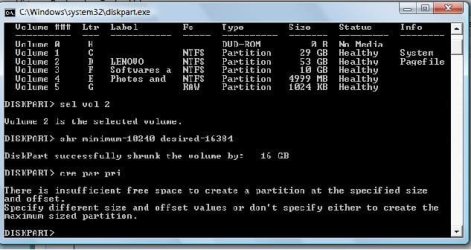
DISKPART> shr minimum=10240 desired=16384

DiskPart successfully shrunk the volume by:   16 GB

DISKPART> cre par pri

DiskPart succeeded in creating the specified partition.

DISKPART> for fs=ntfs quick label="7new"

  100 percent completed

DiskPart successfully formatted the volume.

DISKPART> ass

DiskPart successfully assigned the drive letter or mount point.

DISKPART> act

DiskPart marked the current partition as active.

DISKPART> lis vol

  Volume ###  Ltr  Label        Fs     Type        Size     Status     Info
  ----------  ---  -----------  -----  ----------  -------  ---------  --------
  Volume 0     F                       DVD-ROM         0 B  No Media
  Volume 1     E                       DVD-ROM         0 B  No Media
  Volume 2     C   7            NTFS   Partition     16 GB  Healthy    System
  Volume 3     D   Data         NTFS   Partition    247 GB  Healthy
  Volume 4     G                       Removable       0 B  No Media
* Volume 5     H   7new         NTFS   Partition     15 GB  Healthy

DISKPART> exi- Select the volume to shrink from the list with "sel vol"
- Specify the minimum and desired volume size in megabytes with "shr"
- Specify your own label for the new volume with "for"
- Make note of the drive letter of the starred volume after "ass"
Code:
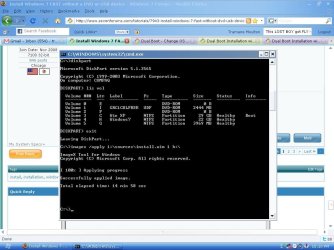
D:\Mike\Desktop\work>imagex /apply e:\sources\install.wim 5 h:\

ImageX Tool for Windows
Copyright (C) Microsoft Corp. All rights reserved.

[ 100% ] Applying progress

Successfully applied image.

Total elapsed time: 7 min 8 sec


D:\Mike\Desktop\work>h:\windows\system32\bcdboot h:\windows

Boot files successfully created.
Now reboot and a few minutes (less than 5 on my box) later you'll be prompted for locale info and to create a user. Welcome to your new Windows 7 installation.
To toggle back and forth between this new installation and the original one use diskpart.
Code:
Microsoft DiskPart version 6.1.7100
Copyright (C) 1999-2008 Microsoft Corporation.
On computer: ORION7

DISKPART> lis vol

  Volume ###  Ltr  Label        Fs     Type        Size     Status     Info
  ----------  ---  -----------  -----  ----------  -------  ---------  --------
  Volume 0     F                       DVD-ROM         0 B  No Media
  Volume 1     E   GRC1CULFRER  UDF    DVD-ROM     2413 MB  Healthy
  Volume 2     C   7            NTFS   Partition     16 GB  Healthy    System
  Volume 3     D   Data         NTFS   Partition    247 GB  Healthy
  Volume 4     H                NTFS   Partition     15 GB  Healthy
  Volume 5     G                       Removable       0 B  No Media

DISKPART> sel vol 2

Volume 2 is the selected volume.

DISKPART> act

DiskPart marked the current partition as active.


DISKPART> exi- Select the volume containing the Windows installation you want to start from the list with "sel vol"
Related Tutorials
- How to Setup Windows 7 to Boot from a VHD (Virtual Hard Disk)
- How to Create a Windows 7 VHD at Boot to Start with from Boot
- How to Do a Upgrade Installation with Windows 7
- How to Do a Clean Installation with Windows 7
- How to Do a Repair Install to Fix Windows 7
- How to Create a Windows 7 Installation USB Key
- How to Setup a Dual Boot Installation with Windows 7 and Vista
- How to Setup a Dual Boot Installation with Windows 7 and XP
- Install Windows 7 Without Using Any External Device
- How to Use Windows 7 Upgrade Advisor
- How to Do a Custom Installation of Windows 7
Last edited by a moderator:

 Missing BootMGR


 , And I stumbled on this thread.