
How to Change Colors Used for Webpages in Internet Explorer
Information
This will show you how to change the colors that are used to display on webpages in Internet Explorer to what you would like.
Resetting Internet Explorer will also reset any color changes you made below back to default as well.
Resetting Internet Explorer will also reset any color changes you made below back to default as well.
Here's How:
1. Do step 2 or 3 below for what you would like to do.
2. Open Internet Explorer, click/tap on Tools and Internet Options, and go to step 4 below.
NOTE: In Windows 8, this would only apply to the IE10 desktop version, and not the IE10 Metro (Windows UI) version.
3. Open the Control Panel (icons View), click/tap on Internet Options, and go to step 4 below.
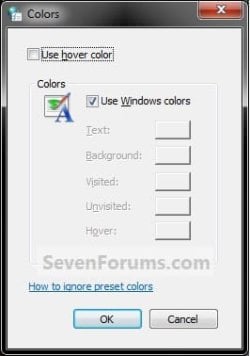
4. In the General tab under Appearance, click/tap on the Colors button. (see screenshot below)

5. To Use Windows Colors
A) Check the Use Windows colors box, click/tap on OK, and go to step 8 below. (see screenshot below)
6. To Select Your Own Colors
NOTE: These settings will not affect webpages that are designed to prevent changes to colors. If you want to use your color choices on all webpages, regardless of whether they've been specified by the website designer, you can use step 6 below to override website color settings.
A) Uncheck the Use Windows colors box. (see screenshot above)
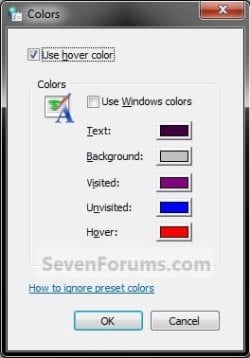
B) Check the Use hover color box, then click/tap on the color next to the item (ex: Text, Background, etc...) you want to change the color of. (see screenshots below)

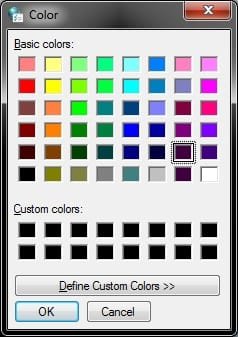
C) Click/tap on the color (Basic or Custom) that you want to use to for that item, then click/tap on OK. (see screenshots below)
NOTE: Click on Define Custom Colors >> to be able to create and add a custom color of your own, then click on Add to Custom Colors to be able to select it.

D) Repeat steps 6B and 6C for other items that you wish to change the color of.
E) When finished, click/tap on OK. (see screenshots below step 5B)
7. To Override Website Color Settings
NOTE: This will allow you to use your color choices in step 6 on all webpages, regardless of whether they've been specified by the website designer to prevent changes to colors.
A) Click/tap on the Accesibility button. (see screenshot below)

B) Check the Ignore colors specified on webpages box, and click/tap on OK. (see screenshot below)

8. Click/tap on OK. (see screenshot below step 4 or 7A)
9. You may need to either refresh (F5) or close and reopen Internet Explorer to see the changes.
That's it,
Shawn
Last edited:

