Windows 7 Forums


Windows 7: Theme - Specify Default Theme to Load for New Users


Theme - Specify Default Theme to Load for New Users

How to Specify a Default Theme to Load for New Users in Windows 7
Published 24 Apr 2010
Published by

Featured Tutorial

Microsoft Accounts - Link

How to Link your Microsoft Accounts

Troubleshooting Steps for Windows 7


Portable OS - Carry your OS on an External Drive

How to Create a Portable OS on an External Drive

User Profile - Customize During Installation

How to Customize Default User Profile in Audit Mode

Clean Reinstall - Factory OEM Windows 7

How to Clean Reinstall a Factory OEM Windows 7

Microsoft Outlook Desktop Shortcut - Create

How to Create a Special Outlook Desktop (Office XP style) Shortcut
How to Specify a Default Theme to Load for New Users in Windows 7

information   Information
This will show you how to have a theme that you specifiy to be applied by default when a new user logs on for the first time.

You must be logged in as an administrator to be able to do this tutorial.
Note   Note
If enabled, this does not prevent the user from changing their theme or any of the theme elements such as the desktop background, window color, sounds, or screen saver after the first logon. It only sets the theme you selected to be used by default until changed.
warning   Warning
Your millage may vary.

It has been reported that this does not always work properly in 64-bit Windows 7, but does in 32-bit Windows 7.

The Windows 7 Starter and Home Basic editions do not have the Personalization features included in them, such as changing and saving themes.


OPTION ONE
Through the Local Group Policy Editor
1. Open the all users, specific users or groups, or all users except administrators Local Group Policy Editor for how you want this policy applied.

2. In the left pane, click on to expand User Configuration, Administrative Templates, Control Panel, and Personalization. (See screenshot below)
Theme - Specify Default Theme to Load for New Users-gpedit-1.jpg
3. In the right pane, right click on Load a specific theme and click on Edit. (See screenshot above)

4. To Disable Loading a Specific Theme for New Users
A) Select (dot) either Not Configured or Disabled. (see screenshot below step 6)

B) Go to step 6.
5. To Enable Loading a Specific Theme for New Users
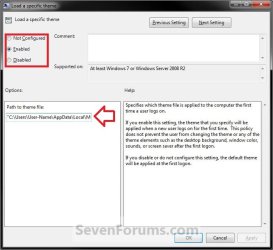
A) Select (dot) Enabled. (see screenshot below step 6)

B) In the Path to theme file box under Options, type in the full path of the .theme file with file extension in quotes that you want to be used by default for new users. (see screenshot below step 6)

For example:
Code:
"C:\Users\User-Name\AppData\Local\Microsoft\Windows\Themes\Brink-Theme.theme"


Tip   Tip

6. Click on OK. (see screenshot below)
Theme - Specify Default Theme to Load for New Users-gpedit-2.jpg
7. Close the Local Group Policy Editor window.


OPTION TWO
Manually in Registry Editor
1. Open the Start Menu, then type regedit in the search box and press enter.

2. If prompted by UAC, click on Yes.

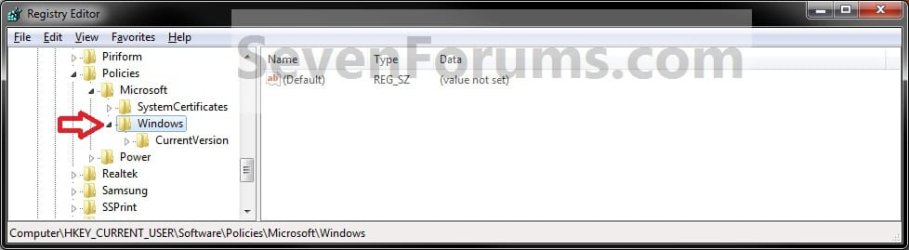
3. In regedit, navigate to the location below. (see screenshot below)
HKEY_CURRENT_USER\Software\Policies\Microsoft\Windows
Theme - Specify Default Theme to Load for New Users-reg.jpg
4. To Enable Loading a Specific Theme for New Users
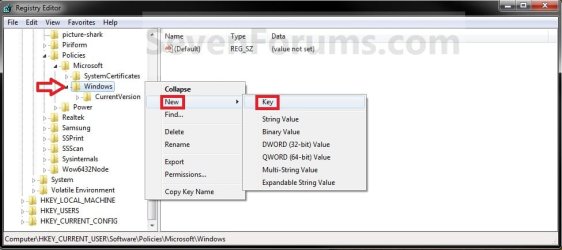
A) In the left pane, right click on Windows and click on New and Key. Type Personalization and press enter. (see screenshot below)
NOTE: If you already have the Personalization key, then skip this step and continue to 4B below.
Theme - Specify Default Theme to Load for New Users-reg1.jpg
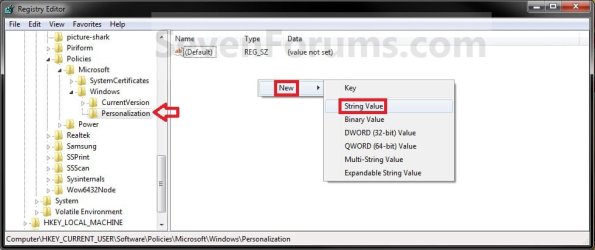
B) In the right pane of Personalization, right click on a empty space and click on New and String Value. (see screenshot below)
Theme - Specify Default Theme to Load for New Users-reg2.jpg
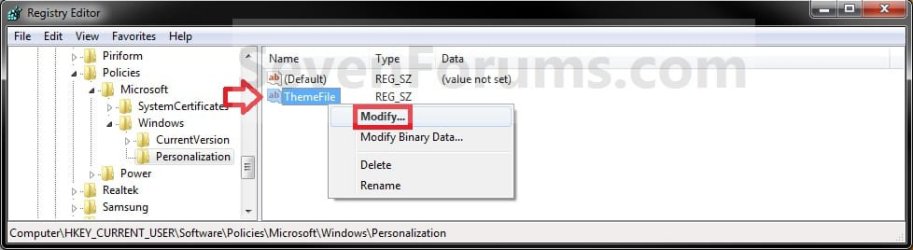
C) Type in ThemeFile and press Enter. Right click on ThemeFile and click on Modify. (see screenshot below)
Theme - Specify Default Theme to Load for New Users-reg3.jpg
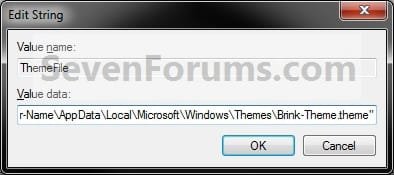
D) type in the full path of the .theme file with file extension in quotes that you want to be used by default for new users. (see screenshot below)
Theme - Specify Default Theme to Load for New Users-modify.jpg

For example:
Code:
"C:\Users\User-Name\AppData\Local\Microsoft\Windows\Themes\Brink-Theme.theme"


Tip   Tip


E) Go to step 6.
5. To Disable Loading a Specific Theme for New Users
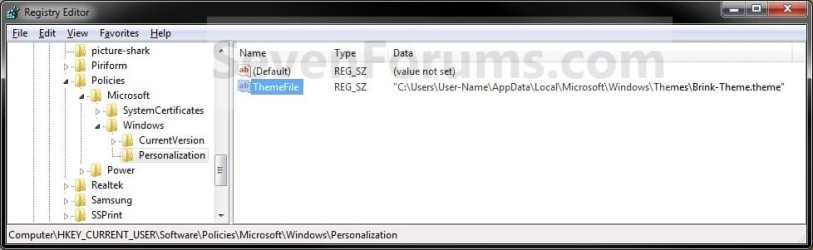
A) In the right pane of Personalization, right click on ThemeFile and click on Delete. (see screenshot below)
Theme - Specify Default Theme to Load for New Users-reg4.jpg
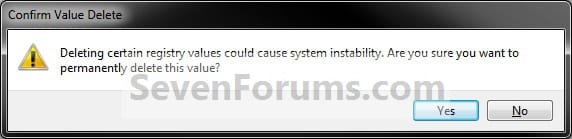
B) Click on Yes to confirm deletion. (see screenshot below)
Theme - Specify Default Theme to Load for New Users-delete.jpg
6. Close regedit.
That's it,
Shawn


Need more help? Try searching our extensive help and support site.
Loading
11 May 2010   #1
erco61

Windows


Hi Shawn:

I was able to use this procedure to set the default theme in Window 7 Pro 32 bit OS. But, in Windows 7 Ultimate 64 bit OS the new user doesn't get the default theme. I checked the registry key and the key is enabled and the group poliocy to load a specific thjeme is enabled and the path is correct. Is there a bug in windows 7 Ultimate 64 bit thta prevents the common theme to be set for all new users?

Thank you,

Erin

My System SpecsSystem Spec

11 May 2010   #2
Brink

64-bit Windows 7 Ultimate SP1 & Windows 8 Enterprise
Texas


Hello Erin,

Umm, it worked before on my 64- bit Windows 7 Ultimate, but I'm getting a the Windows Classic theme instead now for the new user no matter what them I specify. I'll have to do some more test to see what happened. Perhaps some update or something?
My System SpecsSystem Spec
24 May 2010   #3
erco61

Windows
 
 
Default Theme is working better in W7 Ultimate 64 bit

Hi all:

There must have been an update because now when I set a default theme for new users, the new user does get the correct wallpaper and start menu confugurations. The new user still doesn't get all of the desktop ICONs specified though. There may be other settign that are missed but, at least we are moving in the right direction!
My System SpecsSystem Spec
.


24 May 2010   #4
Brink

64-bit Windows 7 Ultimate SP1 & Windows 8 Enterprise
Texas


That's great news Erco.

Did you mean the actual icon used for the desktop icons, or not having some of the desktop shortcuts?
My System SpecsSystem Spec
24 May 2010   #5
erco61

Windows


Sorry, the shortcuts are missing from the desktop for a new user. I also found that the IE favorites are missing as well.
My System SpecsSystem Spec
24 May 2010   #6
Brink

64-bit Windows 7 Ultimate SP1 & Windows 8 Enterprise
Texas


These would not be part of a theme though.

However, you can copy any shortcuts that you would like to have included on all users desktops to the hidden C:\Users\Public\Public Desktop folder.

Unfortunately, you will need to manually copy any favorites that you would like to have included into the users C:\Users\(user-name)\Favorites folder.
My System SpecsSystem Spec
09 Jun 2010   #7
erco61

Windows


Shawn:

I was too hasty in saying that the default theme is set for new users. In fact, it is not set for new users and this is a problem for my team. We build HW platforms and proprietary applications that require specific settings for menu size, windows color, fonts etc. I am able to capture these configuration settings in my saved theme and I am able to make the theme available to a new user by putting the .theme file in C:\Windows\Resources\Themes\myTheme.theme I used the group policy editor to enable the default theme and I checked the registry key to verify the setting is saved there. However, on my Windows 7 Ultimate 64 bit OS, the default theme is not set for a new user by default. Can you verify that the default theme functinality is working for you? Or is it not working for you on a Windows 7 Ult 64 bit OS?
Please let me know if I'm doing something wrong or if MSFT can fix this. We are preparing to go to market in a few weeks and we need to get this resolved.

Thank you very much for your help,
erco
My System SpecsSystem Spec
09 Jun 2010   #8
Brink

64-bit Windows 7 Ultimate SP1 & Windows 8 Enterprise
Texas


Erco,

I think it may only be a issue with 64-bit. It seems to be working fine in 32-bit as reported so far.
My System SpecsSystem Spec
10 Jun 2010   #9
erco61

Windows


I'm not sure how this is helpful to my team?

Can somebody at MSFT please take a look at win 7 64 bit OS and confirm that the default theme policy can be enabled?

If I'm doing something wrong I need to know and if the OS is at fault then MSFT needs to know.
My System SpecsSystem Spec
Comment

 Theme - Specify Default Theme to Load for New Users problems?


Tutorial Tools


Similar help and support threads for: Theme - Specify Default Theme to Load for New Users
Windows 7 Tutorial Category
Help Me Please. Default Theme Themes and Styles
Windows 7 Home Premium basic theme is slow but aero theme is fast? Performance & Maintenance
Solved How can i share my very own theme for other users? Themes and Styles
Restore default theme? Themes and Styles


All times are GMT -5. The time now is 01:41 PM.


Seven Forums Android App Seven Forums IOS App Follow us on Facebook

Windows 7 Forums is an independent web site and has not been authorized,
sponsored, or otherwise approved by Microsoft Corporation.
"Windows 7" and related materials are trademarks of Microsoft Corp.
© Designer Media Ltd
  

1 2 3 4 5 6 7 8 9 10 11 12 13 14 15 16 17 18 19 20 21 22 23 24 25 26 27 28 29 30 31 32