
How to Enable or Disable Hibernate in Windows 7 and Windows 8
Information
Hibernation is a power-saving state designed primarily for laptops. While sleep puts your work and settings in memory and draws a small amount of power, hibernation puts your open documents and programs on your hard disk, and then turns off your computer. Of all the power-saving states in Windows, hibernation uses the least amount of power. On a laptop, use hibernation when you know that you won't use your laptop for an extended period and won't have an opportunity to charge the battery during that time.
This tutorial will show you how to enable or disable hibernate and restore or delete the hiberfil.sys file in Windows 7 and Windows 8.
When hibernate is disabled, the Hibernate option is missing from the Start Menu (Windows 7 only), Shut Down Windows dialog, Power menu (Windows 8 only) and the Advanced Power Plan Options.
You must be logged in as an administrator to be able to do the steps in this tutorial.
This tutorial will show you how to enable or disable hibernate and restore or delete the hiberfil.sys file in Windows 7 and Windows 8.
When hibernate is disabled, the Hibernate option is missing from the Start Menu (Windows 7 only), Shut Down Windows dialog, Power menu (Windows 8 only) and the Advanced Power Plan Options.
You must be logged in as an administrator to be able to do the steps in this tutorial.
Note
- By default, the size of the hidden protected OS hibernation file (C:\hiberfil.sys) is 75% of the total amount of installed RAM on your computer.
- In Windows 7, you can set your computer to either use or not use the Hybrid or Hibernate sleep mode option from the Advanced Power Plan Options.
- In Windows 7, you will only see Hibernate listed in the Start Menu power button arrow menu if you have Hybrid turned off in the Advanced Power Plan Options.
- Windows 8/8.1 PCs with InstantGo don't have the hibernate option
- If you disable hibernate in Windows 8 and 8.1, then it will also disable fast startup.
:note: For Windows 10 instructions please see the following link - Hibernate - Enable or Disable in Windows 10 - Windows 10 Tutorials
CONTENTS:
- Option One: Enable or Disable Hibernate in Elevated Command Prompt
- Option Two: Enable or Disable Hibernate using a REG File Download
- Option Three: Enable or Disable Hibernate in Registry Editor
- Option Four: To Turn On or Off Hibernate in Advanced Power Options
OPTION ONE
Enable or Disable Hibernate in Elevated Command Prompt
1. Open an elevated command prompt.
2. Do step 3 or step 4 below for what you would like to do.
3. To Enable Hibernate
NOTE: This step will restore the hiberfil.sys file, and the Allow hybrid sleep and Hibernate after Power Options under Sleep.
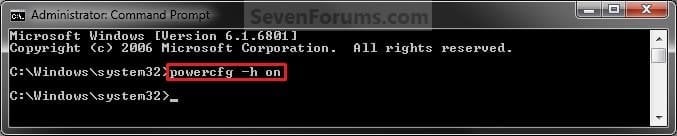
A) In the elevated command prompt, copy and paste the command below, and press Enter. (see screenshot below)
powercfg -h on
C) If you would also like to have hibernate turned on, then you will also need do to step 2 in OPTION FOUR below.
D) If you like, you may also wish to add or remove Hibernate from power menus.
E) Go to step 5 below.
4. To Disable Hibernate
NOTE: This step will disable hibernation, delete the hiberfil.sys file, and remove the Allow hybrid sleep and Hibernate after Power Options under Sleep. This will also disable fast startup in Windows 8.
A)In the elevated command prompt, copy and paste the command below, and press Enter. (see screenshot below)
powercfg -h off

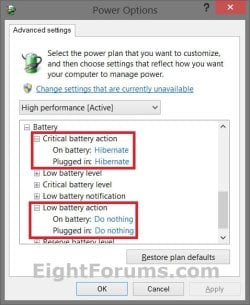
B) Check your Power Options to make sure that the Critical battery action and Low battery action settings under Battery are not set to Hibernate, and go to step 5 below. (see screenshot below)
5. You can now close the elevated command prompt if you like.
OPTION TWO
Enable or Disable Hibernate using a REG File Download
1. To Enable Hibernate
NOTE: This step will restore the hiberfil.sys file, and the Allow hybrid sleep and Hibernate after Power Options under Sleep.
A) Click/tap on the Download button below to download the file below, and go to step 3 below.
Enable_Hibernate.reg
Download
2. To Disable Hibernate
NOTE: This step will disable hibernation, delete the hiberfil.sys file, and remove the Allow hybrid sleep and Hibernate after Power Options under Sleep. This will also disable fast startup in Windows 8.
A) Check your Power Options to make sure that the Critical battery action and Low battery action settings under Battery are not set to Hibernate. (see screenshot below)
B) Click/tap on the Download button below to download the file below, and go to step 3 below.
Disable_Hibernate.reg
Download
3. Save the .reg file to your desktop.
4. Double click/tap on the downloaded .reg file to merge it.
5. Click/tap on Run, Yes (UAC), Yes, and OK when prompted to approve the merge.
6. Restart the computer to apply the changes.
7. If you would also like to have hibernate turned on, then you will also need do to step 2 in OPTION FOUR below.
8. If you like, you may also wish to add or remove Hibernate from power menus.
9. When finished, you can delete the downloaded .reg file if you like.
OPTION THREE
Enable or Disable Hibernate in Registry Editor
1. Press the Windows + R keys to open the Run dialog, type regedit, and click/tap on OK.
2. In regedit, navigate to the location below. (see screenshot below)
HKEY_LOCAL_MACHINE\SYSTEM\CurrentControlSet\Control\Power
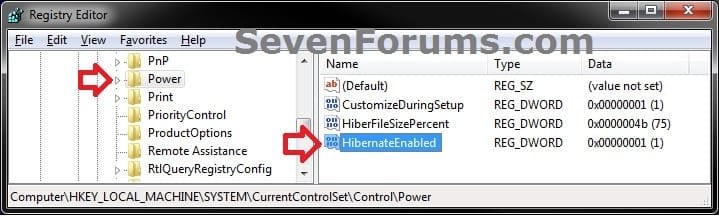
3. In the right pane of the Power key, double click/tap on HibernateEnabled, and do step 4 or 5 below for what you would like to do. (see screenshot above)
4. To Enable Hibernate
NOTE: This step will restore the hiberfil.sys file, and the Allow hybrid sleep and Hibernate after Power Options under Sleep.
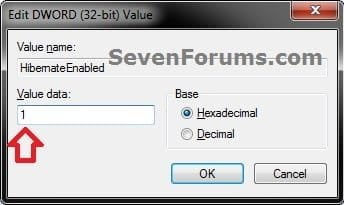
A) Type in 1, click/tap on OK, and go to step 6 below. (see screenshot below)
5. To Disable Hibernate
NOTE: This step will disable hibernation, delete the hiberfil.sys file, and remove the Allow hybrid sleep and Hibernate after Power Options under Sleep. This will also disable fast startup in Windows 8.
A) Type in 0 (zero), and click/tap on OK. (see screenshot above)
B) Check your Power Options to make sure that the Critical battery action and Low battery action settings under Battery are not set to Hibernate, and go to step 6 below. (see screenshot below)
6. Close regedit, and restart the computer to apply the changes.
7. If you would also like to have hibernate turned on, then you will also need do to step 2 in OPTION FOUR below.
8. If you like, you may also wish to add or remove Hibernate from power menus.
OPTION FOUR
To Turn Hibernate On or Off in Advanced Power Options
NOTE: This option does not disable hibernate, but only turns it on or off for your power plan.
1. Do either step 2 or step 3 below for what you would like to do.
2. To Turn On Hibernate
NOTE: You could also use a hibernate shortcut to manually put the computer into hibernation instead or in addition to this option.
A) If you have not already, then you will need to enable hibernate using either OPTION ONE, OPTION TWO, or OPTION THREE above first.
B) Open the Advanced Power Plan Settings for your power plan, then expand Sleep. (see screenshot below step 4)
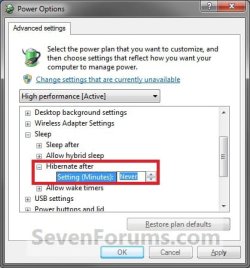
C) Under Hibernate after, set the Setting (Minutes) to how many minutes you want your computer to sit idle for before it goes into hibernation. (see screenshot step 4)
D) Go to step 4.
3. To Turn Off Hibernate
NOTE: If you disabled hibernate using OPTION 1, 2, or 3 above, then there's no need to do this since Hibernate after and Allow hybrid sleep will no longer be listed in your power options.
A) Open the Advanced Power Plan Settings for your power plan, and expand Sleep. (see screenshot below step 4)
B) Under Hibernate after, set the Setting (Minutes) to Never. (see screenshot below step 4)
C) Under Allow hybrid sleep, set Setting to Off. (see screenshot below step 4)
D) Go to step 4.
4. When finished, click/tap on OK. (see screenshot below)
That's it,
Shawn
Related Tutorials
- How to Enable or Disable Hibernate in "Windows To Go" Workspace
- How to Add or Remove "Hibernate after" in Power Options in Windows
- How to Change the Default Action of Alt+F4 Shut Down Window in Windows 7
- How to Change Default Action of Alt+F4 "Shut Down Windows" Dialog in Windows 8 and 8.1
- How to Change the Power Plan Settings in Windows 7
- How to Open and Use Disk Cleanup in Windows 7
- How to Run a Windows 7 Power Efficiency Diagnostics Report
- How to Enable or Disable Require Password on Wakeup in Windows 7
- How to Create a Hibernate Shortcut in Windows
- How to Change the Return to Sleep Timeout for a Unattended Wake Up in Windows 7
- How to Free Up and Recover Hard Drive Space in Windows 7
- How to Change the Default Windows 7 Start Menu Power Button Action
- How to Add or Remove the Shut Down, Restart, Sleep, and Hibernate Commands in Windows 7
- How to Add or Remove Power Button on Start Screen in Windows 8.1 Update
- How to See Available Sleep States on Your System in Windows 7
- How to See Available Sleep States on Your Windows 8 PC
- How to Change the Size of the hiberfil.sys File in Windows 7 and Windows 8
- How to Add or Remove "Sleep" or "Hibernate" from the Power Options Menu in Windows 8
- Add or Remove Shutdown Power Menu from Sign in Screen in Windows 8 and 8.1
Attachments
Last edited:


