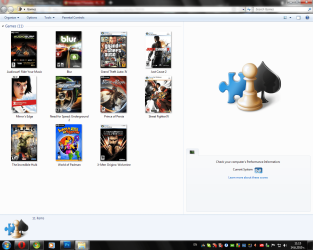
Games Explorer - Edit with Game Explorer Builder
Warning
TO AVOID ANY ERRORS, PLEASE CONSIDER UPDATING YOUR MICROSOFT .NET FRAMEWORK FROM HERE!
Note
I am not the developer of this application, all credit for it goes to the original application author. For more information about the license, view "license.txt" in the Beta 2 ZIP file. All rights reserved 
Step 0:
If you haven't done so yet, please read the HUGE warning above.
Step 1:
Download the Vista Game Explorer Builder Beta 2 and UnZip to a folder of choice (default "Program Files" for 32-bit users and "Program Files (x86)" for 64-bit users).
Step 2:
NOTE: This is done to pervent any unneeded errors to show up.
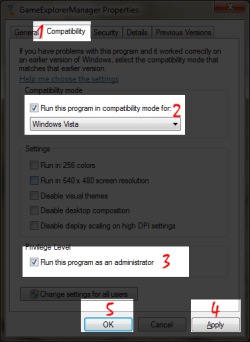
Right Click the executable (.exe) file, select "Properties" and go to the "Compatibility" tab. From there, tick the checkbox named "Run this program in compatibility mode for:" and from the Drop-Down menu select "Windows Vista" (with no service packs). Lastly, tick the "Run As Administrator" checkbox, hit apply, and you're ready to start editing. Screenshot:
Step 3:
Run the app. Start with a Right Click> Add Game > New Resource. Begin by choosing an export location for the GDFResource.dll file for the game.
Warning
In order for this to work you need to have a seperate GDFResource.dll file for every seperate game. (Note: To prevent screw-ups, just place every seperate GDFRecource.dll file in the directory folder of the game (Program Files or Program files x86)
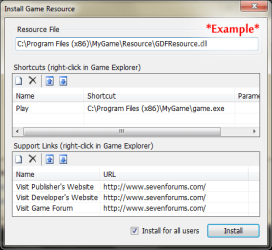
Then you can start filling in game information such as BoxArt, Icon, Description, Developer, Publisher and more. You can even set up minimal and recommended system rating for the game!Once you're done and you've hit OK, you'll be given a new window. In it's first section (Shortcuts) create a new record (with the new button at the upper left) then in "Name" type in "Play" (without the brackets!!!) and in "Shortcut" fill in the full location of the game executable file. (Example: C:\Program Files (x86)\MyGame\game.exe) (See a screenshot below). After hitting OK you will have successfully added the game location.
Step 4 (Optional):
In the "Support Links" section of the "Install Game Resource" window you can add the Developer and Publisher websites as links. Simply add a new record to the second section, then fill in the name, such as "Visit Developer Website" and in URL you will have to fill in the desired URL (needs to be full URL, with "http://" in front of it).
Tip
You can also use this feature to have a direct link to a game forum of your liking or something else associated with the game. For example as a name you'll add "Game Forum" and then fill the forum URL below! Screenshot:
Step 5:
Once you're done with the linking you can select whether you want this game only for you or for all users (using the checkbox below) and then you can click "Install". If everything went alright, the game should be added to the list of games and when you close the editor it should be available in the Games Explorer too. Enjoy playing!
Tutorial by:
~[DW96]~
Related Tutorials
- How to Add Games to Games Explorer Folder
- How to Delete a Game in the Windows 7 Games Explorer Folder
- How to Create a Games Explorer Shortcut
- How to Hide or Unhide Games in the Windows 7 Games Explorer Folder
- How to Restore the Default Games in Windows 7 Games Explorer Folder
- How to Customize the Windows 7 Games Explorer Context Menu
- How to Enable or Disable Game Updates in Windows 7 and Vista "Games Explorer"
- How to Enable or Disable Last Play Time of Games in Windows 7 and Vista "Games Explorer"
- How to Enable or Disable Game Updates in Windows 7 and Vista "Games Explorer"
Last edited by a moderator: