
How to Change Virtual Machine Settings in Windows Virtual PC
Information
This will show you how to change a Windows Virtual PC virtual machine's settings in Windows 7.
Note
To create a virtual machine or install Windows XP Mode, you will need to download and install the 32-bit (x86) or 64-bit (x64) version of Windows Virtual PC for your 32-bit or 64-bit Windows 7 Enterprise, Professional, or Ultimate edition.
Warning
Windows Virtual PC: Requirements
- 1 GHz 32-bit / 64-bit processor required
- Memory (RAM)
- 1.25 GB required, 2 GB memory recommended
- Recommended 15 GB hard disk space per virtual Windows environment
- Supported host (your computer) operating system:
- Windows 7 Professional (32-bit and 64-bit)
- Windows 7 Ultimate (32-bit and 64-bit)
- Windows 7 Enterprise (32-bit and 64-bit)
NOTE: Windows XP Mode can only be installed on Windows 7 Enterprise, Windows 7 Professional, and Windows 7 Ultimate.
- Supported guest (virtual machine) 32-bit only operating system:
- Windows XP
- Virtual Applications feature is supported only on Windows XP Service Pack 3 (SP3) Professional
- Windows Vista
- Virtual Applications feature is supported only on Windows Vista Enterprise and Windows Vista Ultimate
- Windows 7
- Virtual Applications feature is supported only on Windows 7 Enterprise and Windows 7 Ultimate
- Windows XP
Here's How: 1. If you have the virtual machine that you want to change the settings for running, then you must close or shut down the virtual machine first. (see screenshot below)
WARNING: If you do not close or shut down the virtual machine first, the the settings options will remain grayed out until you do.


2. Open the Windows 7 Start Menu.
3. Click on All Programs, expand the Windows Virtual PC folder, and double click on the Windows Virtual PC shortcut. (see screenshot below)
NOTE: You can also do this by opening the Virtual Machines folder at C:\Users\(User Name)\Virtual Machines.
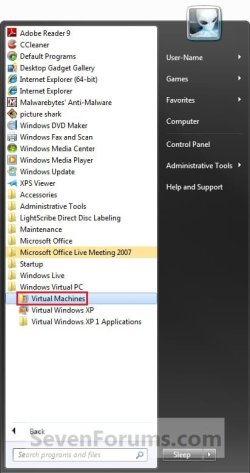
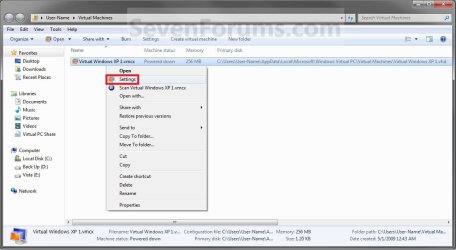
4. Right click on the virtual machine (Ex: Virtual Windows XP) that you want to change the settings for, then click on Settings. (See screenshot below)
5. Select the setting in the left pane, and make any changes that you want in the right pane. (See screenshot below)
WARNING: You should ensure that the Close option is set to Shut Down.
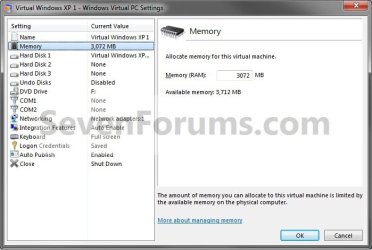
6. Repeat step 5 until your done changing settings, then click on OK.
7. You can now open or start the Virtual machen again with the new settings. (See screenshot below step 4)
That's it,
Shawn
Related Tutorials
- How to Install and Setup Virtual Windows XP Mode in Windows 7
- How to Create a Virtual Machine in Windows Virtual PC
- How to Create Differencing Disks in Windows Virtual PC
- How to Delete a Virtual Machine Created with Windows Virtual PC
- How to Copy a Virtual XP Machine in Windows 7
- How to Add Limited User Accounts to Windows Virtual PC XP Mode
- How to Boot from a CD or DVD in a Windows Virtual PC
- How to Connect Windows Virtual PC to the Network
- How to Install, Enable, and Disable Windows Virtual PC Integration Features
- How to Select Host Devices to Share with Virtual Machines in Windows Virtual PC
- How to Enable the Built-in Administrator Account in Windows XP Mode
Last edited:





