How to Clean Left Over Driver Files with DDU or Driver Sweeper
Information
This tutorial will show you how to clean driver files left over after uninstalling hardware such as: Graphic Card, Sound, Microsoft mouse and even PhysX using the free Display Driver Uninstaller (DDU) or Driver Sweeper. Not cleaning left over files from uninstalling drivers can result in problems when utilizing the hardware.
Note
Driver Sweeper is very easy to use. You only have to select the drivers you want to clean up.
The best way to clean drivers is to first uninstall the drivers using the official uninstallers, reboot in Safe Mode and run Driver Sweeper. However, rebooting and not going into Safe Mode also works, but can cause some files not to be cleaned.
What can it be used for ?
The current supported drivers are NVIDIA (Display and Chipset), ATI (Display), Creative (Sound), Ageia (PhysX), MMouse, Realtek (Sound), NEC (USB), Fresco Logic (USB), Marvell (Storage), JMicron (Storage), HP (Printer).
All the settings are saved in an ini file. Nothing is created in the registry, so it's possible to use it as a portable program. Log files can be saved to the hard disk and viewed as well. You can find the logs under the Tools menu.
System requirements:
Operating Systems - Any Windows version (32-bit and 64 bit) with Microsoft .NET Framework 3.5 from Official Microsoft Download Center or higher installed.
Disk Space (Downloaded) - 5MB
Disk Space (Installed) - 20MB
The best way to clean drivers is to first uninstall the drivers using the official uninstallers, reboot in Safe Mode and run Driver Sweeper. However, rebooting and not going into Safe Mode also works, but can cause some files not to be cleaned.
What can it be used for ?
The current supported drivers are NVIDIA (Display and Chipset), ATI (Display), Creative (Sound), Ageia (PhysX), MMouse, Realtek (Sound), NEC (USB), Fresco Logic (USB), Marvell (Storage), JMicron (Storage), HP (Printer).
All the settings are saved in an ini file. Nothing is created in the registry, so it's possible to use it as a portable program. Log files can be saved to the hard disk and viewed as well. You can find the logs under the Tools menu.
System requirements:
Operating Systems - Any Windows version (32-bit and 64 bit) with Microsoft .NET Framework 3.5 from Official Microsoft Download Center or higher installed.
Disk Space (Downloaded) - 5MB
Disk Space (Installed) - 20MB
1. Click on Download below to download the Display Driver Uninstaller (DDU) file to your desktop.
Download
OR
Download
Note
2. Extract (drag and drop) the contents of the .zip folder into a "New Folder" on your desktop, and run the DDU or Driver Sweeper.exe.
3. If prompted by UAC, then click on Yes.
4. Uninstall the driver from Programs and Features within the Control Panel as your usually would, restart the computer if needed.
5. Run DDU or Driver Sweeper, check the driver(s) you wish to clean, then click either the Analyse button to see what is left over or click Clean to clean the left over files and registry entries straight away.

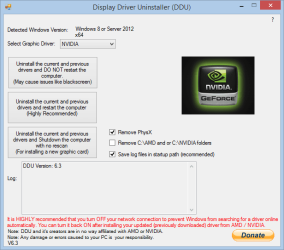
6. When finished, you will be prompted to Restart the computer.
7. When the computer has finished restarting, you can now install the new drivers if you like.
Attachments
Last edited by a moderator: