
Event Viewer - Create Custom System Monitoring
The Event Viewer Console
1. Open the Event Viewer Console through one of the following methods:
- From the RUN Command, type eventvwr.msc and press enter.
- Click the Start Globe, select All programs, Administrative Tools, and then select Event Viewer;
- NOTE: In some Windows 7 releases you can right click on 'Computer' and select 'Manage', you will then need to filter select the event viewer in from the Microsoft Management Console (MMC) window that appears.
2. Expand Windows Logs and click on System, to see your System Events.
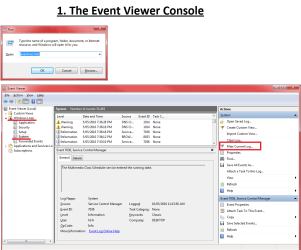
3. Next Click on Filter Current Log, this is found on the action pane on the right. The Filter Current Log dialogue box will now appear.
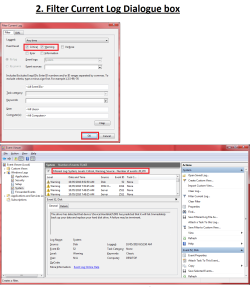
The Filter Current Log Dialogue Box
1. When the Filter Current Log Dialogue box appears, Select the Critical and Warning tick boxes and press Ok.
2. You should now see your filtered log.
The Create Custom View Dialogue box
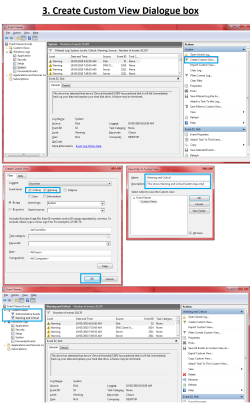
1. From the Event Viewer window, select Create Custom View. The Custom View Dialogue box will appear.
2. In the custom view Dialogue box tick the Critical and Warning Check Boxes.
3. Press OK and the Save Filter to Custom View box will appear.
4. Fill in the Name and Description for your custom view and press OK.
5. You can now view your custom view from the Event Viewer Tree.
Filtering and Creating Custom Event Views for System Monitoring
The Event Viewer Console
1. Open the Event Viewer Console through one of the following methods:
- From the RUN Command, type eventvwr.msc and press enter.
- Click the Start Globe, select All programs, Administrative Tools, and then select Event Viewer;
- NOTE: In some Windows 7 releases you can right click on 'Computer' and select 'Manage', you will then need to filter select the event viewer in from the Microsoft Management Console (MMC) window that appears.
2. Expand Windows Logs and click on System, to see your System Events.
3. Next Click on Filter Current Log, this is found on the action pane on the right. The Filter Current Log dialogue box will now appear.
The Filter Current Log Dialogue Box
1. When the Filter Current Log Dialogue box appears, Select the Critical and Warning tick boxes and press Ok.
2. You should now see your filtered log.
The Create Custom View Dialogue box
1. From the Event Viewer window, select Create Custom View. The Custom View Dialogue box will appear.
2. In the custom view Dialogue box tick the Critical and Warning Check Boxes.
3. Press OK and the Save Filter to Custom View box will appear.
4. Fill in the Name and Description for your custom view and press OK.
5. You can now view your custom view from the Event Viewer Tree.
Last edited by a moderator:


