Windows 7 Forums


Windows 7: User Folders - Allow or Prevent Moving Location


User Folders - Allow or Prevent Moving Location

How to Allow or Prevent Users to Move their User Folders to a New Location
Published 14 May 2010
Published by

Featured Tutorial

Emergency Kit - save your files from a dead OS

How to Create and Use a Linux Mint Mate USB Flash Drive to Recover your Files

Microsoft Accounts - Link

How to Link your Microsoft Accounts

Microsoft Account Primary Alias Email Address - Change

How to Change your Microsoft Account Primary Alias Email Address

Clean Up Factory Bloatware


Microsoft Account Display Name - Change

How to Change your Microsoft Account Display Name

Bootmgr - Move to C:\ with EasyBCD

How to Move Bootmgr to C:\ with EasyBCD
How to Allow or Prevent Users to Move their User Folders to a New Location

information   Information
This tutorial will show you how to allow or prevent all or specific users from being able to change the location of their user folders in Vista, Windows 7, and Windows 8.


EXAMPLE: User Folders
NOTE: These are located at C:\Users\(user-name).
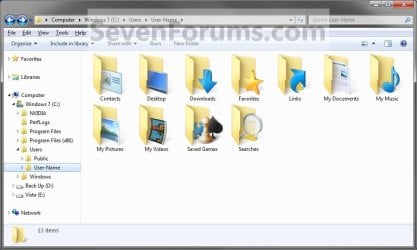
User Folders - Allow or Prevent Moving Location-user_folders.jpg
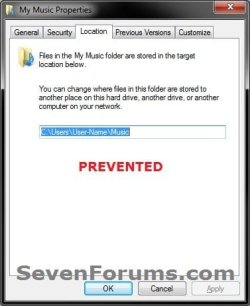
EXAMPLE: Moving User Profile Folders Allowed and Prevented
NOTE: This is an example of moving the Music user folder if set to allow or prevent.
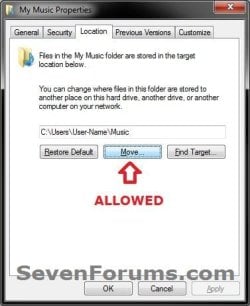
User Folders - Allow or Prevent Moving Location-allowed.jpgUser Folders - Allow or Prevent Moving Location-prevented.jpg


OPTION ONE
Using a REG File Download
1. To Allow Moving User Profile Folders
NOTE: This is the default setting.
A) Click/tap on the Download button below to download the file below, and go to step 3 below.
Allow_Moving_User_Folders_Location.reg
download
2. To Prevent Moving User Profile Folders
A) Click/tap on the Download button below to download the file below, and go to step 3 below.
Prevent_Movning_User_Folders_Location.reg
download
3. Save the .reg file to your desktop.

4. Double click/tap on the downloaded .reg file and click on Merge.

5. If prompted, click/tap on Run, Yes (UAC-Windows 7/8) OR Continue (UAC-Vista), Yes, and OK.

6. When finished, you can delete the downloaded .reg file if you like.


OPTION TWO
Through the Local Group Policy Editor
1. Open the all users, specific users or groups, or all users except administrators Local Group Policy Editor for how you want this policy applied.
2. In the left pane, click/tap on to expand User Configuration, Administrative Templates, and Desktop. (see screenshot below)
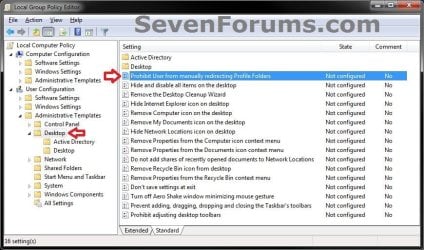
User Folders - Allow or Prevent Moving Location-gpedit-1.jpg
3. In the right pane, right click on Prohibit User from Manually redirecting Profile Folders, and click/tap on Edit. (see screenshot above)

4. To Allow Moving User Profile Folders
A) Select (dot) either Not Configured or Disabled, and go to step 6 below. (see screenshot below step 6)
NOTE: Not Configured is the default setting.
5. To Prevent Moving User Profile Folders
A) Select (dot) Enabled, and go to step 6 below. (see screenshot below step 6)
6. Click/tap on OK. (see screenshot below)
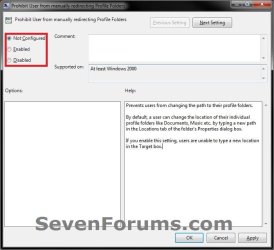
User Folders - Allow or Prevent Moving Location-gpedit-2.jpg
7. Close the Local Group Policy Editor window.
That's it,
Shawn


Need more help? Try searching our extensive help and support site.
Loading
28 Jan 2011   #1
karlsnooks

MS Windows 7 Ultimate SP1 64-bit
Austin, Texas


Think you meant to say User Configuration in the discussion of manually changing.

My System SpecsSystem Spec

28 Jan 2011   #2
Brink

64-bit Windows 7 Ultimate SP1 & Windows 8 Enterprise
Texas


Nice catch Karl. Thank you. It has been corrected.
My System SpecsSystem Spec
Comment

 User Folders - Allow or Prevent Moving Location problems?


Tutorial Tools


Similar help and support threads for: User Folders - Allow or Prevent Moving Location
Windows 7 Tutorial Category
Moving User Folders - additional folders appear Customization
Solved Moving user folders; User picture error Customization
User Folders - Moving User Folders by Modular Script Tutorials
Moving Default User Doc Location? Installation & Setup
Moving the location of the *users* folders. Performance & Maintenance


All times are GMT -5. The time now is 03:11 PM.


Seven Forums Android App Seven Forums IOS App Follow us on Facebook

Windows 7 Forums is an independent web site and has not been authorized,
sponsored, or otherwise approved by Microsoft Corporation.
"Windows 7" and related materials are trademarks of Microsoft Corp.
© Designer Media Ltd
  

1 2 3 4 5 6 7 8 9 10 11 12 13 14 15 16 17 18 19 20 21 22 23 24 25 26 27 28 29 30 31 32