How to Disable the Sleep Option in the Windows Shut Down Menu
Information
Here is a fairly simple method to disable the sleep option in the Windows shut down menu; it's very easy to re-enable the option in future if the need ever arises.
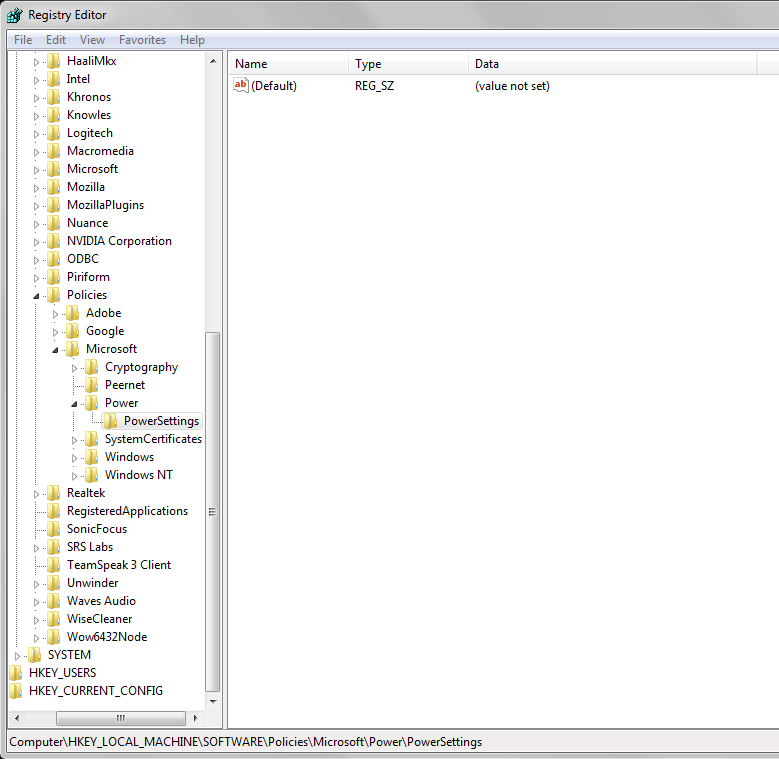
EXAMPLE: "Sleep" Disabled NOTE:Notice that Sleep is grayed out.
Here's How: 1. To Disable "Sleep"
A) Click on the Download button below to download the file below. Disable_Sleep.reg
B) Go to step 3 below. 2. To Enable "Sleep" NOTE:This is the default setting.
A) Click on the Download button below to download the file below. Enable_Sleep.reg
Thank you for pointing this out. I have updated the tutorial to include that. Plus, it has been updated to be able to do the tutorial with REG file downloads so everyone doesn't have to manually do it anymore.
My Computer
At a glance
64-bit Windows 11 Pro for WorkstationsIntel i7-8700K OC'd to 5 GHz64 GB (4x16GB) G.SKILL TridentZ RGB DDR4 3600...ASUS ROG-STRIX-GTX1080TI-O11G-GAMING
Computer type
PC/Desktop
Computer Manufacturer/Model Number
Self built custom
OS
64-bit Windows 11 Pro for Workstations
CPU
Intel i7-8700K OC'd to 5 GHz
Motherboard
ASUS ROG Maximus XI Formula Z390
Memory
64 GB (4x16GB) G.SKILL TridentZ RGB DDR4 3600 MHz
Graphics Card(s)
ASUS ROG-STRIX-GTX1080TI-O11G-GAMING
Sound Card
Integrated
Monitor(s) Displays
2 x Samsung Odyssey G7 27"
Screen Resolution
2560x1440
Hard Drives
1TB Samsung 990 PRO M.2,
4TB Samsung 990 PRO PRO M.2,
TerraMaster F8 SSD Plus NAS
PSU
Seasonic Prime Titanium 850W
Case
Thermaltake Core P3
Cooling
Corsair Hydro H115i
Keyboard
Logitech wireless K800
Mouse
Logitech MX Master 4
Internet Speed
2 Gb/s Download and 100 Mb/s Upload
Antivirus
Malwarebyte Anti-Malware Premium
Browser
Google Chrome
Other Info
Logitech Z625 speaker system,
Logitech BRIO 4K Pro webcam,
HP Color LaserJet Pro MFP M477fdn,
APC SMART-UPS RT 1000 XL - SURT1000XLI,
Galaxy S23 Plus phone
It's not working. I've been using this ASRock Z97 Killer for a few days while my MSI Z97 Gaming 7 is being RMA'd. I should have that back this week. No matter what this ASRock board won't shut down unless I flip the switch on the PSU. That might have something to do with it not being able to process the Registry file. This is what I have in Registry:
My Computer
At a glance
Windows 7 Home Premium 64-bitIntel i7-4790k 4.6 GHz 1.260vGSkill Ripjaws 2133 MHz 9-11-10-28MSI GTX-980 Gaming 4G
Computer type
PC/Desktop
Computer Manufacturer/Model Number
Self built
OS
Windows 7 Home Premium 64-bit
CPU
Intel i7-4790k 4.6 GHz 1.260v
Motherboard
MSI Z97 Gaming 7
Memory
GSkill Ripjaws 2133 MHz 9-11-10-28
Graphics Card(s)
MSI GTX-980 Gaming 4G
Monitor(s) Displays
ASUS VG248QE 144 Hz
Screen Resolution
1920 x 1080
Hard Drives
Samsung 840 EVO 250 GB x2 RAID_0, System drive
OCZ Vertex-4 256 GB, Downloads, Wallpapers and Storage
OCZ Vertex-4 256 GB, Backup Storage
Toshiba Q Series HDTS225XZSTA 256GB, System Image
This is my shutdown menu. My system never sleeps by design. I can try the shortcut but I wouldn't know if it was working or not. Besides, when I shut down this motherboard my case fans, cold cathode tubes and H220 pumps keep running while the H220 radiator fans stop. I am trying to see if the Sleep being disabled is causing my mobo problems but it didn't affect my MSI board. Thanks for the quick replies. I have been using your mods and registry hacks for years. You run a great site and your tutorials are the best I have found.
My Computer
At a glance
Windows 7 Home Premium 64-bitIntel i7-4790k 4.6 GHz 1.260vGSkill Ripjaws 2133 MHz 9-11-10-28MSI GTX-980 Gaming 4G
Computer type
PC/Desktop
Computer Manufacturer/Model Number
Self built
OS
Windows 7 Home Premium 64-bit
CPU
Intel i7-4790k 4.6 GHz 1.260v
Motherboard
MSI Z97 Gaming 7
Memory
GSkill Ripjaws 2133 MHz 9-11-10-28
Graphics Card(s)
MSI GTX-980 Gaming 4G
Monitor(s) Displays
ASUS VG248QE 144 Hz
Screen Resolution
1920 x 1080
Hard Drives
Samsung 840 EVO 250 GB x2 RAID_0, System drive
OCZ Vertex-4 256 GB, Downloads, Wallpapers and Storage
OCZ Vertex-4 256 GB, Backup Storage
Toshiba Q Series HDTS225XZSTA 256GB, System Image
No, not really. I intended this as a Gaming PC and I wanted it running full speed at all times. I do have EIST lowering the clocks when idle now whereas it was always locked at 4.7 GHz. If I were rich I would be eccentric I guess. Right now the Sleep option doesn't even appear in the Windows Start button properties either.
My Computer
At a glance
Windows 7 Home Premium 64-bitIntel i7-4790k 4.6 GHz 1.260vGSkill Ripjaws 2133 MHz 9-11-10-28MSI GTX-980 Gaming 4G
Computer type
PC/Desktop
Computer Manufacturer/Model Number
Self built
OS
Windows 7 Home Premium 64-bit
CPU
Intel i7-4790k 4.6 GHz 1.260v
Motherboard
MSI Z97 Gaming 7
Memory
GSkill Ripjaws 2133 MHz 9-11-10-28
Graphics Card(s)
MSI GTX-980 Gaming 4G
Monitor(s) Displays
ASUS VG248QE 144 Hz
Screen Resolution
1920 x 1080
Hard Drives
Samsung 840 EVO 250 GB x2 RAID_0, System drive
OCZ Vertex-4 256 GB, Downloads, Wallpapers and Storage
OCZ Vertex-4 256 GB, Backup Storage
Toshiba Q Series HDTS225XZSTA 256GB, System Image
Download and merge the .reg file attached below, then restart the computer afterwards. It'll restore the default registry entries for Sleep. Hopefully, it'll help.
Attachments
Sleep.reg
7.9 KB
· Views: 422
My Computer
At a glance
64-bit Windows 11 Pro for WorkstationsIntel i7-8700K OC'd to 5 GHz64 GB (4x16GB) G.SKILL TridentZ RGB DDR4 3600...ASUS ROG-STRIX-GTX1080TI-O11G-GAMING
Computer type
PC/Desktop
Computer Manufacturer/Model Number
Self built custom
OS
64-bit Windows 11 Pro for Workstations
CPU
Intel i7-8700K OC'd to 5 GHz
Motherboard
ASUS ROG Maximus XI Formula Z390
Memory
64 GB (4x16GB) G.SKILL TridentZ RGB DDR4 3600 MHz
Graphics Card(s)
ASUS ROG-STRIX-GTX1080TI-O11G-GAMING
Sound Card
Integrated
Monitor(s) Displays
2 x Samsung Odyssey G7 27"
Screen Resolution
2560x1440
Hard Drives
1TB Samsung 990 PRO M.2,
4TB Samsung 990 PRO PRO M.2,
TerraMaster F8 SSD Plus NAS
PSU
Seasonic Prime Titanium 850W
Case
Thermaltake Core P3
Cooling
Corsair Hydro H115i
Keyboard
Logitech wireless K800
Mouse
Logitech MX Master 4
Internet Speed
2 Gb/s Download and 100 Mb/s Upload
Antivirus
Malwarebyte Anti-Malware Premium
Browser
Google Chrome
Other Info
Logitech Z625 speaker system,
Logitech BRIO 4K Pro webcam,
HP Color LaserJet Pro MFP M477fdn,
APC SMART-UPS RT 1000 XL - SURT1000XLI,
Galaxy S23 Plus phone
That removed the Power entry entirely as seen in the screenshot below. I will try a Repair Install of Windows if necessary when I get my MSI board returned this week. My laptop's Registry looks identical without a Sleep entry. I looked in there last night hoping to find a value to enter manually into my Desktop's Registry. Here are my PC's specs except for my current Fatal1ty Z97 Killer motherboard by ASRock: Mods Rigs
My Computer
At a glance
Windows 7 Home Premium 64-bitIntel i7-4790k 4.6 GHz 1.260vGSkill Ripjaws 2133 MHz 9-11-10-28MSI GTX-980 Gaming 4G
Computer type
PC/Desktop
Computer Manufacturer/Model Number
Self built
OS
Windows 7 Home Premium 64-bit
CPU
Intel i7-4790k 4.6 GHz 1.260v
Motherboard
MSI Z97 Gaming 7
Memory
GSkill Ripjaws 2133 MHz 9-11-10-28
Graphics Card(s)
MSI GTX-980 Gaming 4G
Monitor(s) Displays
ASUS VG248QE 144 Hz
Screen Resolution
1920 x 1080
Hard Drives
Samsung 840 EVO 250 GB x2 RAID_0, System drive
OCZ Vertex-4 256 GB, Downloads, Wallpapers and Storage
OCZ Vertex-4 256 GB, Backup Storage
Toshiba Q Series HDTS225XZSTA 256GB, System Image
Sleep is still grayed out in my Power-off drop down menu and not available in Power Button properties selections. I may have to enter the values manually to get my Sleep function back again. Thanks for all of your assistance.
My Computer
At a glance
Windows 7 Home Premium 64-bitIntel i7-4790k 4.6 GHz 1.260vGSkill Ripjaws 2133 MHz 9-11-10-28MSI GTX-980 Gaming 4G
Computer type
PC/Desktop
Computer Manufacturer/Model Number
Self built
OS
Windows 7 Home Premium 64-bit
CPU
Intel i7-4790k 4.6 GHz 1.260v
Motherboard
MSI Z97 Gaming 7
Memory
GSkill Ripjaws 2133 MHz 9-11-10-28
Graphics Card(s)
MSI GTX-980 Gaming 4G
Monitor(s) Displays
ASUS VG248QE 144 Hz
Screen Resolution
1920 x 1080
Hard Drives
Samsung 840 EVO 250 GB x2 RAID_0, System drive
OCZ Vertex-4 256 GB, Downloads, Wallpapers and Storage
OCZ Vertex-4 256 GB, Backup Storage
Toshiba Q Series HDTS225XZSTA 256GB, System Image
Sleep was working fine until I ran your Reg file to gray it out although I never used it. I thought it would be useful having it grayed out. I don't know what other Reg entries you are refering to. The reg file you uploaded deleted the Power entry after I ran it. The last time I ran the 'Enable Sleep' Reg file I got a warning that 'Disable Sleep' was preventing Windows from shutting down although I was running the 'Enable Sleep' file. I cancelled the Sutdown and ran the file again. Windows restarted but no success at restoring the Sleep function. Maybe there is another Registry key that was affected?
My Computer
At a glance
Windows 7 Home Premium 64-bitIntel i7-4790k 4.6 GHz 1.260vGSkill Ripjaws 2133 MHz 9-11-10-28MSI GTX-980 Gaming 4G
Computer type
PC/Desktop
Computer Manufacturer/Model Number
Self built
OS
Windows 7 Home Premium 64-bit
CPU
Intel i7-4790k 4.6 GHz 1.260v
Motherboard
MSI Z97 Gaming 7
Memory
GSkill Ripjaws 2133 MHz 9-11-10-28
Graphics Card(s)
MSI GTX-980 Gaming 4G
Monitor(s) Displays
ASUS VG248QE 144 Hz
Screen Resolution
1920 x 1080
Hard Drives
Samsung 840 EVO 250 GB x2 RAID_0, System drive
OCZ Vertex-4 256 GB, Downloads, Wallpapers and Storage
OCZ Vertex-4 256 GB, Backup Storage
Toshiba Q Series HDTS225XZSTA 256GB, System Image
I don't know when the problem began. I never use sleep anyway so having it grayed out was useful so I didn't click it by accident. I plan to upgrade to Windows 7 Professional so I can max out my memory to 32 GB and will reinstall this Home Premium on my latest project. I got a G3258 and MSI Z97 PC Mate motherboard for $99 plus a $10 rebate. I couldn't resist. My bad.
My Computer
At a glance
Windows 7 Home Premium 64-bitIntel i7-4790k 4.6 GHz 1.260vGSkill Ripjaws 2133 MHz 9-11-10-28MSI GTX-980 Gaming 4G
Computer type
PC/Desktop
Computer Manufacturer/Model Number
Self built
OS
Windows 7 Home Premium 64-bit
CPU
Intel i7-4790k 4.6 GHz 1.260v
Motherboard
MSI Z97 Gaming 7
Memory
GSkill Ripjaws 2133 MHz 9-11-10-28
Graphics Card(s)
MSI GTX-980 Gaming 4G
Monitor(s) Displays
ASUS VG248QE 144 Hz
Screen Resolution
1920 x 1080
Hard Drives
Samsung 840 EVO 250 GB x2 RAID_0, System drive
OCZ Vertex-4 256 GB, Downloads, Wallpapers and Storage
OCZ Vertex-4 256 GB, Backup Storage
Toshiba Q Series HDTS225XZSTA 256GB, System Image

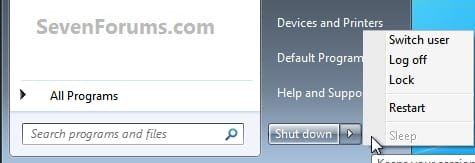

 Start_Regedit.jpg18.8 KB · Views: 278
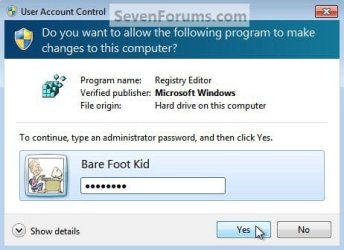 UAC_Regedit.jpg25.3 KB · Views: 252
 MS_NewKey.jpg32.2 KB · Views: 1,045
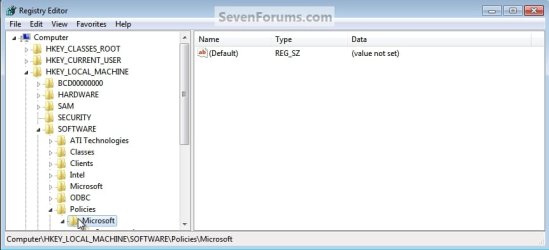 Policies_MS.jpg32.4 KB · Views: 1,006
 Power_NewKey.jpg37.1 KB · Views: 970
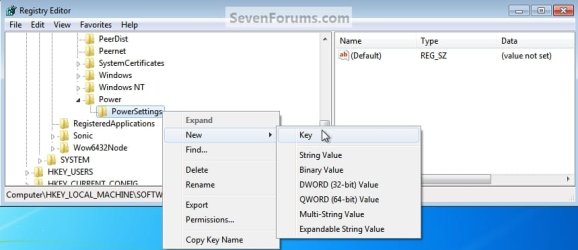 PowerSettings_NewKey.jpg38.6 KB · Views: 887
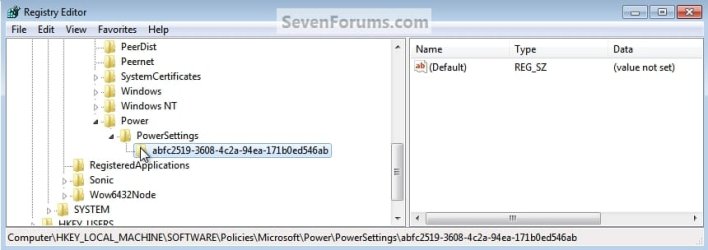 LeftClick_NewKey.jpg30.9 KB · Views: 842
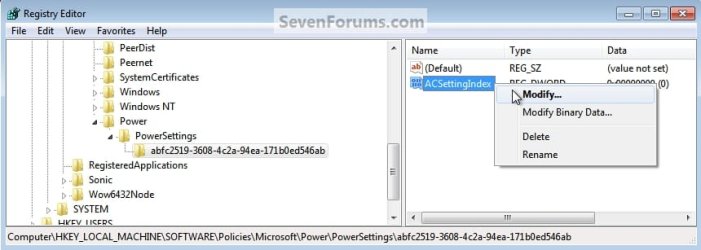 ACSettingIndex_Modify.jpg36.1 KB · Views: 758
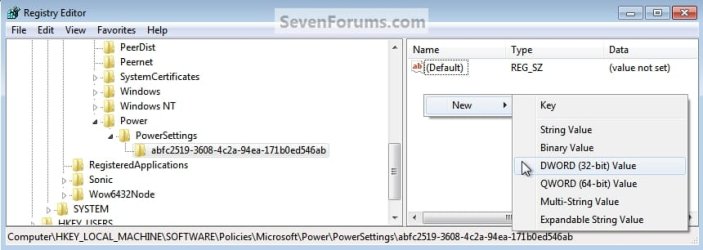 New_DWord.jpg37.7 KB · Views: 700
 DWord_Value.jpg31.3 KB · Views: 734
 File_Exit.jpg20.4 KB · Views: 535
 DWordValue_1.jpg30.1 KB · Views: 465