Windows 7 Forums Search
Welcome to Windows 7 Forums. Our forum is dedicated to helping you find solutions with any problems, errors or issues you are experiencing with Windows 7. The Windows 7 forum also covers news and updates and has an extensive Windows 7 tutorial section that covers a wide range of tips and tricks.


Windows 7 - Audio CDs - Rip with Windows Media Player 12


Audio CDs - Rip with Windows Media Player 12

How to Rip Audio CDs using Windows Media Player 12
Published by Jonathan_King
05-17-2010
Default Audio CDs - Rip with Windows Media Player 12

How to Rip Audio CDs with WMP 12


1. Insert the audio CD into the drive.


2. Open Windows Media Player. Type media player into the start menu and press enter.


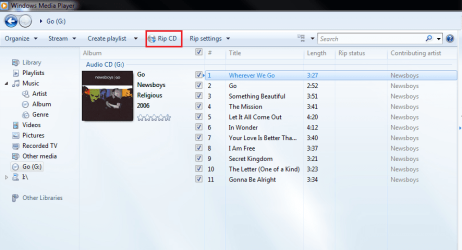
3. Select your CD in the left pane.
Audio CDs - Rip with Windows Media Player 12-capture.png
4. Change whatever settings you need in the Rip Settings menu.
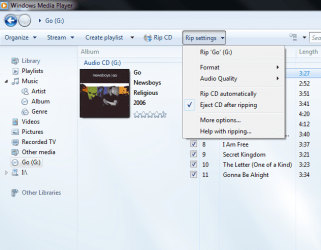
Audio CDs - Rip with Windows Media Player 12-capture1.png
5. Click the Rip button.
Audio CDs - Rip with Windows Media Player 12-capture2.png
6. Wait for it to finish, and that's it!
Published by
Senior Member


Join Date: Sep 2009
Location: Rednecksville
Posts: 13,656
Jonathan_King has a reputation beyond reputeJonathan_King has a reputation beyond reputeJonathan_King has a reputation beyond reputeJonathan_King has a reputation beyond repute

Tutorial Tools
06-08-2010   #1
3strokes


Win 7 Home Premium


I don't have menu item Rip in my WMP12

Win 7 home premium..............WMP12 but no menu item that says Rip or RIP CD.

My System SpecsSystem Spec
06-08-2010   #2
Jonathan_King


Windows 7 Professional x64


Quote   Quote: Originally Posted by 3strokes View Post
Win 7 home premium..............WMP12 but no menu item that says Rip or RIP CD.
Hello 3strokes,

Could you please post a screenshot of what you see in WMP?

A Preferred Method of Uploading/Posting Screen Shots

Thanks,
~JK
My System SpecsSystem Spec
06-09-2010   #3
3strokes


Win 7 Home Premium


It works

If I open my WMP, it has no Rip CD menu item even after I insert a CD....... But, with my WMP closed, if I insert a CD and it starts as Auto-Play then the Rip CD (and Rip Settings) Menu item(s) appear.

Thanks for the quick reply.
My System SpecsSystem Spec
.


06-09-2010   #4
Jonathan_King


Windows 7 Professional x64


Make sure you select the CD from the left pane, if you insert the CD after WMP is open,
My System SpecsSystem Spec
Comment

Audio CDs - Rip with Windows Media Player 12 problems?


Tutorial Tools


Similar Threads for: Audio CDs - Rip with Windows Media Player 12
Windows 7 Tutorial Category
Streaming audio won't play through Windows Media Player Sound & Audio
Windows Media Player 12 dual audio, change channels? Music, Pictures & Video
Windows Media Player 12 No Audio with MPEG1 Media Center
Windows Media Player Overriding Other Audio Programs? Software
Windows 7 Media Player Audio Corruption....... Media Center


All times are GMT -5. The time now is 01:51 AM.


Windows 7 Forums is an independent web site and has not been authorized,
sponsored, or otherwise approved by Microsoft Corporation.
"Windows 7" and related materials are trademarks of Microsoft Corp.
© Designer Media Ltd
  

1 2 3 4 5 6 7 8 9 10 11 12 13 14 15 16 17 18 19 20 21 22 23 24 25 26 27 28 29 30