
How to Change the Keyboard Layout in Windows 7
Information
This will show you how to change the keyboard layout to customize your keyboard for a specific input language or format. The keyboard layout controls which characters appear on the screen when you press the keys on your keyboard. Some input languages have several keyboard layouts; others have only one. This can make it easier to enter text or edit documents in multiple languages.
Warning
Before you will be able to change the Keyboard layout, you must add a input language and keyboard layout that you want to use first.
OPTION ONE
To Change Default Input Language and Keyboard Layout
NOTE: This will allow you to select an added input language and keyboard layout to use as the default for all input fields in Windows 7.
1. Open the Control Panel (icons view), and click on the Region and Language icon.
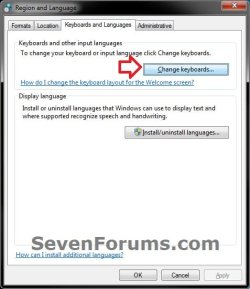
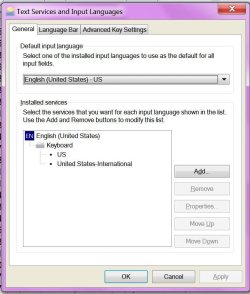
2. Click on the Keyboards and Languages tab, then click on the Change keyboards button. (see screenshot below)
3. In the Defualt input language section, click on the drop box and select a added input language and keyboard layout. (see screenshots below)
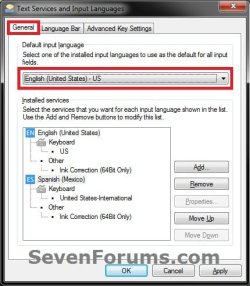

4. Click on OK. (see screenshots above)
5. Click on OK. (see screenshot below step 2)
OPTION TWO
To Change Keyboard Layout from Language Bar
NOTE: The input language you select in this option will only stay set until you log out, shut down, or restart the computer. Afterwards, it will reset to the default input method set in OPTION ONE until changed.
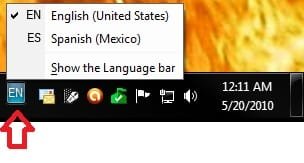
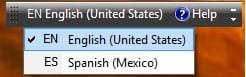
1. Click on the Language bar (on taskbar (default) or desktop), then select (check) a input language with the keyboard layout you want to use. (see screenshots below)
OPTION THREE
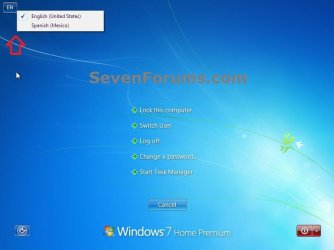
To Change Keyboard Layout from the Welcome Screen
NOTE: For example, on the CTRL+ALT+DELETE screen. The input language you select in this option will only stay set until you log out, shut down, or restart the computer. Afterwards, it will reset to the default input method set in OPTION ONE until changed.
1. On the Welcome screen, click the Keyboard layout button
That's it,
Shawn
Related Tutorials
- How to Add or Remove a Keyboard Input Language in Windows 7
- How to Create a Region and Language Shortcut in Windows 7
- How to See a Keyboard Layout Preview in Windows 7
- How to Hide or Show the Language Bar in Windows 7
- How to Change the Display Language in Vista and Windows 7 Ultimate and Enterprise
- How to Install and Uninstall Display Languages in Windows 7 Ultimate and Enterprise
- How to Copy Your Region and Language Settings to New Users and Welcome Screen
- How to Overwrite the Display Language of All Users with the System Display Language
Attachments

Last edited:


 lapse into my native language and don't want to have to do the extra things I'm perfectly willing to do when every other word has some sort of accent in it. So I do want both those keyboards there. Removing one of them isn't really a solution. Plus, changing keyboards does not entail opening that dialog, so if switching keyboards via the icon is somehow having an impact on the broader settings dialog . . . well, I'd call that a bug. Wouldn't you?
 myself.