
Microsoft Outlook Desktop Shortcut - Create

How to Create a Special Outlook Desktop (Office XP style) Shortcut


OPTION ONE

Add Outlook Desktop Shortcut for All Users


Download this registry file.

View attachment Add_Outlook shortcut_All_Users.reg


Click on it with the left mouse button.

If the User Account Control prompt window appears, click yes.

When a window similar to this one
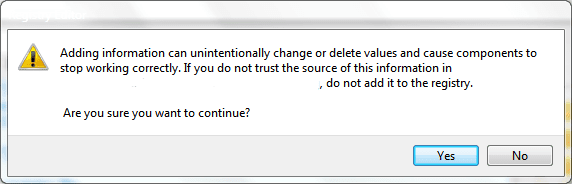
Reg merge.PNG appears, click yes.

If the Outlook icon doesn't appear immediately, refresh the desktop.

To REMOVE the icon, use the following registry file in the same procedure:

View attachment Remove_Outlook shortcut_All_Users.reg


OPTION TWO

Add Outlook Desktop Shortcut for Current User Only


To add this shortcut only for the current user, use the following registry file instead.

View attachment Add_Outlook shortcut_Current_User.reg

Click on it with the left mouse button.

If the User Account Control prompt window appears, click yes.

When a window similar to this one
Reg merge.PNG appears, click yes.

If the Outlook icon doesn't appear immediately, refresh the desktop.

To REMOVE the icon, use the following registry file in the same procedure:

View attachment Remove_Outlook shortcut_Current_User.reg
..............................................................

The icon will look like this:
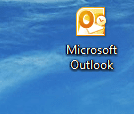
Outlook icon.PNG

Right click on the icon will produce this menu:
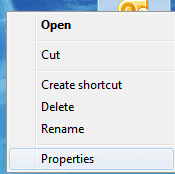
rightclick.PNG

Clicking properties will open the Mail Setup window:
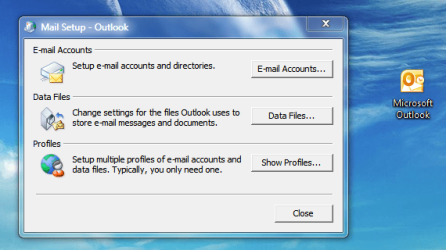
properties.PNG

Clicking the icon with the left mouse button will open Outlook - just like an ordinary shortcut would behave.
 
Last edited by a moderator:
Hello Khalil, and welcome to Seven Forums.

This Outlook desktop icon doesn't appear to work for Outlook 2013. :(
 

My Computer My Computer

At a glance

64-bit Windows 11 Pro for WorkstationsIntel i7-8700K OC'd to 5 GHz64 GB (4x16GB) G.SKILL TridentZ RGB DDR4 3600...ASUS ROG-STRIX-GTX1080TI-O11G-GAMING
Computer type
PC/Desktop
Computer Manufacturer/Model Number
Self built custom
OS
64-bit Windows 11 Pro for Workstations
CPU
Intel i7-8700K OC'd to 5 GHz
Motherboard
ASUS ROG Maximus XI Formula Z390
Memory
64 GB (4x16GB) G.SKILL TridentZ RGB DDR4 3600 MHz
Graphics Card(s)
ASUS ROG-STRIX-GTX1080TI-O11G-GAMING
Sound Card
Integrated
Monitor(s) Displays
2 x Samsung Odyssey G7 27"
Screen Resolution
2560x1440
Hard Drives
1TB Samsung 990 PRO M.2,
4TB Samsung 990 PRO PRO M.2,
TerraMaster F8 SSD Plus NAS
PSU
Seasonic Prime Titanium 850W
Case
Thermaltake Core P3
Cooling
Corsair Hydro H115i
Keyboard
Logitech wireless K800
Mouse
Logitech MX Master 4
Internet Speed
2 Gb/s Download and 100 Mb/s Upload
Antivirus
Malwarebyte Anti-Malware Premium
Browser
Google Chrome
Other Info
Logitech Z625 speaker system,
Logitech BRIO 4K Pro webcam,
HP Color LaserJet Pro MFP M477fdn,
APC SMART-UPS RT 1000 XL - SURT1000XLI,
Galaxy S23 Plus phone
I had the same issue with the old NameSpace entry just creating a no-named folder on the desktop.

Root Cause:
The 32-bit version of office creates a HKEY_CLASSES_ROOT entry but since it is a 32-bit application, it puts it in the registry under Wow6432Node which the X64 Windows desktop does not have.

Search for this value {00020D75-0000-0000-C000-000000000046} under HKEY_CLASSES_ROOT
Export that key to a .reg file
Open that .reg file with notepad
Remove the extra Wow6432Node\ in each line
save the file
Double click to import

Voilla, pretty Outlook icon on your desktop.

Just noticed that right clicking and going to properties doesn't give you the accounts menu. I could figure that out, but I don't care that much for that. Double Clicking opens outlook.
 

My Computer My Computer

At a glance

Windows 8 X64
Computer type
PC/Desktop
OS
Windows 8 X64
does this launch outlook express or do I have to install outlook first?
 

My Computer My Computer

At a glance

Windows 7 UltimateAmd Athelon 64x2 Duel core Processor 6000+ 3....4.0 GBRadeon HD5450 2.8gb
Computer type
PC/Desktop
Computer Manufacturer/Model Number
Self Built With Help
OS
Windows 7 Ultimate
CPU
Amd Athelon 64x2 Duel core Processor 6000+ 3.10ghz
Motherboard
Asus-MX Se Plus
Memory
4.0 GB
Graphics Card(s)
Radeon HD5450 2.8gb
Sound Card
7.1 Surround
Monitor(s) Displays
Lg Flatron 22inch lcd
Screen Resolution
1680x1050
Hard Drives
western digital 320 gig
PSU
550 w
Case
Standard Atx
Cooling
2 Fans
Keyboard
G15 Gaming keyboard
Mouse
Sky mouse
Internet Speed
ADSL2+ QUAD-1
Hello Coldy,

Yeah, you'll need to have Outlook installed. :(
 

My Computer My Computer

At a glance

64-bit Windows 11 Pro for WorkstationsIntel i7-8700K OC'd to 5 GHz64 GB (4x16GB) G.SKILL TridentZ RGB DDR4 3600...ASUS ROG-STRIX-GTX1080TI-O11G-GAMING
Computer type
PC/Desktop
Computer Manufacturer/Model Number
Self built custom
OS
64-bit Windows 11 Pro for Workstations
CPU
Intel i7-8700K OC'd to 5 GHz
Motherboard
ASUS ROG Maximus XI Formula Z390
Memory
64 GB (4x16GB) G.SKILL TridentZ RGB DDR4 3600 MHz
Graphics Card(s)
ASUS ROG-STRIX-GTX1080TI-O11G-GAMING
Sound Card
Integrated
Monitor(s) Displays
2 x Samsung Odyssey G7 27"
Screen Resolution
2560x1440
Hard Drives
1TB Samsung 990 PRO M.2,
4TB Samsung 990 PRO PRO M.2,
TerraMaster F8 SSD Plus NAS
PSU
Seasonic Prime Titanium 850W
Case
Thermaltake Core P3
Cooling
Corsair Hydro H115i
Keyboard
Logitech wireless K800
Mouse
Logitech MX Master 4
Internet Speed
2 Gb/s Download and 100 Mb/s Upload
Antivirus
Malwarebyte Anti-Malware Premium
Browser
Google Chrome
Other Info
Logitech Z625 speaker system,
Logitech BRIO 4K Pro webcam,
HP Color LaserJet Pro MFP M477fdn,
APC SMART-UPS RT 1000 XL - SURT1000XLI,
Galaxy S23 Plus phone

My Computer My Computer

At a glance

Windows 7 UltimateAmd Athelon 64x2 Duel core Processor 6000+ 3....4.0 GBRadeon HD5450 2.8gb
Computer type
PC/Desktop
Computer Manufacturer/Model Number
Self Built With Help
OS
Windows 7 Ultimate
CPU
Amd Athelon 64x2 Duel core Processor 6000+ 3.10ghz
Motherboard
Asus-MX Se Plus
Memory
4.0 GB
Graphics Card(s)
Radeon HD5450 2.8gb
Sound Card
7.1 Surround
Monitor(s) Displays
Lg Flatron 22inch lcd
Screen Resolution
1680x1050
Hard Drives
western digital 320 gig
PSU
550 w
Case
Standard Atx
Cooling
2 Fans
Keyboard
G15 Gaming keyboard
Mouse
Sky mouse
Internet Speed
ADSL2+ QUAD-1
You're welcome. :)
 

My Computer My Computer

At a glance

64-bit Windows 11 Pro for WorkstationsIntel i7-8700K OC'd to 5 GHz64 GB (4x16GB) G.SKILL TridentZ RGB DDR4 3600...ASUS ROG-STRIX-GTX1080TI-O11G-GAMING
Computer type
PC/Desktop
Computer Manufacturer/Model Number
Self built custom
OS
64-bit Windows 11 Pro for Workstations
CPU
Intel i7-8700K OC'd to 5 GHz
Motherboard
ASUS ROG Maximus XI Formula Z390
Memory
64 GB (4x16GB) G.SKILL TridentZ RGB DDR4 3600 MHz
Graphics Card(s)
ASUS ROG-STRIX-GTX1080TI-O11G-GAMING
Sound Card
Integrated
Monitor(s) Displays
2 x Samsung Odyssey G7 27"
Screen Resolution
2560x1440
Hard Drives
1TB Samsung 990 PRO M.2,
4TB Samsung 990 PRO PRO M.2,
TerraMaster F8 SSD Plus NAS
PSU
Seasonic Prime Titanium 850W
Case
Thermaltake Core P3
Cooling
Corsair Hydro H115i
Keyboard
Logitech wireless K800
Mouse
Logitech MX Master 4
Internet Speed
2 Gb/s Download and 100 Mb/s Upload
Antivirus
Malwarebyte Anti-Malware Premium
Browser
Google Chrome
Other Info
Logitech Z625 speaker system,
Logitech BRIO 4K Pro webcam,
HP Color LaserJet Pro MFP M477fdn,
APC SMART-UPS RT 1000 XL - SURT1000XLI,
Galaxy S23 Plus phone
You're welcome. :)


I have tried the both versions and I just get a blank folder and I'm running windows 7 ultimate
plus service pack one... So somewhere there is problem on this..

I followed the steps for the all users. double click the reg file and allowed it in the register refresh
the desktop and got a blank yellow folder I even reboot and no change.
so I use the uninstall reg to take it out.

I then did the single user reg and did the the same thing and got the same result.

so I took it out
 

My Computer My Computer

At a glance

Windows 7 UltimateAmd Athelon 64x2 Duel core Processor 6000+ 3....4.0 GBRadeon HD5450 2.8gb
Computer type
PC/Desktop
Computer Manufacturer/Model Number
Self Built With Help
OS
Windows 7 Ultimate
CPU
Amd Athelon 64x2 Duel core Processor 6000+ 3.10ghz
Motherboard
Asus-MX Se Plus
Memory
4.0 GB
Graphics Card(s)
Radeon HD5450 2.8gb
Sound Card
7.1 Surround
Monitor(s) Displays
Lg Flatron 22inch lcd
Screen Resolution
1680x1050
Hard Drives
western digital 320 gig
PSU
550 w
Case
Standard Atx
Cooling
2 Fans
Keyboard
G15 Gaming keyboard
Mouse
Sky mouse
Internet Speed
ADSL2+ QUAD-1
What version of Outlook do you have installed?
 

My Computer My Computer

At a glance

64-bit Windows 11 Pro for WorkstationsIntel i7-8700K OC'd to 5 GHz64 GB (4x16GB) G.SKILL TridentZ RGB DDR4 3600...ASUS ROG-STRIX-GTX1080TI-O11G-GAMING
Computer type
PC/Desktop
Computer Manufacturer/Model Number
Self built custom
OS
64-bit Windows 11 Pro for Workstations
CPU
Intel i7-8700K OC'd to 5 GHz
Motherboard
ASUS ROG Maximus XI Formula Z390
Memory
64 GB (4x16GB) G.SKILL TridentZ RGB DDR4 3600 MHz
Graphics Card(s)
ASUS ROG-STRIX-GTX1080TI-O11G-GAMING
Sound Card
Integrated
Monitor(s) Displays
2 x Samsung Odyssey G7 27"
Screen Resolution
2560x1440
Hard Drives
1TB Samsung 990 PRO M.2,
4TB Samsung 990 PRO PRO M.2,
TerraMaster F8 SSD Plus NAS
PSU
Seasonic Prime Titanium 850W
Case
Thermaltake Core P3
Cooling
Corsair Hydro H115i
Keyboard
Logitech wireless K800
Mouse
Logitech MX Master 4
Internet Speed
2 Gb/s Download and 100 Mb/s Upload
Antivirus
Malwarebyte Anti-Malware Premium
Browser
Google Chrome
Other Info
Logitech Z625 speaker system,
Logitech BRIO 4K Pro webcam,
HP Color LaserJet Pro MFP M477fdn,
APC SMART-UPS RT 1000 XL - SURT1000XLI,
Galaxy S23 Plus phone
For what it's worth, here is what we use here at work to put the Outlook icon on the desktop (our machines run Windows 7/8.1 x64 but 32 bit Office):
Code:
Windows Registry Editor Version 5.00

[HKEY_LOCAL_MACHINE\SOFTWARE\Classes\CLSID\{00020D75-0000-0000-C000-000000000046}]

[HKEY_LOCAL_MACHINE\SOFTWARE\Classes\CLSID\{00020D75-0000-0000-C000-000000000046}\ShellFolder]
"Attributes"=dword:00000072

[HKEY_LOCAL_MACHINE\SOFTWARE\Classes\CLSID\{00020D75-0000-0000-C000-000000000046}]
@="Microsoft Office Outlook"
"InfoTip"="Displays e-mail, calendar, contacts, and other important personal information."

[HKEY_LOCAL_MACHINE\SOFTWARE\Classes\CLSID\{00020D75-0000-0000-C000-000000000046}\DefaultIcon]
@="C:\\Program Files (x86)\\Microsoft Office\\Office15\\OUTLOOK.EXE,7"

[HKEY_LOCAL_MACHINE\SOFTWARE\Classes\CLSID\{00020D75-0000-0000-C000-000000000046}\InprocServer32]
@="C:\\Program Files (x86)\\Microsoft Office\\Office15\\MLSHEXT.DLL"
"ThreadingModel"="Apartment"

[HKEY_LOCAL_MACHINE\SOFTWARE\Classes\CLSID\{00020D75-0000-0000-C000-000000000046}\Shell]

[HKEY_LOCAL_MACHINE\SOFTWARE\Classes\CLSID\{00020D75-0000-0000-C000-000000000046}\Shell\Open]

[HKEY_LOCAL_MACHINE\SOFTWARE\Classes\CLSID\{00020D75-0000-0000-C000-000000000046}\Shell\Open\Command]
@="\"C:\\Program Files (x86)\\Microsoft Office\\Office15\\OUTLOOK.EXE\""

[HKEY_LOCAL_MACHINE\SOFTWARE\Classes\CLSID\{00020D75-0000-0000-C000-000000000046}\Shell\Properties\command]
@="rundll32.exe shell32.dll,Control_RunDLL \"C:\\Program Files (x86)\\Microsoft Office\\Office15\\MLCFG32.CPL\""

[HKEY_LOCAL_MACHINE\SOFTWARE\Classes\CLSID\{00020D75-0000-0000-C000-000000000046}\shellex]

[HKEY_LOCAL_MACHINE\SOFTWARE\Classes\CLSID\{00020D75-0000-0000-C000-000000000046}\shellex\PropertySheetHandlers]

[HKEY_LOCAL_MACHINE\SOFTWARE\Classes\CLSID\{00020D75-0000-0000-C000-000000000046}\shellex\PropertySheetHandlers\{00020D75-0000-0000-C000-000000000046}]
@=""

[HKEY_LOCAL_MACHINE\SOFTWARE\Classes\CLSID\{00020D75-0000-0000-C000-000000000046}\ShellFolder]
"Attributes"=hex:72,00,00,00

[HKEY_LOCAL_MACHINE\SOFTWARE\Microsoft\Windows\CurrentVersion\Explorer\Desktop\NameSpace\{00020D75-0000-0000-C000-000000000046}]

We used the exact same for Office 2010, the only difference was bumping the Office14 to Office15 in the path where used. For example:
Code:
[HKEY_LOCAL_MACHINE\SOFTWARE\Classes\CLSID\{00020D75-0000-0000-C000-000000000046}\Shell\Open\Command]
@="\"C:\\Program Files (x86)\\Microsoft Office\\Office15\\OUTLOOK.EXE\""

is
Code:
[HKEY_LOCAL_MACHINE\SOFTWARE\Classes\CLSID\{00020D75-0000-0000-C000-000000000046}\Shell\Open\Command]
@="\"C:\\Program Files (x86)\\Microsoft Office\\Office14\\OUTLOOK.EXE\""
in our old Office 2010 reg files.

Hope folks find this helpful. :)
 
Last edited:

My Computer My Computer

At a glance

Windows 8.1 Pro x64Intel Core i5-231012.0GBIntel HD Graphics
Computer type
PC/Desktop
Computer Manufacturer/Model Number
Custom
OS
Windows 8.1 Pro x64
CPU
Intel Core i5-2310
Motherboard
Gigabyte Z77-DS3H
Memory
12.0GB
Graphics Card(s)
Intel HD Graphics
Antivirus
Sophos
TexasRed, wanted to thank you for the correct needed entries. Much appreciated! I've tested on Windows 10 64-bit with 32-bit Office and still works fine.

I modified your registry entries to say "Microsoft Outlook" instead of "Microsoft Office Outlook" for a 2-line fully visible name and updated for Outlook 2016 (Office16 instead of Office15) and it worked great! For anyone interested in reg files for 32-bit 2013 or 2016 versions of Outlook on either Windows 32-bit or 64-bit, I've attached ones that you can use to just click to import or look at for an example for future updated versions of Outlook. (The 32bit on Win32 entry would also work if running a 64-bit version of Office on Windows 64-bit I believe as 64 on 64 registry entries should be the same as 32 on 32 if I am not mistaken) These are exactly as TexasRed's except for the name change on the icon and also including a version for Outlook 2016 (Office16).
 

Attachments

Last edited:

My Computer My Computer

At a glance

64-bit Windows 7 and 10 Ent, 8.1 Pro WMC
OS
64-bit Windows 7 and 10 Ent, 8.1 Pro WMC
Thank you so much for your effort in updating this, TexasRed and jpickerell! I adapted the reg file for Office 2016 x64 on Windows 10x64, and it works just fine. ;)
 

My Computer My Computer

At a glance

Windows 7 x64 Ultimate SP1Core i7-2630QM6 GB DDR3Nvidia GT 540M / Intel HD 3000 - Optimus swit...
Computer Manufacturer/Model Number
Asus N73SV
OS
Windows 7 x64 Ultimate SP1
CPU
Core i7-2630QM
Motherboard
Intel HM 65
Memory
6 GB DDR3
Graphics Card(s)
Nvidia GT 540M / Intel HD 3000 - Optimus switching
Sound Card
HD Audio (Intel Azalia/Realtek) ALC269
Monitor(s) Displays
LED flat panel
Screen Resolution
1920 x 1080
Hard Drives
2x Seagate Momentus 640 GB - 1,28 TB in total
Internet Speed
4 MB/256 kbps
Other Info
External HDs

WD Elements 1,5 TB
WD MyBook 500 GB
Back
Top