| Windows 7: Quick Launch - Enable or Disable |
10 Dec 2008
|
#99 | | 64-bit Windows 7 Ultimate SP1 & Windows 8 Enterprise Texas |
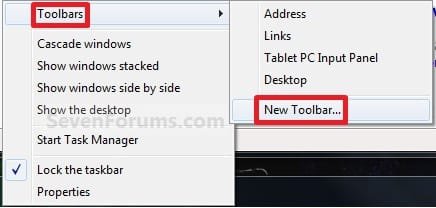
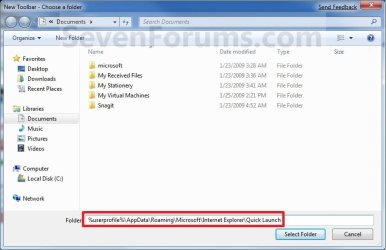
Quick Launch - Enable or Disable How to Enable or Disable Quick Launch in Windows 7
Last edited by Brink; 22 Jan 2013 at 12:09 AM..
| My System Specs |
| Computer type PC/Desktop System Manufacturer/Model Number Self built custom OS 64-bit Windows 7 Ultimate SP1 & Windows 8 Enterprise CPU Intel i7-3930K 3.2 Ghz (O/C 4 Ghz) Motherboard ASRock X79 Extreme11 Memory 32 GB (8GBx4) G.SKILL DDR3 Quad PC3-19200 2400MHz Graphics Card Sapphire HD5870 Eyefinity 6 2GB Sound Card SB Recon 3Di Integrated Chip Monitor(s) Displays 3x 27" Asus VE278Q Screen Resolution 1920x1080 Keyboard Logitech Cordless Desktop MX 5500 Revolution Mouse Logitech Cordless Desktop MX 5500 Revolution PSU OCZ Series Gold OCZZ1000M 1000W Case Thermaltake Level 10 GT Snow Edition Cooling Corsair Hydro H100 Hard Drives 256GB OCZ Vector
160GB OCZ RevoDrive X2
2 x 1TB Samsung HDD HD154UI SATA Internet Speed 50 Mb/s Download and 2 Mb/s Upload Other Info Microsoft LifeCam Cinema
Lite-On iHBS212 12x BD Writer
Samsung CLX-3175FW Printer
Netgear WNDR3800 Router
Motorola SBG6580 Cable Modem
2x APC Back-UPS XS 1500 |
21 Jul 2009
|
#100 | | |
Well i have a problem with quick launch. I started system today and the quick launch was away. So i ve switch it on but my order of icons was gone. So i replace them back and after restart quick launch was away again. I switch it on again and it was same. The system somehow cannt remember that Quick launch is on and the order of icons in it  Any ideas how to fix it? Thx | My System Specs |
| OS Win 7 RC CPU AMD X2 5000+ Motherboard Gigabyte 790X-DS4 Memory 2x2GB Corsair XMS2 Graphics Card Gainward GF8800GT 512MB Monitor(s) Displays Samsung SyncMaster 2053BW Screen Resolution 1680x1050 Keyboard Logitech G11 Mouse Razer DeathAdder PSU Seasonic 500W Hard Drives 2*320GB Seagate |
21 Jul 2009
|
#101 | | 64-bit Windows 7 Ultimate SP1 & Windows 8 Enterprise Texas |
Hello Jirik, and welcome to Seven Forums.
As a test create a new administrator account and see if Quick Launch works better in it. If it does, then you can copy the contents of the old user account's C:\User\(user-name) folders into the corresponding new account's C:\User\(user-name) folders. After everything checks out, you can then delete the old user account from within the new one.
Hope this helps for now,
Shawn | My System Specs | | Computer type PC/Desktop System Manufacturer/Model Number Self built custom OS 64-bit Windows 7 Ultimate SP1 & Windows 8 Enterprise CPU Intel i7-3930K 3.2 Ghz (O/C 4 Ghz) Motherboard ASRock X79 Extreme11 Memory 32 GB (8GBx4) G.SKILL DDR3 Quad PC3-19200 2400MHz Graphics Card Sapphire HD5870 Eyefinity 6 2GB Sound Card SB Recon 3Di Integrated Chip Monitor(s) Displays 3x 27" Asus VE278Q Screen Resolution 1920x1080 Keyboard Logitech Cordless Desktop MX 5500 Revolution Mouse Logitech Cordless Desktop MX 5500 Revolution PSU OCZ Series Gold OCZZ1000M 1000W Case Thermaltake Level 10 GT Snow Edition Cooling Corsair Hydro H100 Hard Drives 256GB OCZ Vector
160GB OCZ RevoDrive X2
2 x 1TB Samsung HDD HD154UI SATA Internet Speed 50 Mb/s Download and 2 Mb/s Upload Other Info Microsoft LifeCam Cinema
Lite-On iHBS212 12x BD Writer
Samsung CLX-3175FW Printer
Netgear WNDR3800 Router
Motorola SBG6580 Cable Modem
2x APC Back-UPS XS 1500 |
21 Jul 2009
|
#102 | | Windows 7 Ultimate x64, XP Mode, W8 RP VM, Linux Mint Debian 2nd OS HD- 7 Pro x64 second case New England |
I haven't run into anything like that so far. On one occasion one of the new toolbars created here disappeared where a simple browse back to the folder for that when using the new toolbar option simply saw it restored.
For arranging or rearranging icons on any quick launch or other named bar that goes easy as well. | My System Specs | | OS Windows 7 Ultimate x64, XP Mode, W8 RP VM, Linux Mint Debian 2nd OS HD- 7 Pro x64 second case CPU AMD Phenom II X4 975 Deneb 3.6ghz - 965 on new mini tower Motherboard Gigabyte GA-790XTA-UD4 Memory Kingston Hyper X DDR3 1600 1.5v 16gb - Mushkin on 2nd build Graphics Card MSI HD Radeon 5750 1gb - MSI HD Radeon 6450 on mini tower Sound Card Creative Labs X-Fi XtremeGamer - Realtek onooard 2nd case Monitor(s) Displays 2 x Acer P191W 19" widesscreen - HP 20" widescreen mini towe Screen Resolution 1440x900 native - 1600x1024 on 7 Pro x64 build Keyboard Microsoft Recusa Razor - MS Comfort 3000 on second build Mouse MS Trackball Explorer - A4TECH dual scroll wheel trackball PSU Corsair 750TX - primary / Corsair CX600 - second Case Antec 900-2 - SSD compatible / NZXT Vulcan mini tower Cooling Zalman CNPS9900A Hard Drives Primary Ultimate x64 build-
WD Black Edition 1tb Sata 6.0 = 2
WD Black Edition 1tb Sata 3.0 = 2 (OS drives)
WD 1tb Green Power sata = 2 1 external
usb flash drives = 18
Second 7 Pro x64 mini tower-
WD Caviar SE 500gb sata II single drive presen Internet Speed 30mbps upgrade - primary hard wired - mini tower usb WiFi |
22 Jul 2009
|
#103 | | |
Hi Brink. I solved it. Because of Ubisoft and their Anno 1404 (RTS with broken loading games) i ve tried to rename my account as they told me. When i renamed it back on the old name quick launch works again. Idk why the quick launch problem started 4 days after i changed the name of my windows account but there is a lot of mysteries around Windows
P.S. sry for my "English" | My System Specs | | OS Win 7 RC CPU AMD X2 5000+ Motherboard Gigabyte 790X-DS4 Memory 2x2GB Corsair XMS2 Graphics Card Gainward GF8800GT 512MB Monitor(s) Displays Samsung SyncMaster 2053BW Screen Resolution 1680x1050 Keyboard Logitech G11 Mouse Razer DeathAdder PSU Seasonic 500W Hard Drives 2*320GB Seagate |
22 Jul 2009
|
#104 | | 64-bit Windows 7 Ultimate SP1 & Windows 8 Enterprise Texas |
Jirik,
I'm happy to hear that you got it sorted. Thank you for posting back with your results and solution. | My System Specs | | Computer type PC/Desktop System Manufacturer/Model Number Self built custom OS 64-bit Windows 7 Ultimate SP1 & Windows 8 Enterprise CPU Intel i7-3930K 3.2 Ghz (O/C 4 Ghz) Motherboard ASRock X79 Extreme11 Memory 32 GB (8GBx4) G.SKILL DDR3 Quad PC3-19200 2400MHz Graphics Card Sapphire HD5870 Eyefinity 6 2GB Sound Card SB Recon 3Di Integrated Chip Monitor(s) Displays 3x 27" Asus VE278Q Screen Resolution 1920x1080 Keyboard Logitech Cordless Desktop MX 5500 Revolution Mouse Logitech Cordless Desktop MX 5500 Revolution PSU OCZ Series Gold OCZZ1000M 1000W Case Thermaltake Level 10 GT Snow Edition Cooling Corsair Hydro H100 Hard Drives 256GB OCZ Vector
160GB OCZ RevoDrive X2
2 x 1TB Samsung HDD HD154UI SATA Internet Speed 50 Mb/s Download and 2 Mb/s Upload Other Info Microsoft LifeCam Cinema
Lite-On iHBS212 12x BD Writer
Samsung CLX-3175FW Printer
Netgear WNDR3800 Router
Motorola SBG6580 Cable Modem
2x APC Back-UPS XS 1500 |
22 Jul 2009
|
#105 | | Windows 7 Ultimate x64, XP Mode, W8 RP VM, Linux Mint Debian 2nd OS HD- 7 Pro x64 second case New England |
Glad to hear the news on that one! xJirikx Typical isn't it? Always one little thing!
I find the Quick Launch or any additional toolbar essential when running Windows on the Virtual PC now seen for 7 there since you often lack viewing area with the smaller desktop with everything getting cramped up a bit when you have a lot on there too! | My System Specs | | OS Windows 7 Ultimate x64, XP Mode, W8 RP VM, Linux Mint Debian 2nd OS HD- 7 Pro x64 second case CPU AMD Phenom II X4 975 Deneb 3.6ghz - 965 on new mini tower Motherboard Gigabyte GA-790XTA-UD4 Memory Kingston Hyper X DDR3 1600 1.5v 16gb - Mushkin on 2nd build Graphics Card MSI HD Radeon 5750 1gb - MSI HD Radeon 6450 on mini tower Sound Card Creative Labs X-Fi XtremeGamer - Realtek onooard 2nd case Monitor(s) Displays 2 x Acer P191W 19" widesscreen - HP 20" widescreen mini towe Screen Resolution 1440x900 native - 1600x1024 on 7 Pro x64 build Keyboard Microsoft Recusa Razor - MS Comfort 3000 on second build Mouse MS Trackball Explorer - A4TECH dual scroll wheel trackball PSU Corsair 750TX - primary / Corsair CX600 - second Case Antec 900-2 - SSD compatible / NZXT Vulcan mini tower Cooling Zalman CNPS9900A Hard Drives Primary Ultimate x64 build-
WD Black Edition 1tb Sata 6.0 = 2
WD Black Edition 1tb Sata 3.0 = 2 (OS drives)
WD 1tb Green Power sata = 2 1 external
usb flash drives = 18
Second 7 Pro x64 mini tower-
WD Caviar SE 500gb sata II single drive presen Internet Speed 30mbps upgrade - primary hard wired - mini tower usb WiFi |
26 Jul 2009
|
#106 | | Windows 7 Professional 64-bit |
I've had a question threading through my mind for many a reboot. How did you learn these procedures? I would love to know so that I could learn on my own instead of depending on others. Others helping is a good thing, but I've always wondered. I've poked around under the hood myself over the years, but the good stuff always comes from someone else's talent. | My System Specs | | System Manufacturer/Model Number Assembled by me OS Windows 7 Professional 64-bit CPU Intel Core i7-960 Bloomfield 3.2GHz 8MB L3 Cache Quad-Core Motherboard ASUS P6X58D Premium LGA 1366 Intel X58 SATA 6Gb/s USB 3.0 Memory 12 gb Corsair Dominator DDR3 1866 (PC3 15000) Triple Channel Graphics Card XFX Radeon HD 5770 1GB 128-bit DDR5 Sound Card Asus Essence STX Audiophile Heaven! Monitor(s) Displays ViewSonic VP201b Screen Resolution 1600 x 1200 Keyboard Microsoft Wireless Comfort 5000 Mouse Logitech USB Trackman Wheel PSU Seasonic 750 Gold Case Lian Li 2100 Cooling Noctua Hard Drives (1) Crucial Real SSD C300
(2) WD Velociraptor 300gb
(1) Seagate DB35 750gb Internet Speed 1gp/s |
27 Jul 2009
|
#107 | | Windows 7 Ultimate x64, XP Mode, W8 RP VM, Linux Mint Debian 2nd OS HD- 7 Pro x64 second case New England |
Hello Barefoot and welcome to the Se7enforums!
If you browse through the large volume of tutorials here and on the VistaForums Vista Forums pay close attention to who wrote the majority of them to find out who devoted a great deal of time and energy into them! It won't be too hard to figure that one out! | My System Specs | | OS Windows 7 Ultimate x64, XP Mode, W8 RP VM, Linux Mint Debian 2nd OS HD- 7 Pro x64 second case CPU AMD Phenom II X4 975 Deneb 3.6ghz - 965 on new mini tower Motherboard Gigabyte GA-790XTA-UD4 Memory Kingston Hyper X DDR3 1600 1.5v 16gb - Mushkin on 2nd build Graphics Card MSI HD Radeon 5750 1gb - MSI HD Radeon 6450 on mini tower Sound Card Creative Labs X-Fi XtremeGamer - Realtek onooard 2nd case Monitor(s) Displays 2 x Acer P191W 19" widesscreen - HP 20" widescreen mini towe Screen Resolution 1440x900 native - 1600x1024 on 7 Pro x64 build Keyboard Microsoft Recusa Razor - MS Comfort 3000 on second build Mouse MS Trackball Explorer - A4TECH dual scroll wheel trackball PSU Corsair 750TX - primary / Corsair CX600 - second Case Antec 900-2 - SSD compatible / NZXT Vulcan mini tower Cooling Zalman CNPS9900A Hard Drives Primary Ultimate x64 build-
WD Black Edition 1tb Sata 6.0 = 2
WD Black Edition 1tb Sata 3.0 = 2 (OS drives)
WD 1tb Green Power sata = 2 1 external
usb flash drives = 18
Second 7 Pro x64 mini tower-
WD Caviar SE 500gb sata II single drive presen Internet Speed 30mbps upgrade - primary hard wired - mini tower usb WiFi |
27 Jul 2009
|
#108 | | 64-bit Windows 7 Ultimate SP1 & Windows 8 Enterprise Texas |

Quote: Originally Posted by Barefoot I've had a question threading through my mind for many a reboot. How did you learn these procedures? I would love to know so that I could learn on my own instead of depending on others. Others helping is a good thing, but I've always wondered. I've poked around under the hood myself over the years, but the good stuff always comes from someone else's talent. Hello Barefoot, and welcome to Seven Forums.
I found that the best way was through very good backups and a lot of trial and error, digging, and reading. Pick one item and work with it until you are familiar with it, then move on to the next item and so on and so on.
Don't worry, you'll get there in time and practice. When you have any questions, please post them in the forum. We'll be happy to help as we can.
Shawn | My System Specs | | Computer type PC/Desktop System Manufacturer/Model Number Self built custom OS 64-bit Windows 7 Ultimate SP1 & Windows 8 Enterprise CPU Intel i7-3930K 3.2 Ghz (O/C 4 Ghz) Motherboard ASRock X79 Extreme11 Memory 32 GB (8GBx4) G.SKILL DDR3 Quad PC3-19200 2400MHz Graphics Card Sapphire HD5870 Eyefinity 6 2GB Sound Card SB Recon 3Di Integrated Chip Monitor(s) Displays 3x 27" Asus VE278Q Screen Resolution 1920x1080 Keyboard Logitech Cordless Desktop MX 5500 Revolution Mouse Logitech Cordless Desktop MX 5500 Revolution PSU OCZ Series Gold OCZZ1000M 1000W Case Thermaltake Level 10 GT Snow Edition Cooling Corsair Hydro H100 Hard Drives 256GB OCZ Vector
160GB OCZ RevoDrive X2
2 x 1TB Samsung HDD HD154UI SATA Internet Speed 50 Mb/s Download and 2 Mb/s Upload Other Info Microsoft LifeCam Cinema
Lite-On iHBS212 12x BD Writer
Samsung CLX-3175FW Printer
Netgear WNDR3800 Router
Motorola SBG6580 Cable Modem
2x APC Back-UPS XS 1500 |
29 Jul 2009
|
#109 | | Windows 7 Ultimate x64, XP Mode, W8 RP VM, Linux Mint Debian 2nd OS HD- 7 Pro x64 second case New England |
I have a better screen here to illustrate how handy having more then toolbar available can be. The other screen posted there only shows one for the host and Virtual PC while this will show how multiple bars are a must when having a system loaded up with all kinds of programs as well as some basic step saving options.
Rather then posting two desktops you'll note the insert to have a better idea since one would cover the other over. | My System Specs | | OS Windows 7 Ultimate x64, XP Mode, W8 RP VM, Linux Mint Debian 2nd OS HD- 7 Pro x64 second case CPU AMD Phenom II X4 975 Deneb 3.6ghz - 965 on new mini tower Motherboard Gigabyte GA-790XTA-UD4 Memory Kingston Hyper X DDR3 1600 1.5v 16gb - Mushkin on 2nd build Graphics Card MSI HD Radeon 5750 1gb - MSI HD Radeon 6450 on mini tower Sound Card Creative Labs X-Fi XtremeGamer - Realtek onooard 2nd case Monitor(s) Displays 2 x Acer P191W 19" widesscreen - HP 20" widescreen mini towe Screen Resolution 1440x900 native - 1600x1024 on 7 Pro x64 build Keyboard Microsoft Recusa Razor - MS Comfort 3000 on second build Mouse MS Trackball Explorer - A4TECH dual scroll wheel trackball PSU Corsair 750TX - primary / Corsair CX600 - second Case Antec 900-2 - SSD compatible / NZXT Vulcan mini tower Cooling Zalman CNPS9900A Hard Drives Primary Ultimate x64 build-
WD Black Edition 1tb Sata 6.0 = 2
WD Black Edition 1tb Sata 3.0 = 2 (OS drives)
WD 1tb Green Power sata = 2 1 external
usb flash drives = 18
Second 7 Pro x64 mini tower-
WD Caviar SE 500gb sata II single drive presen Internet Speed 30mbps upgrade - primary hard wired - mini tower usb WiFi Quick Launch - Enable or Disable problems? All times are GMT -5. The time now is 02:04 AM. | |