| Windows 7: Quick Launch - Enable or Disable |
10 Dec 2008
|
#129 | | 64-bit Windows 7 Ultimate SP1 & Windows 8 Enterprise Texas |
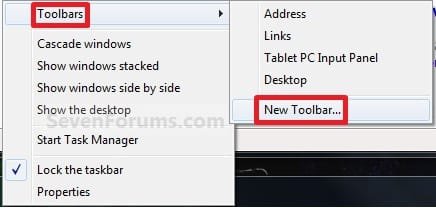
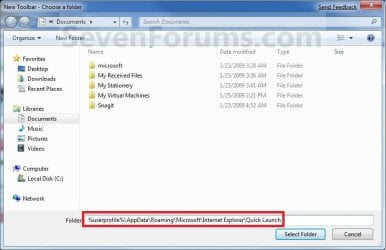
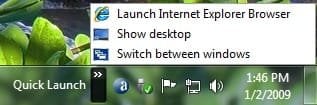
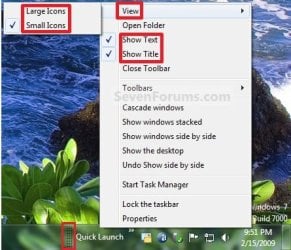
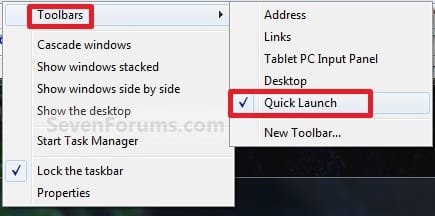
Quick Launch - Enable or Disable How to Enable or Disable Quick Launch in Windows 7
Last edited by Brink; 22 Jan 2013 at 12:09 AM..
| My System Specs |
| Computer type PC/Desktop System Manufacturer/Model Number Self built custom OS 64-bit Windows 7 Ultimate SP1 & Windows 8 Enterprise CPU Intel i7-3930K 3.2 Ghz (O/C 4 Ghz) Motherboard ASRock X79 Extreme11 Memory 32 GB (8GBx4) G.SKILL DDR3 Quad PC3-19200 2400MHz Graphics Card Sapphire HD5870 Eyefinity 6 2GB Sound Card SB Recon 3Di Integrated Chip Monitor(s) Displays 3x 27" Asus VE278Q Screen Resolution 1920x1080 Keyboard Logitech Cordless Desktop MX 5500 Revolution Mouse Logitech Cordless Desktop MX 5500 Revolution PSU OCZ Series Gold OCZZ1000M 1000W Case Thermaltake Level 10 GT Snow Edition Cooling Corsair Hydro H100 Hard Drives 256GB OCZ Vector
160GB OCZ RevoDrive X2
2 x 1TB Samsung HDD HD154UI SATA Internet Speed 50 Mb/s Download and 2 Mb/s Upload Other Info Microsoft LifeCam Cinema
Lite-On iHBS212 12x BD Writer
Samsung CLX-3175FW Printer
Netgear WNDR3800 Router
Motorola SBG6580 Cable Modem
2x APC Back-UPS XS 1500 |
20 Oct 2009
|
#130 | | 64-bit Windows 7 Ultimate SP1 & Windows 8 Enterprise Texas |
Churin,
There's no telling what could be the cause of this possible corrupt account issue.
You can copy the contents of your old account's user folders into the corresponding new account's user folders to copy over all of your settings and shortcuts from the old account. After everything checks out, you can delete the old account from within the new one. | My System Specs |
| Computer type PC/Desktop System Manufacturer/Model Number Self built custom OS 64-bit Windows 7 Ultimate SP1 & Windows 8 Enterprise CPU Intel i7-3930K 3.2 Ghz (O/C 4 Ghz) Motherboard ASRock X79 Extreme11 Memory 32 GB (8GBx4) G.SKILL DDR3 Quad PC3-19200 2400MHz Graphics Card Sapphire HD5870 Eyefinity 6 2GB Sound Card SB Recon 3Di Integrated Chip Monitor(s) Displays 3x 27" Asus VE278Q Screen Resolution 1920x1080 Keyboard Logitech Cordless Desktop MX 5500 Revolution Mouse Logitech Cordless Desktop MX 5500 Revolution PSU OCZ Series Gold OCZZ1000M 1000W Case Thermaltake Level 10 GT Snow Edition Cooling Corsair Hydro H100 Hard Drives 256GB OCZ Vector
160GB OCZ RevoDrive X2
2 x 1TB Samsung HDD HD154UI SATA Internet Speed 50 Mb/s Download and 2 Mb/s Upload Other Info Microsoft LifeCam Cinema
Lite-On iHBS212 12x BD Writer
Samsung CLX-3175FW Printer
Netgear WNDR3800 Router
Motorola SBG6580 Cable Modem
2x APC Back-UPS XS 1500 |
20 Oct 2009
|
#131 | | |

Quote: Originally Posted by Brink You can copy the contents of your old account's user folders into the corresponding new account's user folders to copy over all of your settings and shortcuts from the old account. After everything checks out, you can delete the old account from within the new one. That's something I thought about but was not sure if it would solve the problem because the new account might inherit corrupt part of the old account profile. Anyway I will try that and will post back.
Edit: I logged in to the new account to start the work but found no Quick Launch. The account was created for experimental purpose as you suggested. I previously reported there was no problem on the new account but that is found to be incorrect. The Quick Launch setting could stand aleast one cycle of Boot/Reboot but obviosly no more.
Last edited by churin; 20 Oct 2009 at 06:54 PM..
| My System Specs | | OS W7 Ult x64 CPU Phenom II x4 970 Motherboard Gigabyte GA-790XTA-UD4 Memory 16GB DDR3 1333 G.Skill F3-10666CL9D-8GBXL x2 Graphics Card ATI Radeon HD5770 Sound Card Asus Xonar DS Monitor(s) Displays 24' x2, Gateway FPD2485W, Dell UltraSharp U2410 Screen Resolution 1920x1200 PSU Corsair VX450W 450W Case Cooler Master STORM Scout Model: SGC-2000-KKN1-GP Cooling Cooler Master Hyper TX3 Hard Drives Hitachi 1TB/7200rpm HDE721010SLA330
Hitachi 1TB/7200rpm HDS721010CLA332 Internet Speed 20Mbps/4Mbps Other Info 2nd machine: Vista x64/W7 x64, MSI K8T Neo, Athlon 3200+, 2GB, Radeon X850Pro |
20 Oct 2009
|
#132 | | 64-bit Windows 7 Ultimate SP1 & Windows 8 Enterprise Texas |
Umm, try a repair install to see if it may be able to stop this without losing anything. | My System Specs | | Computer type PC/Desktop System Manufacturer/Model Number Self built custom OS 64-bit Windows 7 Ultimate SP1 & Windows 8 Enterprise CPU Intel i7-3930K 3.2 Ghz (O/C 4 Ghz) Motherboard ASRock X79 Extreme11 Memory 32 GB (8GBx4) G.SKILL DDR3 Quad PC3-19200 2400MHz Graphics Card Sapphire HD5870 Eyefinity 6 2GB Sound Card SB Recon 3Di Integrated Chip Monitor(s) Displays 3x 27" Asus VE278Q Screen Resolution 1920x1080 Keyboard Logitech Cordless Desktop MX 5500 Revolution Mouse Logitech Cordless Desktop MX 5500 Revolution PSU OCZ Series Gold OCZZ1000M 1000W Case Thermaltake Level 10 GT Snow Edition Cooling Corsair Hydro H100 Hard Drives 256GB OCZ Vector
160GB OCZ RevoDrive X2
2 x 1TB Samsung HDD HD154UI SATA Internet Speed 50 Mb/s Download and 2 Mb/s Upload Other Info Microsoft LifeCam Cinema
Lite-On iHBS212 12x BD Writer
Samsung CLX-3175FW Printer
Netgear WNDR3800 Router
Motorola SBG6580 Cable Modem
2x APC Back-UPS XS 1500 |
21 Oct 2009
|
#133 | | |
I am out on the road now and I will try the repair install when I will be back home in a couple of days. | My System Specs | | OS W7 Ult x64 CPU Phenom II x4 970 Motherboard Gigabyte GA-790XTA-UD4 Memory 16GB DDR3 1333 G.Skill F3-10666CL9D-8GBXL x2 Graphics Card ATI Radeon HD5770 Sound Card Asus Xonar DS Monitor(s) Displays 24' x2, Gateway FPD2485W, Dell UltraSharp U2410 Screen Resolution 1920x1200 PSU Corsair VX450W 450W Case Cooler Master STORM Scout Model: SGC-2000-KKN1-GP Cooling Cooler Master Hyper TX3 Hard Drives Hitachi 1TB/7200rpm HDE721010SLA330
Hitachi 1TB/7200rpm HDS721010CLA332 Internet Speed 20Mbps/4Mbps Other Info 2nd machine: Vista x64/W7 x64, MSI K8T Neo, Athlon 3200+, 2GB, Radeon X850Pro |
21 Oct 2009
|
#134 | | 64-bit Windows 7 Ultimate SP1 & Windows 8 Enterprise Texas |
Ok, please let us know how it went. | My System Specs | | Computer type PC/Desktop System Manufacturer/Model Number Self built custom OS 64-bit Windows 7 Ultimate SP1 & Windows 8 Enterprise CPU Intel i7-3930K 3.2 Ghz (O/C 4 Ghz) Motherboard ASRock X79 Extreme11 Memory 32 GB (8GBx4) G.SKILL DDR3 Quad PC3-19200 2400MHz Graphics Card Sapphire HD5870 Eyefinity 6 2GB Sound Card SB Recon 3Di Integrated Chip Monitor(s) Displays 3x 27" Asus VE278Q Screen Resolution 1920x1080 Keyboard Logitech Cordless Desktop MX 5500 Revolution Mouse Logitech Cordless Desktop MX 5500 Revolution PSU OCZ Series Gold OCZZ1000M 1000W Case Thermaltake Level 10 GT Snow Edition Cooling Corsair Hydro H100 Hard Drives 256GB OCZ Vector
160GB OCZ RevoDrive X2
2 x 1TB Samsung HDD HD154UI SATA Internet Speed 50 Mb/s Download and 2 Mb/s Upload Other Info Microsoft LifeCam Cinema
Lite-On iHBS212 12x BD Writer
Samsung CLX-3175FW Printer
Netgear WNDR3800 Router
Motorola SBG6580 Cable Modem
2x APC Back-UPS XS 1500 |
23 Oct 2009
|
#135 | | |
I did the repair install but that did not cure the problem.
After the repair install, I rebooted the system and the Quick Launch showed up. Then I rebooted again and found that the Quick Launch disappeared.
I have three other Windows 7 machines and one of them also has the same problem. I do not have any idea to try. Maybe this is a bug which requires a hotfix from MS for resolution. | My System Specs | | OS W7 Ult x64 CPU Phenom II x4 970 Motherboard Gigabyte GA-790XTA-UD4 Memory 16GB DDR3 1333 G.Skill F3-10666CL9D-8GBXL x2 Graphics Card ATI Radeon HD5770 Sound Card Asus Xonar DS Monitor(s) Displays 24' x2, Gateway FPD2485W, Dell UltraSharp U2410 Screen Resolution 1920x1200 PSU Corsair VX450W 450W Case Cooler Master STORM Scout Model: SGC-2000-KKN1-GP Cooling Cooler Master Hyper TX3 Hard Drives Hitachi 1TB/7200rpm HDE721010SLA330
Hitachi 1TB/7200rpm HDS721010CLA332 Internet Speed 20Mbps/4Mbps Other Info 2nd machine: Vista x64/W7 x64, MSI K8T Neo, Athlon 3200+, 2GB, Radeon X850Pro |
23 Oct 2009
|
#136 | | 64-bit Windows 7 Ultimate SP1 & Windows 8 Enterprise Texas |
Churin,
I'm not sure why either since it works fine on my system even after a restart.
To see if there may be a common cause with others that may have this problem: - How did you install your Windows 7 originally? (ex: clean, upgrade, etc...)
- What build or copy of Windows 7 are you using? (ex: retail, torrent, etc...)
- What antivirus program, or any other security program, are you using?
- Anything else that you can think of that may not be a part of a normal installation.
| My System Specs | | Computer type PC/Desktop System Manufacturer/Model Number Self built custom OS 64-bit Windows 7 Ultimate SP1 & Windows 8 Enterprise CPU Intel i7-3930K 3.2 Ghz (O/C 4 Ghz) Motherboard ASRock X79 Extreme11 Memory 32 GB (8GBx4) G.SKILL DDR3 Quad PC3-19200 2400MHz Graphics Card Sapphire HD5870 Eyefinity 6 2GB Sound Card SB Recon 3Di Integrated Chip Monitor(s) Displays 3x 27" Asus VE278Q Screen Resolution 1920x1080 Keyboard Logitech Cordless Desktop MX 5500 Revolution Mouse Logitech Cordless Desktop MX 5500 Revolution PSU OCZ Series Gold OCZZ1000M 1000W Case Thermaltake Level 10 GT Snow Edition Cooling Corsair Hydro H100 Hard Drives 256GB OCZ Vector
160GB OCZ RevoDrive X2
2 x 1TB Samsung HDD HD154UI SATA Internet Speed 50 Mb/s Download and 2 Mb/s Upload Other Info Microsoft LifeCam Cinema
Lite-On iHBS212 12x BD Writer
Samsung CLX-3175FW Printer
Netgear WNDR3800 Router
Motorola SBG6580 Cable Modem
2x APC Back-UPS XS 1500 |
24 Oct 2009
|
#137 | | |
Thanks! Thanks a lot for this Guide  , I am one of those who cant seem to deal with the pin to taskbar option. I find that switching between simular docs, webpages is harder to sort. Also having to right click to open new instance was annoying. Items moving around and the amount of room they took. Also it was harder to tell if a program was running or not. I just hope my quicklaunch doesnt start disapearing, especially when changing themes.
I do feel like some people use quick lanch as Start menu! IMO, The show desktop button is most important for me as well as 4-5 quick lanch apps. Programs I use daily that dont stay open all the time (IE, FF, Xfire, etc) If I use a program once or twice a week I may pin it to start menu, if use it any less it is either on the desktop or more than likely in the start menu. If it is a program that stays open, hopefully it shows in the taskbar (like nvidia ctrl panel etc.).
Funny thing too, before finding this guide I tried to pin show desktop to the taskbar couldnt do it. It will let you send it to desktop as a shortcut LOL. So if I minimize all my prgs to see desktop I can click on show desktop and guess what happens.....The programs pop back up. ROFL. | My System Specs | | System Manufacturer/Model Number Custom OS Windows 7 Pro CPU Q9650 @ 4.05ghz Motherboard Asus Striker II Extreme Memory Kingston DDR3 @1800mhz 8GB Graphics Card BFG GTX 285SC Sound Card Audigy Fatal1ty Monitor(s) Displays Dell 24" 1920x 1200 PSU Zalman 950-HP Case Cooler Master 690 Cooling Zalman Pure Copper Hard Drives Raid 0 1TB Windows 7-64
Raid 0 800GB XP-32 |
24 Oct 2009
|
#138 | | 64-bit Windows 7 Ultimate SP1 & Windows 8 Enterprise Texas |
You're welcome Sonixmon, and welcome to Seven Forums. | My System Specs | | Computer type PC/Desktop System Manufacturer/Model Number Self built custom OS 64-bit Windows 7 Ultimate SP1 & Windows 8 Enterprise CPU Intel i7-3930K 3.2 Ghz (O/C 4 Ghz) Motherboard ASRock X79 Extreme11 Memory 32 GB (8GBx4) G.SKILL DDR3 Quad PC3-19200 2400MHz Graphics Card Sapphire HD5870 Eyefinity 6 2GB Sound Card SB Recon 3Di Integrated Chip Monitor(s) Displays 3x 27" Asus VE278Q Screen Resolution 1920x1080 Keyboard Logitech Cordless Desktop MX 5500 Revolution Mouse Logitech Cordless Desktop MX 5500 Revolution PSU OCZ Series Gold OCZZ1000M 1000W Case Thermaltake Level 10 GT Snow Edition Cooling Corsair Hydro H100 Hard Drives 256GB OCZ Vector
160GB OCZ RevoDrive X2
2 x 1TB Samsung HDD HD154UI SATA Internet Speed 50 Mb/s Download and 2 Mb/s Upload Other Info Microsoft LifeCam Cinema
Lite-On iHBS212 12x BD Writer
Samsung CLX-3175FW Printer
Netgear WNDR3800 Router
Motorola SBG6580 Cable Modem
2x APC Back-UPS XS 1500 |
24 Oct 2009
|
#139 | | |

Quote: Originally Posted by Brink Churin,
To see if there may be a common cause with others that may have this problem: - How did you install your Windows 7 originally? (ex: clean, upgrade, etc...)
- What build or copy of Windows 7 are you using? (ex: retail, torrent, etc...)
- What antivirus program, or any other security program, are you using?
- Anything else that you can think of that may not be a part of a normal installation.
Please see the attached table. Windows 7 is that which was downloaded direct from MS and is the same as retail version. Thus Windows 7 were installed to Unit B,C,D from the same physical DVD. I thought of finding something in common among those which have the problem to determine the possible cause but could not see anything. | My System Specs | | OS W7 Ult x64 CPU Phenom II x4 970 Motherboard Gigabyte GA-790XTA-UD4 Memory 16GB DDR3 1333 G.Skill F3-10666CL9D-8GBXL x2 Graphics Card ATI Radeon HD5770 Sound Card Asus Xonar DS Monitor(s) Displays 24' x2, Gateway FPD2485W, Dell UltraSharp U2410 Screen Resolution 1920x1200 PSU Corsair VX450W 450W Case Cooler Master STORM Scout Model: SGC-2000-KKN1-GP Cooling Cooler Master Hyper TX3 Hard Drives Hitachi 1TB/7200rpm HDE721010SLA330
Hitachi 1TB/7200rpm HDS721010CLA332 Internet Speed 20Mbps/4Mbps Other Info 2nd machine: Vista x64/W7 x64, MSI K8T Neo, Athlon 3200+, 2GB, Radeon X850Pro Quick Launch - Enable or Disable problems? All times are GMT -5. The time now is 03:16 AM. | |