| Windows 7: Quick Launch - Enable or Disable |
10 Dec 2008
|
#219 | | 64-bit Windows 7 Ultimate SP1 & Windows 8 Enterprise Texas |
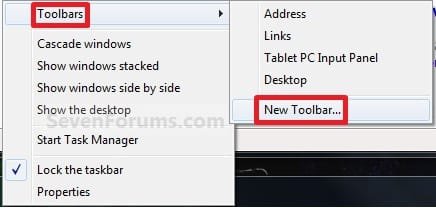
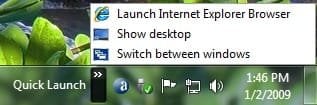
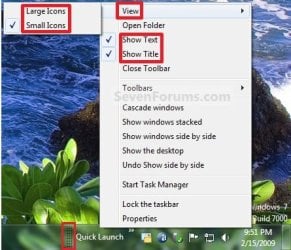
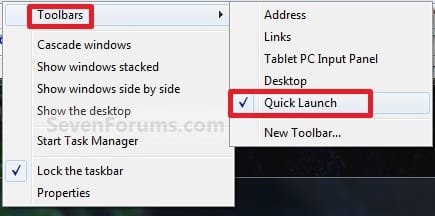
Quick Launch - Enable or Disable How to Enable or Disable Quick Launch in Windows 7
Last edited by Brink; 22 Jan 2013 at 12:09 AM..
| My System Specs |
| Computer type PC/Desktop System Manufacturer/Model Number Self built custom OS 64-bit Windows 7 Ultimate SP1 & Windows 8 Enterprise CPU Intel i7-3930K 3.2 Ghz (O/C 4 Ghz) Motherboard ASRock X79 Extreme11 Memory 32 GB (8GBx4) G.SKILL DDR3 Quad PC3-19200 2400MHz Graphics Card Sapphire HD5870 Eyefinity 6 2GB Sound Card SB Recon 3Di Integrated Chip Monitor(s) Displays 3x 27" Asus VE278Q Screen Resolution 1920x1080 Keyboard Logitech Cordless Desktop MX 5500 Revolution Mouse Logitech Cordless Desktop MX 5500 Revolution PSU OCZ Series Gold OCZZ1000M 1000W Case Thermaltake Level 10 GT Snow Edition Cooling Corsair Hydro H100 Hard Drives 256GB OCZ Vector
160GB OCZ RevoDrive X2
2 x 1TB Samsung HDD HD154UI SATA Internet Speed 50 Mb/s Download and 2 Mb/s Upload Other Info Microsoft LifeCam Cinema
Lite-On iHBS212 12x BD Writer
Samsung CLX-3175FW Printer
Netgear WNDR3800 Router
Motorola SBG6580 Cable Modem
2x APC Back-UPS XS 1500 |
13 Dec 2009
|
#220 | | |
it isnt dissapearing on reboots, but I agree fully. If it did do that I would still be using windows XP now, yes QL means that much to me it would be a showstopper to me upgrading.
I know a netadmin who works for a company that uses 6000 machines and they chose not to upgrade to windows 7 on the basis of the taskbar changes. They also chose not to upgrade to office 2007 because of ribbon. They actually more likely to go to vista than windows 7 as the gui changes are less significant. | My System Specs |
| System Manufacturer/Model Number home built OS windows 7 ultimate x64 CPU intel i5 750 Motherboard asus p7p55d-e modded 1601 bios to get 11.2 intel option rom Memory 16 gig ram ddr3 @ 1333 9-9-9-24 CR2 Graphics Card evga 460 GTX 1 GIG SC Sound Card asus xonar D2X Monitor(s) Displays dell 2209WA Screen Resolution 1680x1050 Keyboard microsoft business ps2 keyboard Mouse microsoft optical black mouse PSU coolermaster silent pro 600watt modular Case antec P182 Cooling artic freezer 7 pro rev 2, 3 case fans Hard Drives Samsung 830 SSD 128gig - boot device wooosh - P55
WD black cavalier 640gig WD6401AALS - P55
WD 500gig WD5000AAKS - P55
Seagate 500gig ST3500630AS - P55
Samsung 750gig HD753LG - Marvell ide mode (drive doesnt like ahci) Internet Speed 30 meg cable Other Info All drives listed as P55 using AHCI |
11 Jan 2010
|
#221 | | Windows 7 x64 Ultimate A Finnish immigrant in Leipzig, Germany |
Weird issue with Quick Launch toolbar, maybe some of you guys can help me?
I use Snipping Tool quite a lot and have it always placed in my Quick Launch toolbar. However, every time I reboot Snipping Tool has disappeared from Quick Launch. I have to manually put it back after every reboot.
When I put it back, I've tried every possible left and right click dragging option (move, copy, create a shortcut). No difference; next time I reboot, Snipping Tool is not there.
This only happens with Snipping Tool. All other shortcuts stay in Quick Launch, Snipping Tool never. I do not reboot so often, maybe two or three times a month (normally just hibernating) so this is not so big issue, more an annoyance. But I still would like to know why.
Kari | My System Specs | | Computer type Laptop System Manufacturer/Model Number HP ENVY 17-1150eg OS Windows 7 x64 Ultimate CPU 1.6 GHz Intel Core i7-720QM Processor Memory 6 GB Graphics Card ATI Mobility Radeon HD 5850 Graphics Sound Card Beats sound system with integrated subwoofer Monitor(s) Displays 17" laptop display, 22" LCD and 32" Full HD TV through HDMI Screen Resolution 1600*900, 1680*1050 and 1920*1080 Keyboard Logitech diNovo Media Desktop Laser (bluetooth) Mouse Logitech MX1000 Laser (Bluetooth) Hard Drives Internal: 2 x 500 GB SATA Hard Disk Drive 7200 rpm
External: 2TB for backups, 3TB USB3 network drive for media Internet Speed 50/10 Mbps VDSL Antivirus MSE, Windows Defender Browser Maxthon 3.5.2. Other Info Windows 7 Ultimate Retail Full in English, additional Guest-user accounts in Finnish, German and Swedish (Working languages English & Swedish, Family language German, my own language, mother tongue, Finnish. I really need Ultimate to get to use Language Packs!) |
11 Jan 2010
|
#222 | | 64-bit Windows 7 Ultimate SP1 & Windows 8 Enterprise Texas |
Hello Kari,
That is strange. Have you already tried pinning the Snipping Tool shortcut in the Start Menu All Programs area directly to the taskbar to see if it stays that way instead?
For in QL, did you create the Snipping Tool shortcut directly from the "C:\Windows\system32\SnippingTool.exe" file and placed it in the C:\Users\(user-name)\AppData\Roaming\Microsoft\Internet Explorer\Quick Launch
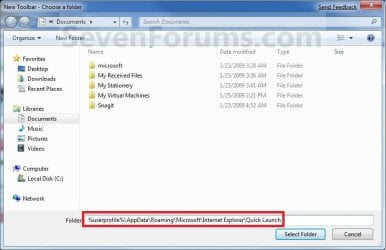
folder? | My System Specs | | Computer type PC/Desktop System Manufacturer/Model Number Self built custom OS 64-bit Windows 7 Ultimate SP1 & Windows 8 Enterprise CPU Intel i7-3930K 3.2 Ghz (O/C 4 Ghz) Motherboard ASRock X79 Extreme11 Memory 32 GB (8GBx4) G.SKILL DDR3 Quad PC3-19200 2400MHz Graphics Card Sapphire HD5870 Eyefinity 6 2GB Sound Card SB Recon 3Di Integrated Chip Monitor(s) Displays 3x 27" Asus VE278Q Screen Resolution 1920x1080 Keyboard Logitech Cordless Desktop MX 5500 Revolution Mouse Logitech Cordless Desktop MX 5500 Revolution PSU OCZ Series Gold OCZZ1000M 1000W Case Thermaltake Level 10 GT Snow Edition Cooling Corsair Hydro H100 Hard Drives 256GB OCZ Vector
160GB OCZ RevoDrive X2
2 x 1TB Samsung HDD HD154UI SATA Internet Speed 50 Mb/s Download and 2 Mb/s Upload Other Info Microsoft LifeCam Cinema
Lite-On iHBS212 12x BD Writer
Samsung CLX-3175FW Printer
Netgear WNDR3800 Router
Motorola SBG6580 Cable Modem
2x APC Back-UPS XS 1500 |
11 Jan 2010
|
#223 | | Windows 7 x64 Ultimate A Finnish immigrant in Leipzig, Germany |
I have not tried to pin it, I do not like and / or use pinned shortcuts.
Yes, I have tried to copy it to Quick Launch folder. Still, it disappears after a reboot. I know this is theoretically not possible, but it really disappears after every reboot. It's like if Windows restored my Quick Launch toolbar to some earlier point every time I boot. But that can not be the case, because if I add another shortcut after Snipping Tool and reboot, the latter shortcut is still there but Snipping Tool is gone.
What makes this even more weird is that it really is only the Snipping Tool that disappears. Everything else stays there. Always.
Interesting: I just rebooted 6 times, just to test this. Snipping Tool stayed there 5 times but now, after sixth reboot it's gone. Added it now manually, once again. So small change: it seems it is not disappearing every time as I thought.
Kari | My System Specs | | Computer type Laptop System Manufacturer/Model Number HP ENVY 17-1150eg OS Windows 7 x64 Ultimate CPU 1.6 GHz Intel Core i7-720QM Processor Memory 6 GB Graphics Card ATI Mobility Radeon HD 5850 Graphics Sound Card Beats sound system with integrated subwoofer Monitor(s) Displays 17" laptop display, 22" LCD and 32" Full HD TV through HDMI Screen Resolution 1600*900, 1680*1050 and 1920*1080 Keyboard Logitech diNovo Media Desktop Laser (bluetooth) Mouse Logitech MX1000 Laser (Bluetooth) Hard Drives Internal: 2 x 500 GB SATA Hard Disk Drive 7200 rpm
External: 2TB for backups, 3TB USB3 network drive for media Internet Speed 50/10 Mbps VDSL Antivirus MSE, Windows Defender Browser Maxthon 3.5.2. Other Info Windows 7 Ultimate Retail Full in English, additional Guest-user accounts in Finnish, German and Swedish (Working languages English & Swedish, Family language German, my own language, mother tongue, Finnish. I really need Ultimate to get to use Language Packs!) |
11 Jan 2010
|
#224 | | 64-bit Windows 7 Ultimate SP1 & Windows 8 Enterprise Texas |
Kari,
Umm, the mystery deepens. You might see if running a sfc /scannow command may be able to turn anything up, or fix it if there is a bad system file at fault. | My System Specs | | Computer type PC/Desktop System Manufacturer/Model Number Self built custom OS 64-bit Windows 7 Ultimate SP1 & Windows 8 Enterprise CPU Intel i7-3930K 3.2 Ghz (O/C 4 Ghz) Motherboard ASRock X79 Extreme11 Memory 32 GB (8GBx4) G.SKILL DDR3 Quad PC3-19200 2400MHz Graphics Card Sapphire HD5870 Eyefinity 6 2GB Sound Card SB Recon 3Di Integrated Chip Monitor(s) Displays 3x 27" Asus VE278Q Screen Resolution 1920x1080 Keyboard Logitech Cordless Desktop MX 5500 Revolution Mouse Logitech Cordless Desktop MX 5500 Revolution PSU OCZ Series Gold OCZZ1000M 1000W Case Thermaltake Level 10 GT Snow Edition Cooling Corsair Hydro H100 Hard Drives 256GB OCZ Vector
160GB OCZ RevoDrive X2
2 x 1TB Samsung HDD HD154UI SATA Internet Speed 50 Mb/s Download and 2 Mb/s Upload Other Info Microsoft LifeCam Cinema
Lite-On iHBS212 12x BD Writer
Samsung CLX-3175FW Printer
Netgear WNDR3800 Router
Motorola SBG6580 Cable Modem
2x APC Back-UPS XS 1500 |
12 Jan 2010
|
#225 | | Windows 7 x64 Ultimate A Finnish immigrant in Leipzig, Germany |
Like you said, Shawn, the mystery deepens.
I've spent last two hours doing some heavy rebooting and testing, over 40 reboots. As I mentioned earlier, this is not so big issue because I normally hibernate, not reboot. Still, it is intriguing enough to make me want to play with it.
Computer in question is my private laptop (see my specs). It is running a German Ultimate x64 with English language pack, in-place upgraded from Vista Ultimate. Never had any problems, no blue screens, no problems with drivers, just working perfectly.
Here's what I found out: - Snipping Tool is not the only disappearing shortcut. To test, I added some Office shortcuts to Quick Launch, and they too seem to disappear time to time, as well as some other shortcuts I played with
- It seems when shortcut is automatically added by the install or setup, it stays. When I add a shortcut manually, it disappears time to time (about one third of reboots, not always)
- The shortcuts I now tested always disappear simultaneously i.e. if Snipping Tool shortcut disappears, so do also these Office shortcuts I now tested
- It looks like Quick Launch is sometimes, somehow reverted to an earlier point
Tried sfc/ scannow. Only 5 reboots after that and nothing disappearing but it's too early to say if it fixed something. I'll continue to play with this later, no time now.
Kari | My System Specs | | Computer type Laptop System Manufacturer/Model Number HP ENVY 17-1150eg OS Windows 7 x64 Ultimate CPU 1.6 GHz Intel Core i7-720QM Processor Memory 6 GB Graphics Card ATI Mobility Radeon HD 5850 Graphics Sound Card Beats sound system with integrated subwoofer Monitor(s) Displays 17" laptop display, 22" LCD and 32" Full HD TV through HDMI Screen Resolution 1600*900, 1680*1050 and 1920*1080 Keyboard Logitech diNovo Media Desktop Laser (bluetooth) Mouse Logitech MX1000 Laser (Bluetooth) Hard Drives Internal: 2 x 500 GB SATA Hard Disk Drive 7200 rpm
External: 2TB for backups, 3TB USB3 network drive for media Internet Speed 50/10 Mbps VDSL Antivirus MSE, Windows Defender Browser Maxthon 3.5.2. Other Info Windows 7 Ultimate Retail Full in English, additional Guest-user accounts in Finnish, German and Swedish (Working languages English & Swedish, Family language German, my own language, mother tongue, Finnish. I really need Ultimate to get to use Language Packs!) |
12 Jan 2010
|
#226 | | |
Easiest method for Quick launch, Taskbar in Windows7 Hey friends,
Just forget all.....  Actually it's very easy to fix any program shortcut on taskbar/quick launch bar in Windows7.
How?
On START---->ALL PROGRAMS---> Right click on any program you want to fix on taskbar. You will get an option as "Pin to taskbar". Click on that & you're done!  And for removing it from the taskbar, again right click on that program icon and "unpin" it.
Isn't it easiest than any other methods or even any other previous versions of Windows?
Cheers, 
KAMAL | My System Specs | | |
12 Jan 2010
|
#227 | | Windows 7 x64 Ultimate A Finnish immigrant in Leipzig, Germany |
Hello Kamal, welcome to the Seven Forums.
If you are referring to my issue, it is not a solution I can use. I do not have any programs pinned on taskbar, I'm using a Vista style taskbar with Quick Launch. See the screenshot in this post.
Kari | My System Specs | | Computer type Laptop System Manufacturer/Model Number HP ENVY 17-1150eg OS Windows 7 x64 Ultimate CPU 1.6 GHz Intel Core i7-720QM Processor Memory 6 GB Graphics Card ATI Mobility Radeon HD 5850 Graphics Sound Card Beats sound system with integrated subwoofer Monitor(s) Displays 17" laptop display, 22" LCD and 32" Full HD TV through HDMI Screen Resolution 1600*900, 1680*1050 and 1920*1080 Keyboard Logitech diNovo Media Desktop Laser (bluetooth) Mouse Logitech MX1000 Laser (Bluetooth) Hard Drives Internal: 2 x 500 GB SATA Hard Disk Drive 7200 rpm
External: 2TB for backups, 3TB USB3 network drive for media Internet Speed 50/10 Mbps VDSL Antivirus MSE, Windows Defender Browser Maxthon 3.5.2. Other Info Windows 7 Ultimate Retail Full in English, additional Guest-user accounts in Finnish, German and Swedish (Working languages English & Swedish, Family language German, my own language, mother tongue, Finnish. I really need Ultimate to get to use Language Packs!) |
15 Jan 2010
|
#228 | | |

Quote: Originally Posted by Brink Hello mansrm81,
True, but with being able to pin items to the taskbar directly now I'm afraid that it will be a fading feature.
Shawn
I too thank you Shawn. I hope this doesn't fade away because unless I'm missing something, the "pin" thing doesn't work once you have open one session of your pinned item (e.g. IE). I then have to go to the start menu or a desktop shortcut to open another window. If I am missing something, please let me know. The quick launch is my life and one of the few features I liked in Vista was that you could send almost anything directly from Start to Quick Launch. It's almost like a conspiracy to take away anything of use. | My System Specs | | |
15 Jan 2010
|
#229 | | 64-bit Windows 7 Ultimate SP1 & Windows 8 Enterprise Texas |
Hello Raul, and welcome to Seven Forums.
I don't think it will be now. There will always be a need to pin a folder to the taskbar, so there will always be a way to create a Quick Launch using that if needed.
In your example, you would right click on the pinned IE icon on the taskbar to be able to pin multiple windows of open IE tabs or windows in the Jump List of the pinned IE icon instead.
Hope this helps,
Shawn | My System Specs | | Computer type PC/Desktop System Manufacturer/Model Number Self built custom OS 64-bit Windows 7 Ultimate SP1 & Windows 8 Enterprise CPU Intel i7-3930K 3.2 Ghz (O/C 4 Ghz) Motherboard ASRock X79 Extreme11 Memory 32 GB (8GBx4) G.SKILL DDR3 Quad PC3-19200 2400MHz Graphics Card Sapphire HD5870 Eyefinity 6 2GB Sound Card SB Recon 3Di Integrated Chip Monitor(s) Displays 3x 27" Asus VE278Q Screen Resolution 1920x1080 Keyboard Logitech Cordless Desktop MX 5500 Revolution Mouse Logitech Cordless Desktop MX 5500 Revolution PSU OCZ Series Gold OCZZ1000M 1000W Case Thermaltake Level 10 GT Snow Edition Cooling Corsair Hydro H100 Hard Drives 256GB OCZ Vector
160GB OCZ RevoDrive X2
2 x 1TB Samsung HDD HD154UI SATA Internet Speed 50 Mb/s Download and 2 Mb/s Upload Other Info Microsoft LifeCam Cinema
Lite-On iHBS212 12x BD Writer
Samsung CLX-3175FW Printer
Netgear WNDR3800 Router
Motorola SBG6580 Cable Modem
2x APC Back-UPS XS 1500 Quick Launch - Enable or Disable problems? All times are GMT -5. The time now is 01:51 PM. | |