
Print Spooler Queue - Clear and Reset

How to Clear and Reset the Print Spooler Queue in Vista, Windows 7, and Windows 8

   Information
This tutorial will show you how to clear and reset the print spooler queue in Vista, Windows 7, and Windows 8.

This can be handy if you have a document stuck in the print spooler, and/or not allowing your computer to go to sleep automatically if set to do so.

You must be logged in as an administrator to be able to do the steps in this tutorial.

   Note
If the print spooler issue persists after resetting it below, the installed printer driver may not be compatible or corrupted. Check the printer manufacturer's website to download and install the latest Windows compatible driver for it.


OPTION ONE

To Automatically Clear and Reset Print Spooler Queue with a BAT File


1. Click/tap on the Download button below to download the file below.
Reset_and_Clear_Print_Spooler_Queue.bat


Download


2. Save the .bat file to your desktop.

3. Right click or press and hold on the downloaded .bat file, and click/tap on Run as administrator.

4. If prompted by UAC, then click/tap on Yes (UAC-Windows 7/8) or Continue (UAC-Vista).

5. You will now see a command prompt open for a few seconds, run the commands, and then automatically close. (see screenshot below)
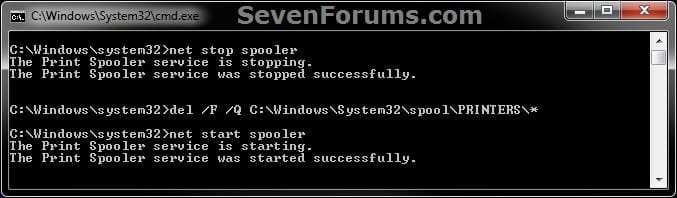
CMD.jpg
6. You can now delete the download .bat file if you like.


OPTION TWO

To Manually Clear and Reset Print Spooler Queue


1. Open Services, and stop the Print Spooler service. (see screenshot below)
Step1.jpg
2. Navigate to the folder below, and open the PRINTERS. (see screenshot below)
C:\Windows\system32\spool\PRINTERS
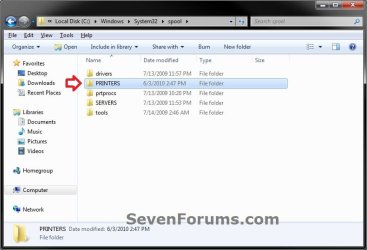
Step2.jpg
3. Click/tap on Continue and Yes (if prompted by UAC) to approve opening the PRINTERS folder. (see screenshot below)

Step3.jpg
4. Delete all files in the PRINTERS folder until it is empty, then close Windows Explorer. (see screenshot below)
:warn:WARNING: DO NOT DELETE the PRINTERS folder itself. Only delete it's contents.
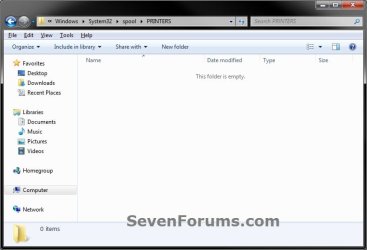
Step4.jpg
5. Open Services, and start the Print Spooler service. (see screenshot below)
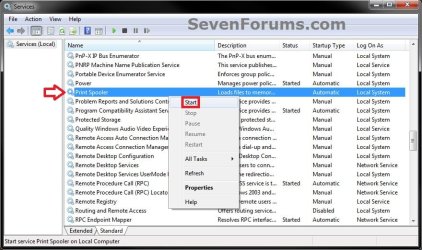
Step5.jpg
That's it,
Shawn


Attachments

Last edited:
Thank you. I have downloaded the latest driver, install and used Scan Doctor and switched the ports for the USB. I am completely baffled by this.
 

My Computer

Computer type
PC/Desktop
Computer Manufacturer/Model Number
Dell
OS
WIndows 7 Professional 64-bit
CPU
Intel Core i5-2400 3.10GHz
Memory
8 GB
Graphics Card(s)
AMD Radeon
Hard Drives
WDC 500 GB
Antivirus
Trend Micro Worry-Free Business Security
Browser
Internet Explorer 11
Hmm, ok.

Check to see if the printer is set as the default printer.

Is the printer connected to USB port directly connected to the motherboard and not to some USB hub?

Does restarting the PC clear it?
 

My Computer

Computer type
PC/Desktop
Computer Manufacturer/Model Number
Self built custom
OS
64-bit Windows 11 Pro for Workstations
CPU
Intel i7-8700K OC'd to 5 GHz
Motherboard
ASUS ROG Maximus XI Formula Z390
Memory
64 GB (4x16GB) G.SKILL TridentZ RGB DDR4 3600 MHz
Graphics Card(s)
ASUS ROG-STRIX-GTX1080TI-O11G-GAMING
Sound Card
Integrated
Monitor(s) Displays
2 x Samsung Odyssey G7 27"
Screen Resolution
2560x1440
Hard Drives
1TB Samsung 990 PRO M.2,
4TB Samsung 990 PRO PRO M.2,
TerraMaster F8 SSD Plus NAS
PSU
Seasonic Prime Titanium 850W
Case
Thermaltake Core P3
Cooling
Corsair Hydro H115i
Keyboard
Logitech wireless K800
Mouse
Logitech MX Master 4
Internet Speed
2 Gb/s Download and 100 Mb/s Upload
Antivirus
Malwarebyte Anti-Malware Premium
Browser
Google Chrome
Other Info
Logitech Z625 speaker system,
Logitech BRIO 4K Pro webcam,
HP Color LaserJet Pro MFP M477fdn,
APC SMART-UPS RT 1000 XL - SURT1000XLI,
Galaxy S23 Plus phone
Deleting files in C:\Windows\system32\spool\PRINTERS and then restarting the Print Spooler worked for me. Thank you! :party:
 

My Computer

Computer type
Laptop
Computer Manufacturer/Model Number
HP CQ61
OS
Windows 7 Home Premium 64 bit
CPU
AMD M300
Memory
3 GB
Graphics Card(s)
ATI HD 4200
Hard Drives
Toshiba 220GB
Browser
IE 9
Having trouble with ypoir tutorial

I have W7 Ultimate and a wireless HP7520 printer I used option 1 of your tutorial and added the pause command as the last line so it would stay on the desktop.
I then shut the printer off and sent a print job to the printer.Did this to create an error in the print Q. see attached (capture1). I then ran your batch file in admin mode and took a screen shot of its action see attached (capture2). I am perplexed with the "file being used by another process" statements. What process might that be? What can I do?
 

Attachments

  • Capture1.JPG
    Capture1.JPG
    42 KB · Views: 6,711
  • capture2.JPG
    capture2.JPG
    85.3 KB · Views: 852

My Computer

Computer type
Laptop
Computer Manufacturer/Model Number
Asus
OS
W7 Ultimate
CPU
2.2 bh Intel Core i3-2330M
Motherboard
Asustek Computer Inc. P53E 1.0
Memory
4MB
Graphics Card(s)
On Board
Sound Card
On Board
Monitor(s) Displays
On Board
Screen Resolution
1366 X 768
Hard Drives
ST9500423AS
ST2000DM USB Backup Drive External
Hello William,

Go ahead and restart the computer to get rid of the in use, and try resetting the printer queue again. :)
 

My Computer

Computer type
PC/Desktop
Computer Manufacturer/Model Number
Self built custom
OS
64-bit Windows 11 Pro for Workstations
CPU
Intel i7-8700K OC'd to 5 GHz
Motherboard
ASUS ROG Maximus XI Formula Z390
Memory
64 GB (4x16GB) G.SKILL TridentZ RGB DDR4 3600 MHz
Graphics Card(s)
ASUS ROG-STRIX-GTX1080TI-O11G-GAMING
Sound Card
Integrated
Monitor(s) Displays
2 x Samsung Odyssey G7 27"
Screen Resolution
2560x1440
Hard Drives
1TB Samsung 990 PRO M.2,
4TB Samsung 990 PRO PRO M.2,
TerraMaster F8 SSD Plus NAS
PSU
Seasonic Prime Titanium 850W
Case
Thermaltake Core P3
Cooling
Corsair Hydro H115i
Keyboard
Logitech wireless K800
Mouse
Logitech MX Master 4
Internet Speed
2 Gb/s Download and 100 Mb/s Upload
Antivirus
Malwarebyte Anti-Malware Premium
Browser
Google Chrome
Other Info
Logitech Z625 speaker system,
Logitech BRIO 4K Pro webcam,
HP Color LaserJet Pro MFP M477fdn,
APC SMART-UPS RT 1000 XL - SURT1000XLI,
Galaxy S23 Plus phone
Hello William,

Go ahead and restart the computer to get rid of the in use, and try resetting the printer queue again. :)
I did as you suggested and the first time I ran the bat file I got the same results as before but I ran it (the bat) a second time and it ran fine with no error.
Incidentally I ran the bat file from a shortcut with admin priviledge. I plan to put it on the several public computers that I maintain. On occassion the print Q on those machines gets an error due to user and can't be reset.
 

My Computer

Computer type
Laptop
Computer Manufacturer/Model Number
Asus
OS
W7 Ultimate
CPU
2.2 bh Intel Core i3-2330M
Motherboard
Asustek Computer Inc. P53E 1.0
Memory
4MB
Graphics Card(s)
On Board
Sound Card
On Board
Monitor(s) Displays
On Board
Screen Resolution
1366 X 768
Hard Drives
ST9500423AS
ST2000DM USB Backup Drive External
I'm glad to hear that you got it sorted William. It sounds like one stubborn printer.
 

My Computer

Computer type
PC/Desktop
Computer Manufacturer/Model Number
Self built custom
OS
64-bit Windows 11 Pro for Workstations
CPU
Intel i7-8700K OC'd to 5 GHz
Motherboard
ASUS ROG Maximus XI Formula Z390
Memory
64 GB (4x16GB) G.SKILL TridentZ RGB DDR4 3600 MHz
Graphics Card(s)
ASUS ROG-STRIX-GTX1080TI-O11G-GAMING
Sound Card
Integrated
Monitor(s) Displays
2 x Samsung Odyssey G7 27"
Screen Resolution
2560x1440
Hard Drives
1TB Samsung 990 PRO M.2,
4TB Samsung 990 PRO PRO M.2,
TerraMaster F8 SSD Plus NAS
PSU
Seasonic Prime Titanium 850W
Case
Thermaltake Core P3
Cooling
Corsair Hydro H115i
Keyboard
Logitech wireless K800
Mouse
Logitech MX Master 4
Internet Speed
2 Gb/s Download and 100 Mb/s Upload
Antivirus
Malwarebyte Anti-Malware Premium
Browser
Google Chrome
Other Info
Logitech Z625 speaker system,
Logitech BRIO 4K Pro webcam,
HP Color LaserJet Pro MFP M477fdn,
APC SMART-UPS RT 1000 XL - SURT1000XLI,
Galaxy S23 Plus phone
Blockie, ""file being used by another process" statements. What process might that be?" is likely the print spooler trying to print. If the printer is off/disconnected the spooler will never be able to print it.

You need to delete queued jobs. Make sure the printer is connected and on. Don't trust wireless, connect via USB. Then try deleting the queued jobs. (If you have Admin privs, stop the print spooler first. Google how-to if you need.)

If you still can't delete, either because the printer is no longer available (not working or not connectable), and/or you do NOT have Admin privs, try rebooting the computer and log in and ASAP try deleting the queued jobs before the print spooler process starts up and tries to print which makes the jobs "in use".

I know the above works for XP and I think I've done it in W7 Pro too. I manage corporate laptops where the users do not have admin privs.
 

My Computer

Computer type
Laptop
Computer Manufacturer/Model Number
Dell, selfmade, Apple
OS
7, XP, osx, ios
CPU
i5, amd, intel-duo core
Motherboard
dell, aopen, apple
Memory
2G, 6G, 8G
Hard Drives
250G, multiple, 320G
Mouse
Dell wired, Logitech wireless, Canon MarkI wireless.
Antivirus
SEP, ZoneAlarm, don't need
Browser
IE9, FF&Ie, FF&Chrome rarely Safari
Other Info
I'm in CT, but DST occurs here and I don't see a way to declare that.
I ran the BAT file as administer, it completes with no errors but the print queue still shows a 3 page word doc out there. I tried option 2 and the PRINTERS folder is empty but still the job is in the queue. Any ideas?
 

Attachments

  • Capture.JPG
    Capture.JPG
    27.4 KB · Views: 6,346

My Computer

Computer type
Laptop
Computer Manufacturer/Model Number
HP
OS
Win 7 Home Premium 64 bit
CPU
Intel i5
Memory
6GB
Hello Keith, and welcome to Seven Forums. :)

Are you able to right click on the print job in your screenshot, and clear it that way instead?
 

My Computer

Computer type
PC/Desktop
Computer Manufacturer/Model Number
Self built custom
OS
64-bit Windows 11 Pro for Workstations
CPU
Intel i7-8700K OC'd to 5 GHz
Motherboard
ASUS ROG Maximus XI Formula Z390
Memory
64 GB (4x16GB) G.SKILL TridentZ RGB DDR4 3600 MHz
Graphics Card(s)
ASUS ROG-STRIX-GTX1080TI-O11G-GAMING
Sound Card
Integrated
Monitor(s) Displays
2 x Samsung Odyssey G7 27"
Screen Resolution
2560x1440
Hard Drives
1TB Samsung 990 PRO M.2,
4TB Samsung 990 PRO PRO M.2,
TerraMaster F8 SSD Plus NAS
PSU
Seasonic Prime Titanium 850W
Case
Thermaltake Core P3
Cooling
Corsair Hydro H115i
Keyboard
Logitech wireless K800
Mouse
Logitech MX Master 4
Internet Speed
2 Gb/s Download and 100 Mb/s Upload
Antivirus
Malwarebyte Anti-Malware Premium
Browser
Google Chrome
Other Info
Logitech Z625 speaker system,
Logitech BRIO 4K Pro webcam,
HP Color LaserJet Pro MFP M477fdn,
APC SMART-UPS RT 1000 XL - SURT1000XLI,
Galaxy S23 Plus phone
sorry for the delay Brink. it doesn't do anything when I right click and try to cancel it. I have since removed the printer from control panel printers and also from the device manager where it showed up twice. Does that mean the queue has gone too or is it stuck now in perpetuity? I had a lot of problems with the printer - its 5 yr old HP and every time I turn it off and on the HP solution center SW cant see it and it wont print. I dont know why - I assigned it a static IP address; I can ping it, but for whatever reason, nothing prints unless I reinstall it; so I think I'm gonna give up with it!
 

My Computer

Computer type
Laptop
Computer Manufacturer/Model Number
HP
OS
Win 7 Home Premium 64 bit
CPU
Intel i5
Memory
6GB
Hey Keith,

How do you have the printer setup and connected?
 

My Computer

Computer type
PC/Desktop
Computer Manufacturer/Model Number
Self built custom
OS
64-bit Windows 11 Pro for Workstations
CPU
Intel i7-8700K OC'd to 5 GHz
Motherboard
ASUS ROG Maximus XI Formula Z390
Memory
64 GB (4x16GB) G.SKILL TridentZ RGB DDR4 3600 MHz
Graphics Card(s)
ASUS ROG-STRIX-GTX1080TI-O11G-GAMING
Sound Card
Integrated
Monitor(s) Displays
2 x Samsung Odyssey G7 27"
Screen Resolution
2560x1440
Hard Drives
1TB Samsung 990 PRO M.2,
4TB Samsung 990 PRO PRO M.2,
TerraMaster F8 SSD Plus NAS
PSU
Seasonic Prime Titanium 850W
Case
Thermaltake Core P3
Cooling
Corsair Hydro H115i
Keyboard
Logitech wireless K800
Mouse
Logitech MX Master 4
Internet Speed
2 Gb/s Download and 100 Mb/s Upload
Antivirus
Malwarebyte Anti-Malware Premium
Browser
Google Chrome
Other Info
Logitech Z625 speaker system,
Logitech BRIO 4K Pro webcam,
HP Color LaserJet Pro MFP M477fdn,
APC SMART-UPS RT 1000 XL - SURT1000XLI,
Galaxy S23 Plus phone
Well its networked. Its used to be hard wired to my router with an ethernet cable but then I switched a a new router which didn't have enough ports so I decided to use WiFi as the printer supports WiFi and that works but not after I turn it off and on again. I did see an HP fix about losing IP addresses on wifi printers and I installed that but didn't seem to help. I've tried unplugging my VOIP adapter and plugging the printer in to that port when I want to use it but no luck. I'm thinking maybe I should use the USB interface - thats probably more solid, especially as its an older printer - nearly 7 years old - probably the USB driver is more solid than the ethernet one. Or just get a new printer :)
 

My Computer

Computer type
Laptop
Computer Manufacturer/Model Number
HP
OS
Win 7 Home Premium 64 bit
CPU
Intel i5
Memory
6GB
Yeah, I like hard wired connections better as well.

You might double check both the router's and printer's settings page to see if one may not be set correctly to use the same IP address.
 

My Computer

Computer type
PC/Desktop
Computer Manufacturer/Model Number
Self built custom
OS
64-bit Windows 11 Pro for Workstations
CPU
Intel i7-8700K OC'd to 5 GHz
Motherboard
ASUS ROG Maximus XI Formula Z390
Memory
64 GB (4x16GB) G.SKILL TridentZ RGB DDR4 3600 MHz
Graphics Card(s)
ASUS ROG-STRIX-GTX1080TI-O11G-GAMING
Sound Card
Integrated
Monitor(s) Displays
2 x Samsung Odyssey G7 27"
Screen Resolution
2560x1440
Hard Drives
1TB Samsung 990 PRO M.2,
4TB Samsung 990 PRO PRO M.2,
TerraMaster F8 SSD Plus NAS
PSU
Seasonic Prime Titanium 850W
Case
Thermaltake Core P3
Cooling
Corsair Hydro H115i
Keyboard
Logitech wireless K800
Mouse
Logitech MX Master 4
Internet Speed
2 Gb/s Download and 100 Mb/s Upload
Antivirus
Malwarebyte Anti-Malware Premium
Browser
Google Chrome
Other Info
Logitech Z625 speaker system,
Logitech BRIO 4K Pro webcam,
HP Color LaserJet Pro MFP M477fdn,
APC SMART-UPS RT 1000 XL - SURT1000XLI,
Galaxy S23 Plus phone
OK What do you think about the USB strategy? Using that and avoiding the network altogether?
 

My Computer

Computer type
Laptop
Computer Manufacturer/Model Number
HP
OS
Win 7 Home Premium 64 bit
CPU
Intel i5
Memory
6GB
That would be solid option, but USB would be slower than ethernet. It really depends on how much printing you do, and if the slower transfer speed will be much of an issue for you or not.
 

My Computer

Computer type
PC/Desktop
Computer Manufacturer/Model Number
Self built custom
OS
64-bit Windows 11 Pro for Workstations
CPU
Intel i7-8700K OC'd to 5 GHz
Motherboard
ASUS ROG Maximus XI Formula Z390
Memory
64 GB (4x16GB) G.SKILL TridentZ RGB DDR4 3600 MHz
Graphics Card(s)
ASUS ROG-STRIX-GTX1080TI-O11G-GAMING
Sound Card
Integrated
Monitor(s) Displays
2 x Samsung Odyssey G7 27"
Screen Resolution
2560x1440
Hard Drives
1TB Samsung 990 PRO M.2,
4TB Samsung 990 PRO PRO M.2,
TerraMaster F8 SSD Plus NAS
PSU
Seasonic Prime Titanium 850W
Case
Thermaltake Core P3
Cooling
Corsair Hydro H115i
Keyboard
Logitech wireless K800
Mouse
Logitech MX Master 4
Internet Speed
2 Gb/s Download and 100 Mb/s Upload
Antivirus
Malwarebyte Anti-Malware Premium
Browser
Google Chrome
Other Info
Logitech Z625 speaker system,
Logitech BRIO 4K Pro webcam,
HP Color LaserJet Pro MFP M477fdn,
APC SMART-UPS RT 1000 XL - SURT1000XLI,
Galaxy S23 Plus phone
I dont print much these days :)
 

My Computer

Computer type
Laptop
Computer Manufacturer/Model Number
HP
OS
Win 7 Home Premium 64 bit
CPU
Intel i5
Memory
6GB
I joined this forum just now specifically to say thank you to Brink for posting the batch file. It will save me a lot of grief in the future when the printer informs my PC it is out of paper and then stays on that status forever. I hope it will also be useful when the computer thinks the printer is not connected when it actually is (instead of having to restart).

It worked on my Windows 10 system.
 

My Computer

Computer type
PC/Desktop
OS
Windows 10 Home 64-bit
You're most welcome elucidate, and welcome to Seven Forums. :)
 

My Computer

Computer type
PC/Desktop
Computer Manufacturer/Model Number
Self built custom
OS
64-bit Windows 11 Pro for Workstations
CPU
Intel i7-8700K OC'd to 5 GHz
Motherboard
ASUS ROG Maximus XI Formula Z390
Memory
64 GB (4x16GB) G.SKILL TridentZ RGB DDR4 3600 MHz
Graphics Card(s)
ASUS ROG-STRIX-GTX1080TI-O11G-GAMING
Sound Card
Integrated
Monitor(s) Displays
2 x Samsung Odyssey G7 27"
Screen Resolution
2560x1440
Hard Drives
1TB Samsung 990 PRO M.2,
4TB Samsung 990 PRO PRO M.2,
TerraMaster F8 SSD Plus NAS
PSU
Seasonic Prime Titanium 850W
Case
Thermaltake Core P3
Cooling
Corsair Hydro H115i
Keyboard
Logitech wireless K800
Mouse
Logitech MX Master 4
Internet Speed
2 Gb/s Download and 100 Mb/s Upload
Antivirus
Malwarebyte Anti-Malware Premium
Browser
Google Chrome
Other Info
Logitech Z625 speaker system,
Logitech BRIO 4K Pro webcam,
HP Color LaserJet Pro MFP M477fdn,
APC SMART-UPS RT 1000 XL - SURT1000XLI,
Galaxy S23 Plus phone
Back
Top