How to Activate a Window by Hovering Over it with the Mouse Pointer
Information
This will allow you to Activate a window by hovering over it with the mouse pointer for a second to make it easier to switch between open windows.
hello all.
I've been reading this great forum passively for a short while now, its quite the wonderful resource.
what i could not find, though, was information on how to focus on windows by simply hovering over them with the mouse.
Back in XP, you could enable this with Tweak UI, which called it X-mouse.
It was great, i didn't have to click on a window to work in it.
but how to enable this in 7?
OPTION #1
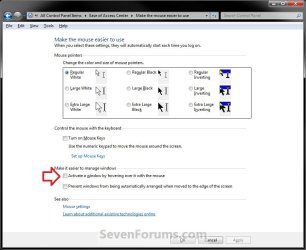
As this article points out, you can switch windows by hovering if you enable it through:
Control Panel> Ease of Access> Change How Your Mouse Works
scroll down, check box "Activate a window by hovering over it with the mouse"
this method raises windows to the front when you hover over them.
OPTION #2
For a true X-mouse experience, you could use this third party software TXMouse:
True X-Mouse Gizmo for Windows
if you are familiar with Linux x-mouse behaviour, you might appreciate its other functions.
OPTION #3
If you don't need those extra functions, you can make a couple swift changes in the registry and achieve the same effect:
[Thanks to original commenter unpaidbill for this particular option]
Step #1:
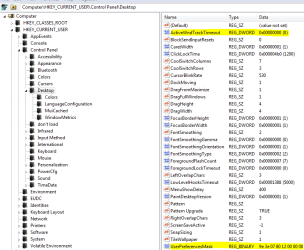
Open regedit, go to HKEY_CURRENT_USER\Control Panel\Desktop
Edit UserPreferenceMask value to be 9F 3E 07 80 12 00 00 00
[You should only have to modify the first pair]
NOTE: Default value is 98 12 07 80 12 00 00 00.
Step #2:
Also in HKEY_CURRENT_USER\Control Panel\Desktop
Edit ActiveWndTrkTimeout, change 'Base' to Decimal and put in 150 as the 'Value Data'
NOTE: Default value is 500.
[this value is time in milliseconds that it takes for the focus to change.
to avoid some issues with the taskbar I recommended using a value like 150 or so,
but if you'd like to have a different delay before the window loses focus, set it to whatever you like.]
Step #3:
Log off and log back in
Information
(Added by John Galt)
Here is the registry key to do that if you don't want to edit the registry yourself. View attachment Hover window select.reg
Here is the registry key to restore the default values. View attachment Default Windows hover.reg
Here is the registry key to do that if you don't want to edit the registry yourself. View attachment Hover window select.reg
Here is the registry key to restore the default values. View attachment Default Windows hover.reg
This results in windows being active (but not being raised) when you hover over them.
Last edited by a moderator: