Windows 7 Forums Search
Welcome to Windows 7 Forums. Our forum is dedicated to helping you find solutions with any problems, errors or issues you are experiencing with Windows 7. The Windows 7 forum also covers news and updates and has an extensive Windows 7 tutorial section that covers a wide range of tips and tricks.


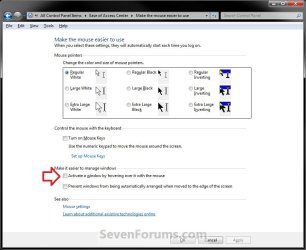
Windows 7 - Mouse Hover Makes Window Active - Enable


05-07-2009   #19
gabeforprez


Win7x64


Mouse Hover Makes Window Active - Enable

How to Activate a Window by Hovering Over it with the Mouse Pointer

...


Last edited by Brink; 10-27-2011 at 11:04 AM.. Reason: improving the method
My System SpecsSystem Spec
05-08-2009   #20
Dixon Butz


Win7 x86 Ultimate, Win7 x64 Ultimate Tri Boot


TXMouse causes random programs to crash when closing TXMouse.

My System SpecsSystem Spec
06-22-2009   #21
crawford


Windows 7


Hi, I like what you're working on and I wonder if you might be able to help out with an annoying quirk I can't find a solution for.

I have set the Taskbar to 'always combine', which gives me the preview thumbnails for applications when you hover over them, but you still have to click on them to switch to the window you want, like this-

http://www.davidaddington.ca/desktop.jpg

Is there any way to set the Taskbar up so that when you move your mouse over the thumbnail, after a set period of time the focus just selects that window? It'd save me the extra click

Thanks in advance, gents!

Guy Crawford
My System SpecsSystem Spec
11-12-2009   #22
Baxter


Windows 7


Not sure if this is what you were looking for crawford but it might help.
Mouse Hovering to Activate a Window - Vista Forums

One thing I noticed is with RDP A LOT of the features won't work. This is super annoying. Anyway to get around this?

Last edited by Brink; 02-22-2010 at 11:19 PM.. Reason: link
My System SpecsSystem Spec
11-25-2009   #23
thenewguy


Windows 7 Home Premium


Quote   Quote: Originally Posted by Mr GRiM View Post
Quote   Quote: Originally Posted by gabeforprez View Post
yes, i noticed that as well with the right-click menu on the pinned programs on the taskbar.

If you set ActiveWndTrkTimeout to decimal 150 or so, it sets a delay that allows enough time to reach past that little gap.
Yeah I tried a whole heap of different values but it didn't make a difference.
I'm having the same issue. Also happens with other programs that open a popup window or have a detached context menu.
My System SpecsSystem Spec
.


11-27-2009   #24
hide


Seven 64


Quote   Quote: Originally Posted by Mr GRiM View Post
Here you go, they are both in Reg files. By the way I really like option 3, it now works just how I always thought it should, good job.

Attachment 10005

Attachment 10006
Don't use these. The two contain also a bunch of crappy settings.

If it's too late for you, nothing biggie but sure it's messy.

Sir I don't thank you for that. You made me rage a little. And you're called a "Guru"...

Last edited by johngalt; 11-27-2009 at 06:39 PM.. Reason: changed color to gray - the problem as reported has been fixed. Also added to poster's rep for finding issue.--JG
My System SpecsSystem Spec
11-27-2009   #25
johngalt


Windows 7 Enterprise x64 SP1 | Windows 8 build 7989


Um, care to qualify that statement?

NM, I see what you mean now. Grimmy exported the entire key instead of just that one setting.

I'll fix it in a second.
My System SpecsSystem Spec
11-27-2009   #26
hide


Seven 64


Quote:
Step #1:
Open regedit, go to HKEY_CURRENT_USER\Control Panel\Desktop
Edit UserPreferenceMask value to be 9F 3E 07 80 12 00 00 00
Step #2:
Also in HKEY_CURRENT_USER\Control Panel\Desktop
Edit ActiveWndTrkTimeout, change 'Base' to Decimal and put in 150 as the 'Value Data'
Anyone have the default value ?

Cause it wasn't exactly that for me :
Quote:
"UserPreferencesMask"=hex:9e,3e,07,80,12,00,00,00
The 3e wasn't a 3e.
My System SpecsSystem Spec
11-27-2009   #27
johngalt


Windows 7 Enterprise x64 SP1 | Windows 8 build 7989


OK, Mr. Grim's post has been fixed. The new reg codes, that I uplodaded, only change those two keys as referenced by gabeforprez - everything else will not be changed as it exists on your system.
My System SpecsSystem Spec
11-27-2009   #28
hide


Seven 64


Thank you.
My System SpecsSystem Spec
11-27-2009   #29
dave1812


Win7


The issue I'm having is that when in Explorer, I can't use the scroll wheel when moving from the folder pane to the file pane without FIRST clicking somewhere in the file pane. Years ago I had a mouse driver that allows that and haven't seen that functionality for quite a while now. If anyone knows how to get the scroll wheel to work by placing the cursor within the pane (without having to click inside of that pane), please share how it's done. I miss that functionality!

FYI, the functionality I'm looking for in Explorer does work in Thunderbird. Clicking on a folder, I can hover over the emails list pane and begin scrolling that window with the wheel without having to click somewhere within it first.
My System SpecsSystem Spec
Comment

Mouse Hover Makes Window Active - Enable problems?


Tutorial Tools


Similar Threads for: Mouse Hover Makes Window Active - Enable
Windows 7 Tutorial Category
Mouse Hover Time - Change Tutorials
Mouse Hover Time reverting General Discussion
Active window to front General Discussion
Subwoofer makes Mouse go Crazy! Hardware & Devices


All times are GMT -5. The time now is 02:08 AM.


Windows 7 Forums is an independent web site and has not been authorized,
sponsored, or otherwise approved by Microsoft Corporation.
"Windows 7" and related materials are trademarks of Microsoft Corp.
© Designer Media Ltd
  

1 2 3 4 5 6 7 8 9 10 11 12 13 14 15 16 17 18 19 20 21 22 23 24 25 26 27 28 29 30