Windows 7 Forums


Windows 7: Folder Background - Change


Folder Background - Change

How to Change the Folder Background with AveFolderBG for Windows 7
Published 14 Jun 2010
Published by

Featured Tutorial

Clean Up Factory Bloatware


Troubleshooting Windows 7 Failure to Boot


Driver Install - Device Manager

How to Install a Driver in Device Manager

Peppermint3 - Create Live CD/DVD/USB To Use For Emergency Backup

How to Perform an Emergency Data Backup When Windows 7 Will Not Boot

Windows 7 Installation - Transfer to a New Computer

How to Transfer your Complete Windows 7 Installation to a New Computer
How to Change the Folder Background with AveFolderBG for Windows 7


I happened upon the fix awhile back that enabled Folder Backgrounds in Windows 7 and have since fixed AveFolderBG to work with Windows 7

warning   Warning
It is recommended to create a restore point before doing this in case a mistake is made, or you do not like the results.

This way you could quickly do a System Restore with the restore point to undo it.


The application works by adding itself to the Folders Property pages. Just Right-Click a Folder, Choose Customize this Folder, or click Properties and you will be presented with a new menu tab.

The fix has a few side-effects such as Tiles are no longer an option under view and is switched to Extended Tiles. Auto Arrange is no longer disabled under Icon View. In some cases you may need to redo you Folder settings after applying the Install.


Note   Note
To Install AveFolderBG:
  • Download the 32-bit or 64-bit AveFolderBG ZIP file below for your same 32-bit or 64-bit Windows 7.
  • Extract (drag and drop) the AveFolderBGW732bit or AveFolderBGW764bit folder and it's contents from the ZIP file, and open it.
  • Right click on the install.bat file and click on Run as administrator.
  • When finished, restart the computer.

To Uninstall AveFolderBG:
  • Right click on the unstall.bat file and click on Run as administrator.
  • When finished, restart the computer.


32Bit AveFolderBG Download for Windows 7
download


64Bit AveFolderBG Download for Windows 7
download


Original Homepage for Aves Vista Background
Need more help? Try searching our extensive help and support site.
Loading
20 Jun 2010  
RoloDman

 
LeeWhittington's background changed issue

It installs fine and works after I log-off/log-on. When I restart the computer all the backgrounds are gone.


FYI:

1.)I use DJ Gx's Snow Leopard theme
2.)I use the windows orb changer

both work fine

Last edited by RoloDman; 20 Jun 2010 at 02:04 PM.. Reason: added info
My System SpecsSystem Spec

21 Jun 2010  
LeeWhittington


The hack\tweak it uses sometimes fails, for what reason noone knows. It did it as well when it was originally written for Vista. Though I only added the patch to work in Windows 7 I am also working on my own complete version and hopefully be able to figure out a workaround.

When they don't show up, usually if you log off or restart explorer they will show back up
My System SpecsSystem Spec
21 Jun 2010  
RoloDman


Quote   Quote: Originally Posted by LeeWhittington View Post
The hack\tweak it uses sometimes fails, for what reason noone knows. It did it as well when it was originally written for Vista. Though I only added the patch to work in Windows 7 I am also working on my own complete version and hopefully be able to figure out a workaround.

When they don't show up, usually if you log off or restart explorer they will show back up
Thank you for responding. I will wait for your new software.
My System SpecsSystem Spec
.


06 Aug 2011  
s00


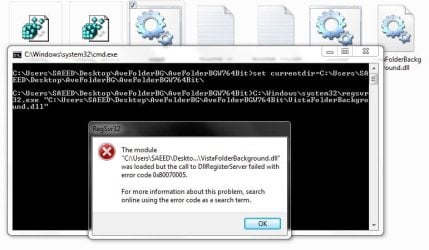
in my pc give this error
Folder Background - Change-1.jpg
please help me
My System SpecsSystem Spec
20 Sep 2011  
scorpivs


Thanks to folder background apps, I now have hope; there is a chance I will not snap my Windows 7 install disk in half, shred & burn it, without ceremony...

I not only use background images in my folders for my own satisfaction, I use folder backgrounds to create more marketable presentations when burning software, music, videos and tutorials to disk. I receive a great deal more business from people who see a folder with a unique, content-related background image, just like a webpage.

Realistically, what if all webpages looked like a dull, barren Windows 7 folder...?
(I realize Facebook already does, and always has.)

By comparison, Windows 2000 not only integrated the folder customization into the interface, it hid the respective settings in the protected system files of each folder. To later move the folder somewhere else (exception being: Vista or VII) had no detrimental affect on the user's settings. This is not true of the 3rd-party apps; if the background's source file (often from an entirely separate folder - even a different partition) is moved, the vison is ...gone.

That much having been said, you come up with a way to use folder backgrounds in W2K, XP and 7, my friend, and I'll give you 40 bucks for it. Seriously.
My System SpecsSystem Spec
24 Feb 2012  
stsaerox


Links does not work anymore...
My System SpecsSystem Spec
24 Feb 2012  
Brink


Hello Stsaerox,

Sorry about that. Links have been fixed.
My System SpecsSystem Spec
26 Feb 2012  
stsaerox


Thank you. No problem...
My System SpecsSystem Spec
26 Feb 2012  
Brink


You're most welcome.
My System SpecsSystem Spec
Comment

 Folder Background - Change problems?


Tutorial Tools


Similar help and support threads for: Folder Background - Change
Windows 7 Tutorial Category
Windows 7 Folder Background Changer : Change Any Folder’s Background Customization
how do i change folder background in libraries Customization
how to change folder background windows 7 manly for theme Themes and Styles
Customizing the left Folder Panel and Folder Background. How? Customization
Change folder background color for free Customization


All times are GMT -5. The time now is 04:31 PM.


Windows 7 Forums is an independent web site and has not been authorized,
sponsored, or otherwise approved by Microsoft Corporation.
"Windows 7" and related materials are trademarks of Microsoft Corp.
© Designer Media Ltd