Windows 7 Forums


Windows 7: Copy & Paste - in Windows Recovery Console

24 Jun 2010   #9
theog

ME/XP/Vista/Win7
uk Hampshire
 
 
Copy & Paste - in Windows Recovery Console

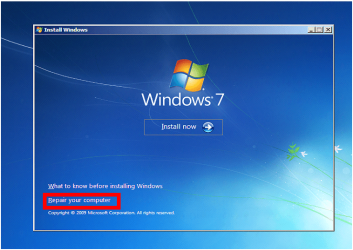
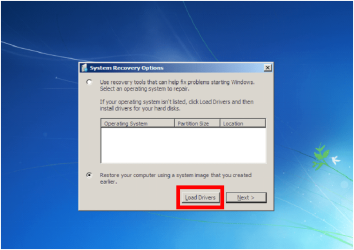
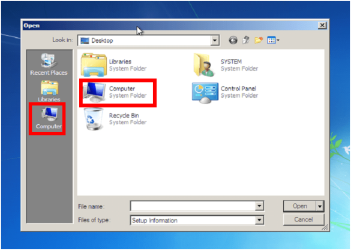
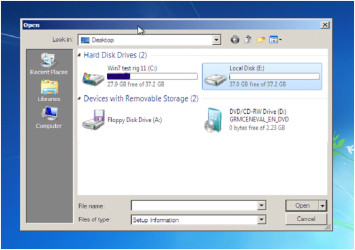
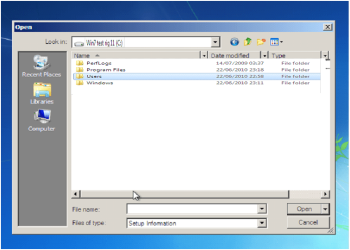
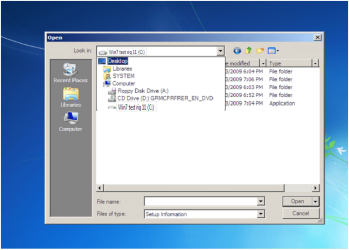
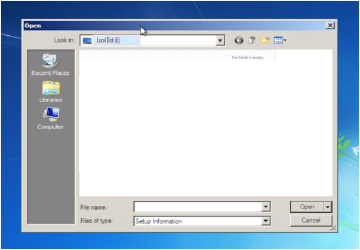
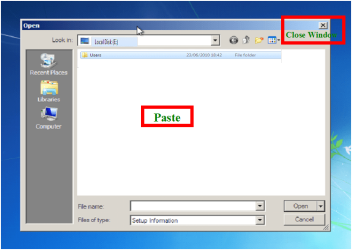
How to Copy & Paste in Recovery Console on Windows 7 or Vista

1) Boot from your Windows installation DVD/USB or...


Last edited by Brink; 3 Weeks Ago at 10:56 AM..
My System SpecsSystem Spec

20 Oct 2010   #10
Bare Foot Kid

W 7 64-bit Ultimate
The Lowcountry


I just had an actual need to give this a go


I must say it worked exceptionally well, thanks Ray!
My System SpecsSystem Spec

25 Oct 2010   #11
theog

ME/XP/Vista/Win7
uk Hampshire


Quote   Quote: Originally Posted by Bare Foot Kid View Post
I just had an actual need to give this a go


I must say it worked exceptionally well, thanks Ray!
Hi BFK

Glad to be of help.

Ray.

My System SpecsSystem Spec
31 Jan 2011   #12
Ztruker

Windows 7 Pro X64
Space Coast of Florida


A suggestion for this tutorial.

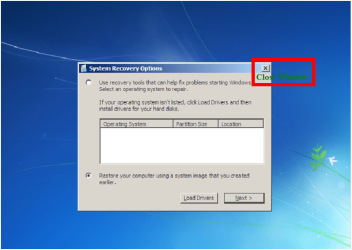
Several times I've referred people to it and they couldn't figure out how to get to the first screen you show.

I think it would help to state the obvious.

Boot your Windows 7 installation DVD.
Press enter at the first window.

That is where you see the window you show first in your tutorial.
My System SpecsSystem Spec
01 Feb 2011   #13
theog

ME/XP/Vista/Win7
uk Hampshire


Quote   Quote: Originally Posted by Ztruker View Post
A suggestion for this tutorial.

Several times I've referred people to it and they couldn't figure out how to get to the first screen you show.

I think it would help to state the obvious.

Boot your Windows 7 installation DVD.
Press enter at the first window.

That is where you see the window you show first in your tutorial.
Hi Rich

When using the Startup Repair CD disk, you would go straight to Step 2.

Ray,
My System SpecsSystem Spec
.


02 Feb 2011   #14
Ztruker

Windows 7 Pro X64
Space Coast of Florida


What Startup Repair CD? Do you mean an iso image that you download? If so, the tutorial doesn't mention that which I guess is why it confuses some folks.

What about if you boot the System Recovery Options from the hard drive?Then the first window is different and you would need to click on Startup Repair to get to the first window you show.

Maybe you could add info on using a normal Windows 7 installation DVD or System Recovery Options from the hard drive if not using the Startup Repair CD?

Just a suggestion.
My System SpecsSystem Spec
03 Feb 2011   #15
theog

ME/XP/Vista/Win7
uk Hampshire


How to Create a Windows 7 System Repair Disc
System Repair Disc - Create

Copy & Paste -  in Windows Recovery Console-capture20.png
My System SpecsSystem Spec
04 Feb 2011   #16
Ztruker

Windows 7 Pro X64
Space Coast of Florida


Theog, I already have a Windows 7 Pro DVD, why would I want/need to create a Repair Disc? From the tutorial:
Quote:
This will show you how to create a Windows 7 system repair disc to use to boot to the system recovery options if you don't have a Windows installation disc, can't find your Windows installation disc, or can't access the recovery options provided by your computer manufacturer.
My System SpecsSystem Spec
05 Feb 2011   #17
theog

ME/XP/Vista/Win7
uk Hampshire


Quote   Quote: Originally Posted by Ztruker View Post
Theog, I already have a Windows 7 Pro DVD, why would I want/need to create a Repair Disc? From the tutorial:
Quote:
This will show you how to create a Windows 7 system repair disc to use to boot to the system recovery options if you don't have a Windows installation disc, can't find your Windows installation disc, or can't access the recovery options provided by your computer manufacturer.
I add the link as Ref:
My System SpecsSystem Spec
13 Mar 2011   #18
njmac

Windows 7 Home Premium 64 bit
Kajaani, Finland


just wanted to say a quick thanks for this info
My System SpecsSystem Spec
14 Mar 2011   #19
theog

ME/XP/Vista/Win7
uk Hampshire


Quote   Quote: Originally Posted by njmac View Post
just wanted to say a quick thanks for this info
You are welcome.
My System SpecsSystem Spec
Comment

 Copy & Paste - in Windows Recovery Console problems?


Tutorial Tools


Similar help and support threads for: Copy & Paste - in Windows Recovery Console
Windows 7 Tutorial Category
Can't copy/paste in windows 7 General Discussion
transfer data through windows 7 by copy and paste perfect copy? Hardware & Devices
XP recovery console versus Vista/7's recovery console General Discussion
Stuck In Windows XP Recovery Console BSOD Help and Support
Copy and Paste on Windows 7 General Discussion


All times are GMT -5. The time now is 06:55 PM.


Seven Forums Android App Seven Forums IOS App Follow us on Facebook

Windows 7 Forums is an independent web site and has not been authorized,
sponsored, or otherwise approved by Microsoft Corporation.
"Windows 7" and related materials are trademarks of Microsoft Corp.
© Designer Media Ltd
  

1 2 3 4 5 6 7 8 9 10 11 12 13 14 15 16 17 18 19 20 21 22 23 24 25 26 27 28 29 30 31 32